
Key Takeaways
- Fulfillment drag slows growth and hurts customer trust
- Most shipping “automation” is partial and still manual
- Magento + ShipStation unlock real automation through syncing
- Batch label printing and multi-carrier logic speed up shipping
- Integration improves CX, loyalty, and operational agility
- Fulfillment can shift from a bottleneck to a growth lever
It’s 4 PM on Tuesday.
Your warehouse manager walks into your office. Fifteen high-priority orders just shipped to the wrong addresses. Someone manually re-keyed order data from three different systems, your ERP, Magento, and ShipStation, and mixed up the delivery details.
Your team will spend the next six hours fixing it. Reshipping. Apologizing. Explaining.
And your biggest customer just sent an email. Subject line: “Final Warning.”
This isn’t a staffing problem. It’s not a training issue. It’s an architecture problem.
And it’s costing you half a million dollars a year.
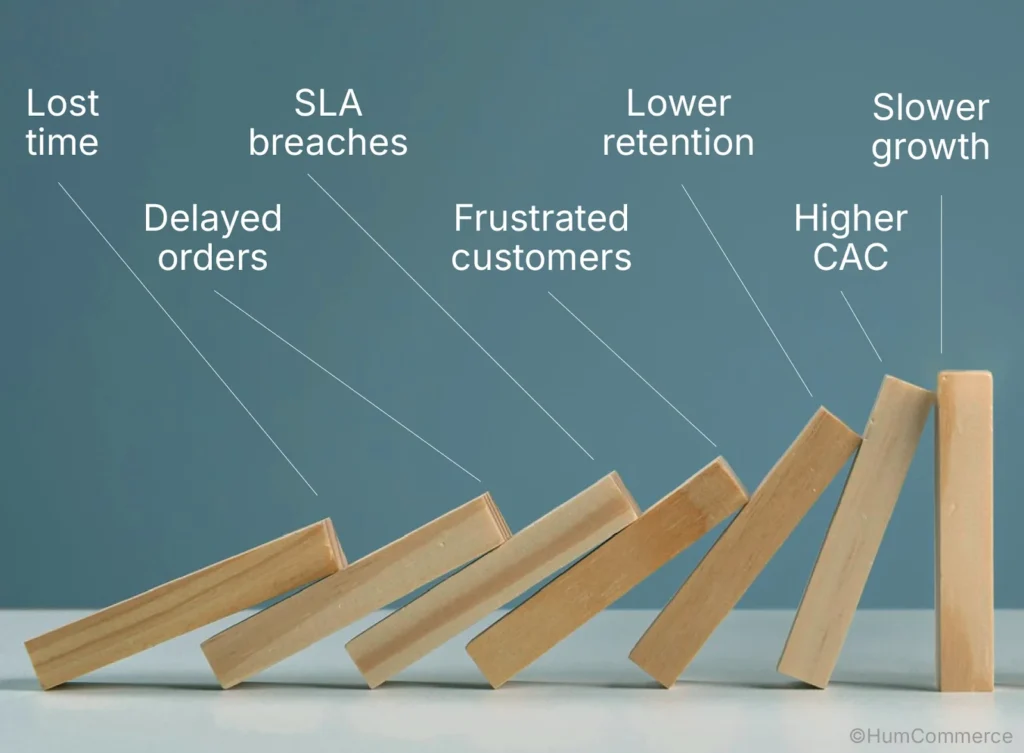
The Real Cost of Manual Fulfillment
Most B2B operations don’t realize how much money leaks out through manual order processing. Here’s what it looks like in real numbers:
- $150K–$200K annually in labor: Teams manually re-keying orders, reconciling inventory across systems, fixing address errors, tracking down shipments
- $100K–$150K annually in shipping waste: Wrong carrier selection, split shipments that shouldn’t be split, expedited freight to fix mistakes
- $75K–$100K annually in lost customers: Missed SLAs, wrong deliveries, “Where’s my order?” tickets that never should have existed
- $50K–$75K annually in inventory errors: Overselling, stockouts, write-offs from products lost in the shuffle
That’s $500K annually. For a mid-sized B2B operation moving 5,000–10,000 orders per month.
And it compounds every year.
Where Does Your Fulfillment Actually Sit?
Most B2B operations fall into one of three stages. The gap between them is where money disappears.
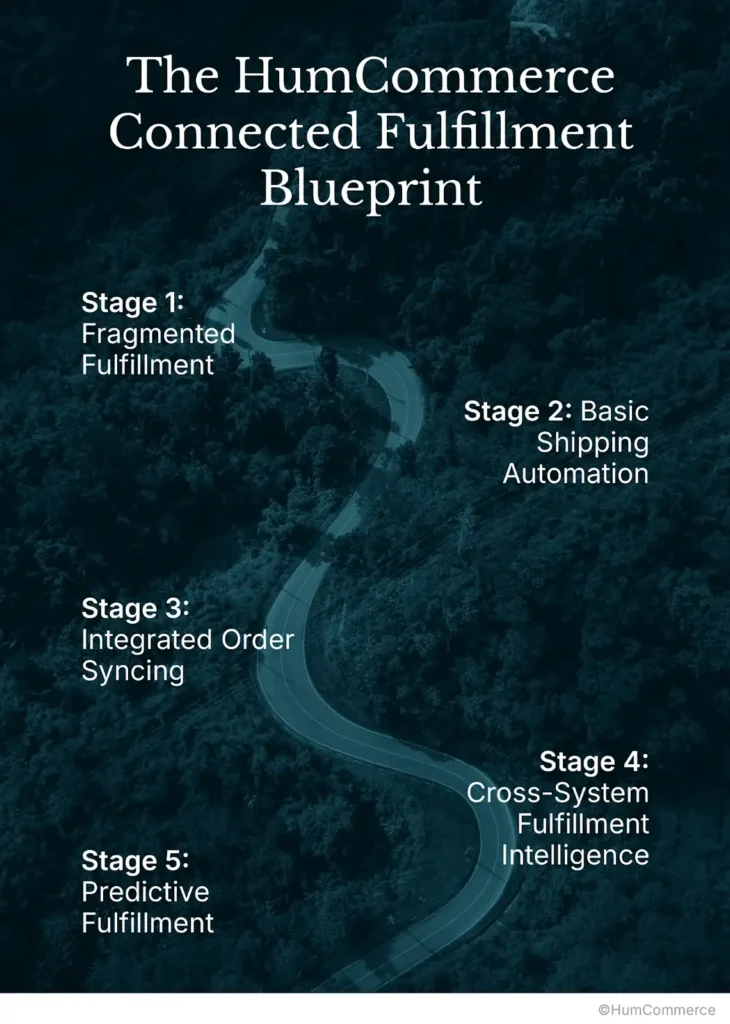
Stage 1: Fragmented Fulfillment
What’s really happening:
Your systems don’t talk to each other. Orders, inventory, and shipping live in separate worlds, and your team is the bridge trying to connect them.
Day-to-day reality:
- Orders show up in your inbox as emails, PDFs, or EDI files. Someone has to type them into your ERP. Then someone else types them into Magento. Then someone types them into ShipStation. Same data, three times.
- Your warehouse team prints a pick list from one system, but when they get to the floor, they’re checking stock in a completely different system because nobody synced them.
- Nobody’s tracking shipping costs or performance. The warehouse just picks a carrier based on whatever they used last time, or whoever picks up the phone first.
- Tracking numbers come back from the carrier, and someone manually logs into the carrier portal, copies the number, and pastes it into Magento. Or worse, sends it via email to the customer.
- A customer wants to return something? That’s a phone call, an email thread, and someone writing it down in a spreadsheet. Maybe they also update your system. Maybe they don’t.
What it costs you:
- Deadlines get missed because nobody saw the SLA requirement until it was too late
- Inventory counts don’t match reality. You oversell or undersell constantly
- Your support team gets buried in calls about orders that don’t exist in one system or another
- You’re reshipping orders because the address was typed wrong the first time
- Growth just adds more chaos more orders means more manual work, not more efficiency
Stage 2: Basic Shipping Automation
What’s really happening:
You’ve connected Magento to ShipStation, which is progress. But the connection is slow, and anything unusual breaks the whole thing.
Day-to-day reality:
- A customer places an order on Magento. That goes to ShipStation, but ShipStation is checking for new orders every 15 or 60 minutes. So there’s a delay. Sometimes orders wait in the queue for an hour before anyone knows about them.
- Your ops team still has to manually select orders in ShipStation and hit the button to print labels. It’s faster than doing it all by hand, but it’s still not automatic. And when volume spikes—Black Friday, year-end orders, a surprise promotion—your team gets swamped.
- Label generation and tracking numbers flow back to Magento, which is good. But your inventory still doesn’t update in real-time. So you oversell constantly. You promise something’s in stock, then discover it’s not, and now you’re scrambling to fix it.
- When something goes wrong – an address doesn’t validate, a SKU isn’t available, an order is missing something – you have to intervene manually. The system doesn’t know what to do.
What it costs you:
- You’re faster than Stage 1, but the system breaks under pressure. When volume jumps, syncs fall behind and manual fixes pile up.
- Overselling and stockouts still happen during busy periods because inventory doesn’t update fast enough.
- Your team is still dealing with exceptions manually instead of handling volume automatically.
Stage 3: Integrated Order Syncing
What’s really happening:
Your systems finally talk to each other instantly. An order doesn’t wait in a queue—it moves immediately. Inventory updates the second it’s reserved. Carriers are chosen automatically based on rules you set.
Day-to-day reality:
- A customer places an order. Magento fires a message instantly to ShipStation—not 15 minutes later, but right now. ShipStation also instantly checks your ERP or WMS to see what you actually have in stock. If it’s there, the order gets reserved. If it’s not, the system knows and doesn’t oversell.
- ShipStation automatically picks a carrier based on rules you’ve set: If the package weighs less than 5 lbs and it’s going to California, use USPS. If it’s heavier and going across country, use FedEx. If it’s VOR or urgent, use overnight. No guessing. No habit.
- Labels print automatically. Nobody clicks “generate label” for each order. Batches of 500 orders print while your team handles exceptions or planning.
- Tracking numbers come back from the carrier and flow automatically into Magento and your ERP. Your customer sees tracking updates without you lifting a finger. Your inventory updates. Everything stays in sync.
- Stock is reserved the moment an order is placed. You can’t oversell because the system sees what’s actually available across all warehouses in real-time.
What it delivers:
- Orders move without waiting. Your team isn’t babysitting the process.
- Errors drop dramatically because you’re not re-keying data three times.
- Your team gets back dozens of hours per week that used to go to manual fixes.
- Growth doesn’t cause chaos anymore—the system scales with volume.
Stage 4: Fulfillment That Actually Thinks
What’s really happening:
The system stops just moving orders and starts making smart decisions. It looks at the whole picture—customer tier, delivery SLA, product type, carrier performance—and routes orders intelligently.
Day-to-day reality:
- An order arrives tagged with metadata: this is a VIP customer, this order is fragile, this needs to arrive by Thursday. The system sees all that and routes accordingly. A regular order goes to your cheapest warehouse. A VIP customer’s order goes to the closest warehouse. A fragile order routes to a carrier known for handling delicate items carefully.
- Your warehouse system doesn’t just pick random inventory. It looks at which warehouse has stock, which one is closest to the customer, what the freight costs are, and which carrier works best for that route. Then it assigns the order to the optimal location.
- Something goes wrong? Address doesn’t validate. SKU is out of stock. A sync failed. The system doesn’t just break. It flags the issue on your ops dashboard, suggests alternatives, and waits for your team to make a decision. Meanwhile, other orders keep moving.
- Returns come in and flow through automated workflows. Product gets checked, inventory gets updated, credit gets issued. No manual chasing, no email threads.
- Fulfillment data flows into your CRM and marketing tools. You can see which customers get on-time delivery, which ones experience delays, which ones have high return rates. Now you can actually segment customers based on their delivery experience, not just what they clicked on.
What it delivers:
- Fulfillment stops being an operational headache and becomes a competitive advantage.
- Your team shifts from firefighting to optimization.
- You’re making smarter routing decisions based on data, not guesses.
- Customer experience improves because orders actually arrive when promised.
Stage 5: Fulfillment That Predicts
What’s really happening:
Machine learning and AI are handling the heavy thinking. The system learns from your data and anticipates problems before they happen.
Day-to-day reality:
- The system analyzes every incoming order and predicts which ones might have issues. An address that looks invalid. A SKU that’s trending low on stock. A customer in a region with carrier delays. The system flags these before processing even begins and routes them carefully.
- Your shipping costs drop because the system doesn’t just use static rules anymore. It watches actual carrier performance—which carriers deliver on time, which ones have damage claims, which ones are getting expensive. It adjusts automatically.
- The system predicts demand. It looks at seasonal patterns, customer behavior, regional trends. It knows you’re going to sell 50% more widgets in Q4 in the Midwest, so it suggests stocking more inventory there before demand hits.
- Everything is monitored constantly. API health, inventory accuracy, SLA compliance. If something starts to drift, the system alerts you before it becomes a problem. You’re not discovering issues when customers call. You’re fixing them before anyone notices.
- You can optimize for whatever matters: cost, speed, sustainability. The system balances delivery speed with carbon footprint. You can adjust those priorities based on your business strategy, and the routing algorithms adapt automatically.
What it delivers:
- Fulfillment runs on autopilot. Your team isn’t dealing with daily operational fires.
- You’re anticipating problems instead of reacting to them.
- Carriers are chosen based on actual performance data, not contracts or guesses.
- Inventory is always optimized based on demand predictions.
- You have time to think about strategy instead of managing chaos.
Real-World Example: Automotive Parts Distributor (VOR Orders)
The Problem
An automotive parts distributor was struggling with something their customers couldn’t afford to ignore: VOR orders. VOR stands for Vehicle Off Road—parts that are needed to get a vehicle off the side of the highway and back into service.
When a VOR order was delayed, the consequences weren’t abstract:
- A vehicle sat on the side of the road with a driver waiting. Unproductive. Expensive.
- A service bay lost revenue because they were waiting for parts instead of working on the next job.
- A dealership relationship got strained because they’d promised their customer a quick fix and couldn’t deliver.
- Contracts had penalties written in for missed SLAs. Penalties that added up fast.
But here’s what was actually happening in their operation:
Orders came in three different ways—EDI feeds, emails, phone calls—with no system to flag which ones were actually urgent. A regular parts order and a VOR order looked the same in the system until someone manually noticed and called the warehouse.
Carrier selection was basically a habit. “We usually use FedEx for this area.” Nobody was calculating actual delivery times based on where the parts were sitting and where they needed to go.
Warehouse teams had no idea which orders were critical until someone called them. So they’d be picking parts for regular orders, then suddenly get a call: “Hey, we’ve got a VOR sitting in the queue. Drop everything.” Chaos.
Freight modes were chosen the same way—by habit, not by logic. “We’ve always used LTL for this weight.” Never mind that expedited ground would be cheaper and faster.
The Fix: Priority-Driven Integration
Instead of replacing their whole system, they built intelligence on top of what they had.
How it worked:
When an order came in through Magento, it got tagged with metadata—is this a VOR order? What’s the delivery zone? The order flowed to Celigo middleware, which instantly synced with their NetSuite ERP. The ERP checked inventory across all their warehouse locations and tagged the order with VOR priority if it was marked as such.
Then the order went to ShipStation, which had one job: look at the VOR tag and the delivery zone, then pick the right carrier automatically. If it’s a VOR order within 200 miles, book a same-day courier. If it’s a VOR order going further than 200 miles, use expedited air. If it’s a regular order, find the cheapest ground shipping option that still gets it there on time.
Meanwhile, the system looked at which warehouse had the part in stock and which one was closest to the customer. A VOR order checking all warehouses simultaneously. If the closest warehouse was out, the system escalated to the ops dashboard with suggestions instead of just failing.
Labels printed automatically. Tracking numbers flowed back to Magento and the ERP instantly. The customer got updates without anyone typing them in.
The Results
Before they implemented this:
- A VOR order took 6 hours to process. That’s manual prioritization, phone calls, email threads, decisions about which carrier to use, someone watching for the shipment.
- On-time delivery was 78%. That’s one in five VOR shipments arriving late when the customer was waiting for it.
- 22% of their orders violated the SLA. Those penalties were adding up.
- The warehouse team was spending 45 hours per week just on the manual work of routing orders, prioritizing, and dealing with the chaos.
After 90 days with the integrated system:
- VOR orders processed in 45 minutes. Automatically. Almost entirely hands-off.
- On-time delivery jumped to 94%. Dealerships started getting what they needed when they needed it.
- SLA violations dropped to 3%. Penalties stopped. Relationships improved.
- Warehouse labor on manual order routing? Down to 12 hours per week. The team went from firefighting to handling exceptions.
- Customer satisfaction went up 18 NPS points. Dealerships trusted them again.
The real payoff: One large dealership customer liked this new reality so much that they started giving this distributor more business. They increased their quarterly orders by $280K because they could finally count on delivery windows. One customer. $280K. In a quarter.
How to Move from Stage 2 to Stage 3: Getting It Done in 90 Days
This isn’t rocket science. It’s a methodical process. Do these six things in order, and your fulfillment stops being a bottleneck.
Step 1: Audit Your Current Flow (Week 1–2)
Before you change anything, map what you’ve actually got.
Questions to answer:
- Where do your orders actually come from? Are they emails someone forwards? EDI feeds? People typing them into Magento? All of the above?
- How does data move between your systems right now? Is someone manually copying and pasting? Is there some API connection, but it’s slow and unreliable?
- Where do things break the most? Do you get bad addresses? Inventory mismatches? Picking the wrong carrier?
- How long does it take for data to sync? Are orders sitting in a queue for 15 minutes? 60 minutes? Is anything real-time?
What you’re building: A one-page diagram that shows how orders flow from entry to shipment and where the bottlenecks are. That diagram becomes your reference point for everything that follows.
Step 2: Implement Webhook-Based Order Sync (Week 3–4)
This is the first real win. You’re replacing polling (checking for new orders every 15 minutes) with webhooks (orders arriving instantly).
Here’s what you actually do:
- Install the connection: Go into Magento and install the Auctane/ShipStation API extension. It’s built to do exactly this.
- Get your API key: Log into ShipStation, go to Settings, find API, generate a key. That key is your password between Magento and ShipStation.
- Tell Magento when to send data: Configure Magento to fire a webhook the instant an order is placed. The event is called sales_order_place_after. Point it at your ShipStation webhook URL.
- Test it: Place a test order on your Magento store. Check ShipStation. It should arrive within 5 seconds. If it takes longer, troubleshoot. If it arrives instantly, you’re good.
- Set up the return trip: When ShipStation generates a label and gets a tracking number, configure it to send that back to Magento automatically. This updates your order status and lets the customer see the tracking number.
- Go live: Move it to production.
What you’ll feel immediately: Orders stop sitting in a queue waiting to be discovered. They appear in ShipStation the moment they’re placed. That 15–60 minute delay? Gone. Now it’s under 5 seconds.
Step 3: Connect Real-Time Inventory (Week 5–6)
Now you’re making sure inventory data actually matches reality across all your systems.
Here’s what you do:
- Pick your middleman: You need something to translate between your ERP and Magento. Options: Celigo (works with most ERPs), Boomi (more powerful, more complex), or custom API if you’re technical. Most companies use Celigo.
- Map the data fields: Your ERP has inventory data. Your Magento store needs that same data. Map them: ERP’s SKU field → Magento’s product_id. ERP’s warehouse location → Magento’s location. ERP’s available quantity → Magento’s stock level. Do this for reserved quantity and reorder threshold too.
- Set up the sync frequency: Real-time via webhooks is best (inventory updates the moment it changes). If that’s too complex, sync every 1–5 minutes. Don’t go longer than that or you’ll still oversell during busy periods.
- Create the rules for reserving stock: When an order is placed, reserve that inventory instantly. Not at payment confirmation—at order placement. If an order gets canceled within 30 minutes, release the reservation. If it stays, keep the stock held.
- Test it: Place an order on Magento. Watch your ERP stock decrement instantly. If it does, you’re syncing.
What changes: Overselling becomes almost impossible. Your team stops fielding calls about promised inventory that doesn’t actually exist.
Step 4: Automate Carrier Selection (Week 7–8)
Stop guessing which carrier to use. Let rules do it.
Here’s what you do:
- Define your rules in ShipStation: You’re telling ShipStation: “If a package is under 1 pound and going domestically, use USPS First Class because it’s cheap. If it’s 1–50 pounds and domestic, use FedEx Ground. If it’s over 50 pounds or international, get a freight quote.” Add rules for speed too: “If the customer paid for 2-day delivery, use FedEx 2-Day. If the order is tagged VOR, use expedited air no matter the cost.”
- Test it: Run sample orders through these rules. Does a 3-pound package to California actually get routed to FedEx Ground? Good. Does a VOR order get expedited? Good.
- Watch what actually happens: Carriers have different performance. One might be cheaper but ship late constantly. Another might be pricier but always on-time. Track on-time rates, damage claims, actual costs. Keep notes.
- Adjust your rules: If you discover FedEx is delivering late in the Midwest, adjust your rule. Or switch to UPS for that region. Rules should evolve based on what actually works.
What changes: You’re shipping cheaper and faster because you’re making data-driven decisions, not guessing. Shipping costs drop 12–18% just from choosing the right carrier for each order.
Step 5: Enable Closed-Loop Tracking (Week 9–10)
Get tracking information to your customer automatically, without anyone typing it in.
Here’s what you do:
- Set up tracking pushback: When ShipStation generates a label and gets a tracking number from the carrier, tell ShipStation to automatically push that tracking number back to Magento. At the same time, update the order status to “Shipped.”
- Trigger customer notification: When tracking is pushed, have Magento automatically send an email to the customer with the tracking link. They get notified without your team doing anything.
- Send tracking data to your ERP: ShipStation should also send tracking information to your ERP for your records and reporting.
- Set up smart alerts: If ShipStation sees a “Delivery Exception” (package is delayed or stuck), alert your ops team. If the carrier marks it “Delivered” but the customer later says they didn’t receive it, flag that for investigation.
What changes: “Where’s my order?” calls drop 70–80% because customers get tracking updates automatically. Your team isn’t hunting for tracking numbers to email to people.
Step 6: Optimize and Scale (Week 11–12)
Don’t just set it and forget it. Keep it healthy.
What you monitor:
- Sync health: Is the webhook connection working? Are messages getting through? Check API response times. Are there failed webhook deliveries sitting in a queue? Fix them.
- Carrier performance: Every month, look at which carriers actually delivered on-time. Which ones had damage claims? Which ones got expensive? If a carrier’s on-time rate drops below 92%, stop using them for time-sensitive orders. Maybe stop using them altogether.
- Edge cases: As orders flow through, you’ll discover situations the automation doesn’t handle. Write new rules for those. Each rule you add makes the system smarter.
- Train your team: Your ops team doesn’t need to process orders anymore. They handle exceptions. Train them on what to do when the system flags something: bad address, out-of-stock SKU, unusual order pattern.
The Data Fields That Actually Matter
When you’re wiring everything together, these are the data points that need to flow between systems:
Order information (from Magento to ShipStation):
- Order ID (the unique number for this order)
- Line items (what was ordered: SKU, quantity, price)
- Customer account number (who is this?)
- Delivery address (where it’s going)
- Shipping method (what they selected)
- SLA tier (is this standard, 2-day, or VOR?)
- Special handling flags (is this fragile? Hazmat? A big bulk shipment?)
Inventory information (from your ERP to Magento):
- SKU (the product code)
- Warehouse location (which warehouse has it)
- Available quantity (how many are actually there)
- Reserved quantity (how many are already promised to orders)
- Reorder threshold (when should we reorder?)
Tracking information (from ShipStation to Magento and ERP):
- Tracking number (the carrier’s reference)
- Carrier (FedEx, UPS, etc.)
- Service level (ground, 2-day, overnight?)
- Shipment date (when did it ship?)
- Estimated delivery date (when will it arrive?)
Error handling (the if-then rules):
- If an address doesn’t validate a flag for your team to review and fix. Don’t ship an order to a bad address.
- If a SKU is out of stock to automatically assign a backup warehouse that has it. If no warehouse has it, alert your ops team so they can decide whether to backorder or cancel.
- If a sync fails to retry three times. Wait 5 seconds, try again. Wait 15 seconds, try again. Wait 45 seconds, try again. If all three fail, alert your ops dashboard so someone knows to investigate.
Your 90-Day Roadmap
Days 1–14: Audit
Map current fulfillment flow. Identify three biggest bottlenecks.
Days 15–30: Quick Win
Implement webhook-based order sync. Eliminate polling lag.
Days 31–60: Real-Time Inventory
Connect ERP inventory to Magento via middleware. Stop overselling.
Days 61–75: Carrier Automation
Set up smart carrier selection rules. Reduce shipping costs.
Days 76–90: Optimize
Monitor performance. Refine rules. Train team on new workflows.
Deliverable at Day 90: Quantified impact.
- “Order processing: 6 hours to 45 minutes”
- “OTIF rate: 78% to 94%”
- “Overselling: 18 incidents/week to zero”
- “Customer tickets: 85/week to 12/week”
What Actually Changes
When fulfillment finally works the way it should:
Orders move when they’re supposed to no more batch delays, no more manual intervention for 90% of orders
Inventory numbers you can trust real-time sync means what you see is what you have
Shipping costs drop automated carrier selection based on actual cost and performance data, not habit
Team bandwidth opens up ops shifts from re-keying orders to handling exceptions and optimizing workflows
Customers stop calling tracking updates happen automatically, and orders actually arrive on time
Growth doesn’t break your system architecture that scales with volume, not against it
The Technical Reality: This Isn’t OMS Replacement
We get this question constantly: “Is this replacing our ERP or OMS?”
No.
What we build strengthens the “order-to-ship” layer—the stretch where fulfillment either wins you loyalty or costs you contracts.
This approach makes your existing systems work better by:
- Eliminating manual data re-entry across Magento, ShipStation, and ERP
- Automating carrier selection and label generation
- Syncing inventory, tracking, and order status in real-time
- Catching errors before they become customer problems
- Feeding fulfillment performance data back into your CRM and analytics
You keep your ERP. You keep your WMS. You just make them talk to each other intelligently.
Stop Paying the Fulfillment Tax
At HumCommerce, we’ve helped B2B operations across industrial supply, automotive parts, building materials, and manufacturing eliminate the $500K fulfillment tax.
We know which integrations actually deliver ROI. We know where projects usually stumble. And we know how to design architecture that scales with your business instead of against it.
Schedule your Fulfillment Integration Audit
and let’s map your path from fragmented to intelligent in 90 days.
Author Note
HumCommerce helps B2B and wholesale companies turn fragmented fulfillment stacks into growth engines. We specialize in Magento-ShipStation-ERP integration across industries like manufacturing, construction, automotive, and industrial supply. We know where fulfillment usually falls apart and how to fix it.