
Important Points
- Find out why most Magento-PIM integrations don’t work with tariffs.
- Find out which tariff-specific attributes (like HS codes) need to go from ERP to PIM to Magento.
- Learn how top tools like Akeneo and Salsify handle 100,000+ SKUs with regulatory accuracy.
- Find out how CPQ pricing rules depend on product data that is accurate and up to date.
- Find out how middleware can help you find missing or invalid compliance fields.
- Get a useful list to help you figure out if your current setup can handle changing trade condition
You have a plan for tariffs. You have a plan for where to get things.
But if your product data is still in separate spreadsheets or PIM setups made for marketing teams, your ERP won’t stand a chance when customs comes back.
This is the quiet killer:
Tariff risk is in your catalog.
– A field for the country of origin is missing
– An HS code that is no longer valid
– A mismatch between Magento and ERP components
Any of those mistakes can raise your landed cost without ever being flagged as a system error.
And in industrial commerce, where you have to keep track of 250,000 or more SKUs across bonded zones, vendor contracts, and CPQ workflows, one wrong piece of data doesn’t just mean a fine. It hurts trust, shrinks margins, and stops reorders.
That’s why the best Magento-ERP stacks today do more than just sync prices and inventory.
They send tariff-ready product data from PIMs like Akeneo and Salsify to all the systems that need to know about it right away.
Where to Find Compliance in Your Product Catalog
When people think about following the rules for tariffs, they think of trade lawyers, customs brokers, and audit trails.
But for most leaders in industrial eCommerce, the real problem starts much earlier in the PIM.
Because following the rules about tariffs isn’t just a legal matter. It’s a problem with the data.
This is where things go wrong:
- No HS codes in the PIM means Customs will take longer.
- Inconsistent country-of-origin data leads to paying too much in duties.
- Unlinked parts and assemblies lead to an incorrect BOM valuation.
- Attribute gaps between ERP and Magento can lead to wrong prices or the risk of reclassification.
Let’s say you’re using Akeneo to add more information, but the tariff-specific fields aren’t the same across all of your SKUs. Or worse, they don’t get sent to ERP or Magento.
That means your quote engine can’t give you the right price. Your CPQ logic doesn’t work anymore. And your CFO never sees the tax refunds you could have gotten.
When you have hundreds of thousands of SKUs to manage, these aren’t just edge cases; they’re margin killers that are easy to see.
That’s why tariff compliance doesn’t start with legal or ops; it starts with how your PIM is set up and connected.
Why Most Magento-PIM Setups Don’t Meet Tariff Requirements
Most suppliers of industrial goods use PIMs to organize their product information. Get rid of extra attributes. Push SKUs that are always the same to Magento.
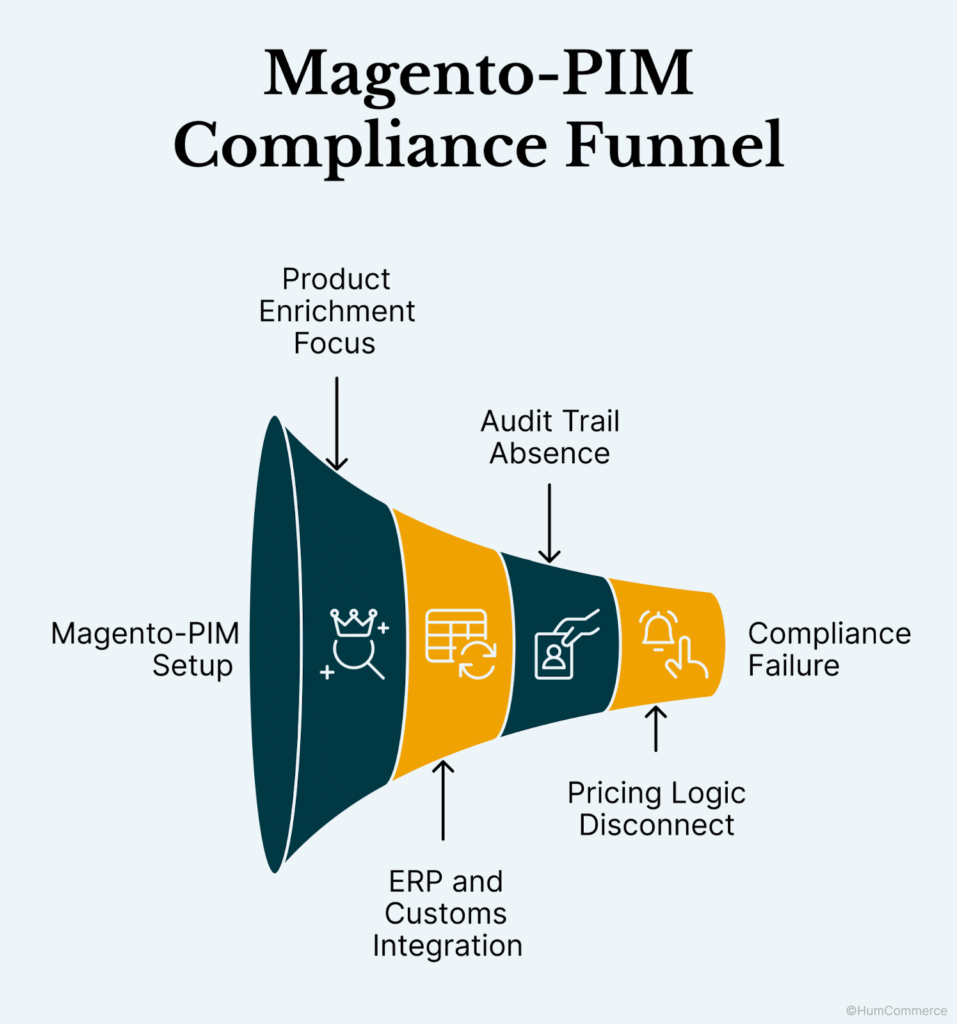
Let’s look at where most setups go wrong:
1. They’re made to improve products, not to control them.
Akeneo, Salsify, and other platforms are great at handling marketing tags, descriptions, and images. But what about following the rules for global trade? That’s not what they were made for.
Try to find organized fields for HS codes, COO, and ECCNs, let alone a way to flag mismatches.
Most teams end up using custom fields, sticky notes, or even worse, spreadsheets.
That’s not just a mess. It’s dangerous.
2. You can’t sync with your ERP or customs validation.
It could say “Country of Origin: Mexico” on your ERP.
Your PIM says “USA.”
Which one is sent to Magento? Who’s looking?
It’s easy for product data to get lost if your ERP and PIM don’t validate each other.
When customs checks that SKU, you need more than just your best guess. You need to keep track of things.
That’s where smarter Magento ERP integration comes in. It connects systems so that mistakes are found early, before they cost you money.
3. If there is no audit trail, there is no defense in an audit.
This is the truth: compliance data changes. A tariff code is changed. A supplier changes their COO paperwork.
But most PIM integrations don’t keep track of who made changes and when. So, when auditors ask for the paper trail, there isn’t one.
For businesses that have more than 250,000 SKUs, that’s not a small mistake; it’s a big problem.
4. Before the pricing logic, the PIM → Magento sync stops.
Even if the right tariff data is in your PIM, it doesn’t often make its way into Magento’s pricing rules.
Your catalog might look great, but your quotes are still based on old prices.
Your PIM needs to be able to talk to both the ERP and Magento’s pricing engine if you want to automate costs and stay compliant. That’s where CPQ pricing rules and contract logic can really help.
In short, most Magento-PIM setups weren’t made to handle changes in global trade.
But with the right integration architecture, your product data can do a lot more than just fill a page; it can also protect margins and make sure you follow the rules. or worse — spreadsheets.
That’s not just messy. It’s risky.
The 5 Best Magento-Compatible PIM Tools for Tariff Compliance
It’s not just about keeping track of product data when you choose a PIM for Magento.
If you have thousands of SKUs in different countries and tariffs that change all the time, you need a PIM that does more than just keep your catalog in order. You need one that talks compliance.
We’ve seen too many B2B teams choose PIM tools based on features like drag-and-drop UI or image support, only to find out six months later that their setup can’t handle real-world trade rules.
These five Magento PIM tools do more than just keep track of product data; they also help you stay ahead of changes in tariffs, SKU risk, and the difficulty of compliance.
1. Akeneo
Why it’s a good choice:
When people talk about integrating Magento with PIM, Akeneo is often the first name that comes to mind. It is adaptable, well-documented, and has a lot of support from the community. Supports bulk imports of CSV and XLSX files and has built-in API rate-throttling logic for high-SKU volumes. HumCommerce sets up cron-based sync jobs with delta detection and fallback queues for deployments with more than 250,000 SKUs.
Good for: Open-source teams that want to be in charge and have a tech-savvy person on board.
What to look out for: You will need to make custom connections to your ERP to see things like landed cost or pricing based on tariffs.
2. Salsify
What makes it stand out:
Salsify was made for omnichannel retail, but industrial teams are quickly picking it up, especially those that need strong management across teams that are spread out. Its workflows make it easier to manage how product attributes (like tariff flags or sourcing zones) change before they get to Magento.
Good for: Ops teams that have to keep track of SKUs in more than one store or marketplace.
What to look out for: It doesn’t come with ERP pricing rules or CPQ logic, so you’ll have to find those things somewhere else.
3. Pimcore
Why it works with complicated stacks:
Pimcore helps you put all of your product data together if it’s messy, multi-layered, and spread out over PDFs, images, and databases. It’s also very customizable, which makes it great for teams that handle kits, configurable parts, or global SKUs with rules that vary by country.
Good for: Groups with complicated catalogs and many areas.
What to watch out for: It’s strong, but not light. Be ready to spend more time setting things up.
4. inRiver
Why it helps with compliance:
If you have to manage SKUs across different tariff regimes, inRiver lets you split your catalog by market, language, or compliance zone. You can also see who changed what and when, which makes audits a lot easier.
Good for: Businesses that need to be able to change their marketing while still following the rules.
What to look out for: There are Magento connectors, but some integrations may need middleware before they can be used in production.
5. Bluestone PIM
Why it’s becoming more popular:
Bluestone is newer to the game, but it’s made to work in real time. This one is worth checking out if your SKUs change a lot and you have to send updates to Magento, ERP, and WMS. It was built with APIs in mind, so you can sync pricing, tariff attributes, and product changes without having to wait for manual exports.
Good for: Industrial teams that need a clean, connected stack and work quickly.
What to look out for: It doesn’t have as many users as Akeneo or Pimcore yet, so community support is limited.
If You Can Only Remember One Thing…
Most teams ask, “Can this make my data better?” when they look at PIM platforms.“
The better question is, “Will this keep me in compliance if tariffs change?“”
Your PIM has to do its part for Magento ERP integration to work. That means that product specs, tariff attributes, and pricing rules will all be automatically synced across the stack.
Do you want to see how this works in real life? The full eBook goes into detail about side-by-side comparisons, compliance use cases, and tips for putting things into action.
What Integration Really Looks Like in Tariff-Ready PIM Architecture
Most PIM systems only add more information to products. But that’s only half the story when it comes to the complexity of industrial trade.
Your PIM stack needs to be at the crossroads of three moving systems—Magento, ERP, and customs data—to be truly tariff-ready.
So what does that structure really look like?
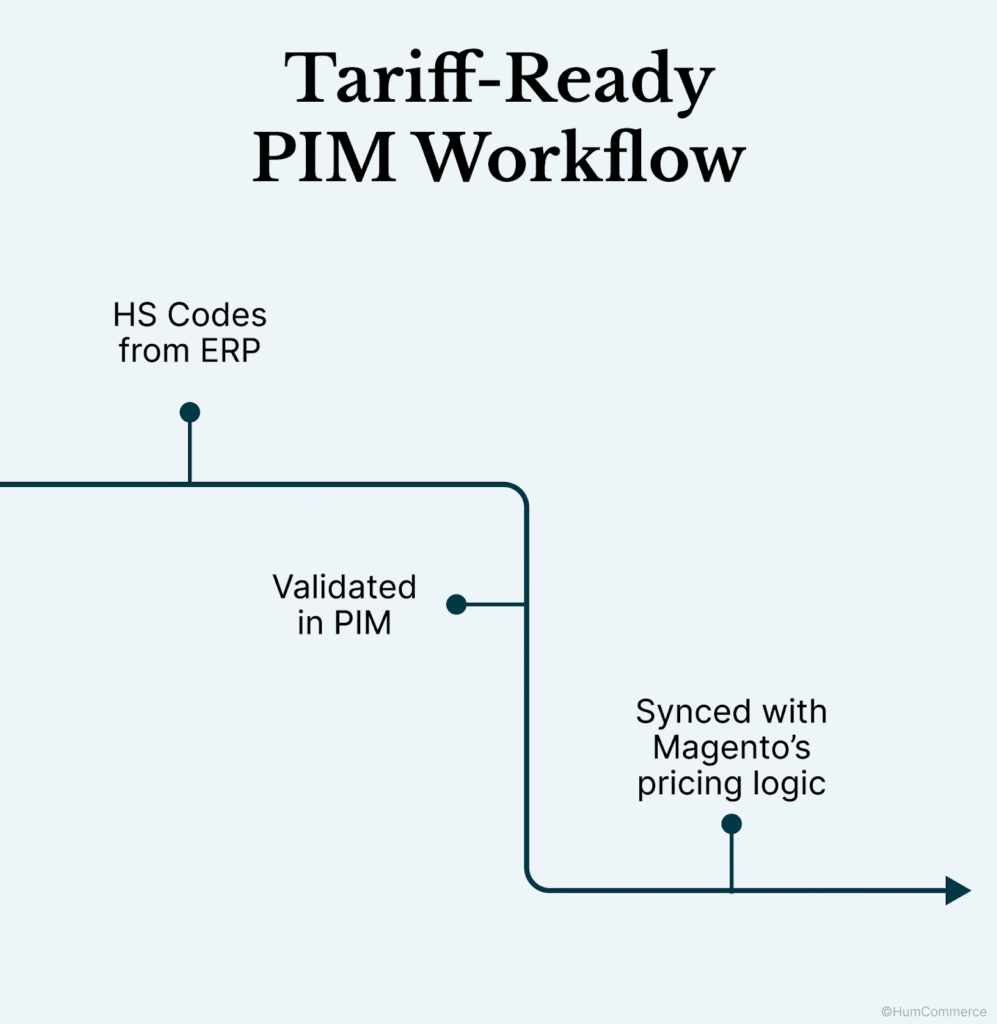
ERP to PIM: Giving the Source of Truth
Your ERP already has important trade information like HS codes, country of origin, tariff exemptions, and supplier pricing clauses. But that information doesn’t often get to Magento right away.
The answer?
Set up a continuous sync so that your ERP sends validated attributes straight to your PIM fields. These are more than just tags. They decide how much things cost, how they get to their destination, and how they are shown, especially when tariffs change in the middle of a cycle.
When we set up businesses, we use tariff APIs (like USITC or EU TARIC) to get HS code changes on the fly. These go into ERP master tables and are checked against rules that are specific to each country before they show up in Akeneo.
PIM to Magento: How to Use CPQ Engines to Set Pricing Rules
The next step is to turn on CPQ pricing rules in Magento after your PIM has the right tariff attributes. This means:
- Mapping cost bands based on tariffs to price tiers for each customer
- Changing the price of an SKU based on whether or not it is duty-free
- Flagging items that need bonded warehousing logic
Field-level automation that works directly with Magento 2 CPQ modules is possible with the best PIM systems, such as Akeneo or Pimcore.
No overrides by hand. No uploading of spreadsheets.
Just clean, flexible prices based on real-world data.
The Middleware Role: Catching What Gets Missed
There is no perfect system. That’s why your middleware layer is important.
Middleware tools catch:
- HS codes that are not valid
- Fields for country of origin are missing
- Differences in attributes between ERP and Magento
Middleware checks fields like ECCNs, COO mismatches, or tariff exemption logic before they go downstream to make sure they follow customs rules.
This is like a real-time audit trail. Middleware checks compliance data before it causes a pricing mistake or, even worse, a customs fine.
This is where Magento PIM integration goes from “nice to have” to “mission critical” for businesses that trade around the world.
Who Should Make This Setup a Priority?
Not every business needs tariff-specific PIM logic right away. If you see yourself in any of the situations below, though, it’s time to rethink your stack.
When you need an upgrade
- You’re in charge of more than 100,000 SKUs across different types of products.
- Your catalog covers more than three customs zones, each with its own duty rate.
- You often have to change the classification of products because of changes in materials, vendors, or how they are used.
- Cleaning up data by hand is making your Magento ERP integration workflows slower.
- You still use spreadsheets to keep track of costs and make sure they are in line with the rules.
Magento PIM integration needs to take into account real-time sync stress, bulk data pipelines, and indexing latency for catalogs with more than 250,000 SKUs.
You need systems that can batch-update tariff attributes without crashing when there are a lot of them, as well as an architecture that keeps Elasticsearch, MySQL, and your pricing engine in sync.
Bonus Requirements
- You sell kits or bundles, and the rules for tariffs are different for each part.
- After 2020, you started sourcing from more than one country, and now you have problems with reclassification.
- Your compliance team and eCommerce team work separately and miss things.
In conclusion, your product data is a tool for compliance.
It’s not just about faster enrichment anymore with your PIM. It’s your first line of defense when tariffs are unstable.
When your product data is compliant, up-to-date, and linked to your pricing engine in real time, you don’t just respond faster. You keep your margin safe, avoid fines, and ship with peace of mind.
Most Magento PIM integrations are meant to add value, not to enforce rules.
HumCommerce goes even further by adding compliance protocols, customs checks, and tariff automation right into the data. Our stack can handle 50,000 or 500,000 SKUs without breaking down, which isn’t something that off-the-shelf connectors can promise.
If your current setup can’t handle customs volatility, cost automation, and SKU governance all at once, it’s time to redesign it with compliance at the center.