
TL;DR
- The core pain is real: syncing NetSuite ERP data with Adobe Commerce (Magento) for real-time B2B pricing and inventory is hard because of mismatched data models, batch-based sync delays, and manual workarounds that compound errors across customer accounts and SKU catalogs.
- This guide gives you a clear, six-step process to design, implement, and measure a working Magento NetSuite integration that eliminates manual order re-entry and pricing discrepancies.
- The high-level path: map your current process, check readiness, prepare systems and data, design the improved workflow, implement changes in your stack, then pilot and iterate.
- A US-based manufacturer connecting NetSuite CPQ to Adobe Commerce achieved 75% faster quote workflows and real-time pricing accuracy across all customer accounts from day one, eliminating back-and-forth manual quoting entirely.
- This guide is for IT Directors and digital transformation leads in manufacturing and distribution who use Adobe Commerce with NetSuite and need a clear plan to connect these systems before committing budget or choosing a connector.
Manufacturers and distributors running Oracle NetSuite ERP alongside Adobe Commerce face a persistent problem: their storefront and back office don’t speak the same language. Pricing updates lag behind contract changes, inventory counts drift between systems, and orders require manual re-entry that introduces errors at every step. This guide walks IT leaders through a practical, step-by-step approach to Magento NetSuite integration, covering everything from process mapping and readiness checks to piloting and measuring results. The goal isn’t a theoretical framework. It’s a working integration that delivers real-time B2B pricing, accurate inventory, and automated order sync.
Why This Matters for manufacturing and distribution
Picture a quarterly operations review where your VP of Sales flags that 12% of orders shipped last month had pricing discrepancies between what the customer saw on Adobe Commerce and what Oracle NetSuite ERP had on file. Customer service is fielding complaints. The finance team is issuing credits manually. Your team traces the root cause to a batch sync that runs every four hours, meaning contract rate updates in NetSuite don’t appear on the Magento storefront until the next cycle. This kind of gap between systems isn’t a minor annoyance: it erodes margin, damages trust, and creates rework across departments. You need a clearer, faster way to integrate NetSuite with Adobe Commerce for real-time B2B pricing and inventory.
Why integrate NetSuite with Adobe Commerce for real-time B2B pricing and inventory Is a Priority Now
For IT Directors in manufacturing and distribution, the pressure to unify commerce and ERP data has shifted from “strategic initiative” to “operational necessity.” Your buyers expect self-service portals with accurate, customer-specific pricing. Your operations team needs inventory visibility that reflects warehouse reality, not yesterday’s batch export. Magento NetSuite integration sits at the center of these demands because it determines whether your storefront is a reliable sales channel or a liability that generates support tickets.
The practical reality on Adobe Commerce with Oracle NetSuite ERP often looks like this: product data lives in NetSuite as the master, but pricing rules, volume tiers, and contract rates don’t translate cleanly into Magento’s pricing engine. Inventory counts sync on a schedule, so a buyer places an order for 500 units of a part that was allocated to another customer two hours ago. Customer-specific catalogs require manual configuration because the systems use different account hierarchies. These aren’t edge cases. They’re daily friction points that affect conversion rates and operational efficiency across the entire order lifecycle.
This guide covers a structured, six-step process to connect NetSuite to Adobe Commerce so that pricing, inventory, and order data flow bidirectionally in near-real-time. By the end, you’ll have a clear framework to assess your current state, prepare your systems, design the improved workflow, and measure results. The approach applies whether you’re evaluating a native NetSuite connector, considering custom middleware, or building a netsuite ecommerce integration through API-first architecture. The goal is to give you enough specificity to make informed decisions about scope, timeline, and resource allocation before you write a single line of integration code.
What ‘Done’ Looks Like When You integrate NetSuite with Adobe Commerce for real-time B2B pricing and inventory
Vague project goals like “just connect the systems” or “add a NetSuite integration” lead to scope creep, missed expectations, and integrations that technically work but don’t solve the actual business problem. Before you start building, you need a concrete definition of what success looks like in daily operations.
The before state: your team manually re-enters orders from Adobe Commerce into NetSuite, pricing updates take hours or days to appear on the storefront, and inventory discrepancies trigger 15-20 customer service tickets per week. The after state: orders flow automatically from checkout to NetSuite with full validation, contract pricing updates appear within minutes, and inventory counts reflect real warehouse positions.
Here’s what “done” looks like in concrete terms:
- Orders placed on Adobe Commerce automatically create sales orders in NetSuite with correct pricing, tax, and customer account mapping, requiring zero manual data entry.
- Contract-specific and tiered pricing from NetSuite displays accurately on the B2B portal for each authenticated buyer, with updates reflected within five minutes of an ERP change.
- Inventory availability syncs bidirectionally so that the storefront shows real-time stock positions across warehouses, and order fulfillment accuracy exceeds 98%.
- An integration monitoring dashboard exists for the IT team, showing sync status, error logs, and failed transactions so problems are caught before customers notice them.
These benchmarks connect the NetSuite-to-Adobe Commerce integration to measurable business outcomes rather than vague technical milestones.
Step 1: Map How You integrate NetSuite with Adobe Commerce for real-time B2B pricing and inventory Today
Every integration project should start with an honest map of how data actually moves between your systems right now, not how it’s supposed to move. Skip this step, and you’ll automate broken processes instead of fixing them.
Walk through these steps to document your current state:
- Identify every data handoff between Adobe Commerce and Oracle NetSuite ERP. This includes order creation, pricing updates, inventory syncs, customer account creation, returns, and credit memos. Write down whether each handoff is automated, semi-manual, or fully manual.
- For each handoff, record the trigger, the person or system responsible, the frequency, and the typical delay. A pricing update that happens via CSV upload every Tuesday morning is a very different problem than one that syncs via API every hour but fails silently 10% of the time.
- Map where data is duplicated or maintained in both systems. Customer records, product attributes, and pricing rules that exist in both NetSuite and Magento are common sources of drift. Note which system is the “source of truth” for each data type, and whether that’s actually enforced.
- Document failure points. Where do orders get stuck? Where do pricing errors surface? Shadow your customer service team for a day and listen for patterns: “where’s my order” calls, pricing disputes, and stock availability complaints all point to specific sync gaps.
- Talk to your warehouse team about inventory discrepancies. Ask how often they encounter situations where the netsuite adobe commerce b2b workflow shows stock that doesn’t physically exist, or vice versa.
- Capture the volume: how many orders per day, how many SKUs, how many customer accounts with unique pricing. These numbers determine whether a lightweight connector will suffice or whether you need middleware capable of handling enterprise-scale B2B transaction volumes.
This map becomes your baseline. Every improvement you make later gets measured against it.
Step 2: Check If You’re Ready to integrate NetSuite with Adobe Commerce for real-time B2B pricing and inventory
Readiness isn’t about having perfect systems. It’s about having enough foundation to build on without the integration collapsing under bad data or unclear ownership. Run through this checklist before committing to implementation:
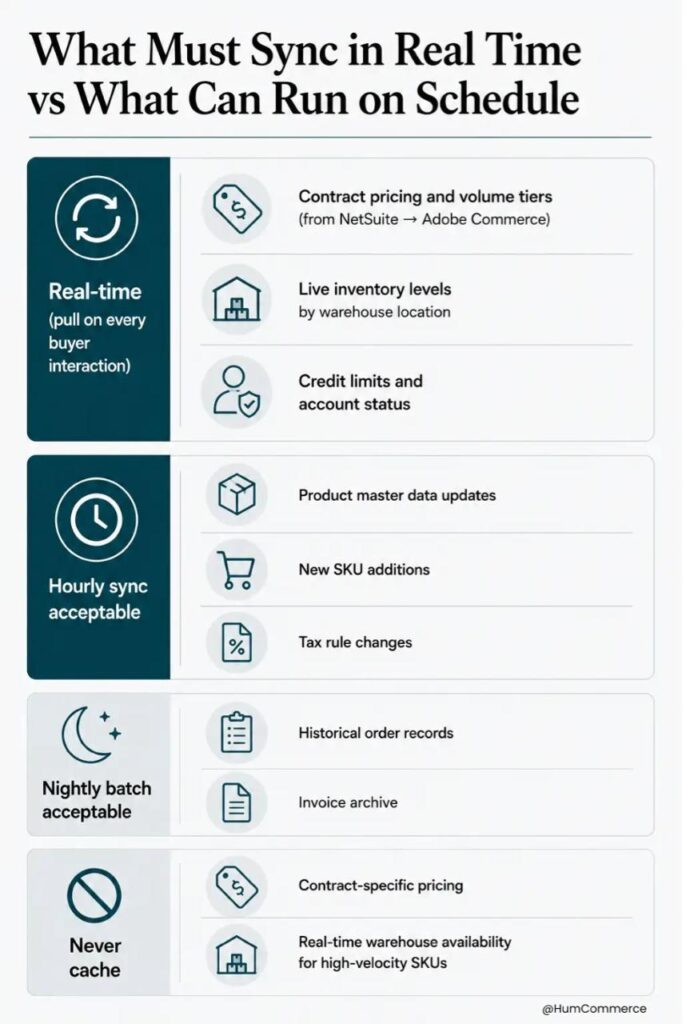
- Do you have a single, agreed-upon source of truth for product data, pricing, and customer accounts? If your team argues about whether NetSuite or Magento “owns” pricing, you’re not ready for bidirectional sync. Establish data ownership first. For most B2B operations, the ERP should be authoritative for pricing, inventory, and customer credit limits.
- Are your SKU identifiers consistent across both systems? Mismatched product IDs are the most common cause of netsuite magento 2 integration failures. If NetSuite uses one alphanumeric SKU format and Adobe Commerce uses another, you need a mapping table or a cleanup project before integration will work reliably.
- Do you have API access and the right permission levels configured in both systems? NetSuite’s SuiteTalk and REST APIs require specific roles and token-based authentication. Adobe Commerce’s REST and GraphQL APIs need properly scoped integration tokens. Confirm that your IT team or partner has the access needed to build and test connections.
- Is there a clear owner for the integration on the business side? Someone, typically an IT Director or operations lead, needs to own the requirements, approve the data mapping, and be accountable for testing. Without this, integration projects stall in committee.
- Can you articulate three specific outcomes you expect from the integration? If the answer is vague (“make things better”), narrow scope before proceeding.
If you answered “no” to two or more of these, focus on data cleanup and organizational alignment first. A phased approach, starting with one-way sync for inventory before tackling bidirectional pricing, often works better than trying to solve everything at once.
Step 3: Prepare Your Systems and Data
Before you configure a single integration endpoint, your Adobe Commerce instance and Oracle NetSuite ERP need to be in a state where clean data can flow between them. Here’s what to address:
- Standardize product identifiers. Every SKU in NetSuite must have an exact match in Adobe Commerce. Run a cross-reference audit to identify orphaned products, duplicates, and format inconsistencies. For manufacturers with 50,000+ SKUs, this step alone can take two to four weeks.
- Align customer account structures. NetSuite’s customer hierarchy (parent/child accounts, billing vs. shipping entities) needs to map cleanly to Adobe Commerce’s company account and buyer role structure. Document how volume tiers, contract rates, and credit limits should translate between systems.
- Normalize pricing data. Contract pricing, volume discounts, and customer-specific rates in NetSuite must follow consistent rules that the integration can interpret. If pricing logic lives in spreadsheets or sales reps’ heads rather than in structured ERP fields, you’ll need to formalize it before any netsuite ecommerce integration can work reliably.
- Configure API endpoints and authentication. Set up dedicated integration roles in both systems with the minimum permissions needed. Use token-based authentication rather than username/password credentials. Document rate limits: NetSuite enforces concurrency limits that can throttle high-volume sync jobs.
- Establish a staging environment. Never test integration changes against production data. Both Adobe Commerce and NetSuite support sandbox or staging instances. Set these up with representative data, including a sample of real customer accounts, pricing tiers, and inventory positions.
- Create baseline reports. Before integration goes live, capture current metrics: average order processing time, pricing error rate, inventory discrepancy count, and customer service ticket volume related to order or pricing issues. These become your “before” measurements.
Step 4: Design the Improved Process
This step is where you decide what the better version of your NetSuite-to-Adobe Commerce data flow looks like for your specific manufacturing or distribution operation. The design should reflect your actual business rules, not a generic template.
Start by identifying which manual steps from your current process map can be eliminated entirely. Order re-entry from the storefront into NetSuite is an obvious candidate for full automation. Pricing updates that currently require someone to export a CSV from NetSuite and import it into Magento should become event-driven: when a contract rate changes in NetSuite, the integration pushes that update to Adobe Commerce within minutes.
Next, decide what stays manual and what gets automated across these areas:
- Order validation: should the integration automatically check customer credit limits and approval chains in NetSuite before confirming an order on Adobe Commerce, or does your sales team handle exceptions manually?
- Inventory sync frequency: real-time webhook-based updates work for fast-moving SKUs, but batch sync every 15 minutes may be sufficient for slow-moving inventory. Design different sync strategies for different product categories.
- Returns and credit processing: define whether return requests initiated on Adobe Commerce should automatically create return authorizations in NetSuite or route through a manual approval step.
- Error handling: design what happens when a sync fails. Does the system retry automatically? Does it alert the IT team? Does it hold the order in a queue? The netsuite magento 2 integration experience for your internal team depends heavily on how gracefully the system handles exceptions.
Step 5: Implement Changes in Your Stack
Implementation means translating your design into working configurations across Adobe Commerce and Oracle NetSuite ERP. The work splits into what your IT Director should own directly and what a technical partner handles.
Your IT Director owns: defining business rules for pricing, inventory, and order sync; approving data mapping documents; coordinating user acceptance testing with operations and sales teams; and setting go/no-go criteria for the pilot launch.
Your technical partner or internal development team owns: configuring the integration middleware or native connector; building custom API endpoints for data types that don’t map cleanly out of the box; setting up error logging and monitoring; and performance testing under realistic transaction volumes.
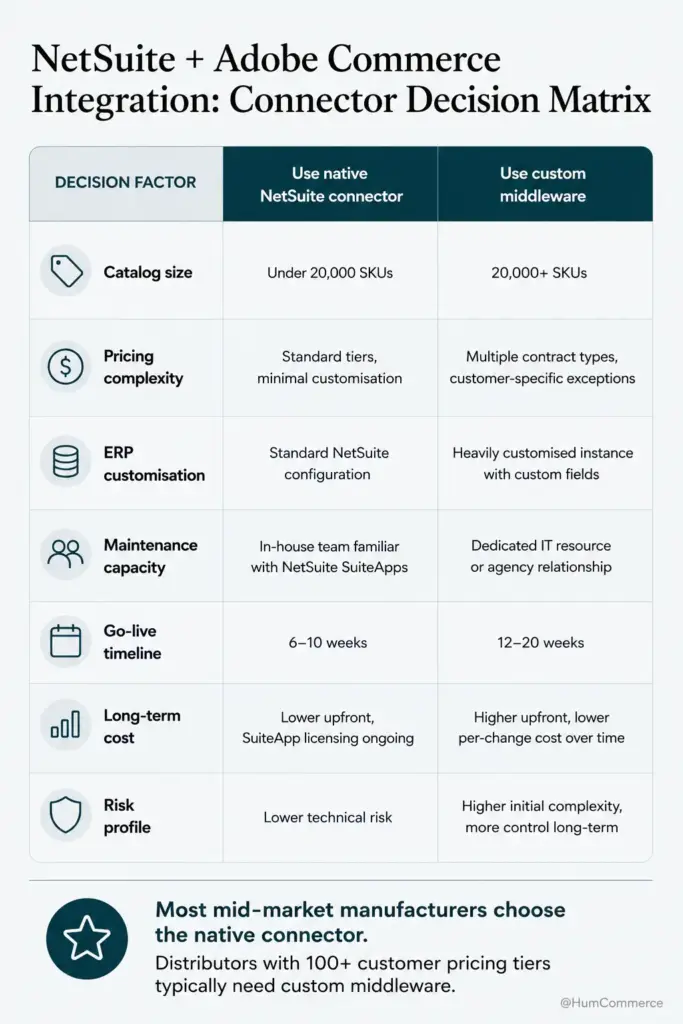
For the Magento NetSuite integration layer itself, you’ll choose between a native connector (such as Celigo or similar iPaaS platforms), custom middleware built on your own infrastructure, or a direct API-to-API connection. Each has trade-offs. Native connectors offer faster initial setup for standard B2B scenarios but can struggle with complex, manufacturer-specific pricing logic. Custom middleware gives you full control but requires ongoing maintenance. The right choice depends on your SKU count, pricing complexity, and internal development capacity.
Run integration tests in staging before touching production. Test with real-world scenarios: a customer placing a bulk order with contract pricing, a warehouse adjusting stock levels, a sales rep updating a quote in NetSuite CPQ.
Step 6: Pilot, Measure, Improve
Treat your first live integration as a controlled pilot, not a full rollout. Pick a scope that’s meaningful but contained: one product category, one customer segment, or one warehouse location. This limits blast radius if something breaks while still generating real data about performance.
Measure against the baselines you established in Step 3. Track order processing time (from checkout to NetSuite sales order creation), pricing accuracy (percentage of orders where the storefront price matches the ERP contract rate), inventory sync latency, and customer service ticket volume related to order or pricing issues.
A US-based manufacturer that connected NetSuite CPQ to Adobe Commerce through a similar phased approach achieved 75% faster quote workflows and real-time pricing accuracy across all customer accounts from day one. Their quote turnaround time dropped from three to five days to just hours by automating quote capture, approvals, and ERP checks.
Establish a weekly review cadence during the pilot. Your IT Director, operations lead, and a representative from sales or customer service should review sync logs, error rates, and any manual interventions that were required. Each review should produce a short list of adjustments for the following week. After four to six weeks, if metrics are stable and error rates are within acceptable thresholds, expand the pilot to additional product lines or customer segments. Connecting NetSuite to Adobe Commerce is an iterative process: the first phase rarely covers every edge case, and that’s expected.
Common Mistakes to Avoid When You integrate NetSuite with Adobe Commerce for real-time B2B pricing and inventory
- Skipping process mapping and jumping straight to tool selection. If you don’t know where your current workflow breaks, no connector will fix it. The most common netsuite ecommerce integration failures happen because teams automate a broken process.
- Treating the integration as a one-time IT project. Pricing rules change, new product lines launch, customer account structures evolve. Your integration needs ongoing monitoring and maintenance, not a “set and forget” deployment.
- Underestimating NetSuite’s API concurrency limits. High-volume sync jobs that exceed NetSuite’s governance limits will fail silently or throttle to a crawl. Design your sync architecture around these constraints from the start.
- Not testing with real customer data. Synthetic test data doesn’t expose the edge cases that real B2B transactions create: superseded parts, cross-reference SKUs, split shipments, and partial invoices all behave differently than clean test orders.
- Trying to sync everything bidirectionally from day one. Start with clear data ownership. NetSuite owns pricing and inventory. Adobe Commerce owns the buyer experience and cart. Bidirectional sync should be limited to data types where both systems genuinely need write access.
- Ignoring error handling and monitoring. An integration that works 95% of the time but fails silently on the other 5% will erode trust faster than no integration at all. Build alerting and retry logic into every sync endpoint.
- Treating a UI tweak on the Magento side as a complete Magento NetSuite integration. Displaying pricing from a cached feed isn’t real-time sync. If the data pipeline behind it isn’t reliable, the frontend fix is cosmetic.
Need Help Putting This Into Practice?
If you’ve followed this guide, you now have a structured framework for integrating NetSuite with Adobe Commerce: from mapping your current state through piloting and measuring results. You know what “done” looks like, what readiness requires, and where the common failure points hide in manufacturing and distribution environments.
HumCommerce specializes in exactly this kind of work. We build Magento NetSuite integrations for manufacturers and distributors who need contract pricing, bulk order workflows, and inventory visibility to flow accurately between their ERP and storefront. Our approach is ERP-first: we design Adobe Commerce to behave as an extension of your operations, not a disconnected sales channel.
If you’re running Adobe Commerce with Oracle NetSuite ERP and dealing with pricing discrepancies, manual order re-entry, or inventory sync gaps, share your current setup and main pain point with our team. We’ll map these steps to your specific stack and give you a realistic scope and timeline.
Reach out for a technical walkthrough, and we’ll show you what this integration looks like for your business: humcommerce.com.