
TL;DR
- Connecting AI personalisation to your Adobe Commerce storefront is hard when your pricing, inventory, and customer data lives in Epicor P21, NetSuite, or SAP Business One – and none of those systems were designed to feed real-time buyer-level recommendations.
- This guide helps you build a dual-layer personalisation architecture where account-level rules (contract pricing, catalog restrictions, approval chains) coexist with individual buyer preferences (reorder patterns, product affinities, search behavior) inside a single B2B portal.
- The steps: map your current personalisation gaps, check data and integration readiness, prepare your systems, design the improved process, implement changes across your stack, then pilot and measure results.
- A US-based industrial distributor with 300+ repeat accounts found that reorder intelligence surfaced at the right moment reduced rep outreach for reorders by 40%, while account-level personalisation increased average order frequency by 20% in the first year – proof that AI product recommendations for repeat B2B buyers drive measurable revenue.
- This guide is for Heads of eCommerce in manufacturing and distribution running Adobe Commerce, who need to decide where to start with AI for sales personalisation and how to sequence the rollout without disrupting existing ERP-driven workflows.
Why This Matters for manufacturing and distribution
You’re in a quarterly business review. Self-service order rates are flat. Your Adobe Commerce storefront treats every logged-in buyer the same, despite customer-specific pricing locked inside Epicor P21 or SAP Business One. Reps are still fielding reorder requests by phone because the portal doesn’t surface what each buyer actually needs. The board wants to know why your ecommerce investment isn’t reducing manual effort. You realize the gap isn’t the platform – it’s that personalisation hasn’t been architected at two distinct levels: the account and the individual buyer. This guide gives you that architecture.
Why implement account-level and buyer-level AI personalisation in a B2B ecommerce portal Is a Priority Now
Manufacturers and distributors face a structural problem that most B2C personalisation frameworks ignore entirely. A single account – say, a regional HVAC contractor – might have five buyers, each with different purchasing authority, product needs, and reorder cycles. Yet your storefront shows all five the same catalog, the same homepage, and the same promotions. The Head of eCommerce owns fixing this, and AI for sales personalisation is the mechanism that makes it possible without multiplying manual configuration work.
The challenge compounds when your source-of-truth data sits in Epicor P21, NetSuite, or SAP Business One. Contract rates, volume tiers, credit limits, and approval chains all live in the ERP. Product attributes and cross-reference tables live in your PIM. Adobe Commerce holds the session data, browsing behavior, and cart history. These systems weren’t built to share context in real time, which means personalisation attempts often collapse into static customer group assignments – a blunt instrument that fails to meet the expectations of 85% of B2B buyers who report online ordering frustrations around pricing, stock visibility, and relevance.
This guide walks through a practical, six-step process to implement both account-level and buyer-level personalisation inside your B2B ecommerce portal. By the end, you’ll have a clear sequence for layering AI-driven recommendations on top of ERP-enforced business rules, a readiness checklist for your data and systems, and a measurement framework tied to real KPIs like average order value, reorder frequency, and rep workload reduction. Account-level personalisation in B2B ecommerce isn’t a nice-to-have anymore – it’s the structural prerequisite for making your portal the preferred buying channel.
What ‘Done’ Looks Like When You implement account-level and buyer-level AI personalisation in a B2B ecommerce portal
Vague goals like “add AI to the storefront” produce vague results. Projects drift when nobody defines what the buyer experience should feel like after launch, or what the Head of eCommerce should be able to measure. A clear definition of “done” separates a successful rollout from an expensive experiment.
Before: every buyer at an account sees the same catalog, the same sorting, and the same promotions. Reps manually flag reorder opportunities. After: the portal recognizes both the account’s contractual context and each buyer’s individual behavior, surfacing relevant products, pricing, and reorder prompts automatically.
Here’s what “done” looks like in concrete terms:
- Account-level rules are enforced automatically: contract pricing, catalog restrictions, payment terms, and approval workflows all pull from the ERP without manual configuration per session. No buyer ever sees a price that contradicts their negotiated rate.
- Individual buyer dashboards reflect purchase history, frequently ordered SKUs, and AI-generated reorder suggestions based on consumption patterns – a personalized B2B ecommerce experience powered by AI rather than static merchandising rules.
- Rep workload for routine reorders drops measurably. The portal handles the “Do you need more of what you bought last month?” conversation, freeing reps for complex quotes and new account development.
- The Head of eCommerce has a standard report showing reorder conversion rates, average order frequency by account, and recommendation click-through rates – broken down by account tier and buyer role.
Step 1: Map How You implement account-level and buyer-level AI personalisation in a B2B ecommerce portal Today
Start with reality, not tools. Before selecting any AI vendor or configuring recommendation widgets, you need a clear picture of how personalisation – or the lack of it – works across your current stack. Most manufacturers discover that what they call “personalisation” is actually a handful of customer groups in Adobe Commerce with manually assigned catalogs.
- List every touchpoint where a buyer interacts with your portal: login, homepage, category pages, search, product detail pages, cart, and checkout. Note which of these currently show any account-specific or buyer-specific content.
- Document where your ERP (Epicor P21, NetSuite, or SAP Business One) feeds data into Adobe Commerce. Map the sync frequency – batch nightly, hourly, or real-time API. Identify which data points (pricing, inventory, credit limits) are current and which are stale by the time a buyer sees them.
- Interview your inside sales team and customer service reps. Ask them: what questions do buyers ask that the portal should already answer? Common answers include “What’s my price on this?” and “What did I order last time?” These are personalisation gaps hiding in your support queue.
- Shadow two or three buyer sessions if possible. Watch where they struggle, where they abandon, and where they call a rep instead of completing the order online. Failed site search logs are particularly revealing – they show what buyers expected to find but didn’t.
- Identify handoff points between systems. Where does a buyer’s request leave Adobe Commerce and enter a manual process? Quote requests, approval chains, and reorder triggers are the most common friction zones.
- Capture failure points and rework loops. If a buyer sees incorrect pricing because the ERP sync lagged, that’s a data freshness problem. If a buyer can’t find a superseded part because cross-reference tables aren’t surfaced, that’s a product data problem. Each of these becomes a personalisation requirement.
Research shows that AI-driven personalisation represents a $500 million-plus opportunity for enterprises that get their data foundations right. The mapping exercise above tells you exactly where your foundations need work.
Step 2: Check If You’re Ready to implement account-level and buyer-level AI personalisation in a B2B ecommerce portal
Readiness means your data, integrations, and organizational ownership are strong enough to support personalisation without creating new problems. A “no” on any of the following items doesn’t mean you stop – it means you fix that item first.
- Do your customer accounts in Adobe Commerce map 1:1 to accounts in your ERP? If account IDs are inconsistent between systems, every personalisation rule built on account data will misfire. Clean up the mapping before anything else.
- Can you identify individual buyers within an account? B2B buyer personalisation with AI requires distinguishing between the procurement manager who orders fasteners weekly and the project engineer who orders specialty components quarterly. If all buyers share a single login, you need to enable individual user accounts under the company structure in Adobe Commerce.
- Is your product data enriched with attributes that support recommendations? AI needs more than SKU numbers. It needs category hierarchies, application data, unit-of-measure options, and supersession chains. If your PIM feeds Adobe Commerce with bare-minimum data, recommendations will be shallow.
- Do you have at least 6-12 months of order history accessible in a structured format? AI models for reorder intelligence need historical purchase patterns. If your order data lives only in the ERP and isn’t synced to a queryable data layer, you’ll need to extract and stage it.
- Is there a clear owner for the personalisation initiative? The Head of eCommerce typically owns the buyer experience, but IT owns the integrations, and sales owns the account relationships. Without a single decision-maker who can prioritize across these teams, projects stall.
If you’re not ready on two or more items, narrow your scope. Start with account-level personalisation for your top 50 accounts before attempting buyer-level AI across the full base.
Step 3: Prepare Your Systems and Data
Your systems need specific configurations before AI personalisation can function reliably. Here’s what to address in Adobe Commerce and your ERP:
- Standardize customer and account IDs across Adobe Commerce and your ERP (Epicor P21, NetSuite, or SAP Business One). Every API call between systems depends on consistent identifiers. Mismatched IDs cause pricing errors, catalog misassignment, and broken approval workflows.
- Ensure contract pricing and volume tiers sync in near-real-time. If your ERP updates a customer’s negotiated rate but Adobe Commerce still shows list price for 24 hours, you’ve undermined trust. Configure your integration middleware to prioritize pricing data freshness.
- Enrich product data for AI readiness. Your PIM should feed Adobe Commerce with SKU-level attributes: material, dimensions, application compatibility, and cross-reference numbers. AI product recommendations for repeat B2B buyers perform significantly better when the model understands product relationships, not just purchase co-occurrence.
- Set up role-based permissions within Adobe Commerce’s B2B module. Buyers, approvers, and account admins need distinct roles so personalisation can tailor the experience by function – showing reorder suggestions to regular buyers and spend analytics to approvers.
- Build baseline reports before you change anything. Capture current metrics for average order value, reorder rate, search-to-cart conversion, and rep-assisted order percentage. These become your “before” benchmarks.
- Validate that your integration layer (whether middleware like Celigo, Boomi, or custom APIs) can handle the additional data calls that personalisation requires. A b2b buyer personalisation AI layer that times out because your integration can’t handle concurrent pricing lookups will frustrate buyers more than no personalisation at all.
Step 4: Design the Improved Process
This step is where you decide what the better version of personalisation looks like for your specific manufacturing or distribution operation. Not every interaction needs AI. Some steps stay manual because they involve judgment, negotiation, or relationship context that machines can’t replicate.
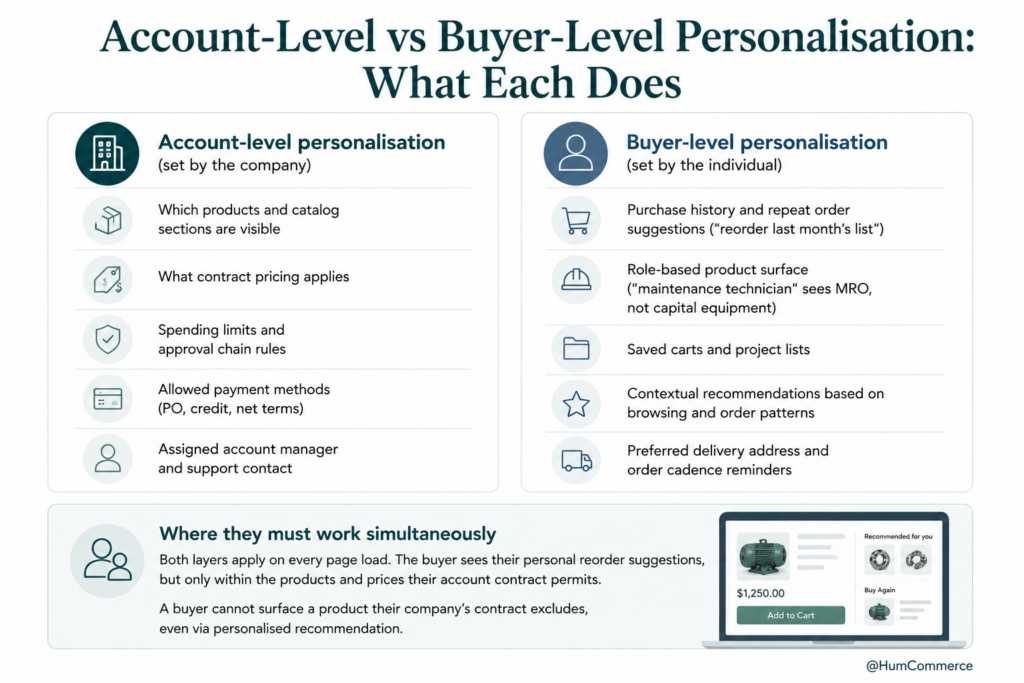
- Define which personalisation layers are account-driven versus buyer-driven. Account-driven: catalog visibility, pricing tiers, payment terms, shipping preferences, and approval thresholds. Buyer-driven: reorder suggestions, recently viewed products, preferred categories, and search personalization. Keep these layers distinct in your architecture.
- Decide where AI adds value versus where rules suffice. Contract pricing enforcement is a rules engine problem – your ERP already handles it. But predicting which products a specific buyer needs to reorder next week? That’s where AI excels, analyzing purchase frequency, seasonal patterns, and consumption velocity.
- Map the data flow. Account-level data flows from the ERP to Adobe Commerce. Buyer-level behavioral data stays in Adobe Commerce (or a connected CDP). The AI layer reads from both sources to generate recommendations that respect account rules while reflecting individual preferences.
- Design the monitoring dashboard. The Head of eCommerce needs visibility into recommendation performance by account segment, adoption rates across different buyer roles, and revenue attributed to AI-surfaced products. Build this into your analytics stack before launch, not after.
- Plan for exceptions. What happens when a buyer searches for a product outside their account’s catalog? What if the AI recommends a product that’s been superseded? Design fallback experiences that are helpful rather than dead ends.
Account-level personalisation in B2B ecommerce forms the foundation. Buyer-level intelligence is the layer that makes the experience feel like the portal actually knows each user.
Step 5: Implement Changes in Your Stack
Implementation on Adobe Commerce with an ERP backend involves both configuration and custom development. Here’s how to divide ownership:
The Head of eCommerce should own: defining the recommendation placements (homepage, category pages, cart, post-purchase), approving the UX for reorder prompts, setting the business rules for which accounts get AI personalisation first, and establishing the KPI targets.
IT or your technical partner should own: configuring Adobe Commerce’s B2B company structure and role permissions, building or configuring the API connections between the ERP and the AI recommendation engine, setting up the data pipeline for behavioral event tracking (searches, page views, add-to-carts), and deploying the recommendation models in a staging environment for testing.
HumCommerce has handled this split for manufacturers running complex Adobe Commerce stacks – one example involved reducing quote turnaround from 3-5 days to hours by automating the data flow between commerce and ERP layers. The same integration architecture that powers faster quoting also powers AI for sales personalisation: both depend on real-time, trusted data moving between systems.
Start with a single recommendation type – reorder intelligence is the highest-value, lowest-risk starting point. Surface “items you may need to reorder” on the buyer’s dashboard based on their purchase history and typical reorder intervals. This single feature often delivers measurable results within 60 days.
Step 6: Pilot, Measure, Improve
Treat the first rollout as a controlled pilot. Pick 20-50 accounts that represent your core buyer segments: high-frequency reorderers, mixed-basket buyers, and occasional purchasers. Run the pilot for 8-12 weeks to capture enough data for meaningful analysis.
Measure three things: reorder conversion rate (what percentage of AI-surfaced reorder suggestions result in an add-to-cart), change in average order frequency per account, and reduction in rep-assisted reorder volume. A US-based industrial distributor with 300+ repeat accounts found that reorder intelligence surfaced at the right moment reduced rep outreach for reorders by 40%. That same distributor saw account-level personalisation increase average order frequency by 20% in the first year.
Establish a bi-weekly review cadence. The Head of eCommerce reviews recommendation performance, identifies accounts where AI suggestions aren’t converting (often a data quality signal), and decides whether to expand the pilot or adjust the models. AI product recommendations for repeat B2B buyers improve with more data, so expansion should be deliberate but steady.
After the pilot validates results, extend personalisation to additional accounts in waves of 50-100. Each wave is an opportunity to refine the models, add new recommendation types (complementary products, bundle suggestions), and improve the personalization strategy based on real buyer behavior data.
Common Mistakes to Avoid When You implement account-level and buyer-level AI personalisation in a B2B ecommerce portal
- Skipping the process mapping step. Teams jump to vendor selection without understanding their current personalisation gaps. You end up buying a tool that solves problems you don’t have while ignoring the ones you do.
- Treating account-level and buyer-level as the same thing. Showing contract pricing is account-level. Showing “you usually order this product every 6 weeks” is buyer-level. Conflating them produces a system that does neither well.
- Ignoring ERP data freshness. If your pricing sync runs overnight but your AI recommends products in real time, buyers will see recommendations with stale or incorrect prices. This destroys trust faster than showing no recommendations at all.
- Launching to all accounts simultaneously. A big-bang rollout means you can’t isolate what’s working. Pilot with a controlled group, measure, then expand.
- Labeling a UI widget as “AI personalisation.” Dropping a generic “recommended products” carousel onto your homepage isn’t account-level personalisation in B2B ecommerce. If the recommendations don’t respect contract catalogs, pricing tiers, and individual purchase history, they’re noise.
- Not measuring rep workload impact. One of the primary ROI drivers for AI for sales in B2B is reducing the time reps spend on routine reorder management. If you’re not tracking this, you’re missing half the business case.
- Underestimating data enrichment requirements. AI needs rich product attributes to make useful recommendations. SKU number and description alone won’t produce results that feel intelligent to a buyer searching for “M8 hex bolts in stainless, A2-70 grade.”
Need Help Putting This Into Practice?
If you’ve followed this guide, you now have a structured approach to implementing dual-layer AI personalisation in your Adobe Commerce portal – with account-level rules enforced by your ERP (Epicor P21, NetSuite, or SAP Business One) and buyer-level intelligence driven by behavioral data and purchase history.
HumCommerce specializes in exactly this intersection for manufacturers and distributors. We build Adobe Commerce implementations where AI for sales personalisation connects directly to ERP data, respecting contract pricing, approval chains, and catalog restrictions while surfacing intelligent recommendations that help buyers complete orders faster. Our team has delivered 75% faster quote workflows for complex B2B manufacturers by connecting Epicor CPQ with Magento – the same integration discipline that powers effective personalisation.
If you’re running Adobe Commerce with an ERP backend and want to move from static customer groups to genuine AI-driven personalisation, share your current stack details and primary pain point. We’ll map these steps to your specific systems and give you a realistic implementation timeline.
Reach out to HumCommerce for a technical walkthrough – we’ll show you where to start based on your data, your accounts, and your buyers.