TL;DR
- Building a mobile-first B2B ecommerce experience requires rethinking your entire digital commerce strategy from the ground up.
- Start by auditing your current mobile buyer journey, then assess your technical readiness across ERP, PIM, and commerce platforms.
- Design for thumb-friendly navigation, simplified checkout, and real-time pricing visibility.
- Implement changes incrementally, pilot with a subset of customers, and measure against clear KPIs.
- The payoff is significant: mobile applications yield 157% higher conversion rates than mobile web sessions, and simplified checkout alone boosts mobile conversions by 31%.
Why This Matters for B2B Distributions
The B2B buying landscape has shifted permanently toward mobile devices. Procurement managers check inventory from warehouse floors. Field sales reps place orders between client meetings. Operations teams approve purchases during their commutes. Your buyers aren’t sitting at desks waiting for page loads anymore.
Mobile commerce is expected to account for nearly 60% of total online retail sales, and B2B buyers increasingly mirror these consumer behaviors. When a distributor’s customer can’t quickly reorder fasteners from a job site, they’ll find a competitor who makes it easy. When a procurement officer struggles to check contract pricing on a tablet during a budget meeting, trust erodes.
The stakes are substantial. The global B2B e-commerce market is expected to exceed $32.11 trillion in 2026, and distributors who fail to capture mobile transactions will watch revenue flow to competitors who prioritized the experience. This isn’t about following trends. It’s about meeting buyers where they already are: on their phones, expecting the same responsiveness they get from consumer apps.
Why Build a Mobile-First B2B Ecommerce Experience for Modern Buyers Is a Priority Now
80% of B2B sales interactions will be digital by 2025, and mobile represents the fastest-growing segment of that shift. Your competitors are already investing here. Waiting another quarter means falling further behind buyer expectations.
The demographic reality is unavoidable. Millennial and Gen Z buyers now dominate B2B procurement roles. These buyers grew up with smartphones and expect instant access to pricing, inventory, and order history. They won’t tolerate pinch-to-zoom interfaces or checkout flows that require desktop completion.
As one industry expert noted, “B2B customers have mobility in mind. That means mobile is more than a channel; it’s really a moment, a point in time and space when a B2B customer pulls out a mobile device and wants to do something for work within the immediate context.” That moment might be a warehouse manager confirming stock before committing to a customer, or a field technician ordering replacement parts mid-repair. If your platform can’t serve that moment, you’ve lost the transaction.
What ‘Done’ Looks Like When You Build a Mobile-First B2B Ecommerce Experience for Modern Buyers
Success isn’t just a responsive website. It’s a complete mobile buying experience that handles B2B complexity without friction.
A completed mobile-first B2B experience includes:
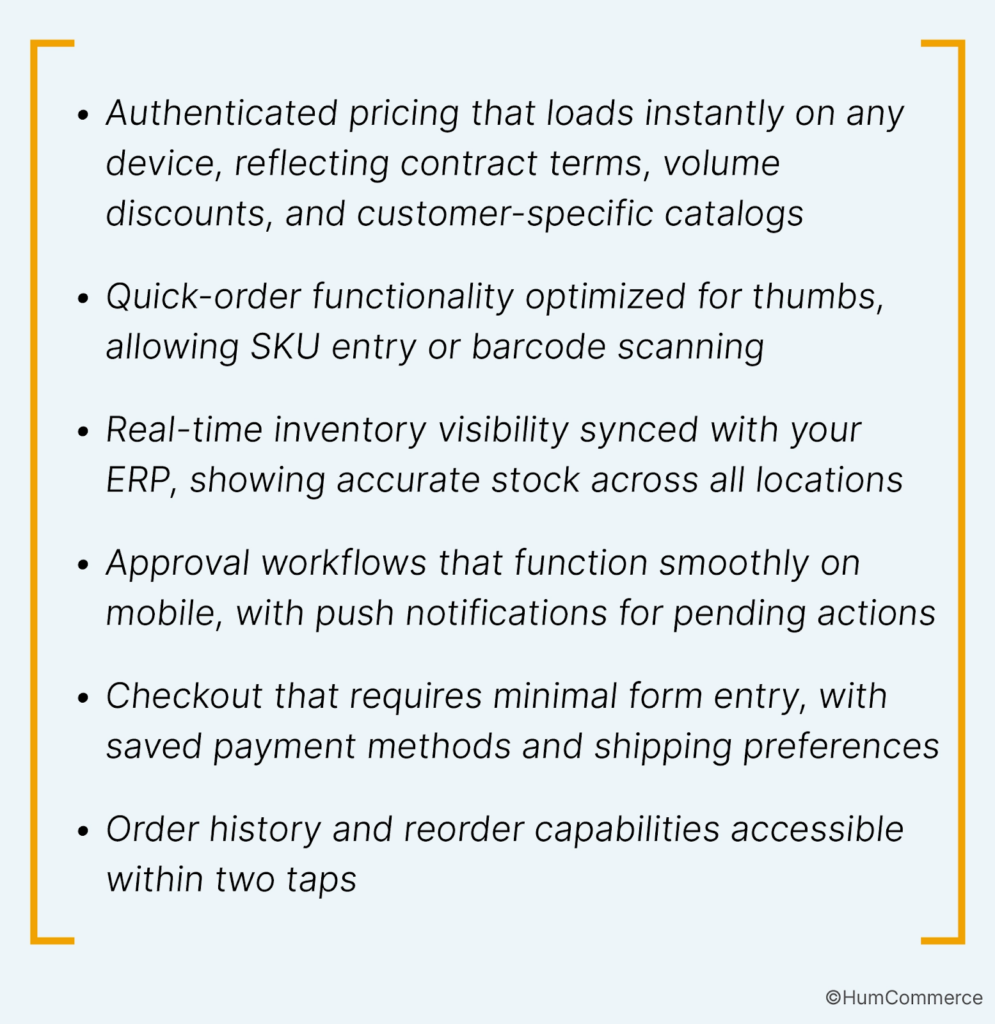
The technical foundation matters equally. Your Adobe Commerce instance should deliver sub-three-second page loads on mobile networks. ERP integration must be bidirectional and real-time, so mobile orders reflect accurate pricing and trigger proper fulfillment workflows. PIM data should serve mobile-optimized product images and specifications.
Step 1: Map How You Build a Mobile-First B2B Ecommerce Experience for Modern Buyers Today
Before changing anything, document your current mobile buyer journey. This audit reveals friction points you might not see from internal testing.
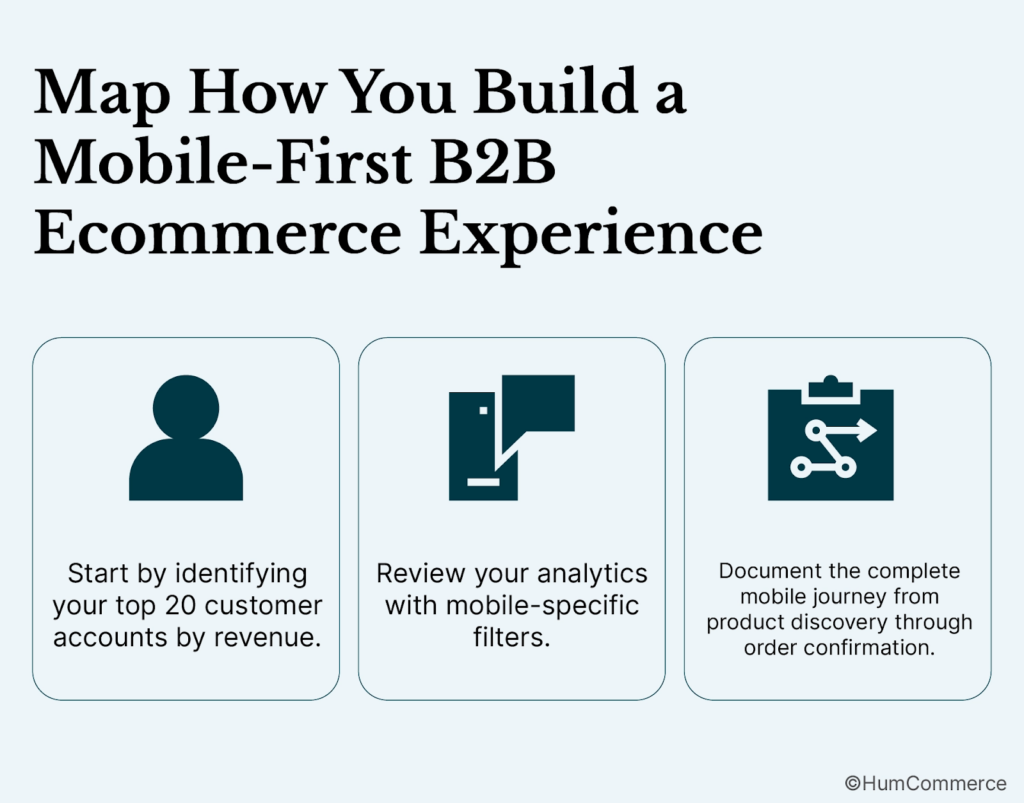
Start by identifying your top 20 customer accounts by revenue. Contact them directly and ask how they currently interact with your digital channels. Which devices do they use? Where do they abandon transactions? What workarounds have they developed? A procurement manager who emails orders because your mobile site is unusable represents both a problem and an opportunity.
Next, review your analytics with mobile-specific filters. Examine bounce rates by device type, checkout abandonment rates on mobile versus desktop, and time-on-page for key conversion points. If mobile users spend twice as long on your pricing pages but convert at half the rate, you’ve identified a specific problem to solve.
Document the complete mobile journey from product discovery through order confirmation. Screenshot each step on actual mobile devices, noting tap targets that are too small, forms that require excessive typing, and any point where users must switch to desktop. This documentation becomes your baseline for measuring improvement.
Step 2: Check If You’re Ready to Build a Mobile-First B2B Ecommerce Experience for Modern Buyers
Technical readiness determines whether your mobile transformation succeeds or stalls. Assess three critical areas: platform capabilities, integration architecture, and data quality.
Your commerce platform must support responsive design at minimum, but true mobile-first requires more. Adobe Commerce with the Hyva theme delivers significantly faster page loads and improved Core Web Vitals compared to legacy Luma implementations. If you’re running outdated theme architecture, budget for this upgrade before investing in mobile-specific features.
Integration architecture is equally critical. Your ERP must support real-time API calls for pricing, inventory, and order submission. Batch-updated data creates mobile experiences where buyers see stale inventory or incorrect pricing. At HumCommerce, we’ve seen distributors reduce quote turnaround time from three to five days to just hours by automating the connection between commerce and ERP systems.
Data quality issues become painfully visible on mobile. Product descriptions that work on desktop may overwhelm small screens. Images optimized for desktop bandwidth crush mobile load times. Customer-specific pricing rules that function in legacy systems may not translate cleanly to mobile-first interfaces. Audit your data before assuming it’s mobile-ready.
Step 3: Prepare Your Systems and Data
System preparation involves both technical upgrades and data cleanup. Neither is optional if you want a mobile experience that actually works.
On the technical side, implement a content delivery network if you haven’t already. Mobile users often connect via cellular networks with variable bandwidth. CDN caching reduces server round trips and improves perceived performance. Configure your CDN to serve appropriately compressed images based on device capabilities.
Your product data needs mobile-specific treatment. Create short-form descriptions for mobile display, keeping the detailed specifications available via expandable sections. Compress product images to mobile-appropriate file sizes without sacrificing clarity. Ensure your PIM can serve different asset versions based on requesting device.
Customer data requires attention too. Clean up duplicate accounts that might cause authentication confusion on mobile. Verify that pricing rules and catalog assignments will function correctly when accessed via mobile APIs. Test your authentication flow on actual devices, confirming that saved credentials and single sign-on work as expected.
For distributors with complex catalogs, this preparation phase often takes longer than expected. A manufacturer with 50,000 SKUs and customer-specific pricing for 500 accounts has significant data work ahead. Plan accordingly.
Step 4: Design the Improved Process
Mobile-first design means starting with the smallest screen and adding complexity for larger devices, not the reverse. This approach forces you to prioritize ruthlessly.
Begin with your highest-value mobile use cases. For most B2B distributors, these include reordering, checking inventory and pricing, and tracking shipments. Design these flows first, optimizing for minimal taps and minimal typing. A reorder flow should require no more than three taps from login to confirmation.
Navigation must work for thumbs. Primary actions belong in the lower half of the screen where thumbs naturally rest. Avoid hamburger menus that hide critical functions. Use bottom navigation bars for the most common actions: search, cart, account, and orders.
Simplified checkout boosts mobile conversions by 31%. Remove every unnecessary field. Implement address autocomplete. Save payment methods securely. Allow guest checkout for new customers while making account creation effortless post-purchase. Every additional form field on mobile represents potential abandonment.
Design for intermittent connectivity. Mobile users lose signal in warehouses, elevators, and rural areas. Your interface should handle network interruptions gracefully, saving cart state locally and syncing when connectivity returns.
Step 5: Implement Changes in Your Stack
Implementation should proceed incrementally, not as a single massive release. This approach reduces risk and allows course correction based on real user feedback.
Start with performance optimizations that benefit all users. Implement lazy loading for images below the fold. Minify JavaScript and CSS. Enable browser caching. These changes improve mobile experience immediately without requiring interface redesign.
Next, address your checkout flow. This single improvement often delivers the largest conversion impact. Implement autofill support, reduce form fields, add progress indicators, and ensure error messages appear inline rather than requiring users to scroll. Test extensively on actual mobile devices, not just browser emulators.
Then tackle navigation and product discovery. Implement sticky search bars, improve filter interfaces for touch, and optimize product listing pages for mobile scrolling. Consider implementing barcode scanning for quick order entry, a feature particularly valuable for buyers in warehouse or field environments.
At HumCommerce, we’ve helped distributors achieve 75% faster quote workflows by integrating CPQ systems directly with mobile commerce interfaces. The key is ensuring that complex B2B functions like quoting, approvals, and contract pricing work as smoothly on mobile as they do on desktop.
Step 6: Pilot, Measure, Improve
Launch your mobile improvements to a subset of customers before full rollout. This pilot phase reveals problems that testing alone won’t catch.
Select pilot participants carefully. Include customers who represent your target mobile users: field buyers, procurement managers who travel, and operations staff who work away from desks. Provide them direct feedback channels and respond quickly to reported issues.
Define success metrics before the pilot begins:
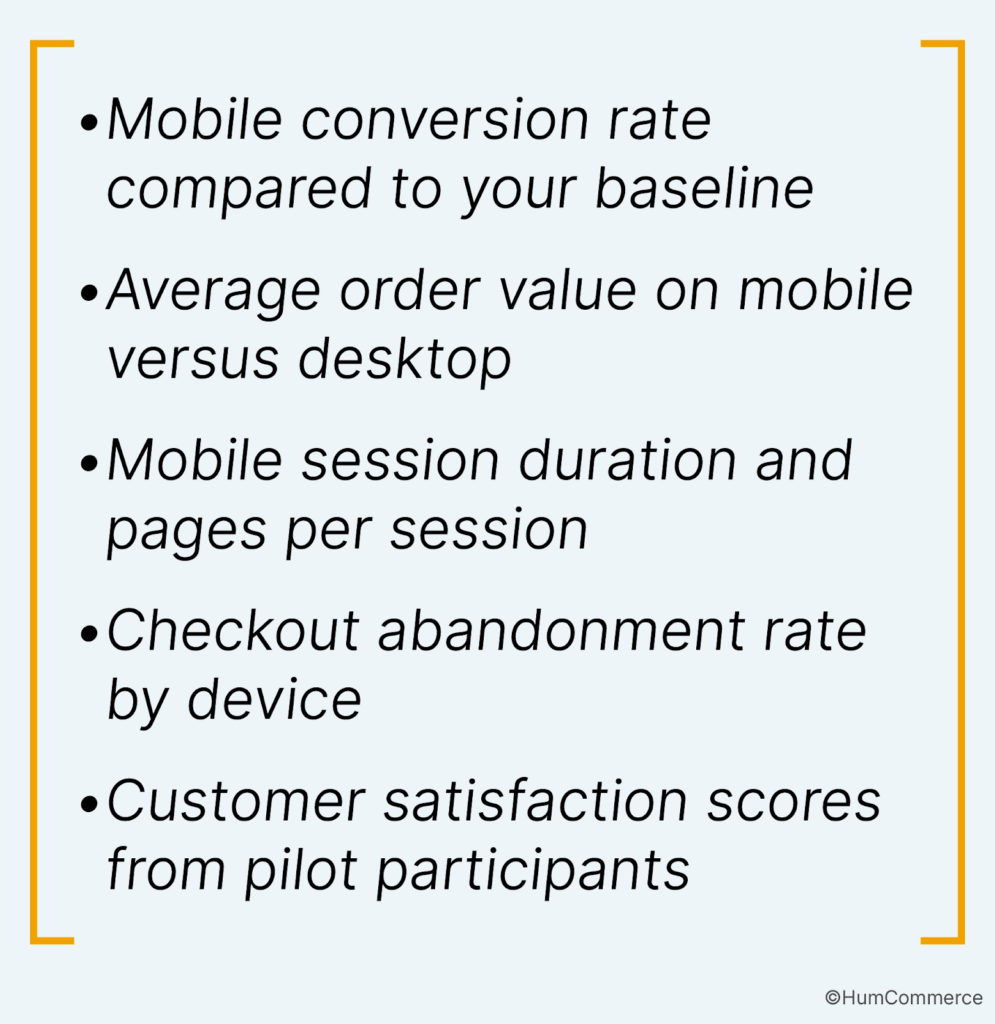
Monitor these metrics daily during the pilot. If mobile conversion doesn’t improve within two weeks, investigate specific friction points rather than assuming the approach is wrong. Often, a single interface element or performance issue explains the gap.
Iterate based on data, not assumptions. If users consistently abandon at a specific checkout step, redesign that step. If search isn’t converting, examine your search results page design. Continuous improvement matters more than perfect initial launch.
Common Mistakes to Avoid When You Build a Mobile-First B2B Ecommerce Experience for Modern Buyers
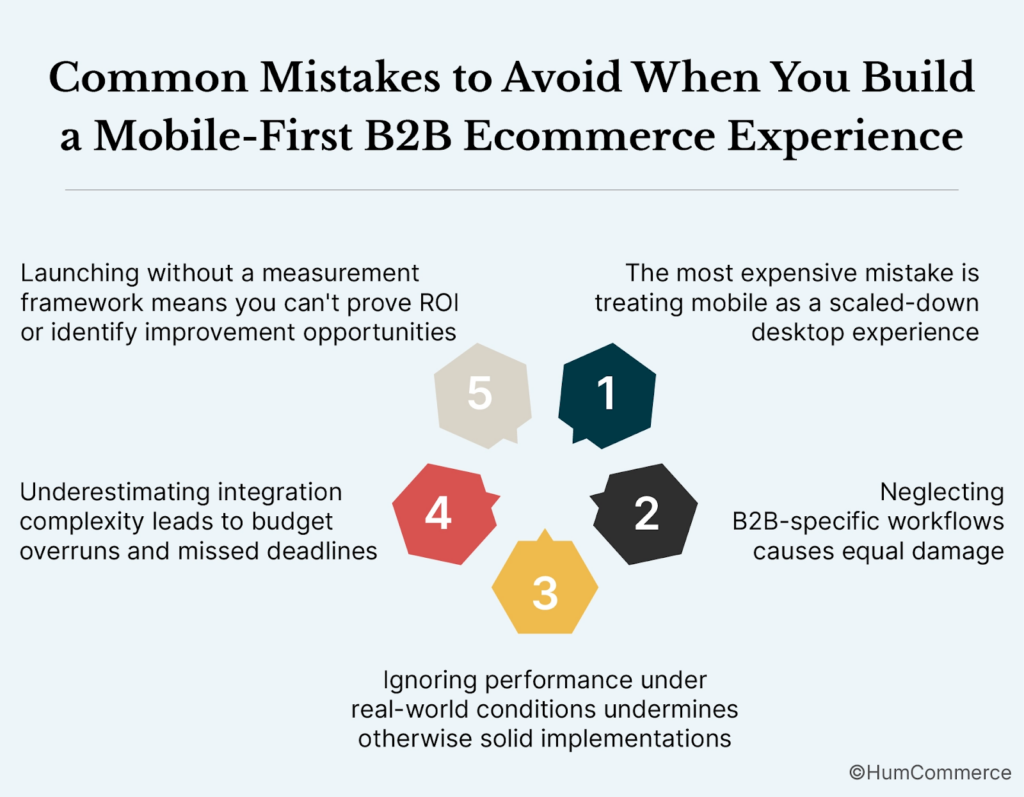
The most expensive mistake is treating mobile as a scaled-down desktop experience. Responsive design alone doesn’t create a mobile-first experience. It creates a desktop experience that technically fits smaller screens.
Neglecting B2B-specific workflows causes equal damage. Consumer mobile commerce patterns don’t translate directly to B2B. Your buyers need quick order entry, requisition lists, approval workflows, and account-specific pricing. Stripping these features for mobile simplicity removes the functionality your buyers actually need.
Ignoring performance under real-world conditions undermines otherwise solid implementations. Testing on fast WiFi in your office doesn’t reflect how buyers experience your site on cellular networks in warehouses. Test on actual devices with throttled connections.
Underestimating integration complexity leads to budget overruns and missed deadlines. Mobile-first B2B commerce requires real-time data from ERP, PIM, and other systems. If these integrations aren’t already robust, budget significant time and resources for this foundation.
Finally, launching without a measurement framework means you can’t prove ROI or identify improvement opportunities. Define your KPIs, establish baselines, and commit to ongoing measurement before writing any code.
Need Help Putting This Into Practice?
Building a mobile-first B2B ecommerce experience requires expertise across commerce platforms, ERP integration, and mobile UX design. Most internal teams lack bandwidth to execute this transformation while maintaining existing operations.
HumCommerce specializes in Adobe Commerce implementations for manufacturers, distributors, and wholesalers. We’ve helped B2B companies reduce quote turnaround from days to hours, implement real-time ERP-connected pricing, and build mobile experiences that match how modern buyers actually work.
Our approach starts with your specific business requirements, not a generic template. We assess your current systems, design solutions that integrate with your ERP and PIM, and implement changes incrementally to minimize disruption.If you’re ready to discuss how mobile-first commerce could work for your business, contact our team for a consultation. We’ll review your current state and outline a practical path forward.