
SAP Business One manages your pricing, inventory, and customer accounts. Your B2B portal shows none of it accurately. That’s an integration architecture problem.
TL;DR
- SAP Business One integrates with Adobe Commerce via the SAP B1 Service Layer (REST API) for modern deployments, or via the older DI API for legacy installations.
- Five data objects must sync in real time for a B2B portal to function correctly: customer-specific pricing, inventory by location, orders, invoices, and customer account data.
- The most common integration failure: the portal queries base price list instead of the customer’s Business Partner pricing group, showing list price to contract accounts.
- Implementation timeline for a standard SAP B1 + Adobe Commerce B2B build: 8-10 weeks.
- Real-time sync is non-negotiable for pricing and inventory in B2B use cases. Batch sync creates the pricing trust problems that drive buyers back to phone ordering.
SAP Business One is the ERP of choice for a large segment of mid-market manufacturers and distributors — particularly those who’ve outgrown entry-level systems but don’t need the full complexity of SAP S/4HANA. Its B2B data architecture, with Business Partner master data, customer-specific pricing, and multi-location inventory, is well-suited for the integration work that a B2B portal requires.
The challenge is not SAP B1 itself. It’s that most B2B portal deployments don’t complete the integration work required to make the portal accurate for B2B buyers. This guide covers the architecture that makes SAP B1 + Adobe Commerce work correctly, and the failure modes to avoid.
How SAP Business One Stores B2B Data
SAP B1’s data model is organized around three primary objects that drive B2B portal behavior:
Business Partner (BP) master data
Every customer in SAP B1 is a Business Partner record. The BP record stores: customer-specific pricing group, payment terms, credit limit, approved product list (where applicable), and order history. When a buyer logs into your portal, the system should authenticate against their BP record and use it to determine what pricing and catalog they see.
Pricing hierarchy
SAP B1 has a multi-level pricing hierarchy: base price list, special price (customer-specific override), and price list per Business Partner group. For a B2B portal to show buyers their correct price, it must query the right level of this hierarchy in the correct order. A query that only checks base price list will return list price to a contract account.
Item master and inventory
SAP B1’s item master stores product details, unit of measure, and pricing references. Inventory is tracked at the warehouse and bin level. For real-time inventory visibility in the portal, the integration queries the item master for product data and the inventory module for current available stock by location.
Integration Architecture Options
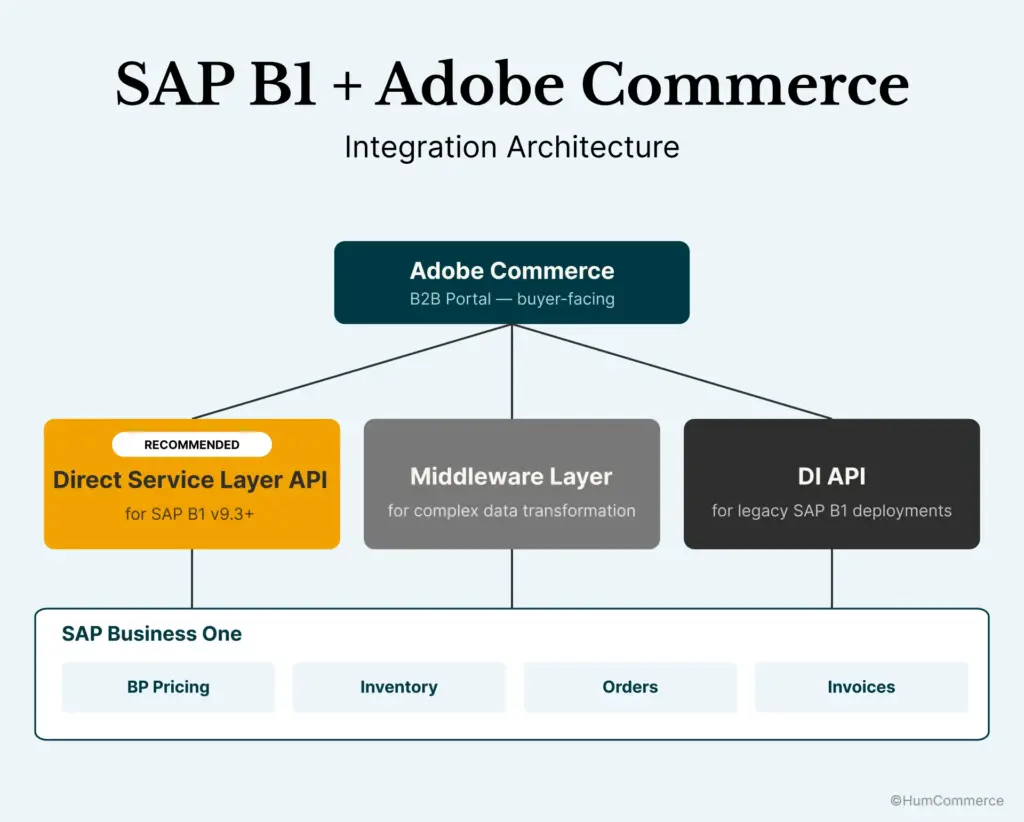
For SAP B1 + Adobe Commerce, three integration architectures are in common use:
Direct Service Layer API connection
SAP B1 has exposed a REST API — the Service Layer API — that provides direct, real-time access to BP data, pricing, inventory, orders, and invoices. For modern SAP B1 deployments (version 9.3 and above), the Service Layer is the recommended integration approach. It supports real-time queries with response times under 1-2 seconds for standard data objects.
The Service Layer API covers: customer pricing (via Special Price endpoint), inventory by warehouse, order placement and status, invoice retrieval, and BP account data. This is sufficient for the five data objects required by a B2B portal.
DI API (legacy deployments)
For SAP B1 installations running older versions, the Data Interface (DI) API is the integration layer. The DI API is a COM-based interface that requires a Windows server component and has higher latency than the Service Layer. It is fully functional but more complex to maintain and less suited for high-frequency real-time queries.
For operations running SAP B1 on SQL or HANA with current versions, migrating to Service Layer for the portal integration is worth the upgrade path. For operations locked to older versions, the DI API works with appropriate middleware and response time planning.
Middleware-assisted integration
For operations with complex data transformation requirements — custom pricing logic outside standard B1 structures, integration with multiple systems beyond SAP B1, or high query volumes requiring caching — a middleware layer between Adobe Commerce and SAP B1 adds resilience and observability.
Middleware options for SAP B1 include iPaaS platforms (MuleSoft, Azure Integration Services, Boomi), custom API gateway layers, or purpose-built SAP B1 connectors available on the Adobe Commerce Marketplace. The right choice depends on the complexity of your pricing logic and the query volumes your portal will generate.
HumCommerce integrates SAP B1 with Adobe Commerce across all three architecture options. For most mid-market operations, a direct Service Layer connection is the cleanest and fastest to implement.
The Five Data Flows That Must Work in Real Time
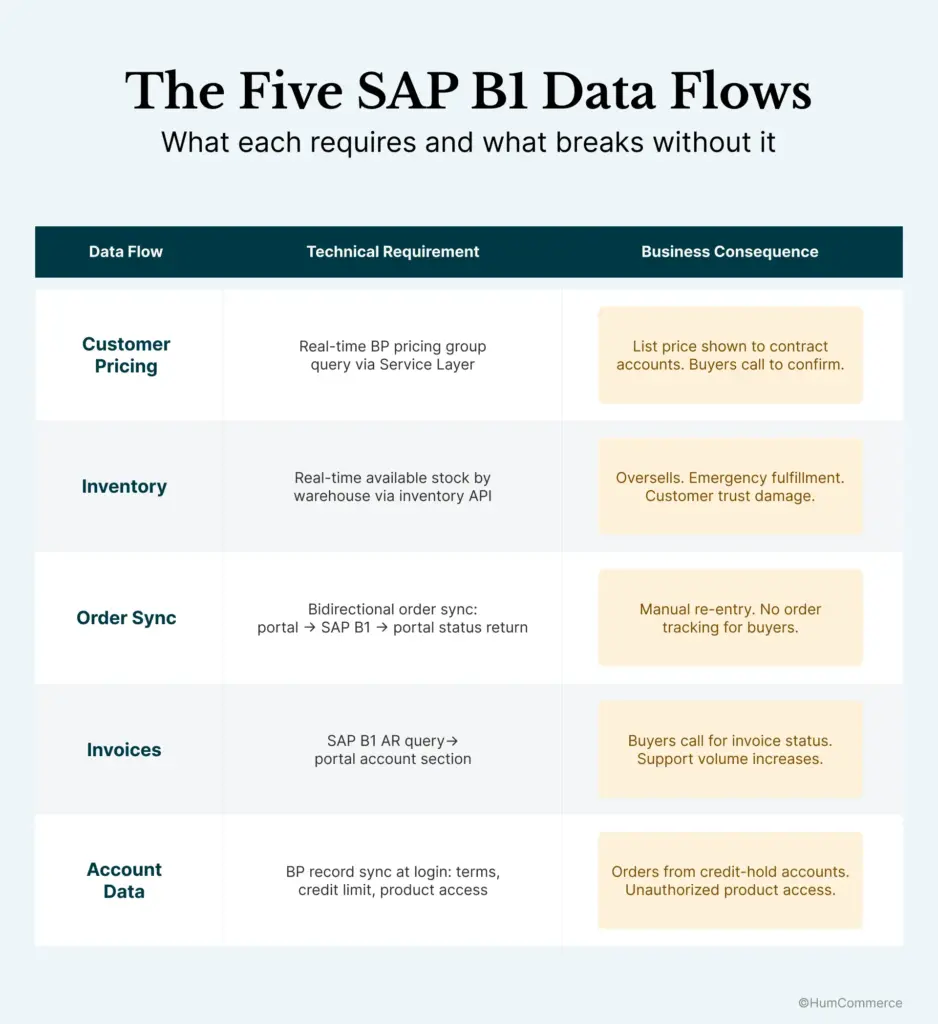
These five data flows are the difference between a B2B portal buyers trust and one they abandon:
1. Customer-specific pricing at login
When a buyer authenticates, the portal queries the SAP B1 Service Layer for their BP pricing group and Special Price records. The returned price is displayed in the portal at product pages and cart. This happens at each login and at each pricing-sensitive page load.
What breaks without this: The portal shows base price list to all users. Contract accounts see the wrong price. They call to confirm. They don’t place orders online.
2. Real-time inventory by location
At product page load and at checkout, the portal queries SAP B1 inventory for available stock by warehouse. The buyer sees current availability and, where applicable, which location can ship.
What breaks without this: Buyers order products that can’t ship. Oversells require manual correction, emergency fulfillment, and customer service.
3. Bidirectional order sync
Orders placed on the portal create SAP B1 Sales Orders automatically. SAP B1 order updates (confirmed, shipped, invoiced) flow back to the portal and are visible in the buyer’s account.
What breaks without this: Reps manually re-enter portal orders into SAP B1. Order status is not visible to buyers. Routine inbound contacts increase.
4. Invoice and payment history
The portal queries SAP B1 Accounts Receivable for invoice history and payment status, displaying these in the buyer’s account section.
What breaks without this: Buyers call accounting or their rep to check invoice status. A common reason buyers under-adopt self-serve portals.
5. Customer account data sync
BP account details — payment terms, credit limit status, and where applicable approved product list — sync from SAP B1 to the portal at login. The portal enforces credit limits and shows only approved products.
What breaks without this: Orders placed by accounts on credit hold. Products shown to accounts that aren’t authorized to purchase them.
Common SAP B1 Integration Failure Points
Querying base price list instead of BP pricing group
This is the most frequently encountered error in SAP B1 + Adobe Commerce integrations that weren’t fully implemented. The integration queries the Item Master price list rather than the buyer’s BP-specific Special Price or pricing group. Every contract account sees list price. Buyer trust in the portal immediately breaks.
The fix: the pricing query must follow SAP B1’s pricing hierarchy — Special Price first (customer-specific override), then BP Group pricing, then base price list. The integration must implement this hierarchy explicitly, not rely on a single endpoint that returns base price.
Service Layer timeout under concurrent load
The SAP B1 Service Layer has session limits. Under high concurrent query load — particularly at portal launch when multiple users are active simultaneously — session limits can cause query timeouts. Test concurrent load before go-live. For operations expecting high concurrent user volumes, caching for product-level data (not pricing, which must remain real-time) reduces Service Layer query frequency.
Available vs on-hand inventory
SAP B1 tracks on-hand stock (total physical inventory), available stock (on-hand minus committed to open orders), and ordered stock (on purchase order, not yet received). The portal must query available stock, not on-hand. Querying on-hand and then fulfilling against available creates oversells when committed inventory is higher than expected.
Order document series
SAP B1 uses document series to differentiate order types (B2B web orders vs rep-entered orders, for example). Establish the document series for portal-placed orders during the design phase, not after go-live. This matters for reporting, fulfillment routing, and SAP B1 approval workflows.
What a 90-Day SAP B1 + Adobe Commerce Implementation Looks Like
Weeks 1-2: Technical discovery
Review the SAP B1 installation: version, Service Layer availability, pricing hierarchy structure, inventory warehouse setup, BP data quality. Map the five data flows. Identify custom pricing arrangements outside the standard pricing hierarchy. Confirm Adobe Commerce version and current B2B feature configuration.
Weeks 3-4: Integration build
Build the Service Layer API connection. Implement pricing hierarchy query logic (Special Price → BP Group → base price list). Build inventory query by warehouse. Build order placement endpoint. Build order status and invoice retrieval.
Weeks 5-6: Testing
Pricing hierarchy test suite: verify correct price returned for base price, BP group price, and customer-specific Special Price accounts. Inventory test: verify available vs on-hand logic. Order placement test: verify Sales Order creation in SAP B1 and status return to portal. Concurrent load test: simulate realistic simultaneous user sessions.
Weeks 7-8: Pilot
Deploy to a small group of internal users and selected customer accounts. Log all pricing queries and responses. Flag anomalies. Refine exception handling for pricing edge cases. Confirm document series and fulfillment routing.
Weeks 9-10: Full go-live
Roll out to all accounts. Monitor for pricing anomalies, inventory discrepancies, and Service Layer performance in the first two weeks post-launch.
Sources
- SAP Business One Service Layer API documentation (help.sap.com)
- APPSeCONNECT, SAP Business One and Magento Integration: https://www.appseconnect.com/sap-business-one-and-magento-integration/
- Adobe Experience League, How to Integrate Adobe Commerce with SAP ERP for B2B Commerce, May 2026: https://experienceleague.adobe.com/en/perspectives/how-to-integrate-adobe-commerce-with-sap-erp-for-b2b-commerce
- i95Dev, SAP Business One Connect (Adobe Commerce Marketplace): https://commercemarketplace.adobe.com/i95dev-i95devsapconnect.html
- HumCommerce SAP B1 integration implementation data, 2026