
The most common AI assistant failure isn’t the AI. It’s the data the AI is querying.
TL;DR
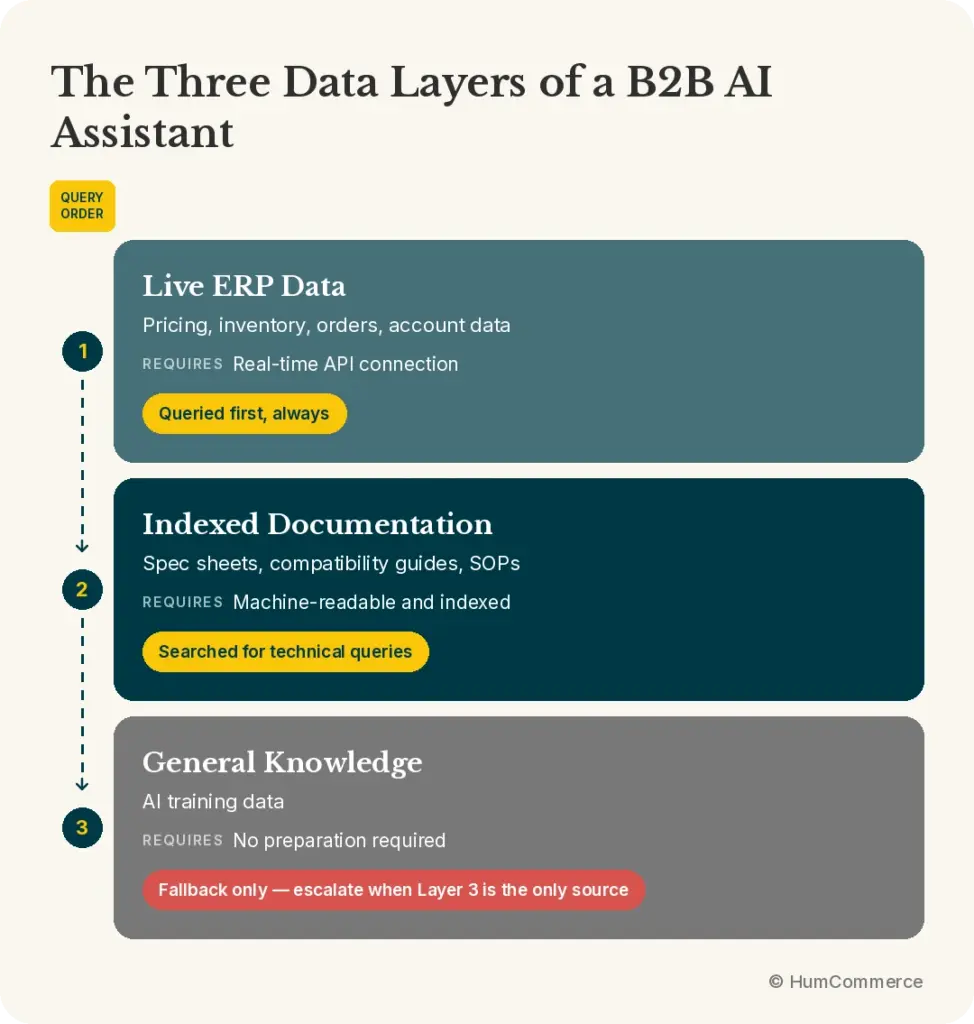
- A B2B AI assistant queries three data layers in sequence: live ERP data, indexed documentation, and general knowledge. Most deployment failures trace to Layer 1 — the ERP and product data is either not connected or not accurate.
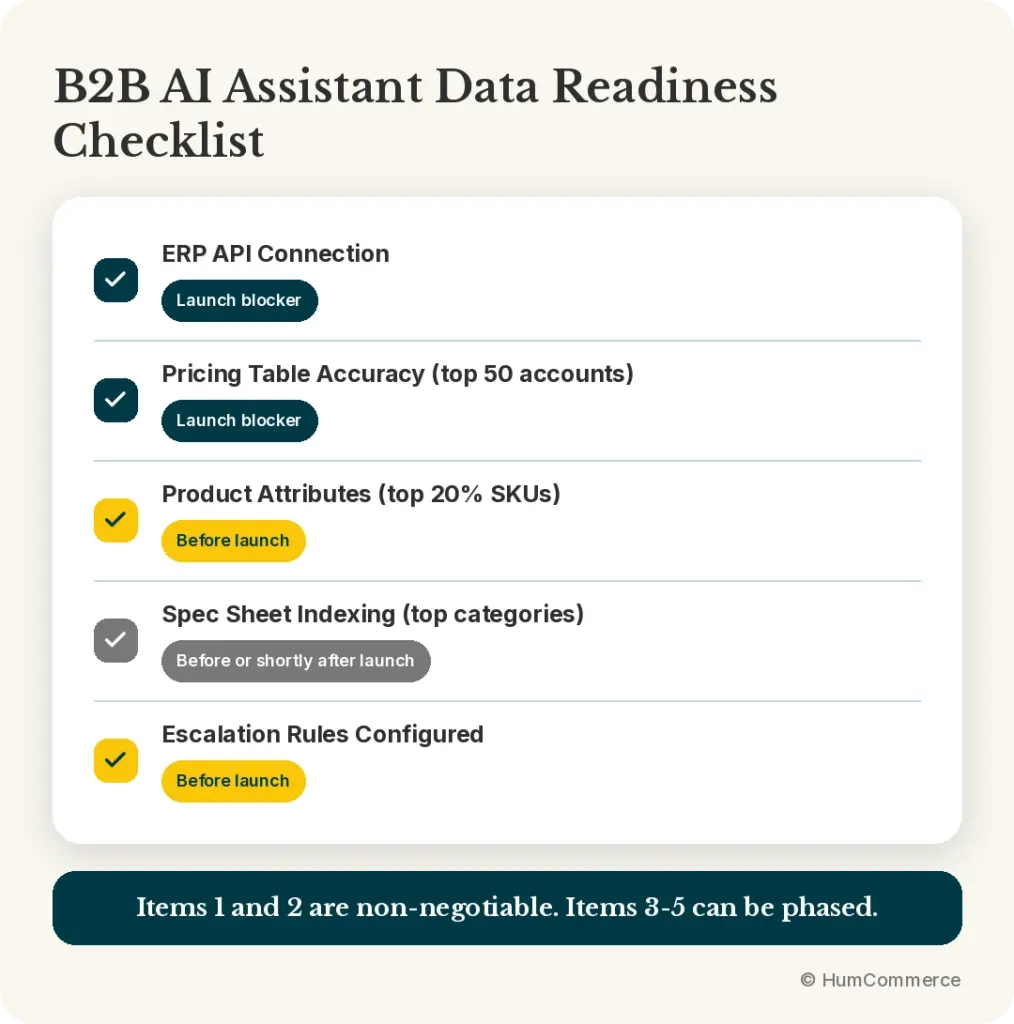
- A data readiness checklist covers five areas: ERP API connection, pricing table accuracy, product attribute structure, spec sheet indexing, and escalation rule configuration.
- Your data doesn’t need to be perfect across every SKU before you launch. It needs to be accurate for the top 20% of SKUs that generate 80% of buyer queries.
- The deployment process includes a technical discovery session that produces a data readiness score and a prioritized checklist.
- Cleaning up data after a bad launch is harder than doing it before. Buyers who get wrong answers in the first two weeks form a negative impression that’s difficult to reverse.
Manufacturers and distributors who rush AI assistant deployments consistently make the same mistake: they focus on the AI and skip the data.
The platform matters. The architecture matters. But a database-first AI assistant is only as accurate as the database it queries. Deploy it on top of stale pricing tables, missing product attributes, and incomplete spec sheets, and you’ve built a fast way to give buyers wrong answers.
Prepare the data first. The deployment is easier, the launch is cleaner, and buyers trust the tool from the first interaction.
The Three Data Layers and What Each Requires
Layer 1: Live ERP and catalog data
This is the highest-priority layer and the source of most deployment failures. Layer 1 covers everything the AI assistant queries for structured, transactional responses: pricing, inventory, order status, account data.
What it needs:
An active, real-time API connection to your ERP. Not a batch file. Not a daily export. A live API that the AI assistant calls at the moment a buyer makes a request.
Pricing tables that are current and complete. If your ERP has stale contract rates, missing volume break schedules, or accounts that haven’t been updated since their last contract renewal, those gaps appear immediately in buyer interactions.
Inventory data queried at the available-stock level — on-hand minus committed — not total on-hand. This is the distinction that prevents oversells.
Order and account data accessible via API for the account section: order history, invoice status, return status, payment terms.
The most common Layer 1 gaps:
- Pricing tables that are accurate in the ERP but haven’t been connected to the AI assistant query layer
- Customer accounts with missing or outdated pricing groups
- Inventory queries returning on-hand rather than available stock
- ERP API returning base price list when the buyer has a Special Price override
Layer 2: Indexed documentation
Layer 2 covers the knowledge that doesn’t fit neatly in structured database fields: technical specifications beyond standard catalog attributes, safety data sheets, installation guides, compatibility documentation, product SOPs.
What it needs:
Documents in a machine-readable format — PDFs that have been processed for text extraction, or structured documents with consistent formatting. A PDF of a spec sheet that’s been scanned from a paper original requires OCR processing before it’s usable.
Documents that are current. An indexed spec sheet for a discontinued product version creates confusion. Documentation needs a review and currency check before indexing.
Documents organized with consistent naming and categorization so the AI can match document context to product queries accurately.
The most common Layer 2 gaps:
- Spec sheets in PDF format that haven’t been OCR-processed
- Product documentation that’s split across multiple files with inconsistent naming
- Compatibility guides in formats the indexing system can’t read (image-only PDFs, encrypted files)
Layer 3: General knowledge
Layer 3 is the AI model’s general training data. It requires no preparation on your end. The AI uses it only when Layers 1 and 2 have no relevant data.
The important configuration task for Layer 3 is setting the escalation threshold: when the AI is drawing only from Layer 3 for a query that buyers expect to be answered from your data, it should route to a human rather than answer from general knowledge. A buyer asking about their specific order shouldn’t receive a response based on how order tracking generally works. They should be told the system can’t find their specific data and be connected to support.
The Data Readiness Checklist
Before the deployment timeline starts, work through these five areas:
1. ERP API connection
Questions to answer:
- Does your ERP have a REST API? (Epicor P21, NetSuite, SAP Business One, Acumatica, and Dynamics 365 all do. Legacy systems may require a middleware layer.)
- Is the API documented and accessible for external connection?
- Have you tested pricing queries against the API? Does it return the correct pricing level for a contract account with a Special Price override?
Test before you start: Query the API manually for three accounts — one with base pricing, one with a customer class tier, one with a Special Price. Confirm the API returns the correct level for each. This test surfaces the most common pricing query failure before it reaches buyers.
2. Pricing table accuracy and completeness
Questions to answer:
- When was pricing last updated for your top 50 accounts by volume? Are those rates current?
- Do all accounts have a defined pricing group or tier in the ERP? Accounts without a pricing group return base list price.
- Are volume break schedules entered for all products that have tiered pricing?
What to do if gaps exist: Prioritize the top 20% of accounts by annual order volume. Ensure those accounts have accurate, current pricing before launch. Remaining accounts can be cleaned up post-launch, but high-volume accounts should be complete from day one.
3. Product attribute structure
Questions to answer:
- Do your products have dedicated attribute fields for the specifications your buyers search by? For industrial distribution: dimensions, materials, pressure ratings, connection types. For HVAC: tonnage, refrigerant type, BTU. For automotive: make, model, year, engine.
- Are those fields consistently populated? A field that’s empty for 30% of products produces 30% gaps in spec matching.
- Are values standardized? “3/4 inch,” “3/4″,” “0.75”,” and “.75” all mean the same thing but won’t match unless they’re normalized.
What to do if gaps exist: Run an attribute completeness report across your catalog. Prioritize your top-selling SKUs for attribute completeness. For spec-intensive categories, assign a data cleanup sprint before the deployment timeline starts.
4. Spec sheet and documentation indexing
Questions to answer:
- Do you have spec sheets for your products? In what format?
- Are they organized and named consistently?
- Have they been reviewed for currency? (Remove documentation for discontinued products or outdated specifications before indexing.)
What to do: Create a document inventory. Identify which documents are in indexable format (text-based PDFs, Word documents, structured web pages) and which require processing (scanned PDFs, image files). Process the high-priority documents before launch — focus on spec sheets for your top product categories.
5. Escalation rules
Questions to answer:
- What query types should always route to a human, regardless of whether the AI can answer them? (Custom pricing negotiations, high-value complaints, regulatory questions.)
- What confidence threshold triggers escalation? (If the AI is less than X% confident in its answer, it escalates rather than responding.)
- Who receives escalated queries? Is there a routing system, or does it go to a shared inbox?
What to do: Document your escalation taxonomy before deployment. Configure escalation rules before go-live. Test escalation by submitting queries the system should route — verify they reach the right person with full conversation context.
The “Good Enough for Launch” Standard
You don’t need perfect data across every SKU before going live. You need accurate data for the queries buyers will actually make.
The 80/20 rule applies: your top 20% of SKUs typically generate 80% of buyer queries. Accurate data for those SKUs produces an AI assistant that answers the vast majority of real buyer questions correctly. The remaining 20% of query coverage builds over time as the knowledge base expands.
Priority sequence for data readiness:
- ERP API connected and tested (non-negotiable — don’t launch without this)
- Pricing accurate for top 50 accounts by volume
- Product attributes complete for top 20% of SKUs by order frequency
- Spec sheets indexed for top product categories
- Escalation rules configured and tested
Items 1 and 2 are the minimum viable data state for a launch that builds buyer trust. Items 3-5 can be completed in phases post-launch without significantly degrading the buyer experience, as long as escalation is working correctly.
Why Data Cleanup Before Launch Matters More Than You Think
The AI assistant’s reputation with your buyers forms in the first two weeks of deployment. A buyer who receives wrong pricing on their second interaction, or gets a confident answer about a spec that turns out to be incorrect, develops a skepticism about the tool that doesn’t easily reverse.
Buyers are forgiving of “I don’t have that information — let me connect you with our team.” They are not forgiving of confident wrong answers. The escalation response is always preferable to an inaccurate response.
The deployment framework that HumCommerce follows reflects this: launch with a smaller scope of highly accurate data rather than a larger scope of partially accurate data. A focused launch — strong data on core SKUs and top accounts — produces a better buyer experience than a broad launch on incomplete data.
The Technical Discovery Session
HumCommerce begins every AI assistant deployment with a technical discovery session. This session reviews your current setup across the five data readiness areas and produces:
- A data readiness score for each area
- A prioritized cleanup list with effort estimates
- A deployment timeline based on actual data state, not optimistic assumptions
- A recommendation on launch scope: which SKU categories and account types to include in the initial deployment
The discovery session typically takes 90 minutes and prevents the most common deployment failures before they happen.
Sources
- HumCommerce B2B AI Assistant deployment framework, 2026
- HumCommerce AI Assistant solution page: https://humcommerce.com/b2b-ai-assistant/
- HumCommerce technical discovery session protocol, 2026