

Did you know the Hyva theme for Magento B2B stores has helped reduce page load times by up to 60 percent for some merchants?
As businesses strive to enhance efficiency, reduce costs, and improve customer experiences, the role of effective eCommerce integration cannot be overstated.
B2B eCommerce, with its unique complexities and requirements, necessitates robust solutions that can handle intricate workflows, extensive data synchronization, and integration with legacy systems.
Enter Hyva, a cutting-edge solution to streamline B2B eCommerce processes and drive business growth.
This blog aims to provide a comprehensive guide on integrating the Hyva theme for Magento B2B stores for seamless B2B eCommerce, delving into its features, benefits, and implementation strategies.
By the end of this guide, you will have a thorough understanding of how Hyva can revolutionize your B2B eCommerce operations and ensure a smooth and efficient integration process.
What is B2B Ecommerce Integration and Why Does It Matter?
B2B eCommerce integration means connecting different systems and tools in a B2B store so they can work together smoothly. This usually includes software like ERP, CRM, inventory tools, and order management systems.
The main goal is to bring everything into one platform so that teams can work together better and information flows freely between departments.
When systems are not connected properly, problems like data mismatches, manual work, and delays start to show up. These issues often lead to poor customer experiences, higher costs, and slow operations.
With proper integration, all tools stay in sync. This means real-time updates, fewer mistakes, and faster decision-making. It also helps automate everyday tasks, so your team can focus on what really matters — growing the business and serving customers better.
Common Challenges in B2B Ecommerce Integration
There are many challenges businesses face while trying to bring all their systems together. Here are five common problems that often get in the way of smooth B2B eCommerce integration.
- The data does not match across systems
One of the biggest problems is making sure the same data appears in all systems. If customer or product details are different across platforms, it can lead to mistakes and delays. - Workflows are too complicated
B2B processes often involve several teams and steps like approvals, quotes, and bulk orders. Without a proper connection between systems, managing these tasks becomes messy and time-consuming. - Old systems are hard to connect
Many businesses still use older software that does not work well with new eCommerce tools. Making these systems talk to each other can be difficult and may require custom solutions. - Manual tasks slow everything down
Without integration, teams often update the same data in different places. This takes time and increases the chance of errors. - No real-time updates
If systems do not sync in real time, teams and customers may work with outdated information. This can hurt customer trust and delay important decisions.
How the Hyva Theme Helps Magento B2B Ecommerce Integration
Hyva is a powerful eCommerce solution built to meet the specific needs of B2B businesses. It focuses on improving store performance, user experience, and flexibility on the frontend.
These areas matter the most when trying to connect multiple tools like ERP, CRM, inventory, and order systems under one setup.
In B2B, these systems must work together smoothly for operations to run without delays.
What Makes Hyva Ideal for B2B Stores
B2B eCommerce is different from B2C. In B2C, one person visits a store, adds a product to the cart, and checks out.
But in B2B, things are more layered. There are bulk orders, longer buying cycles, and multiple people involved in approvals.
That’s why Magento B2B stores need a solution like Hyva. It helps them manage complex user roles and permissions while keeping everything fast and user-friendly.
Hyva’s lightweight structure leads to better performance. Pages load faster, which means buyers get the information they need without delay. This is important for customer satisfaction and conversions.
At the same time, Hyva offers easy customization. Each business can adjust the look and flow of its frontend without heavy technical work, which saves both time and resources.
Its user-focused layout helps buyers navigate without confusion. Whether someone is placing a repeat order or reviewing past purchases, the journey is clear and smooth.
How Hyva Helps in Solving Key Integration Challenges in Magento B2B
One of the biggest hurdles for B2B businesses is integration. Keeping product data, orders, and customer details in sync across platforms is often a struggle. Hyva helps by integrating seamlessly with ERP, CRM, and inventory management tools. This makes real-time updates and process automation much easier.
The theme also supports business growth. As your store adds more tools and workflows, Hyva keeps up without slowing down. It helps simplify processes, cuts down on manual tasks, and supports better decision-making with updated data across all systems.
With everything connected and running fast, Hyva gives Magento B2B stores a stronger foundation for both growth and efficiency.
Preparing Your Magento B2B Store for Hyva Integration
Before starting the Hyva theme integration, it is important to understand where your Magento B2B store currently stands. A clear picture of your setup helps avoid surprises later and makes the entire B2B eCommerce integration process smoother.
Start by looking at how you manage your inventory and products. Ask yourself if your inventory updates in real time and if your product information is accurate across all platforms. If this is not the case, fixing it should be your first step.
Next, take a look at your customer data. Make sure your CRM system is clean, organized, and ready to work with Hyva. Good customer data leads to better personalization and smoother order handling.
Once your current setup is reviewed, define what you want to achieve from this integration. In the short term, most stores aim to improve website speed and offer a better user experience. In the long term, it may be about increasing sales, reaching new markets, or improving how buyers interact with the site.
You should also think about technical compatibility. Look at your server setup and the tools you are currently using. Make sure they can support Hyva without performance issues.
It’s also a good time to revisit your business goals and match them with what Hyva offers. This step ensures that you are choosing the right tools for the results you want.
Taking the time to audit your store now will lead to a much smoother Hyva integration later.
Step-by-Step Guide to Magento B2B Ecommerce Integration With Hyva Theme
If you are planning to use the Hyva theme for your Magento B2B store, it is important to follow the right steps for a smooth integration. Here is a simple and practical breakdown of how to go about it.
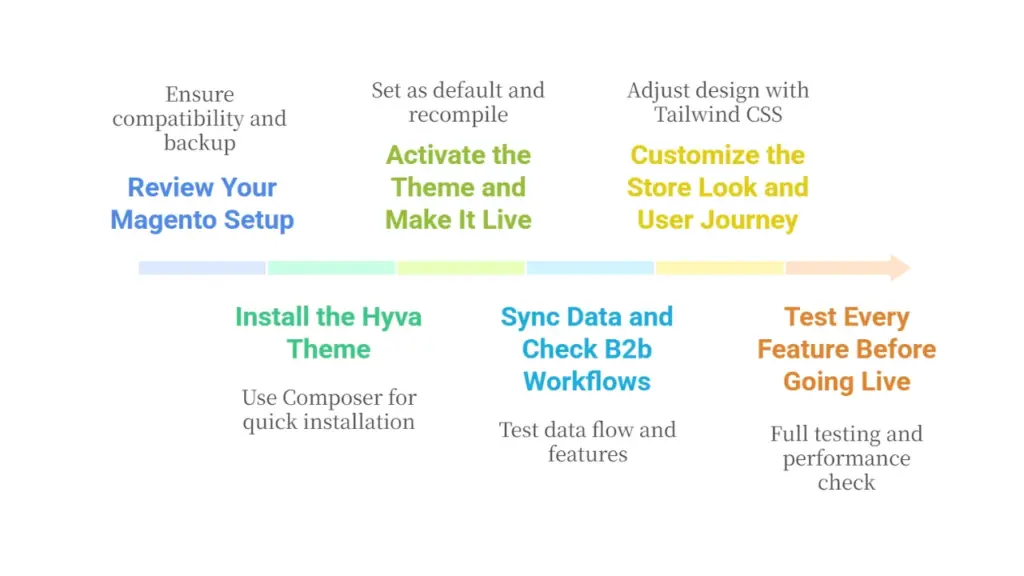
Step 1: Review Your Magento Setup
Before you begin, check if your Magento version is compatible with Hyva. It works best with Magento 2.4.3 and above. You also need access to your server, Composer installed, and your theme license ready. Back up your store before moving to the next step to stay safe.
Step 2: Install the Hyva Theme
You can install the Hyva theme using Composer. This is a quick way to bring all Hyva files into your store’s codebase. Once installed, run the setup and deployment commands so the changes take effect. Make sure to clear the cache so that the theme loads properly on the frontend.
Step 3: Activate the Theme and Make It Live
After installing, go to your Magento admin panel and activate the Hyva theme. Set it as your default theme. You may also need to recompile your store and redeploy static content. Once that is done, you can check how your frontend looks with the new theme.
Step 4: Sync Data and Check B2b Workflows
Review how your product, order, and customer data flows work with the new frontend. If you use features like shared catalogs, custom pricing, or company accounts, test them to make sure nothing breaks. If you use extensions, confirm they are compatible with Hyva or check if a Hyva-compatible version is available.
Step 5: Customize the Store Look and User Journey
Now is a good time to change the design to match your brand. Hyva is flexible and lets you adjust layouts, colors, and components using Tailwind CSS. This means you can build your store with fewer files and faster loading pages, all while keeping the shopping experience clean and user-friendly.
Step 6: Test Every Feature Before Going Live
Do a round of full testing. Make sure checkout, user logins, permissions, and order placement work properly. Check for bugs, broken layouts, and performance issues. If everything looks good, switch to production mode and monitor the performance after launch.
Optimizing Your Magento B2B eCommerce Integration with Hyva
Once you have launched your Magento B2B store with the Hyva theme, the next step is to focus on ongoing optimization. This helps ensure everything continues to run smoothly while giving you the chance to improve performance, fix issues, and offer a better user experience.
Monitor Your Store Regularly
Start by tracking how your website is performing. Keep an eye on page speed, bounce rates, and load times. Use simple performance monitoring tools to check whether pages are loading as fast as they should.
Watch for any sudden drops in speed or changes in how your B2B features behave. Regular monitoring also helps spot bugs or errors before they become a real problem.
Keep Everything Up to Date
Stay updated with new versions of the Hyva theme and Magento. Updates often include important fixes, performance improvements, and new features. Plan regular updates and test them in a staging environment before pushing them live.
If you use third-party extensions, make sure they are always compatible with Hyva. This keeps your store stable and secure.
Improve the User Experience Step by Step
After launch, collect feedback from your team and customers.
Look at how people are using your store. Are they facing issues while browsing or checking out? Are product details easy to find?
Use this input to make small changes that improve the shopping experience. A better journey leads to happier B2B buyers.
Use Built-in Performance Tools
Hyva comes with clean, lightweight code that already improves speed. But you can go a step further by fine-tuning caching, compressing media, and reducing unnecessary scripts.
Focus on optimizing core pages like category listings, product detail pages, and the checkout process. These are the places where your buyers spend most of their time.
Make the Most of Integrations
If you have connected your Magento store with tools like ERP, CRM, or inventory systems, make sure the data flow is working properly.
Clean data and smooth sync between systems help your team work better and deliver better service to your customers. You can also explore adding new tools for automation or analytics that work well with Hyva and Magento.
Keep Learning and Improving
The work does not stop after launch. Track results, test new ideas, and keep improving your store every few months. This approach keeps your Magento B2B eCommerce integration fresh, fast, and ready to scale.
How HumCommerce Helps You Seamlessly Integrate Hyva with Your Magento B2B Store
At HumCommerce, we specialize in helping businesses achieve smooth and efficient Magento B2B eCommerce integration with Hyva.
Our team of certified Magento developers and experts understands the complexities of B2B workflows, from managing large product catalogs to syncing data with ERP and CRM systems. We offer tailored B2B eCommerce integration services that align with your specific business needs.
Whether you’re migrating to Hyva or implementing it from scratch, our approach focuses on performance, scalability, and long-term success. We ensure that your store is fully optimized for speed, responsive across all devices, and ready for future updates.
Our process includes careful auditing of your current setup, seamless theme integration, extension compatibility checks, and workflow customizations. We also offer ongoing support to make sure your store continues to perform even after the launch.
If you’re looking to improve your B2B eCommerce store with Hyva, our experts are here to guide you every step of the way.
Conclusion
Hyva is a strong and reliable option for Magento B2B stores that want better performance and smoother integration. It helps solve many common challenges by offering faster load times, a cleaner user experience, and easier connections with tools like ERP and CRM systems.
If your business handles complex workflows and large orders, Hyva makes managing those tasks much simpler.
In this guide, we have walked through why integration matters, how Hyva supports it, and what steps you can take to get started. We also shared tips for preparing your store, implementing the theme, and making ongoing improvements after launch.
When done right, this kind of setup can save you time, improve customer satisfaction, and support your growth.
If you are thinking about upgrading your B2B eCommerce experience, Hyva is a smart choice. It gives your Magento store the tools it needs to work better, grow faster, and stay ready for the future.
If you liked reading this, you should also consider going through the following articles.
- Is Hyva the Right Move for Your Magento Store?
- Difference Between Hyva and Luma Themes
- How Adobe Commerce Powers B2B Integration Excellence
Explore how HumCommerce can help you integrate the Hyva theme with your Magento B2B store. Visit our Hyva platform page to get started.






