Key Takeaways
- Hyvä vs Luma → Hyvä is faster, cleaner, and built for modern Magento stores.
- Hyvä implementation requires careful planning around migration, extensions, and checkout flows.
- Magento Hyvä theme integration should be handled by experienced developers who can balance performance with compatibility.
- Post-launch support is as important as the migration itself, without it, performance gains can slip over time.
- The ROI of Hyvä theme development is clear: faster sites, higher conversions, and lower long-term costs.
It’s Monday, 9:07 a.m. Your campaign just went live. Traffic spikes. So do complaints.
Support calls out a “spinning checkout.” Paid clicks bounce. Someone pings, “Can we turn ads off?
You don’t need another tuning sprint. You need a frontend that gets out of the way.
That’s why so many Magento teams move to Hyvä, because a lighter, modern frontend unlocks revenue: faster discovery, smoother carts, fewer drop-offs.
At HumCommerce, we implement Hyvä for Magento stores every week: auditing, integrating, and launching with measurable gains in speed, Core Web Vitals, and conversion.
This guide is the practical playbook we use with clients: what Hyvä implementation involves, how long it takes, what it costs, and how to avoid the traps that blow up timelines and ROI.
Hyvä Implementation: What it Actually Involves
Migrating to Hyvä is a strategic rebuild that reshapes your Magento store’s frontend for long-term speed, stability, and scalability. The goal is to create a foundation that will hold up under real-world traffic, heavy SKUs, and complex B2B logic.
Here’s what a typical Hyvä implementation looks like:
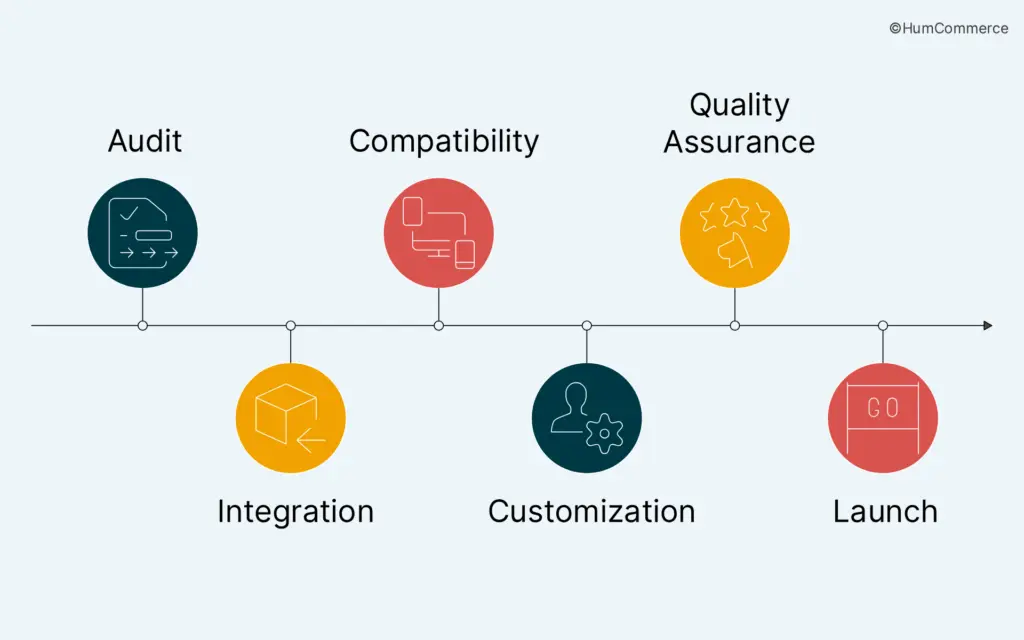
1. Audit & Benchmark
Every successful implementation starts with visibility.
A Magento performance audit helps you identify where your store slows down. Is it large JS payloads, render-blocking scripts, duplicate CSS, or unoptimized images?
Deliverables from this stage typically include:
- Core Web Vitals report (LCP, CLS, FID)
- Checkout speed & conversion funnel analysis
- List of heavy or conflicting extensions
- Baseline page load & TTFB benchmarks
2. Hyvä Theme Integration
This is the step where the old Luma frontend is replaced with Hyvä’s modern architecture built on Alpine.js and Tailwind CSS.
Certified Hyvä developers handle this phase to ensure your site’s visual identity, layout hierarchy, and Magento core features (like layered navigation, search, and checkout) remain intact.
Deliverables:
- Base Hyvä setup integrated with Magento backend
- Rebuilt layout templates using Tailwind
- Responsive design verification across devices
3. Extension Compatibility
Most Magento stores depend on 10-50 extensions: ERP syncs, CPQ modules, custom carts, or shipping integrations. Not all are natively compatible with Hyvä.
Developers must either:
Apply Hyvä compatibility patches (many are open-source), or, rebuild legacy extensions with Hyvä’s view models and templates.
Deliverables:
- Compatibility matrix (supported vs rebuild required)
- Patched or alternative modules list
- Performance validation post-integration
4. Customization & Development
Every business is unique and your storefront should reflect that.
This is where design and UX enhancements come in: creating modern, mobile-first pages, optimizing checkout flows, and integrating Hyvä Checkout for frictionless transactions.
Typical customization work:
- Redesigning category & product pages
- Simplifying checkout forms
- Adding B2B-specific workflows (e.g., quick orders, account-level pricing)
- Integrating third-party analytics or CDPs
5. Testing & QA
Once the integration and customizations are done, thorough QA ensures nothing breaks under load.
This includes:
- Page-speed & CWV retesting
- Browser and device compatibility
- Checkout flow simulation
- Stress testing for traffic surges
6. Hyvä Theme Migration & Launch
Finally, your Magento Hyvä replatforming goes live.
For merchants moving from Luma, this launch often includes cleanup of old CSS/JS files, URL redirects, and post-launch tracking setup.
Post-launch deliverables include:
- SEO health check (schema, sitemaps, redirects)
- Load test under live traffic
- Developer handoff documentation
- 30-day optimization sprint (fine-tuning after go-live)
Not happy with your store’s performance? Claim your free Magento speed audit and find out exactly what’s slowing you down.
How Long Does Hyvä Implementation Take?
One of the first questions store owners ask is: “How long will it take to move from Luma to Hyvä?”
The honest answer: it depends on your store’s size, complexity, and how prepared you are before starting.
Unlike a simple theme switch, Hyvä implementation is a full frontend rebuild – faster and cleaner than Luma, but still a project that requires planning.
Typical Timelines (By Store Type)
- Small to Mid-Sized Stores
- Catalog size: < 5,000 SKUs
- Minimal custom modules
- Standard Magento workflows
- Timeline: 4-–6 weeks for Hyvä theme integration and launch.
- Mid-Market B2B/B2C Stores
- Catalog: 5,000-–50,000 SKUs
- Multiple third-party extensions
- B2B pricing/ordering workflows
- Timeline: 6-–10 weeks, including Magento Hyvä theme integration and compatibility fixes.
- Enterprise-Level Stores
- Multi-storefronts, regional catalogs
- Custom modules + legacy extensions
- Advanced integrations (ERP, CRM, CPQ, PIM)
- Timeline: 10-–14+ weeks, often part of a broader Magento Hyvä replatforming strategy.
Factors That Impact Timelines
- Extension Compatibility
- Some modules work seamlessly with Hyvä, others need patches or full rewrites.
- A clean extension stack = faster delivery.
- Custom Designs
- Using Hyvä’s base styling = quicker.
- Heavy UI/UX customization = adds weeks.
- Checkout Migration
- Hyvä Checkout (Alpine.js + Tailwind) is lean and fast but requires planning.
- Migrating custom payment/shipping modules can extend timelines.
- Team Experience
- Certified Hyvä developers familiar with Hyvä theme development services cut timelines drastically.
- Inexperienced Magento teams can get stuck debugging extension issues.
- Pre-Implementation Prep
- Stores that run a speed audit and clean up unused extensions before migration save weeks of effort.
Process Stages You Can Expect
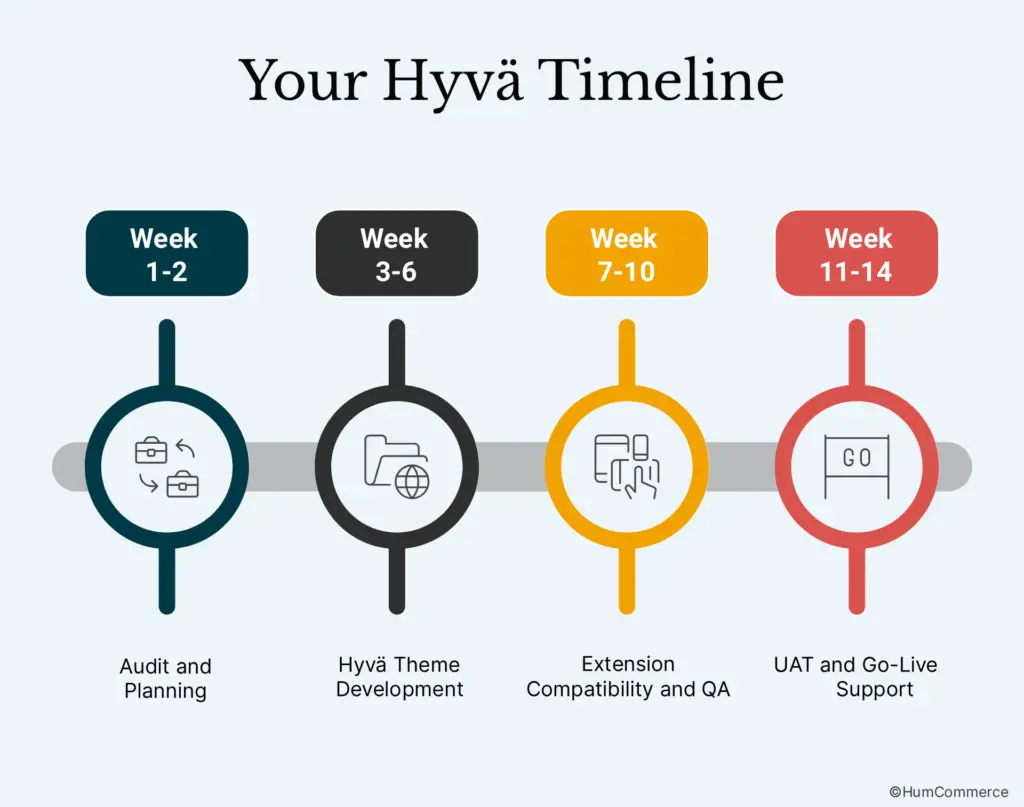
Week 1-2: Audit + Planning
This is where your Hyvä journey starts.
What happens:
- A full performance audit of your Magento store: Core Web Vitals, Lighthouse scores, and backend response times.
- Mapping of all third-party extensions, themes, and modules to assess compatibility.
- Documentation of design goals, integrations, and checkout logic: what stays, what needs a rebuild.
- Kickoff workshop between your internal team and Hyvä developers to define milestones, ownership, and sprint cadence.
Output:
A detailed implementation roadmap with timelines, responsibilities, and performance benchmarks.
Week 3-6: Hyvä Theme Development
Once the groundwork is laid, the build begins.
What happens:
- Developers install the Hyvä theme and set up the new frontend stack (Alpine.js + Tailwind CSS).
- Migration of layouts and components from Luma to Hyvä while preserving design integrity.
- Integration of Hyvä Checkout for faster, simplified transactions.
- Implementation of responsive design, accessibility checks, and custom branding updates.
Output:
A working Hyvä frontend prototype with live product and category pages.
Week 7-10: Extension Compatibility + QA
Now the focus shifts from design to functionality.
What happens:
- Developers review all third-party extensions (payment, shipping, ERP sync, etc.) for compatibility.
- Where needed, Hyvä compatibility patches are applied or modules are refactored.
- Performance, regression, and browser/device testing begins.
- SEO checks ensure meta data, URLs, and structured data carry over cleanly.
Output:
A fully functional store running on Hyvä with near-final load times and stable extensions.
Week 11-14: UAT + Go-Live Support
The final sprint is all about confidence and control.
What happens:
- Conduct User Acceptance Testing (UAT) with real users, checkout flows, order placement, admin functions.
- Fine-tuning of site speed, caching, and image optimization.
- SEO validation (redirects, sitemap submission, analytics setup).
- Soft launch followed by full deployment and performance monitoring.
Output:
Your Magento store goes live with Hyvä, fast, stable, and ready to scale.
Pro Tip: If you’re still on Luma, read our 7 Steps to Magento 2 Speed Optimization.
How Much Does Hyvä Implementation Cost?
If time is the first big question, cost is the second.
The truth is Hyvä implementation isn’t a one-price-fits-all project. Costs vary depending on your store’s size, integrations, and the level of customization needed.
But here’s a clear framework to help you benchmark.
| Store Type | What’s Included | Estimated Cost (USD) | Notes |
| Small to Mid-Sized Store | Basic Hyvä theme integration, standard extensions, Hyvä Checkout setup | $8,000 – $15,000 | Faster if using default Hyvä styling |
| Mid-Market B2B/B2C | Magento Hyvä theme integration, 10-–15 extensions, custom checkout flows, brand styling | $15,000 – $30,000 | Includes Hyvä theme migration from Luma |
| Enterprise-Level | Magento Hyvä replatforming, custom modules, multi-storefronts, ERP/CRM integrations | $30,000 – $75,000+ | Tailored build, higher dev effort |
Key Cost Drivers
- Licensing Fee
- Hyvä theme has a one-time license (~€1,000)
- Compared to ongoing PWA costs, this is modest
- Extension Compatibility
- Simple extension stacks = lower cost
- Complex B2B or legacy extensions = higher dev effort
- Checkout Implementation
- Standard Hyvä Checkout = minimal cost
- Custom payments, shipping, or B2B workflows add to budget
- Custom Design & Branding
- Using Hyvä’s default templates is faster and cheaper
- Full brand redesign = higher investment
- Development Team
- Experienced Hyvä developers deliver faster with fewer errors
- Choosing certified Hyvä theme development services avoids costly rework
Cost vs ROI: Why Hyvä Pays Back Fast
- Faster site speed = more conversions (even a 1s improvement can mean +7% sales)
- Better Core Web Vitals = stronger SEO visibility
- Lower maintenance costs = no ongoing React overhead like with PWA
- Developer productivity = clean, modern stack means easier updates and future scalability
When you zoom out, Hyvä theme development is less about cost and more about ROI. Many merchants recoup their investment in months thanks to higher conversions and lower abandonment.
Get expert advice that’s tailored to your store. Book a 30-minute free consultation with our CEO and walk away with a clear optimization roadmap.
Points to Consider Before Hyvä Implementation
Choosing Hyvä isn’t just about flipping a switch. It’s a strategic decision that affects your store’s performance, timeline, and future scalability. Before you move forward with Hyvä implementation, here are the essentials to weigh:
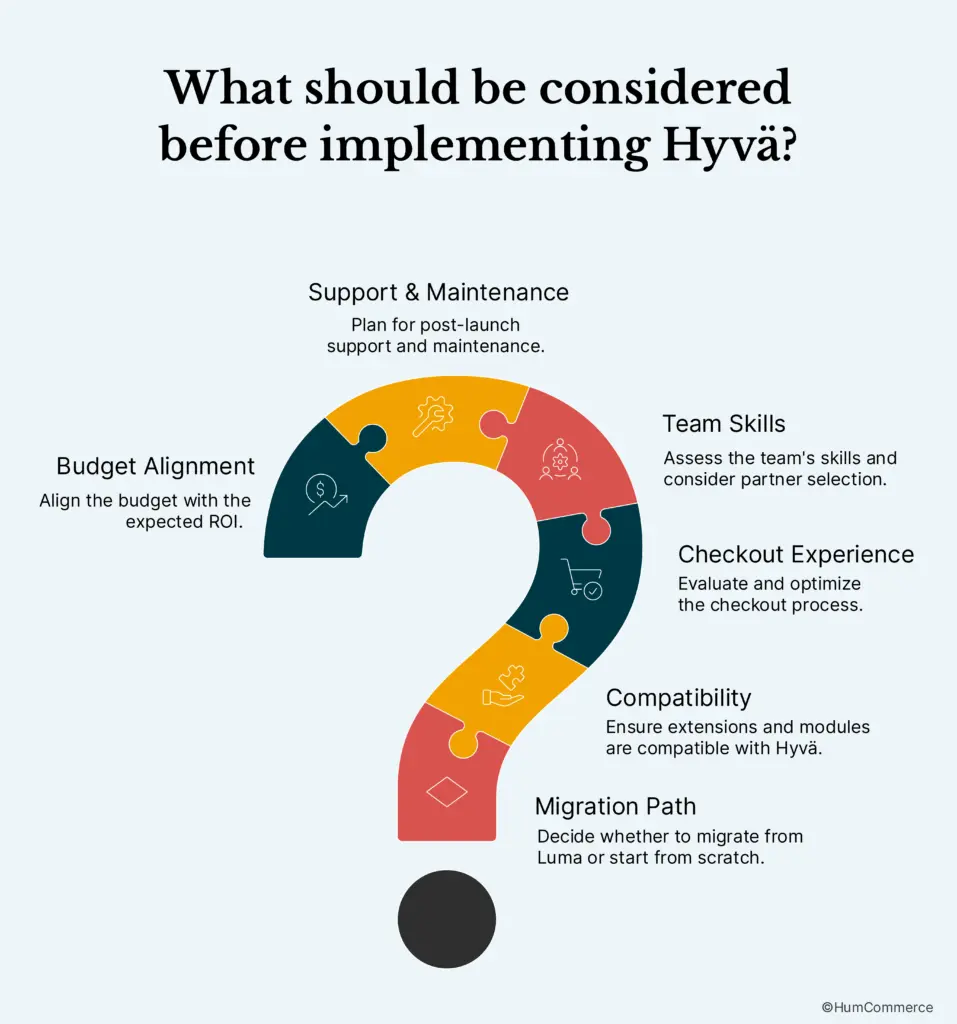
1. Migration Path: From Luma or Scratch?
- If you’re currently on Luma, you’ll need a Hyvä theme migration. This often involves cleaning up legacy code, removing unused extensions, and rethinking frontend workflows.
- For new builds, Magento Hyvä theme integration can start clean, no baggage, just faster performance from day one.
Tip: If you haven’t yet audited your store’s performance, check out our blog on Magento 2 Speed Optimization for step-by-step guidance before migrating.
2. Extension & Module Compatibility
- Not every extension works out-of-the-box with Hyvä. Some may need custom APIs or compatibility modules.
- That’s why working with experienced Hyvä developers matters, they know which extensions play well and which ones need rework.
3. Checkout Experience
- Do you need a simple checkout, or do you run a complex B2B flow with account hierarchies, custom pricing, and approvals?
- Hyvä Checkout is lightweight and fast, but custom workflows require additional Hyvä theme development services.
4. Team Skills & Partner Selection
- Your in-house Magento team may not be fully ready for Hyvä theme development since it uses Tailwind + Alpine.js.
- Certified Hyvä theme developers bring proven expertise in both implementation and long-term maintenance.
Look for agencies with case studies and a clear track record in Magento Hyvä replatforming projects.
5. Post-Launch Support & Maintenance
- Hyvä isn’t a “set it and forget it” solution. Updates roll out, Magento versions evolve, and extensions change.
- Ongoing Hyvä theme services – monitoring, upgrades, and compatibility fixes – keep your storefront fast and stable.
6. Budget Alignment with ROI
- Initial Hyvä implementation costs vary, but think beyond upfront spend.
- Faster speed = higher conversions. Clean code = lower maintenance.
- A well-executed Magento Hyvä replatforming often pays for itself within months.
Conclusion
Making the move to Hyvä can feel complex – migration costs, timelines, and compatibility questions can easily stall decision-making. But with the right partner, you don’t have to navigate it alone.
At HumCommerce, we specialize in:
- Hyvä theme migration & replatforming
- Magento Hyvä theme integration tailored to your workflows
Hyvä theme development services that ensure compatibility, scalability, and speed