
Key Takeaways:
- Know why Magento–ERP sync doesn’t work (APIs, mapping, network problems, bad data).
- See how problems with order sync hurt inventory, fulfillment, accounting, and customer trust.
- Use a simple, operator-friendly checklist to quickly find and fix problems with Magento ERP integration.
- Fix common problems with step-by-step guides that range from quick fixes to major repairs and making things last longer.
- Find out what Magento needs for ERP integration, such as real-time sync, monitoring, and error handling.
- Get a tried-and-true plan of action from the audit to the rollout, as well as advice on how to choose the best technology for B2B scale.
- Learn how HumCommerce makes Magento ERP integration easy so you can stop putting out fires and start growing your business.
Have you ever waited days for a package that said “out for delivery” but never got it? You call the shipper, refresh the tracking, and start to wonder what’s taking so long.
When your eCommerce and ERP systems get out of sync, it’s the same thing: orders are placed, but nothing happens behind the scenes, and everyone is left wondering what’s going on.
This kind of disconnect happens more often than you might think. At HumCommerce, we see it every day as we help leaders figure out what’s causing sync problems, fix them, and set up long-term protections.
Before we go any further, let’s talk about why Magento ERP integration stops working in the first place.
What makes Magento ERP integration stop working in the first place?
Magento ERP integration promises smooth data flow, but why do so many businesses have problems with their order sync at the worst times?
It usually comes down to a few technical problems, like APIs that don’t work right or time out, data mapping problems between Magento and your ERP, network problems, old software versions, or even just bad data being shared.
It’s possible that the integration connector needs a zip code, but your Magento order comes in with an address format that your ERP can’t handle.
They may seem small, but they add up quickly.
Batch syncs can take longer when you don’t have real-time connections. The more fixes and plugs you try to add to the problem, the harder it is for your team.
How much does a bad Magento-ERP sync cost your business?
- Shipments are late or don’t show up at all, which makes customers angry and makes you spend more time looking for orders.
- When your inventory gets out of sync, you end up selling things you don’t have anymore, which means you have to give refunds and say you’re sorry.
- Your finance and accounting teams never have the same numbers, which makes manual reconciliation a constant pain and slows down your month-end close.
- Several teams waste hours trying to figure out what went wrong with an order, time that should have been spent on growth.
- Customers lose faith when their orders are wrong, late, or just disappear. This sends them straight to your competitors, who seem more reliable.
- Every bug costs you money, time, and a slow but real hit to your reputation.
Every day, problems with Magento ERP integration cost you money, people, and the loyalty of your customers.
How can you find problems with Magento ERP integration before they get worse?
If your order data isn’t moving smoothly from Magento to your ERP, it’s a good idea to be methodical in your diagnosis.
Here’s a quick and easy way to check yourself:
- See if orders stay in “pending” or “processing” mode in Magento but never show up in your ERP.
- Look over your most recent orders: Are you getting duplicate orders or records that are missing in either Magento or the ERP?
- Check the SKUs in both systems to see if the product codes or item details really match.
- Look through API logs for errors or timeout messages. API rate limits and failed connections are big red flags.
- Find out if your inventory is synced in real time or in batches that happen overnight. During busy sales times, batch syncs are more likely to break or get behind.
- Check the status of your orders: Do canceled or refunded orders in your store show up in the ERP, or do they just go away?
- Look for any recent changes to plugins or upgrades to the software. A lot of the time, breaking updates are to blame.
The patterns that make you the most angry are usually:
- Orders that are stuck in limbo
- Customers getting the same order twice
- Inventory always doesn’t match up
- No matter what you do, the numbers in your books never add up.
What are the quickest fixes for Magento ERP integration that you can try right now?
Don’t worry if you see a problem. There are quick, hands-on fixes that can fix most problems with order sync:
- Restart the integration plugin or connection between Magento and ERP.
- Check the mapping for the order and SKU data again. Sometimes the sync fails because of a typo or a missing field.
- Before you try again, delete any failed jobs, logs, and cached syncs from both systems.
- Set up batch or timed syncs for times when traffic is light so you don’t have to deal with traffic jams on the data highway.
How do you permanently fix deeper problems with Magento ERP integration?
If the “quick wins” only fix things for a day or two, it’s time to take a closer look:
- Fix any mapping mistakes at the field or table level. Check that the product data, shipping information, and statuses in Magento and your ERP are all the same.
- If your business has grown or you keep getting timeouts, increase the API rate limits.
- Fix problems with software compatibility: plugin or version mismatches can cause small problems all over the place, especially after big updates to Magento or ERP.
- Watch how well the integration is working. When things start to go wrong, they often slow down and lag.
How can you make sure that your Magento ERP integration doesn’t break again?
To really feel safe, prevention is the key:
- You can set up two-way sync to make sure that inventory, prices, and order statuses are always correct.
- Change to incremental updates so you don’t have to send a lot of data all at once.
- Before syncing starts, use pre-sync validation tools to find mistakes or bad data.
The best Magento ERP integration is dependable, can fix itself, and can grow with you.
Are you still not sure about this? Schedule a FREE 30-minute consultation with our CEO to get rid of all your questions and improve your eCommerce store.
How do you find a Magento ERP integration solution that works?
Your Magento ERP integration needs to be able to handle B2B complexity when your sales, fulfillment, and finances are at stake.
If you want something that will work, look for:
- You have to have real-time sync. Batch syncing can put you behind by hours and cause overselling or inventory problems when you need them the most.
- Compatibility: Making sure that your current version of Magento and your ERP work together, as well as being able to upgrade them in the future, will save you a lot of trouble later on.
- Error Correction: Make sure there is built-in error correction and smart monitoring so you can find API failures or data problems right away, not after three days of customer complaints.
Architecture: When it comes to architecture, point-to-point integration works for small, single-store businesses, but as you grow, an ESB (Enterprise Service Bus) or hub-and-spoke setup keeps multiple channels running smoothly and under control.
What are the steps you should follow to fix your Magento ERP integration?
This is a detailed, step-by-step plan for B2B operators who need to get things done. This method uses both practical and best practices to make sure that your data sync will work in the future.
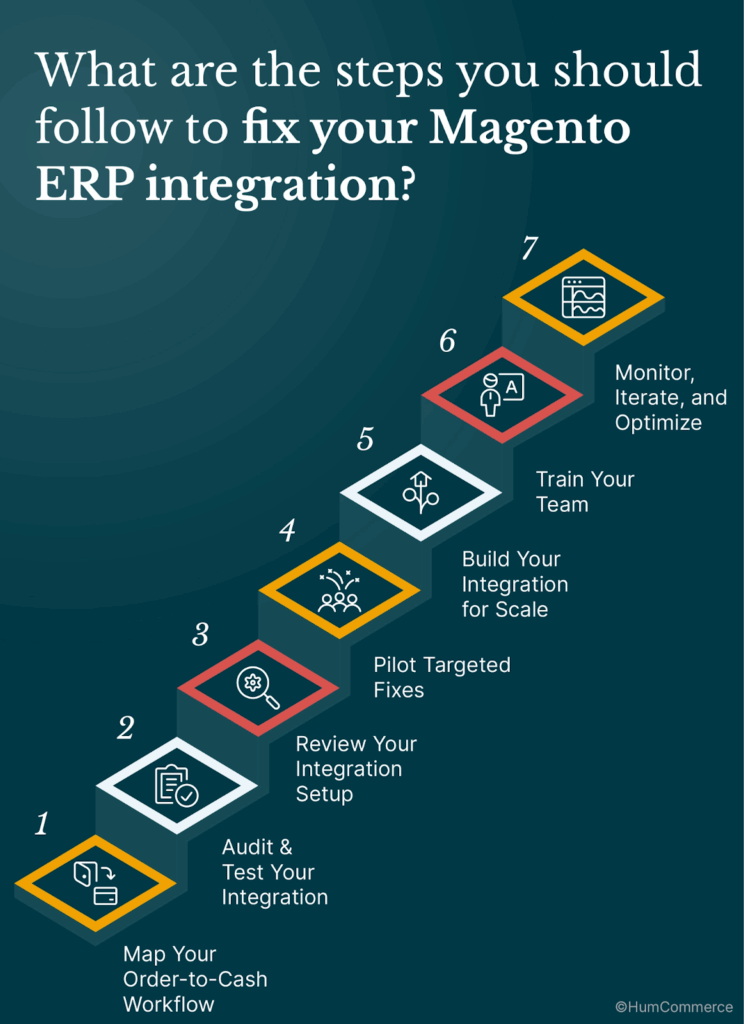
Step 1: Make a map of your order-to-cash process
Write down every step, such as making an order in Magento, updating the status, changing the inventory, handing off the order to ERP, fulfilling it, and reconciling the finances. Find out which handoffs are done by hand and which are (supposed to be) done by machines. Look for patterns in real orders from the last week, like missing order IDs, wrong status, or amounts that don’t match.
Step 2: Test and check your integration
Get the most recent error logs from both your ERP and Magento (logs are where the truth is). Look at the order numbers, SIUs, and fulfillment data in each system. Try syncing a variety of order types, such as refunds, backorders, and sales of multiple items. Make sure that changes to prices and inventory go both ways and that the data is the same after syncing.
Step 3: Look over how your integration is set up.
Is your sync in real time or in batches? For B2B scale, real-time is much more stable. Make sure that your integration tool works with the versions of Magento and ERP you have, and check the API’s rate limits and user permissions. Check the mapping of fields and data: even a small mistake, like a typo in an SKU, a different address format, or a missing custom order field, can stop syncs.
Step 4: Test Targeted Fixes
Restart all API connections and delete any jobs or logs that didn’t work. If fields don’t line up, change the data mapping or update it. Test in small steps by syncing one or two SKUs or types of orders at a time and checking for errors.
Step 5: Make Your Integration Work for More People
Point-to-point tools might work if you only have one store and one ERP. You should switch to ESB (Enterprise Service Bus) or a strong integration platform as soon as you add new channels or partners for fulfillment. This makes sure that things can change and stay strong. Add alerts and monitoring. Make dashboards so that customers never have to tell you about a sync error.
Step 6: Teach Your Team
Write down your new sync process and give everyone involved, not just IT, the power to spot problems. Hold a training session to show people how to get to logs, pause and resume data sync, and move up quickly.
Step 7: Keep an eye on things, make changes, and make things better.
Set up a weekly sync review, especially after big sales events or when you change your tech stack. As your business grows and your products or processes change, keep making your mapping and alerts better.
B2B eCommerce needs to be accurate because orders are complicated, the amounts of money involved are large, and customers expect it every time.
A strong Magento ERP integration makes your business more flexible and lets your team focus on high-value work that drives growth instead of always having to fix problems.
Get a free audit of your integration.
We’ll look over your store setup, error logs, and sync points…and send you a personalized list of all the places where you’re wasting time and where data is getting lost.
Are you ready to stop putting out fires? This is how HumCommerce can help.
HumCommerce makes deep-dive ERP integrations that work in the real world of B2B.
What’s the difference?
- Manufacturers, wholesalers, and industrial eCommerce can now use Magento ERP in real time.
- Solutions that automate reconciliation, get rid of messy CSV imports, and cut the amount of time spent fixing mistakes by up to 88%.
- Fast rollouts: from audit to pilot to company-wide sync in just a few weeks.
- Support, error checking, and upgrades that are always there to help you grow.
Order sync shouldn’t just be “fixed”; it should be what makes you better than your competitors.
Want to start with a custom audit? Let HumCommerce help you make order sync a growth lever instead of a headache.