

Key Takeaways
- Adobe Commerce is perfect for B2B needs that are hard to meet, like custom pricing, connecting to ERP systems, and selling on global marketplaces
- Shopify Plus is easier to use and set up than Shopify, but it needs apps for more advanced features
- Real-time data syncing is necessary for high-SKU procedures because manual updates might create delays and errors
- Going global? Out of the box, Adobe performs a better job at scaling across different regions
- With Adobe, customisation is more natural and deeper. With Shopify, you need help
If it seems like too much to handle a lot of SKUs, pricing that change all the time, and consumers that want different things, you’re not imagining it. A lot of B2B teams have systems that just can’t keep up. A lot of people say that their current platforms are making things take longer and soaking up too many resources.
The appropriate eCommerce platform does more than just let manufacturers, distributors, and wholesalers take orders. It has to keep everything operating smoothly, keep customers happy, and keep up with growth. When choosing between Adobe Commerce and Shopify Plus, it’s not just about the capabilities; it’s also about finding a partner that works for you.
We’re not comparing bells and whistles; we’re looking at how each platform works in the kinds of high-pressure scenarios that B2B companies genuinely function in.
Can Shopify Plus maintain track of your stock at all of your stores? Will Adobe Commerce operate with custom prices and extensive product catalogs?
We’re cutting through the noise to help you pick the platform that works best for your business now and where you want to take it.
The truth about B2B eCommerce: It’s not hard, but connected
If you’re creating machines or delivering building supplies, running a B2B firm isn’t just about keeping track of a few thousand SKUs. It’s about being able to think clearly while you do it.
You have to deal with prices that change all the time, contracts that are different for each client, and supply networks that don’t always function. If you mess up a decimal point in a big order or utilize an old product feed, you’ll get three angry phone calls before lunch.
That’s how much it costs to have systems that don’t work together. Not just time lost, but also trust lost.
And what about being complicated? It’s not going anywhere. The important point is whether your platform works with it or makes things worse.
Problem #1: Prices that go up and down all the time
A customer wants a lower price because they bought a lot. Another includes terms that are only used in a given place. Three months ago, a third person arranged special bundles and thinks the prices will still be good.
There are bound to be blunders when you use spreadsheets or shared drives to keep track of everything. That’s when.
A price engine that works with your contracts and customer data is helpful. For example, Adobe Commerce works with ERPs and CRMs to automatically apply the right prices, so you don’t have to do any more math or send emails back and forth.
Problem #2: Expanding your business to other countries without it going apart
Simply translating your homepage isn’t enough to market to customers in foreign countries. It’s about value-added tax. Shipping rules. Payments in more than one currency. You could lose a transaction if you give the wrong delivery estimate in the wrong language.
Most companies cobble this together with a lot of plug-ins and hope that nothing goes wrong.
Tools that automatically update your store based on where you are are a better way. Adobe Commerce allows you set up tax rules, languages, currencies, and even custom storefronts for multiple markets with just one admin.
Problem #3: Inventory data that is always a step behind
Let’s say that a product goes out of stock at 3 p.m. At 5 PM, your supplier updates the spreadsheet. You don’t discover it until 9 AM the next day, and by then, three orders have already been placed.
Does this sound like something you’ve heard before?
Why it happens: Inventory systems that aren’t linked and only get changes in groups instead of all at once.
What works best? Systems that can communicate with each other. You can acquire stock levels and update product availability on your store in minutes instead of hours since Adobe Commerce can communicate directly with suppliers.
More than business, it’s your name
In B2B, every error has a ripple effect: a false quote makes it impossible for procurement, a late shipment breaks up your client’s schedule, and one SKU that isn’t in sync could wreck an entire order.
But what about companies that can deal with complicated things? They turn it into a strength.
- You don’t have to worry about GDPR, tax law, or PCI-DSS every time you enter a new territory since Adobe Commerce takes care of everything for you
- No more guessing about suppliers: With integrated systems, you can plan for lead times, handle delays, and stay ahead of the game instead of behind it
- Localized customer experience: You can serve consumers in Chicago, Munich, and Sydney without having to rebuild your business three times since you accept payments in different currencies and languages
The most important thing is that complexity isn’t your biggest issue. A platform that doesn’t care about it is.
A Useful Guide for B2B Teams on How to Pick Between Adobe Commerce and Shopify Plus
Let’s be honest: whether you have to deal with a complicated product catalog, unique pricing arrangements, or big orders with a lot of moving parts, your eCommerce platform needs to do more than just “work.” It needs to work like you do.
That’s why comparing Adobe Commerce vs Shopify Plus isn’t only about which one offers more features on paper. It’s about figuring out which one can handle the messy, everyday tasks of a real B2B firm.
This isn’t a list of things to do. It’s a look at what each platform really accomplishes, especially if you want to make things easier, support customers better, and keep your operations team from getting too busy with manual work.
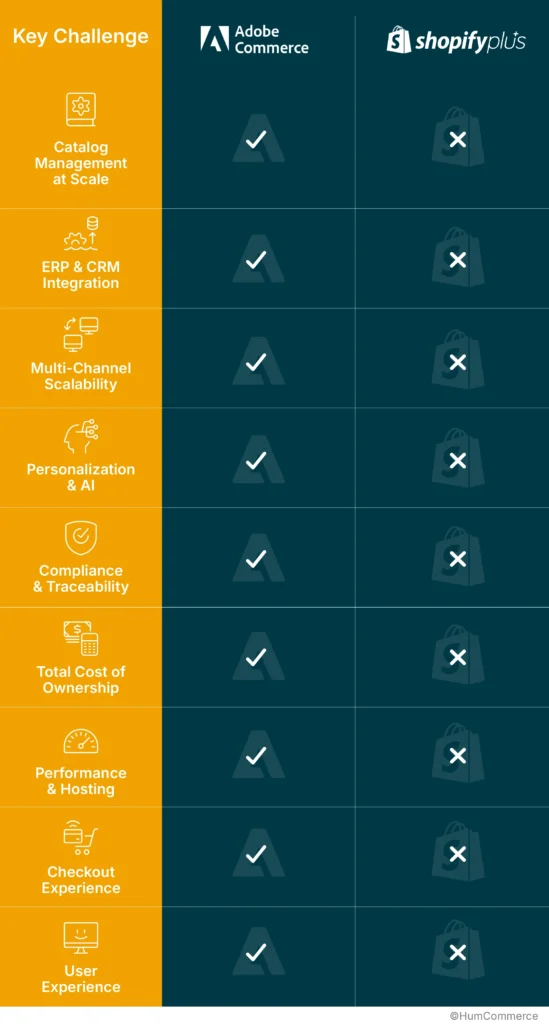
What really goes on when you use these platforms
It’s one thing to look at the features. When you have real B2B demands, like adding a new catalog, opening up in a new area, or just making sure that prices are right across teams, it’s a completely different story to figure out how a platform works.
A big catalog makes things harder in other areas
It could seem like a good idea to have a global product catalog to be ahead of the competition, and it can be. When you have to maintain track of 20,000 SKUs in the US, Germany, and Australia, things start to get bad. Taxes, prices, and compliance are handled very differently in each region.
Things that are small get by. A tax rate that works in one market could not work in another. Customers are realizing that your personnel will soon be spending more time correcting problems than growing.
One of our clients, a manufacturer, had this problem: prices were always erroneous in different places. Once they were live, their team had to keep monitoring for updates and addressing problems. Things got better when they connected Adobe Commerce to their SAP system and set up certain rules for how prices should change automatically. They used to take a week to accomplish it, but now it only takes a few hours.
Shopify Plus can also handle huge catalogs, however because of differences between regions, items sometimes depend on third-party apps, which might be an issue when you’re growing quickly.
Quickly Getting a New Product Out
Sometimes, the most important thing is to be quick. Like when a distributor needs to get a new seasonal product out there before other companies do.
In this case, Shopify Plus really does live up to its name. You can set up a business in only a few days because it has a plug-and-play design and an app store full of extras. Companies have gone from idea to launch in less than a week. This is great for developing promotional microsites or testing out different product lines.
Adobe Commerce, on the other hand, is designed to be flexible over time. If your launch involves sophisticated user flows or links to pricing or inventory systems, you’ll have to work harder at first, but you’ll have more control later.
Making the Catalog Different for Each Buyer
In B2B, not every customer sees the same thing or pays the same price. Wholesalers need catalogs and prices that can alter depending on who the customer is. Things get complicated rapidly if the architecture isn’t right.
Adobe Commerce does a great job doing this with portals that are tailored to each client. Customers can only see the prices they agreed to, the items they ordered, and the regulations they put up when they check in. You don’t need to utilize extra tools or limit access by hand.
A regional food distributor has used this to make it easier to place orders in general. There were fewer mistakes, orders were processed faster, and support tickets went down.
Shopify Plus can be customized, but it normally needs apps or additional programming to accomplish things like set different prices for each customer. That might work for smaller catalogs, but as they get greater, it gets harder to keep track of them.
From regional to global
Going worldwide isn’t as straightforward as flipping a switch. Your stores need to speak the right language, show the right money, and follow the right tax requirements, all without producing a mess of systems that are all the same.
Adobe Commerce was built to provide you that level of power. You may run multiple regional stores from one location, tailoring the experience for each market while staying in one place.
With Shopify Plus, you can also sell products all over the world. But in practice, it tends to go with a one-store strategy that is expanded with apps. That might work for early growth, but as your needs become more intricate, you may run into problems that require particular fixes or middleware.
Choosing a platform that won’t hold you back
Adobe Commerce and Shopify Plus have more to offer than just their features. They are two different ways to get things done. One provides you a blank canvas and a lot of tools to work with. The other one gets you going quickly, but it doesn’t give you as much room to paint beyond the lines.
We’ve seen teams become stuck on the road not because their platform broke, but because it couldn’t keep up with how fast things changed. The way prices were set altered. There is a new area open. That “good enough” answer suddenly seemed more like a wall than a base. This is where Adobe Commerce really stands out.
One of the global distributors we worked with needed different tax rules, languages, and price ranges for each place they did business in. They used Adobe’s customization layer to bring everything into one system. They didn’t have to cobble together a bunch of different plug-ins or hacks; everything just operated from the same system.
Shopify Plus may also grow with you, especially in the beginning. But we’ve seen that the setup gets harder as companies get bigger. Using third-party apps to handle important tasks adds more things to keep care of, which could slow things down or cost more over time.
There are genuine costs that aren’t obvious, and they build up
We’ve seen teams pick a platform because the monthly prices appeared fair, only to find that six months later they’re paying more in app fees. It’s easier to get started with Shopify Plus, but if you require extras to manage several stores or intricate workflows, the costs can be greater than you think.
Adobe Commerce usually costs more at first, especially when it comes to how long it takes to create. But once it’s up and going, a lot of the essential functionality are already there. That means fewer ongoing app subscriptions, less vendor lock-in, and a better experience for your operations team.
Going Headless? One Way Is Easier Than the Other
Both platforms let you go headless, which implies that your front-end experience and back-end logic are separate. But not quite the same.
This type of architecture was designed for Adobe Commerce. It works well with PWAs and other headless tools because it is API-first. This makes it easy to design snappy, responsive interfaces that don’t get in the way of what’s going on behind the scenes.
You can also go headless with Shopify Plus, but you’ll definitely need middleware to fill in the gaps. That means more effort during development, more things to keep track of, and maybe more chances to make mistakes.
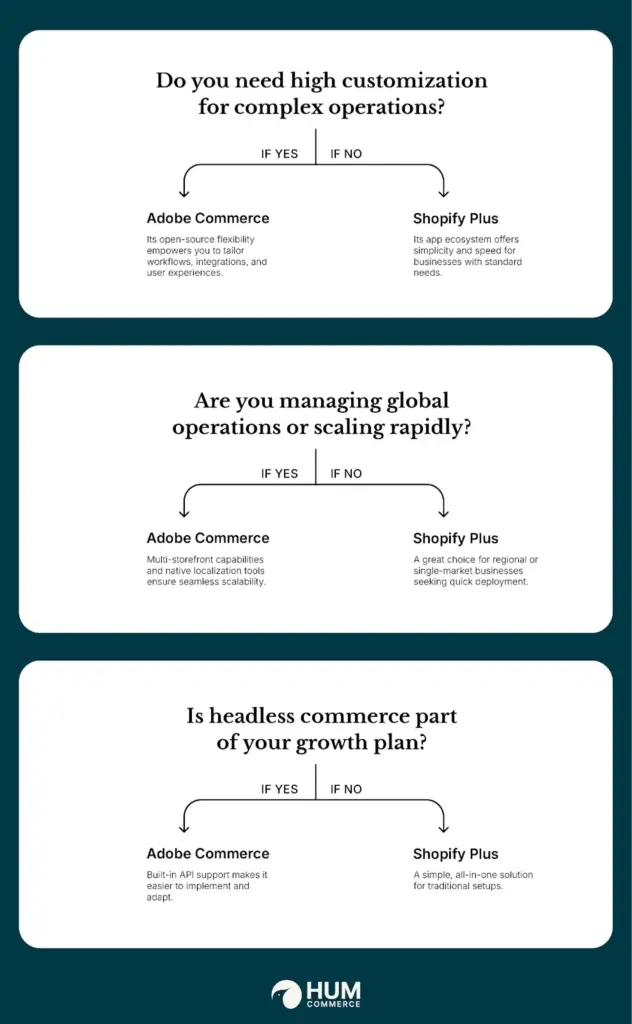
Taking a Closer Look
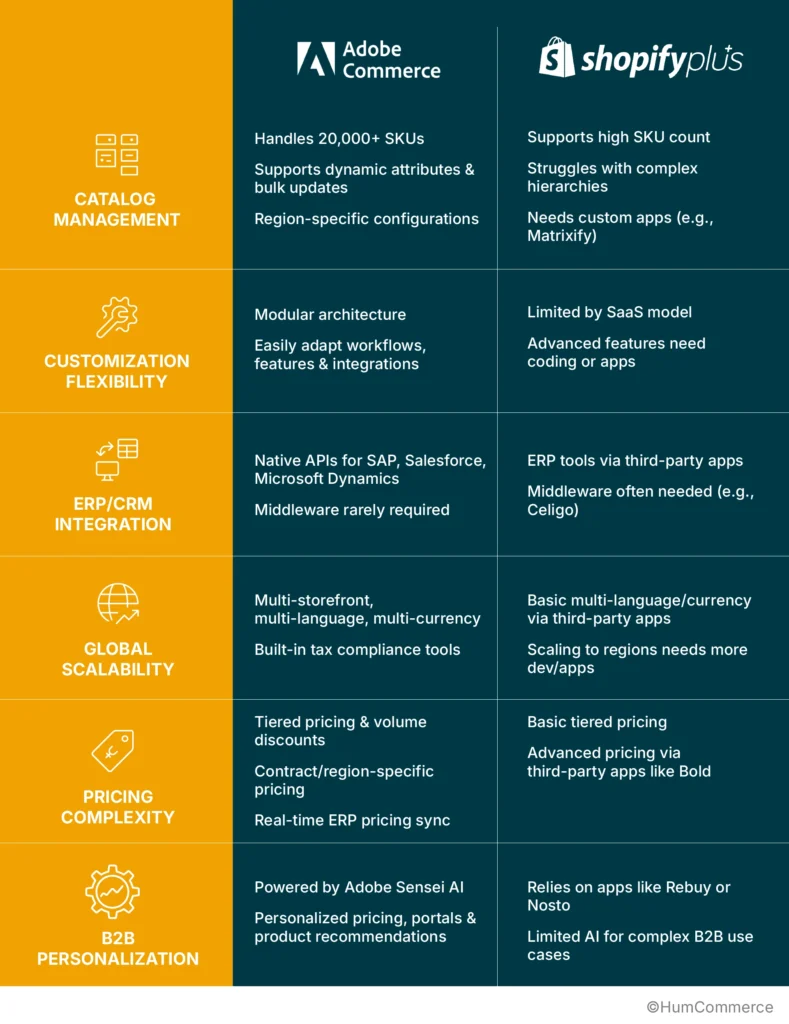
Taking a Closer Look
Choosing an eCommerce platform isn’t just a technical decision; it also changes how everyone in your company does their job every day. It might be how various places get price changes or how inventory is tracked between warehouses. It could even depend on whether your systems can talk to one other without anyone having to check everything again.
These problems are not small. They affect your life every day.
The right platform should support your employees, not make things worse for them.
Based on what we’ve seen, Adobe Commerce is better for firms that have a lot of moving parts. If your catalogs are complicated, you need to work in more than one region, or you rely heavily on ERP, it gives you the freedom to change. Shopify Plus is often easier to set up, so it’s an excellent alternative for teams who don’t need a lot of customization. If getting online quickly and keeping things light are the most critical things, it can do the job with less work up front.
Being a Part of the Process
We’ve helped B2B organizations including manufacturers, distributors, and retailers choose platforms not just based on features, but also from the ground up: What are the challenges that need to be solved? What are the problems? What will break if you use it a lot? That sometimes means fixing things that are already in place. Sometimes it means starting over with a new migration.
Do you want to talk about it?
We’re happy to assist you figure up your options or determine if your current setup can handle the load. No pressure, no hard sell just a clear picture of what makes sense based on how your business really works.
If you find this helpful, you might also want to think about going through the following:
- Find out everything there is to know about B2B payment gateways
- A Complete Guide to the ERP Integration System
- Ten great tips for B2B store owners who use Magento for UX design
[Let’s have a conversation → Book a call]
If you find this informative and helpful, you may also want to consider going through the following.







