Most B2B portals show products and accept orders. That’s where the resemblance to a working commerce operation ends.
TL;DR
- A catalog displays products. A commerce engine connects your storefront to live ERP data: contract pricing, real-time inventory, order history, and account-specific access.
- The gap shows up in five specific ways: buyers confirming prices by phone, reps re-entering orders manually, inventory oversells, no order history visibility, and slow product updates.
- Every order a rep handles because a buyer doesn’t trust the portal costs significantly more than a self-serve order. Moving orders to self-service reduces cost-to-serve by 50-80%.
- Most manufacturers and distributors in the $30M-$150M range sit at Stage 1 or Stage 2 of a four-stage maturity model.
- The fix is not a platform switch. It’s closing specific integration gaps between your portal and your ERP.
A buyer at one of your accounts logs into your portal to place a repeat order. They see a price that doesn’t match their contract. They close the tab and call your rep. Your rep confirms the price, takes the order, and manually enters it into the ERP.
You just paid a human being to do something a connected portal could have handled in 30 seconds.
That sequence plays out dozens of times a week at most B2B manufacturers and distributors. It looks like a customer service problem. It’s an architecture problem. Your portal is a catalog. It was never built to be a commerce engine.
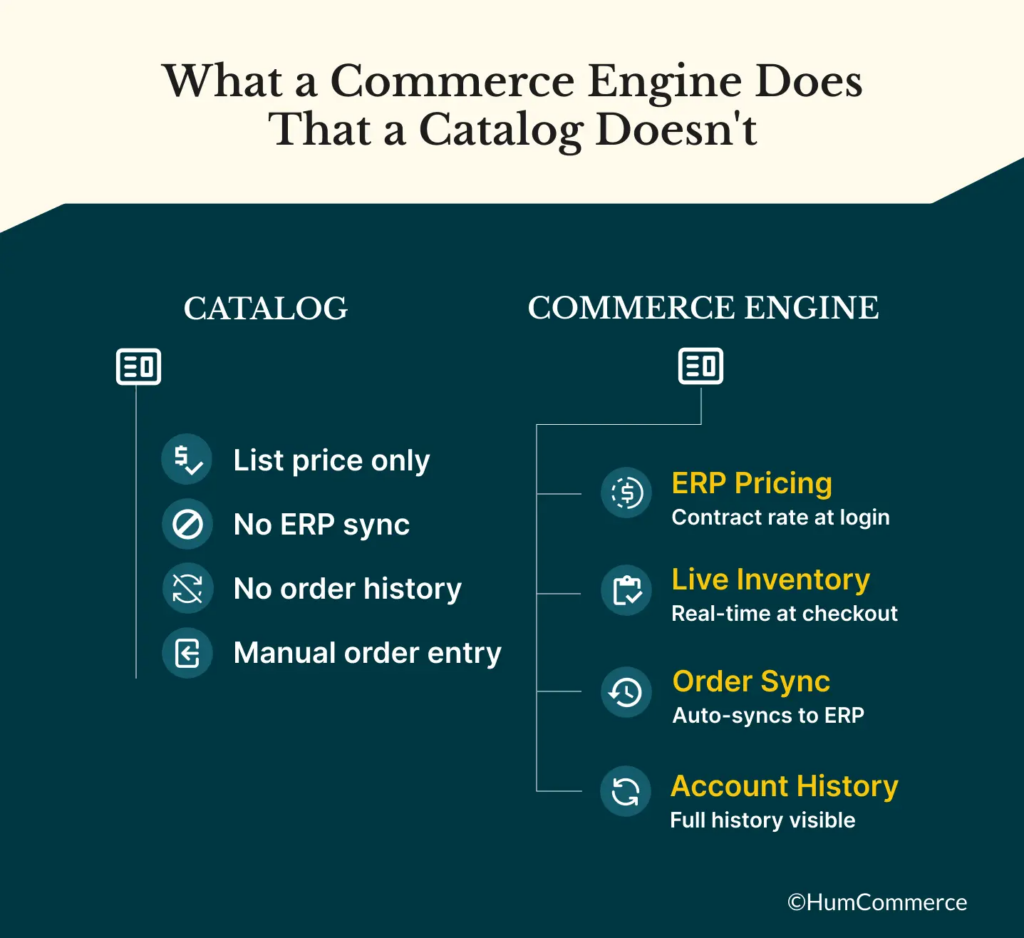
What a Commerce Engine Does That a Catalog Doesn’t
The difference comes down to data connectivity.
A catalog is a static display layer. It shows products, descriptions, and maybe a list price. A buyer can browse and submit an order request. That’s the full extent of what it does.
A B2B commerce engine connects that display layer to the systems where your real business data lives:
- Contract pricing from your ERP. When a buyer logs in, they see their negotiated rate, not your list price. This requires a live API connection between your portal and your ERP’s customer pricing tables.
- Real-time inventory. The system queries your ERP or WMS at the moment a buyer checks availability. Not once a day. Not every four hours. At the moment they ask.
- Account-specific order history. Buyers can see what they’ve ordered before, how much they paid, and reorder in two clicks. That data comes from your ERP, not from a separate log the portal maintains.
- Bidirectional order sync. When a buyer places an order online, it flows directly into your ERP. No rep re-entry. No delay. No transcription errors.
None of these capabilities come from a better-designed portal. They come from integration architecture. And that architecture is what separates a commerce engine from a catalog with a checkout button.
Five Signs You’re Running a Catalog
You don’t need to audit your integration layer to know which one you have. The signs show up in your operations every week.
Customers call or email to confirm pricing before ordering
If buyers regularly contact your team to verify a price before placing an order, your portal is showing them the wrong number. Usually it’s list price instead of their contract rate. Sometimes it’s a stale price that hasn’t updated since the last batch sync. Either way, the buyer doesn’t trust what they see, so they call.
Every one of those calls is a data integration problem presenting as a customer service interaction.
Your reps re-enter orders that came through the portal
If your team regularly copies orders from the portal into your ERP, your order sync is broken or missing entirely. This typically costs a 50-person distributor 10 to 15 hours per week in manual data entry. That number is almost never tracked as a line item. It shows up under headcount as “operations.”
Customers buy products that can’t ship
Oversells happen when your portal reads inventory from a sync file rather than querying your ERP in real time. The file was accurate this morning. Three orders came in since then and reduced available stock. Your portal doesn’t know. The buyer checks out on a product that shipped an hour ago.
Buyers can’t see their order history or invoice status
If a buyer has to call your team to find out whether an invoice was paid or when an order shipped, your portal isn’t connected to your ERP’s order management and accounts receivable data. This is one of the most frequently cited reasons B2B buyers give for low portal adoption: the portal doesn’t tell them what they actually need to know.
New products take days to appear after you add them in the ERP
If updating your product catalog requires manual work every time something changes in your ERP, someone on your team is the bridge between those two systems. They’re creating a lag that costs launch time, introduces errors, and delays revenue on new products.
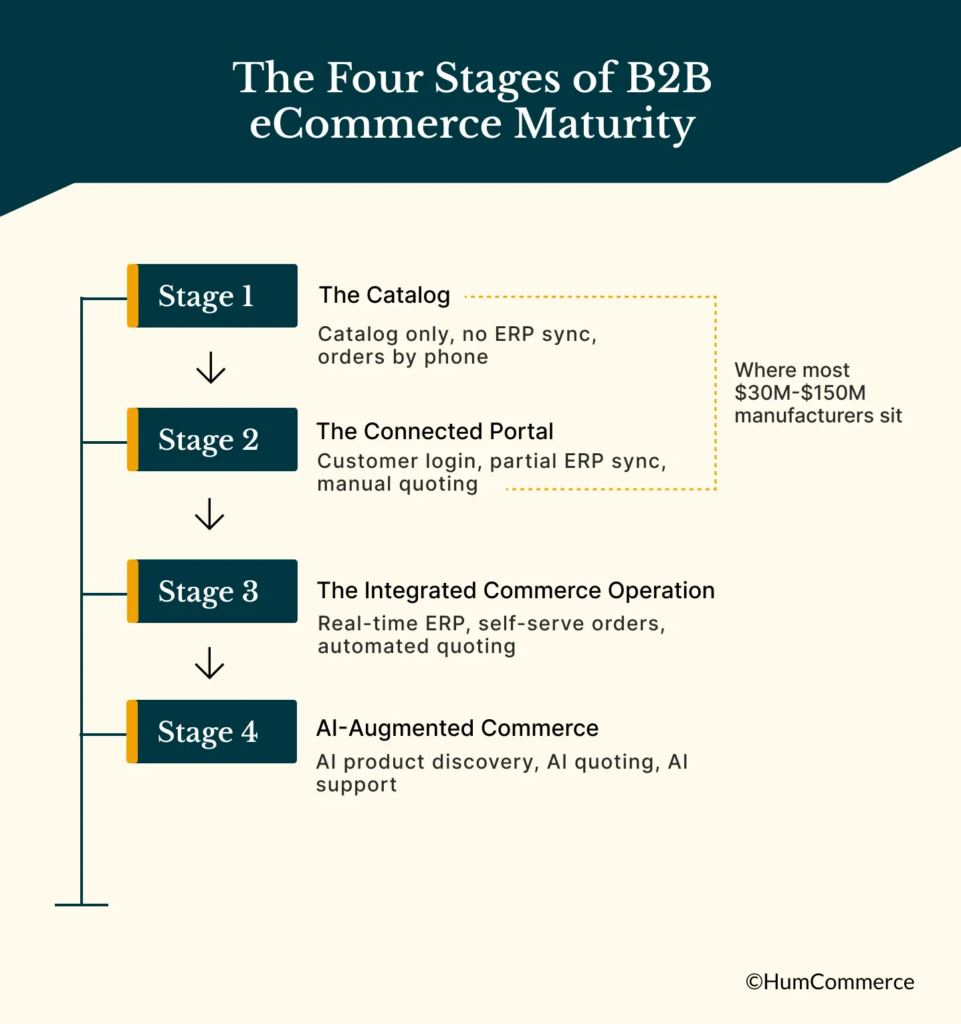
The Four Stages of B2B eCommerce Maturity
Where you fall in this picture isn’t binary. Most manufacturers and distributors sit somewhere on a spectrum with four distinct stages.
Stage 1: The Catalog
You have an online presence. Buyers can browse products and submit order requests, usually by phone or email after they find what they want. No ERP connection. No contract pricing. No real-time inventory. This is where most operations start, and where many stay longer than they realize.
Stage 2: The Connected Portal
You have a B2B portal with customer login. Pricing syncs from the ERP, though often on a batch schedule rather than in real time. Buyers can place some orders directly, but quoting is still manual and order history may not be visible. This is the most common stage for $30M-$100M manufacturers who’ve invested in Adobe Commerce or Magento but haven’t completed the integration work.
Stage 3: The Integrated Commerce Operation
Real-time ERP sync is live. Buyers see their contract pricing at login. Inventory queries happen in real time at checkout. Orders sync to the ERP automatically. A meaningful share of repeat orders move through self-service without rep involvement. Quoting is either automated or significantly faster than manual.
Stage 4: AI-Augmented Commerce
Everything in Stage 3, plus AI-powered product discovery, automated quoting for standard orders, and an AI assistant that handles routine support queries without a human. Buyers can get pricing, check stock, track orders, and request quotes through a conversational interface connected to live ERP data.
Most $30M-$150M manufacturers and distributors sit at Stage 1 or Stage 2. Moving to Stage 3 doesn’t require a platform replacement. It requires closing the integration gaps that keep your portal from talking to your ERP.
The Move to Stage 3 Is an Integration Decision, Not a Platform Decision
The most common mistake manufacturers make when they recognize this gap is assuming the portal is the problem. They evaluate new platforms, run a selection process, and 12 months later launch a new portal that has the same architecture problem the old one had.
Stage 3 requires three things, regardless of which platform you’re on:
- A live API connection between your portal and your ERP for pricing and inventory
- Bidirectional order sync so orders placed online flow directly into the ERP
- Account data sync so buyers can see their order history, invoices, and contract-specific catalog
If you’re on Adobe Commerce or Magento and sitting at Stage 2, you likely don’t need a new platform. You need a complete integration architecture on the platform you already have. HumCommerce has done this work across Epicor P21, NetSuite, SAP Business One, Acumatica, and Microsoft Dynamics. The platform matters less than the integration layer built on top of it.
Where to Start
The fastest path from Stage 1 or Stage 2 to Stage 3 starts with a clear picture of where your current gaps actually are. Not every integration gap costs the same amount, and not every integration gap requires the same investment to close.
A structured audit of your current setup across five dimensions — product data, ordering, quoting, ERP integration, and customer support — takes about 60 minutes and produces a dollar figure attached to each gap. That number tells you which integration to close first and what the ROI looks like before you commit to anything.