
TL;DR
- The Issue: Bad data architecture costs $8.5 million a year for 100,000 to 500,000 SKUs.
- 86% of customers stop buying from brands after having unfavorable encounters with product data.
- The answer is to create hierarchical product models with parent-child relationships.
- Set up teams per product category with clear ownership.
- Implementation: Begin with one important category, make it excellent.
- The first category takes 8 to 12 weeks, and each one after that requires less time.
- The Results: 70% faster launches (weeks to days), 95%+ data completeness, 98% marketplace listing success.
Before computers, libraries used card catalogs.
A drawer full of index cards, each book had three cards: one by title, one by author, one by subject. With 50,000 books, this system worked. Librarians could find anything, the system was elegant in its simplicity.
Now imagine a library with 5 million items that never upgraded its card catalog.
Instead of replacing it with a database, they just kept handwriting more cards.
Some cards use different naming conventions.
Some subjects are spelled three different ways.
Some books appear under multiple inconsistent entries.
New items take weeks to catalog because nobody knows how to file them. Researchers waste hours searching for books that exist but are filed under the wrong category.
The system that worked for 50,000 items makes the library unfindable at 5 million.
This is exactly what happens inside most companies when they reach 100,000 SKUs without the right product data architecture.
Your product information system works fine when you’re managing 10,000 items but when you scale to 500,000 products without fundamentally rethinking how you organize, classify, and maintain that data, the same system that once worked becomes a liability.
Products get buried under inconsistent naming, variants aren’t properly related, asttributes are scattered across spreadsheets instead of systematized. New team members spend weeks learning to catalog products instead of actually contributing. Your entire operation becomes constrained by data infrastructure that was never designed to scale.
The Physics of SKU Explosion: What Happens at 100K
Before we talk about solutions, we need to understand why managing SKUs is so different when there are a lot of them.
You can keep track of product information in spreadsheets if you have 10,000 SKUs. It’s inefficient but it works. With 50,000 SKUs, you need a basic product information management system. The system works reasonably well if you’re disciplined about data entry.
With 100,000 SKUs, spreadsheet-adjacent approaches start to fail completely. At this scale, you’re dealing with performance constraints, data quality nightmares, and synchronization problems that don’t exist at smaller volumes. Query times slow down, variant relationships become impossible to track manually. You discover that the same physical product exists under multiple SKU numbers. Taxonomy becomes a mess.
With 500,000 SKUs, the problems get a lot worse. A single mistake in data causes multiple problems. A misspelled category name affects every related product. An incorrect attribute affects how thousands of SKUs display across channels. Database query times that take seconds for 100K SKUs take minutes for 500K. Synchronization to marketplaces becomes unreliable.
The companies that manage this scale successfully don’t do it through more people or harder work. They do it through architectural decisions that eliminate manual work and make data governance systematic instead of reactive.
Problem One: Making sure that product information is correct across all channels
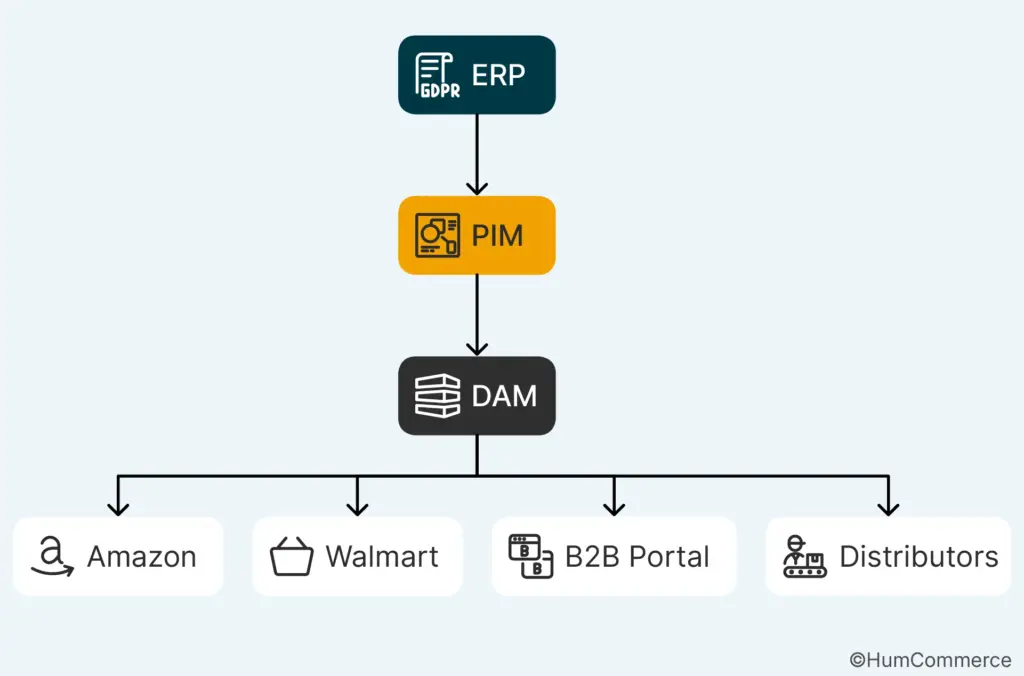
Let’s start with the most important problem. You have product data living in multiple places. Your ERP holds one version. Your PIM holds another. Marketplaces have their own transformations. Your B2B portal shows something different. The same SKU looks inconsistent everywhere.
At 100K SKUs, inconsistencies are annoying. At 500K SKUs, they’re operational disasters:
- A single wrong attribute on 10,000 related products means 10,000 customer confusion points
- Each inconsistency triggers customer support escalations and potential returns
- Product reviews mention conflicting information, tanking trust
- Your team spends thousands of hours reconciling data across systems
Studies show that 86 percent of shoppers will permanently abandon a brand after experiencing bad product data. With a 500,000 SKU catalog, the probability that at least some products have inconsistent information across channels approaches certainty. Without systematic architecture, you’re essentially guaranteeing customer churn.
The architectural solution is a hierarchical product model that creates genuine single-source-of-truth governance:
- Your ERP owns pricing and inventory (the transactional truth)
- Your PIM owns enriched content and relationships (the market-facing truth)
- Your DAM owns digital assets (images, specs, compliance docs)
- Each system owns what it’s best at, and clear integrations keep everything synchronized
When this architecture works correctly, a pricing change in your ERP propagates to your eCommerce platform, your marketplace listings, and your sales quoting tools within minutes. Your team stops chasing inconsistencies and starts focusing on growth. The key is that this only works if your underlying product model is designed to support it.
Building Your Foundation: Hierarchical Product Models Explained
A hierarchical product model is the architectural foundation that lets you manage massive catalogs without drowning in complexity.
At the most basic level, a hierarchical model organizes products into parent-child relationships that reflect how your business actually works. This is not just categorization. This is a structural organization that determines how data flows, how variants are managed, how attributes are inherited, and how efficiently queries execute.
Let’s look at a specific example. If you make fasteners,
At the top level, there is the “Bolts” category.
↓
Under that: “Hex Head Bolts,” “Socket Head Cap Screws,” and “Eye Bolts” are all types of products.
↓
Base goods include the “M8 Hex Head Bolt” and “M10 Hex Head Bolt.”
↓
Lastly, there are the following types: “M8 Hex Head Bolt – Grade 8.8,” “M8 Hex Head Bolt – Grade 10.9,” and “M8 Hex Head Bolt – Stainless Steel.”
What occurs when there is no hierarchy (flat database):
- 10,000 separate SKUs, each with extra information
- There are 10,000 books with the word “bolt” in them.
- Material property entered separately for each version
- Manufacturing spec copied thousands of times
Change materials once and have to manually edit thousands of records. What a nightmare!
What happens with hierarchy (structured model):
- Once the hierarchy is formed, rules set the order of things.
- Change the way materials are defined at the top level.
- Change happens automatically everywhere it should.
- New variations get specifications right away.
- Updates spread to thousands of goods in a matter of seconds.
The real benefits are:
Less duplicate data: Store information only once at the right level, not a thousand times.
Faster queries: The database goes through the hierarchy instead of looking at 500,000 flat records.
Clear governance: You know who is in charge of what category, what parent items, and what rules.
Growth that can be scaled: Each new product fits into the existing hierarchy and automatically takes on the same criteria.
The way you organize your products should be based on how your firm really thinks about them, not on how a generic database schema recommends they should be organized.
Hierarchy reduces complexity. Period.
Variant Management Strategies: Avoiding the Combinatorial Explosion
Once you have hierarchy, the next challenge is managing variants without creating exponential complexity.
Variants are where product explosion typically happens. A basic product like a T-shirt exists in sizes S, M, L, XL and colors black, white, navy, gray. That’s only 16 combinations. But in B2B manufacturing and distribution, variant combinations can reach thousands or tens of thousands. An industrial motor exists in multiple voltages, frequencies, power ratings, mounting configurations, and certifications. The combinatorial explosion is real.
Most companies make the same mistake. They create a separate SKU for every single variant combination. This works until you reach about 20,000 SKUs. Then it breaks. You end up with thousands of duplicate data entries. You can’t update one variant without remembering to update related ones. You create inconsistencies because updates miss some variants. You make queries slow because the database has to sift through hundreds of thousands of individual records.
The better approach is to use parent-child variant relationships instead of flat SKU lists. You create a parent product record that holds shared attributes. Next, you make child variant records that solely include the features that set them apart. A parent “Industrial Motor M250” might have something in common, such the size of the frame and how it cools down. Child variations show various voltage levels or power ratings. The database relationship makes it possible for queries to be fast and efficient, and changes to parent properties are automatically applied to all variants.
Three important parts of managing variants are:
Set clear rules for variants: Write out which combinations are permissible. You can’t offer stainless steel bolts and grade 10.9 bolts at the same time if grade 10.9 exclusively comes in carbon steel. Your system checks combinations before they get to customers.
Inventory at the variant level: Keep track of stock at the variant level, not the parent level. “100 units of parent motor” doesn’t signify anything. You require “30 units of 120V-15HP and 70 units of 240V-20HP.” This level of detail is necessary for proper availability across channels.
Variants inherit parent attributes by default. This is called variant inheritance with overrides. But they can change things if they need to. This stops people from having to enter data by hand, but it still lets them make changes when needed.
Taxonomy Architecture: The Navigation System That Actually Works
Taxonomy is the way your products are sorted and found. At small scale, a few dozen categories work fine. At 500K SKUs, taxonomy becomes critical infrastructure.
A well-designed taxonomy serves multiple purposes simultaneously:
- Helps customers find products through web navigation
- Determines how products are organized for your sales team
- Affects how marketplace algorithms categorize your products
- Impacts how efficiently your database queries run
- Drives conversion on your B2B portal and marketplace listings
A poorly designed taxonomy fails at all of these simultaneously.
The first principle: Balance breadth versus depth
The wrong approach:
- Shallow taxonomy with 100 categories but 5,000 products per category = Navigation nightmare
- Deep taxonomy with 50 levels = Confusing and impossible to maintain
The right approach:
Research suggests that five to seven levels deep with an average of 15–20 products per category works well for most B2B applications. This balances specificity with navigability.
The second principle: Align with industry standards
If you’re in automotive, use ACES categories. If you’re in industrial supply, use Grainger’s taxonomy as reference. If you’re in electronics, use Heilind’s structure. This matters because:
- Distributors are already familiar with these structures
- Retailers recognize and trust them
- Your own sales team navigates them instantly
- Search algorithms are optimized around them
When you invent idiosyncratic taxonomies, you create friction for everyone trying to navigate your catalog.
The third principle: Define each taxonomy node clearly
Vague definitions create problems:
- “Fasteners” versus “Hardware” – what exactly goes in each?
- “Switches” versus “Circuit Breakers” – what’s the difference?
- Products end up in wrong categories
- Customers get lost searching
Clear definitions matter because they determine placement and discoverability.
The fourth principle: Support multiple classification paths
Some products logically fit in multiple categories:
- A stainless steel fastener could be in Fasteners by product type OR in Stainless Steel by material
- Good taxonomy systems allow products to live in multiple places without creating duplicate SKUs
- This improves discoverability because customers can find products by thinking about either classification
Important: Taxonomy is a living system, not a one-time exercise
Products change. New categories emerge. Customer search behavior evolves. Your taxonomy should be monitored and updated quarterly based on:
- Search behavior analysis
- Customer feedback
- Operational needs
- Competitive positioning
This requires dedicated resources. You can’t manage taxonomy as a side project for someone already overwhelmed with day-to-day work.
Attribute Inheritance and Rules: Making Data Consistent Without Manual Entry
Attribute inheritance is how you prevent the data quality nightmare that kills most large catalog management efforts.
Attributes are the descriptive properties of products:
- For fasteners: material, finish, thread type, grade
- For electronics: voltage, current rating, frequency, certifications
- For apparel: size, color, material composition, care instructions
- For motors: horsepower, voltage, phase, duty cycle
The principle of attribute inheritance is that child products inherit attributes from their parents unless explicitly overridden. A parent product “Socket Head Cap Screw” has an attribute “Head Type” set to “Socket Head.” All child variants inherit this attribute automatically. You don’t need to enter it for each variant. If you create a new size variant, it gets “Socket Head” automatically. This eliminates redundant data entry and makes updates efficient.
Attribute rules are more in-depth. You can say that some traits are needed at certain levels. “Material” can be needed at the level of the product family. It comes from the family and can’t be changed at the individual SKU level. This stops someone from making an SKU by mistake without saying what material it is. You can say that some traits depend on other ones. If the material is stainless steel, it needs to have a “Corrosion Resistance Grade.” That feature doesn’t matter if the material is carbon steel. This stops products from being combined in ways that don’t make sense and maintains your data logically consistent.
When you use this method on a large basis, its usefulness becomes clear. You can’t check each of the 500,000 SKUs by hand. You need rules that stop bad data from being created in the first place. Your data quality goes up a lot when you employ attribute inheritance and conditional rules since the system makes sure that everything is the same.
You need to think hard about your data model before you can use attribute inheritance. You need to figure out which features are essential to all products in a family and which ones set them apart from other products in the same family. Core traits should be at the family level and pass down through generations. Attributes that are distinctive to a variant should be at the variant level. This needs feedback from people with domain knowledge and people from different departments. Your product team needs to decide what really makes your product stand out. Your operations team needs to tell you what they need to do to fulfill orders. Your eCommerce team needs to know what matters to customers when they choose.
Problem Two: Make listings for marketplaces and B2B platforms automatic
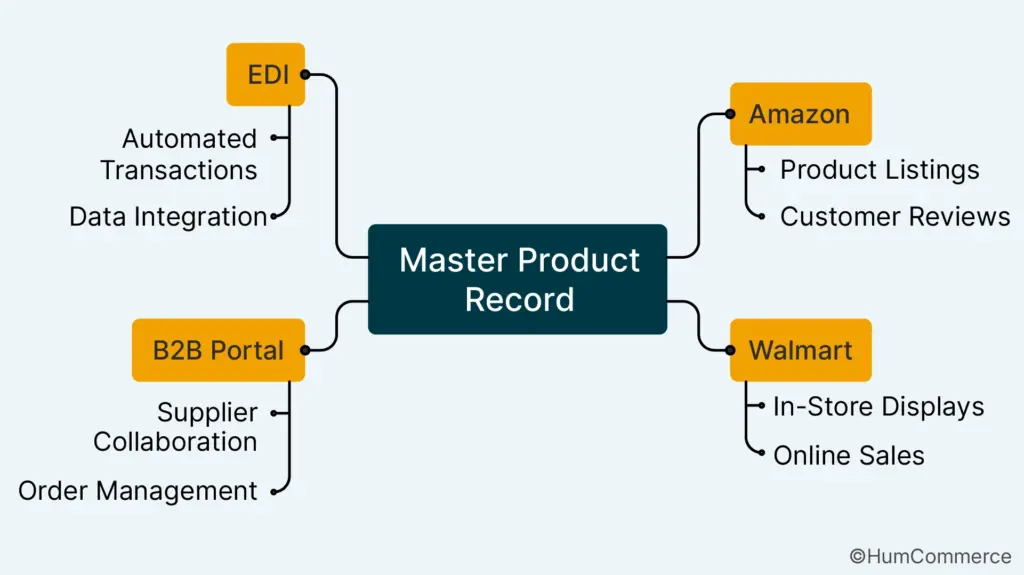
The second problem gets easier to solve once you have a hierarchical model with unambiguous attribute inheritance. You need to make listings for Amazon, Walmart, your B2B portal, and distributor networks that are customized to each channel. You don’t want to have to enter product data for each platform by hand.
There are distinct rules for each marketplace. Amazon wants titles formatted one specific way, bullet points in a specific structure, images with specific dimensions. Walmart has migrated to Item Spec 5.0, which requires specific product type classifications and attribute mappings. Your B2B portal needs technical specifications and compliance documentation. Distributors need EDI-compliant data with specific unit of measure standardization.
Without automation, this means your team manually adapts product data for each channel. For 500K SKUs, that’s impossible. Manual adaptation creates errors, consumes resources, and slows launches to a crawl.
The solution is channel mapping automation. Your PIM system applies transformation rules that take your master product data and reshape it for each channel’s requirements automatically. A transformation rule might specify that for Amazon, you take the brand attribute plus the product name plus the key differentiator, format it to 200 characters, and that becomes the Amazon title. For Walmart, you apply different rules that respect their Item Spec requirements. For your B2B portal, you apply different rules that include technical specifications. All of this happens through rules, not manual work.
This automation requires investment upfront. You have to understand each channel’s requirements deeply. You have to build the transformation rules correctly. But once you make that investment, it becomes repeatable. New products flow through automatically. Product updates propagate to all channels without manual intervention. Listing errors drop dramatically because the rules are consistent and error-checked.
The research confirms this. Companies that implement marketplace automation see marketplace listing success rates improve from about 60 percent on first attempt to 98 percent. They see time-to-market drop by 70 percent. They reduce manual work by 80 percent.
Database Optimization: Making 500K SKUs Performant
None of this architecture works if your database can’t actually perform at scale. This is where most companies make mistakes.
A database optimized for 10,000 SKUs can become unusable when you scale to 500K. Query times that took milliseconds start taking seconds or minutes. Syndication to marketplaces gets slow and unreliable. The search functionality users expect becomes sluggish.
Five database optimization strategies:
1. Proper indexing
Databases use indexes to locate records quickly without scanning every row.
For a 500K SKU database, you need indexes on:
- Product ID
- Category
- Parent product ID
- Variant attributes
- Any fields used in search queries
Without proper indexes: Queries scan all 500K rows = catastrophically slow
With indexes: Queries locate relevant subsets in milliseconds = usable performance
Index strategy is technical work, but it’s worth every penny of investment.
2. Partitioning
Instead of one massive product table, partition the data. You might partition by category:
- All fasteners together
- All electronics together
- All motors together
- Etc.
Query engines can search just the relevant partition instead of the entire table. This dramatically improves performance and makes management easier.
3. Storing in memory
Instead of querying data from disk every time, it should be stored in memory instead:
- Searches for popular products
- Hierarchies of categories
- Information about variants
- Rules for pricing
This gives up storage space for speed, which is the proper trade-off at scale.
4. Processing that isn’t in sync
These heavy tasks shouldn’t block the user interface when you’re syncing 500,000 products to a marketplace or changing all of them for a new channel.
They should happen in the background at different times. Users can keep working while bulk processes are going on without getting upset.
5. Syncing Delta
Don’t sync all 500,000 products every night. Only sync products that have changed since the last time you synced.
This makes less of:
- Network load
- API calls for the marketplace
- Time to process
- Stress on the system
You need a change log that shows which products have been changed and when. This is what Delta syncing depends on.
Why this is important:
Database optimization is a job that never ends. You need to do the following as your catalog grows:
- Keep an eye on performance all the time
- Find problems before they happen by looking for them.
- Change your strategy based on how people actually use it.
- Put money into upgrades when you need to.
Someone who knows a lot about databases should do this work. You can’t give this task to a less experienced team member or put it off because other things seem more important. When a database’s performance drops, everything else does too.
Data Quality at Scale: Building Systems That Prevent Chaos
You don’t just get data quality once and then keep it up without doing anything. At 500K SKUs, data quality requires systematic discipline and ongoing investment.
The first element of data quality at scale is validation rules. Before any product record can be published to any channel, it should pass automated validation checks. Is the product name present? Is it within character limits? Is the category valid? Are required attributes filled in? Are variant combinations valid? Do compliance certifications exist if the product requires them? Thousands of rules can execute automatically, catching errors before they reach customers.
The second element is data profiling. You need regular reports showing the health of your catalog. What percentage of products have complete data? What percentage have images? What’s the average attribute completeness by category? Which categories have the most errors? This reporting reveals patterns and problem areas. It gives you data to drive resource allocation decisions.
The third element is remediation workflows. When data quality problems are identified, you need a process for fixing them. This might be automated where possible. If 10,000 products are missing dimensions, and dimensions can be inferred from related products, you can automate the fix. For problems that can’t be automated, you need assigned ownership. The category owner is responsible for remediating data quality issues in their category. This creates accountability.
The fourth element is preventing bad data from being created in the future. This is where attribute inheritance and conditional rules matter. If you prevent bad data from being entered, you don’t have to remediate it. This is always better than cleanup. Every data quality process should focus on prevention first and remediation second.
The fifth element is vendor data quality. If you’re importing product data from suppliers, that data is often incomplete or inconsistent. You need validation rules for incoming data. If a supplier provides product data that fails validation, it goes into a quarantine queue before publishing. Someone reviews it, works with the supplier to fix it, or manually corrects it. The key is that bad supplier data doesn’t immediately contaminate your catalog.
At scale, data quality requires resources. You need people monitoring quality, running validation reports, managing remediation. You need database expertise for optimization. You need category owners to take responsibility for their sections of the catalog. This is not work a single person can do on top of other responsibilities.
Problem Three: Smarter Media Management with PIM and DAM Sync
As your catalog grows to 500K SKUs, managing images, videos, specification sheets, compliance documents, and CAD drawings becomes its own logistical nightmare.
The core problem:
Product data isn’t just text. It’s also:
- Images that appear on your website
- Specification sheets that go to B2B customers
- Compliance certifications that manufacturers require
- CAD files that engineers need
- Lifestyle photography for marketplace listings
- Comparison charts and technical diagrams
When your media management is separated from your product data management, chaos ensues:
- Products get published with wrong images attached
- Updated specification sheets don’t reach all channels
- Compliance documents get out of date
- Different versions of the same product use different images
- Marketing creates beautiful photography that sits unused because nobody connected it to products
- Engineers can’t find CAD files because they’re filed independently from product records
The solution: PIM and DAM integration
PIM (Product Information Management) manages structured product information. DAM (Digital Asset Management) manages digital files. When they work together systematically, everything improves.
How proper integration works:
A product record in PIM maintains references to its associated assets in DAM. When you update an image in DAM, products using that image automatically get the updated version. When you create a new product in PIM, the system can enforce that required assets are attached before the product publishes.
Specific benefits:
- Automatic asset linking: SKU matching and categorization automatically attach the right files to the right products
- Bidirectional sync: Updates in either system flow to the other automatically
- Version control: Only approved, current assets get linked to products
- Channel-specific formatting: Automatically create channel-specific versions of media
- Amazon version (1000×1000 white background)
- Walmart version (specific dimensions per category)
- Direct site version (high-resolution)
- B2B portal version (technical diagram)
Why this matters at scale:
With manual media management at 500K SKUs:
- Hours wasted recreating images for different platforms
- Constant mismatches between product records and attached files
- Old assets still appearing on products after updates
- Compliance documentation not reaching all channels that require it
With PIM–DAM integration:
- Upload master image once
- System automatically creates channel-specific versions
- Products always reference current approved assets
- Compliance docs attach to all relevant SKUs automatically
- Media management becomes scalable instead of chaotic
This integration requires technical architecture. Your PIM and DAM systems need APIs that communicate. They need to track asset relationships. They need to enforce consistency rules. But once it’s built, a media management approach that would be manual chaos becomes automated and reliable.
Team Organization: Scaling Without Chaos
Here’s what many companies get wrong about scaling to 500K SKUs. They assume they need proportionally more people. Ten thousand SKUs, one product manager. Five hundred thousand SKUs, fifty product managers. This doesn’t work. On a massive scale, you don’t need proportionally more people. You need fundamentally different organization.
The first principle is category ownership. Don’t organize around functions. Organize around product categories. Someone owns fasteners. Someone else owns electrical components. Someone owns industrial motors. Each category owner is responsible for product data quality in their category, maintaining the hierarchy, managing variants, ensuring compliance documentation is complete, and remediating data quality issues. This creates accountability and clarity.
The second principle is separation of responsibilities. Someone shouldn’t be both maintaining data quality and handling customer service. Your eCommerce team shouldn’t own product information. They should consume it. Your procurement team shouldn’t own the PIM. They should contribute data to it. Clear separation of responsibilities means teams have focused objectives.
The third principle is data governance committee. Someone needs to own the overall product data strategy. This is typically a role that sits across product, operations, eCommerce, and compliance. The governance committee makes decisions about taxonomy changes, attribute standards, variant rules, and data quality standards. They own the roadmap for improving data infrastructure. This should be a formal role with dedicated time, not something delegated to someone too busy to focus on it.
The fourth principle is automation over manual process. When you reach 500K SKUs, manual processes don’t scale. If you’re manually enriching products, manually adapting them for channels, manually validating data, you’re building a team that grows linearly with catalog size. Instead, you should be investing in systems that make manual work obsolete. Automation requires upfront investment, but it prevents headcount explosion.
The fifth principle is cross-functional input on standards. Your product team needs to input on which attributes matter for variants. Your operations team needs to input on what’s needed for fulfillment. Your eCommerce team needs to input on what customers search for. Your compliance team needs to input on certifications that matter. Building standards in isolation fails. Building them with genuine cross-functional input succeeds.
How It All Works Together
When you combine hierarchical product modeling, proper variant management, taxonomy architecture, attribute inheritance and rules, database optimization, data quality systems, media management, and aligned team structure, you create something that can actually manage 500K SKUs with efficiency instead of chaos.
Let’s walk through a complete product launch scenario:
Day 1: Product arrives from engineering
Product data comes through automatically, validated against your standards. If anything is missing, it gets flagged immediately. The product gets assigned to the motor category, which has clear taxonomy placement rules. It inherits motor family attributes automatically (frame size, cooling method, etc.).
Days 2–3: Variant creation and validation
The team managing motors creates variants for different voltage options and power ratings. The system validates that all variant combinations are sensible and all required attributes are present. Impossible combinations are rejected by rules. Required certifications are checked.
Days 4–5: Content enrichment and asset linking
Images from your DAM automatically attach based on category and product family. They get resized for each channel automatically. Specification sheets attach. Compliance certifications are linked.
Days 6–7: Channel transformation and publication
Transformation rules automatically create Amazon listings (with Amazon title format, bullet points, A+ content structure). Walmart listings are created with Item Spec 5.0 compliance. B2B portal descriptions are built with technical specifications. Distributor EDI feeds are generated with GS1 standardization.
Day 8: Final validation and go-live
Automated QA checks make sure that everything is complete, correct, and up to code. Approvals that go via a workflow go to the right people with explicit due dates. The final human inspection takes care of any edge cases. Syndication sends products to all channels at the same time.
The result: The launch that would have taken three weeks of manual work happens in eight days with zero manual data re-entry.
This is what scale looks like when you have the right architecture.
Measuring Success and Knowing You’re Ready
How do you know if your product data infrastructure is working at scale?
Track time-to-market. How long does it take from “product ready” to “live on all channels”? This should be measured in days, not weeks. At scale, it should be measured in hours for products with standard features. If launches are still taking weeks, you have an architecture problem.
Track data completeness. What percentage of your products have all required attributes filled? Aim for 95 percent or higher. Below 90 percent indicates that your validation and governance isn’t working.
Track marketplace listing success. What percentage of products publish without rejection on first attempt? Aim for 98 percent or higher. Below 95 percent indicates problems with channel mapping rules or data preparation.
Track inventory accuracy. How often do you oversell because of inventory sync issues? At scale, this should be near zero. If it’s happening regularly, you have a real-time sync problem.
Track data remediation effort. How many hours per month does your team spend manually fixing data problems? At a well-functioning scale, this should be low enough that most team time goes to improving the catalog, not fixing problems. If most time goes to remediation, you have a fundamental architecture issue.
Getting Started: Your Implementation Path
If you’re at 100,000 SKUs today and growing, the decisions you make now determine whether you can scale to 500K efficiently or whether you’ll be swimming against the current at every step.
First, audit your current state honestly. How is product data organized today? How many systems is product information split across? How often do inconsistencies happen? What’s the business impact? What percentage of your team’s time goes to data maintenance versus strategic work?
Second, design your hierarchy. What are your natural product groupings? How many levels deep does your hierarchy need to be to be useful without becoming overwhelming? What are variant-defining characteristics for each product family?
Third, define your standards. Which attributes are truly required? Which are optional? Which are variant-specific? Which inherit from parents? Build these standards explicitly.
Fourth, choose your platform. You need a PIM system that can handle your projected SKU volume, that integrates with your ERP and eCommerce platform, and that supports hierarchical modeling and variant management. Don’t choose based on features. Choose based on fit for your specific requirements.
Fifth, organize your team. Who owns product categories? Who owns data governance? Who manages the PIM and data quality? Make these roles explicit.
Finally, start small and expand. Don’t try to remigrate your entire 100K catalog at once. Start with your highest-value products or your cleanest category. Get the system working, prove the value, then expand. Each layer you add is easier because you’ve already sorted through the difficult decisions.
HumCommerce has spent years working with B2B businesses at exactly this stage. We’ve helped companies transition from spreadsheet-based product management to systematic PIM at scale. We’ve guided them through hierarchy design, platform selection, team organization, and phased implementation.
More importantly, we’ve seen what happens when this is done right. Time-to-market drops from weeks to days. Data quality improves from 60 percent completeness to 95 percent. Marketplace listing success goes from 60 percent on the first attempt to 98 percent. Teams stop firefighting data problems and start driving growth.
If you’re managing 100K to 500K SKUs, or you’re headed in that direction, this decision point is critical. The architecture choices you make now determine whether scaling is smooth or painful.
Download Your SKU Complexity Scorecard
We’ve created an assessment tool to help you evaluate your current product data complexity and identify which areas need the most attention first.
The SKU Complexity Scorecard measures:
- Your current hierarchical model maturity and identifies gaps in your product structure
- Variant management sophistication and opportunities to reduce manual variant creation
- Taxonomy consistency and whether your structure aligns with industry standards
- Attribute inheritance effectiveness and where you’re still doing manual data entry that could be automated
- Database performance and whether your system can handle your growth trajectory
- Data quality health across your catalog and specific categories that need remediation
- Team organization and whether you have clear ownership and accountability
This assessment takes about 30 minutes and gives you a baseline to work from. It shows you exactly which areas will have the highest impact if you improve them first.