

TL;DR
- When inventory sync latency reflects “Out of Stock” for products that are still available, industrial distributors lose sales.
- Depending on what the API can do, Prophet 21, Eclipse, and Kinetic need different ways to be integrated.
- Setting up middleware systems like Celigo or Boomi costs between $40,000 and $80,000, and there are also monthly expenses.
- Every 30 seconds, the inventory syncs up to keep you from selling too much. The prices come straight from Epicor contracts.
- It takes 12 to 16 weeks to put something into action, not 90 days. Add 20% more time.
- The return on investment (ROI) changes depending on the size of the firm and how well it is running right now. Ask for an audit of certain estimations.
The bearing was in stock at the Dallas warehouse, but the web site said it was “Out of Stock” because the latest inventory sync happened six hours ago.
The customer care rep had to verify Epicor by hand, but by then the customer had already placed an order with a competitor whose system displayed real-time availability.
This happens every week in the industrial distribution business. Your Epicor ERP keeps track of everything in stock, how much it costs, and who gets what price. Customers really buy from your Adobe Commerce web store. Deals fall through in the space between these two systems.
Customers don’t call to check when they see old data from yesterday’s batch sync at 2 AM. They go. They argue about the bill when the prices don’t match their contract because someone failed to update the webstore. When orders are in a queue waiting to be entered into Epicor by hand, it takes longer to fulfill them, and competitors look faster.
It’s not hard to repair, but you do need to know how these systems really work together.
Why Industrial Distribution Is Unique
General B2B integration advice doesn’t take into consideration how complicated industrial distribution is. The needs of different sub-verticals affect how you build your integration.
- Distributors of auto parts keep track of serialized products and make sure they meet warranty requirements. Each part needs a serial number that links it to the client and the date it was installed. Your integration needs to send serial numbers back and forth between Epicor and Adobe Commerce while keeping a record of warranty claims.
- Industrial MRO distributors keep track of cross-reference catalogs that show the same part with different manufacturer part numbers. A customer types in “3M 2090” and needs to identify the SKU that is the same as yours. Your integration needs to be able to handle these cross-references and show supersessions when portions are no longer available.
- Building materials wholesalers have a hard time with units of measure. You can buy the same item by the each, by the pallet, or by the truckload. Pricing adjustments dependent on quantity breaks that aren’t just simple volume reductions. Your integration needs to be able to convert UOMs and show the proper pricing for the right amount in the right unit.
- Electrical distributors supply both cut lengths and bespoke orders. A customer wants 47 feet of cable, not a usual 50-foot spool. Your connection needs to operate with configurable products, pricing that is based on how long the item is, and special order workflows that make items that aren’t in stock in Epicor.
For each of these situations, you need to map out the data and the business logic. An integration that works for one sort of distributor might not work at all for another.
Before you start, make sure you know what version of Epicor you have.
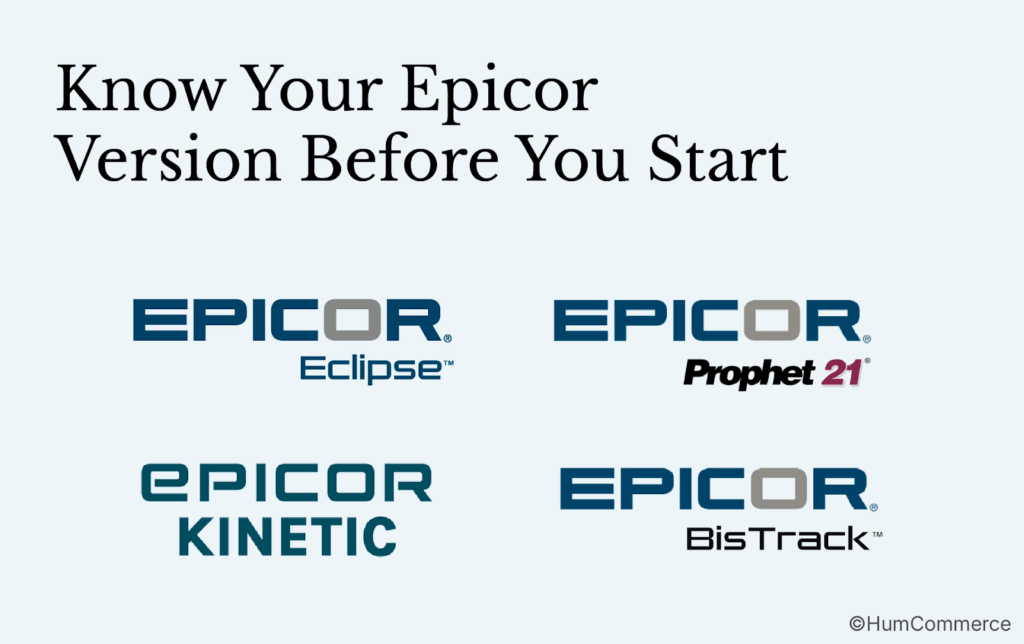
There isn’t just one Epicor product. It’s a group of products that have distinct architectures, API capabilities, and integration needs.
Prophet 21
Prophet 21 was made for selling in bulk. P21 is mostly used by distributors of HVAC, electrical, plumbing, and industrial products. It shows four different types of APIs:
- The v2 P21 API (REST): Doesn’t keep any state and works with most systems using a metadata approach.
- The Entity API: Has tightly typed business object models and REST endpoints that are right for the job.
- The Interactive API: Developers can use this to work with a Prophet 21 session that keeps track of its status.
- The Data Services API (OData): Lets the Data Services API read data safely.
One thing to know about P21 APIs is that they can cost a lot to set up, and third-party integrations usually don’t let you change them much. Some distributors say that P21 API support isn’t as good as it is on newer platforms. If you’re using the cloud version of P21, you can only read SQL, which makes some ways of integrating less effective.
Eclipse
Eclipse works with distributors of electrical, HVAC, plumbing, and PVF products. It takes care of sales, the supply chain, the warehouse, and finances automatically. Because Eclipse’s architecture is older than P21’s contemporary API layer, it usually needs more special programming to work with other systems.
Epicor Kinetic (previously Epicor ERP)
Kinetic is a cloud-first program with a modern user interface and RESTful APIs. It’s the Epicor family member that works best with other software. As a native solution for Kinetic users, Epicor offers Commerce Connect (ECC). Magento is the base for ECC, which works with Kinetic right out of the box. If you’re on Kinetic and don’t require a lot of customisation, ECC might be the easiest way to go.
BisTrack
Dealers of lumber and building products use BisTrack. It takes care of syncing job accounts and integrating quotes that are relevant to that vertical.
The Architecture: How Adobe Commerce and Epicor ERP Work Together
Now let’s get into more detail about how this integration works. Don’t worry, we’ll make things obvious without using too much technical language.
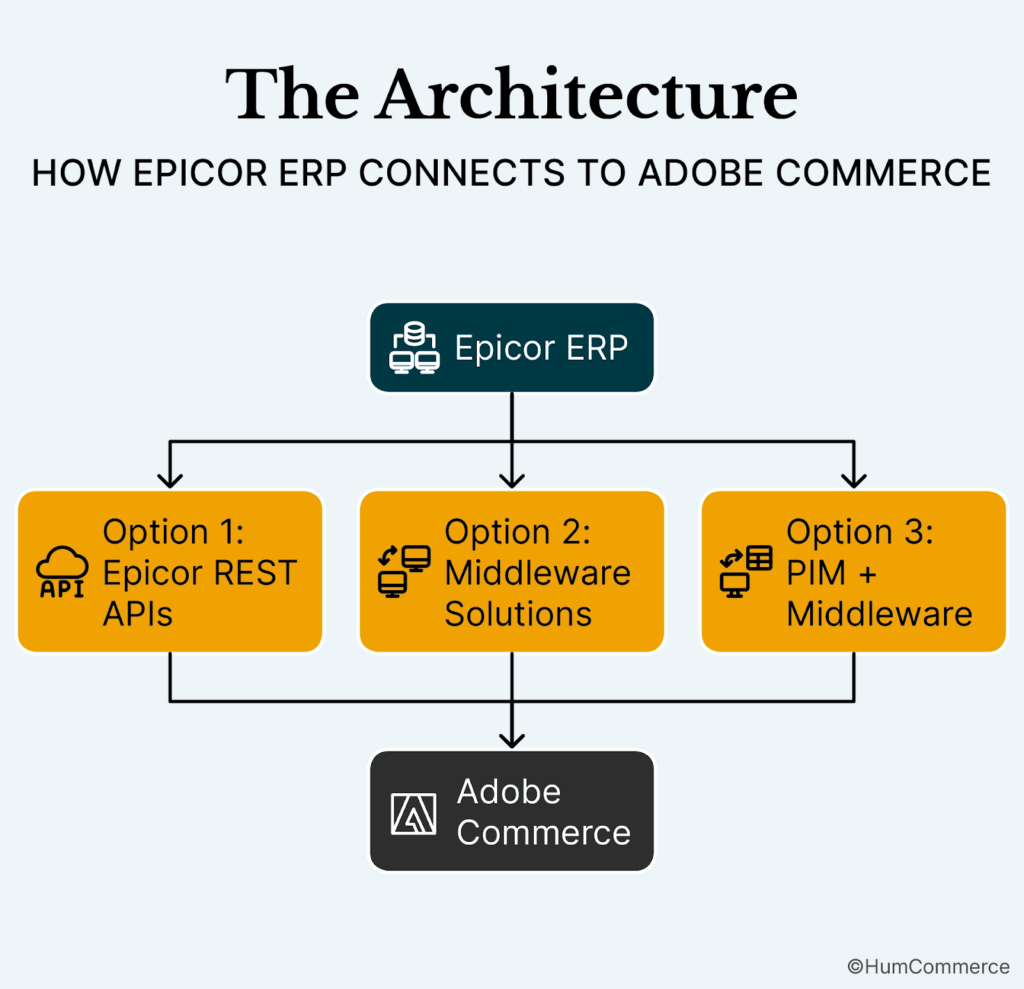
Option 1: Epicor REST APIs (Direct Integration)
If you have good IT support, this is the best choice. Epicor Prophet 21, Eclipse, and ERP 10 all have REST APIs that let Adobe Commerce send and receive data natively.
How It Works:
- Using REST API, Adobe Commerce delivers order information to Epicor.
- Epicor answers with real-time information about inventory, prices, and customer verification.
- Every 30 seconds, data goes in both directions.
Pros:
- Synchronization in real time (the fastest option)
- No fees for middleware
- Direct control over how data is mapped
Disadvantages:
- Needs dedicated IT resources
- More complicated ways to handle errors
- If your team changes, it may be harder to keep up with.
Best for: Distributors that have their own development teams and the capacity to keep the API up to date.
Option 2: Middleware Solutions (Celigo, Dell Boomi, MuleSoft)
Middleware is the thing that lets Epicor ERP and Adobe Commerce talk to each other. It takes care of the hard work of mapping data, fixing mistakes, and organizing things so your team doesn’t have to.
How It Works:
- Adobe Commerce delivers information about orders to middleware.
- Middleware changes the data so that it fits with Epicor’s format.
- Middleware sends data to Epicor using SOAP or REST APIs.
- When the inventory in Epicor changes, middleware sends those changes back to Adobe Commerce.
- If something goes wrong, middleware marks it for manual inspection or fixes it automatically if it’s set up to do so.
Some well-known middleware platforms are:
- Commercient SYNC: Made just for Epicor and eCommerce
- Celigo: An integration platform that is flexible and visual
- Dell Boomi: Works with complex workflows and is good for businesses
- MuleSoft: Owned by Salesforce, which has the best ecosystem.
Pros:
- Automatically changes complex data
- Pre-made connections for Epicor and Adobe Commerce
- Built-in error management and retry logic
- Your IT team doesn’t have to keep up with custom code.
Bad things:
- Monthly payments for subscriptions ($500 to $3,000 or more)
- A little bit of latency compared to direct APIs
- Vendor lock-in for your integration code
Best for: Distributors that want a third-party platform that is reliable and has support, but don’t want to have to keep developing it.
Option 3: Middleware with Product Information Management (PIM)
A PIM system (like Akeneo or Pimcore) is a must for distributors who have more than 100,000 SKUs to keep track of. The PIM is the only place where you can find product data, and middleware keeps everything in sync.
The Three-Layer Stack:
- Epicor ERP: Source of master inventory, pricing, supplier data
- PIM (Akeneo/Pimcore): The main place for product specifications, catalogs, photos, and SEO data.
- Adobe Commerce: A platform for selling on the front end.
- Middleware: Controls the flow of data between all three.
What This Makes Possible:
- Different product features for different types of customers
- Catalogs in more than one language that don’t have the same data twice
- Tracking compliance for companies that have rules (like pharmaceuticals and cars)
- Ability to handle millions of SKUs over several channels
What Actually Syncs And How
Let’s talk about what data moves across systems, how often it moves, and what occurs when anything goes wrong.
Data about inventory
- Direction: From Epicor to Adobe Commerce
- Frequency: Every 30 seconds for fast-moving SKUs and every hour for slow-moving goods
- Fields: Sync include the number of items available by warehouse, the number of items reserved (already assigned to orders), the time it takes to fill backorders, the safety stock thresholds, and the serial and lot numbers for industries that have a lot of rules to follow.
- Fallback Logic: If sync fails, Adobe Commerce should show “Call for Availability” instead of old data. This stops people from buying too much and makes sure customers know what to expect.
- Performance goal: A catalog with 100,000 SKUs should take less than 200 milliseconds to respond to a query. Customers notice lengthier wait times while checking availability if your queries take longer.
- Dependencies: Before inventory sync works right, you need to set up warehouse location data in Adobe Commerce.
Price Information
- Direction: Epicor to Adobe Commerce
- Frequency: Real-time search for customer-specific prices and hourly batch for list prices
- Fields: Base list prices by product and currency, customer-specific contract pricing, volume discount levels, promotional overrides, and regional adjustments are all fields that sync.
- How customer-specific pricing works: When a customer who is logged in looks at a product, Adobe Commerce asks Epicor for that customer’s individual price based on their contract, their volume history, and any active specials. You don’t have to look up the right pricing by hand; it shows up right away.
- What price does the customer see if pricing sync fails? Set up fallback behavior in a clear way. You can show the list price with a note that the contract price will be used at checkout, show “Request Quote” instead of a price, or put the order in a queue for manual price verification.
Information about customers
- Direction: Two-way (from Epicor to Adobe Commerce for current clients and from Adobe Commerce to Epicor for new registrations)
- Frequency: Real-time for new registrations and daily batch for profile updates are the two times it happens.
- Fields: Customer master data, credit limits and payment terms, current contracts and pricing tiers, delivery preferences and shipment addresses are all fields that sync.
- Dependencies: Orders can’t be processed until customer data is synced. If a new customer signs up for Adobe Commerce but hasn’t synchronized to Epicor yet, their order won’t be made in the ERP.
Data for Orders
- Direction: Adobe Commerce to Epicor
- Frequency: Right away (orders should show up in Epicor within 2–5 minutes of being sent)
- Fields: The fields that sync include the customer’s PO number, delivery address, billing address, line items (SKU, quantity, price), special requests (rapid delivery, special packaging), and payment information.
- What occurs next: An order is automatically made in Epicor. Inventory reserves against stock that is available. Fulfillment priorities are depending on how urgent the order is, how the client pays, and what tier the consumer is in. The warehouse gets the pick list in a few minutes. The shipping notification goes back to Adobe Commerce. The customer can see tracking information on their portal.
- Failure Reasons: The most typical reasons for failing to create an order include a missing tax code, an incorrect client reference, or an SKU that can’t be located. Your integration has to keep an eye on errors and send notifications, have a retry queue with exponential backoff (try again in 5 minutes, then 15 minutes, then 1 hour), and let customers know if their order fails.
Returns and credits
- Direction: Two-way
- How often: Real-time for making RMAs and daily for syncing credit memos
Fields: RMA numbers, return reason codes, credit amounts, and restocking status are all fields that sync.
Problems that happen a lot and how to fix them
Every time you connect Epicor to Adobe Commerce, you run into the same problems. Here’s what goes wrong and how to fix it.
Problem 1: It takes longer than expected to map the data.
The Issue:
- Epicor calls it “Bill-to Party ID,” whereas Adobe Commerce calls it “Customer Account Number.”
- Different date formats are used (MM/DD/YYYY and YYYY-MM-DD).
- Unit of measure codes don’t match across systems
- There are problems with tax jurisdiction mappings.
- Wrong mapping leads to silent order failures or faults that are hard to understand.
The Answer:
- Before starting the implementation, develop a complete data mapping paper.
- Get both an Epicor expert and an Adobe Commerce expert to look at it.
- Before going live, test mapping with at least 100 sample orders.
- Make an error log for building that shows which field caused the mismatch.
- Plan to spend weeks 3 and 4 just on mapping work.
Check the facts: Most solutions don’t give enough time for mapping, by 50%. It takes more time to set up bespoke Epicor fields and complicated pricing rules.
Problem 2: Real-time sync slows down performance
The Problem:
- Real-time syncing of every product field, SKU variation, and pricing tier makes API calls go up.
- Times for responses becoming longer.
- Costs of integration go up
- Users have to wait instead of seeing improvements
The Answer:
- Sync only the most important information in real time: stock levels, prices for each customer, and order status.
- Update secondary data (descriptions, images, specs) hourly or daily batch
- Use caching wisely so you don’t have to keep asking Epicor the same question.
- Use webhook-based updates instead of polling all the time.
- Scheduled polling is less efficient than webhooks.
Problem 3: People Don’t Notice When Orders Fail
The Problem:
- Order comes at 2 AM on Sunday, but it doesn’t go through since it doesn’t have the right tax code.
- No one notices until Monday morning.
- Customer waits more than 18 hours for confirmation.
- Silent failures make customers lose faith.
The Stack of Solutions:
- Error Monitoring: Use Sentry, Rollbar, or Datadog to get alerts in real time
- Retry Queue: Use RabbitMQ or AWS SQS with exponential backoff (5 minutes, 15 minutes, and 1 hour).
- Dashboard: Grafana shows unsuccessful orders by reason, such as an invalid SKU, a missing tax code, or a credit hold.
- Automated email: “We got your order, but we need to check the details.” “Expect confirmation in two hours”
- Success Metric: Less than 0.5% of orders fail, and 95% of failures are fixed automatically within 15 minutes.
Problem 4: Selling too much inventory
The Problem:
- Last 50 items in stock at 3 PM
- At 3:00 PM, Customer A places an order on the webstore.
- At 3:01 PM, customer B places an order with a sales agent.
- Both orders are confirmed.
- Both customers want their packages to arrive.
- You are missing 50 units.
The Answer:
- Instead of just checking to see if something is available, use inventory reservations (locks).
- Set a reservation timeout: if the order isn’t confirmed in Epicor within 10 minutes, hold the releases.
- Set up a safety stock buffer by keeping 2–3% of your inventory unreserved.
- Make the backorder procedure clear
- At checkout, let customers know when they can anticipate their backorders to arrive.
Problem 5: Performance Gets Worse When Under Load
The Problem:
- Integration works well with ten orders an hour.
- During a promotion, traffic goes up to 100 orders per hour.
- Integration is starting to time out.
- Customers see screens that are stuck
- The number of abandoned carts goes up.
The Answer:
- Plan for at least ten times your present peak demand.
- Use asynchronous processing so that customers don’t have to wait for Epicor to get back to them.
- Use caching and a CDN to store product and price information.
- Set up load balancing between several API instances
- Check the depths of the queues to find load problems early.
The Realistic Timeline for Implementation
Most providers say that it will take 90 days to connect Epicor to Adobe Commerce. The truth is that it will take 12 to 16 weeks, therefore you should add 20% more time for problems that come up.
Phase 1: Finding out and making plans (Weeks 1–2)
Look over your present Epicor setup. Which version: Prophet 21, Eclipse, or Kinetic? What is the exact release number? What kinds of custom changes are there? What integrations are already in place?
Write down how data flows and how things are done by hand right now. Where does data become stuck? Where do individuals put information back in? What are some ways to get around this?
Make a list of people from IT, operations, sales, and finance who are involved. Everyone who works with the data needs to know what is needed.
Deliverables include a current state diagram, a gap analysis, a scope document that explains what the integration will and won’t perform, and the chosen integration approach.
Step 2: Technical Setup (Weeks 3–6)
Set up Adobe Commerce B2B framework with custom attributes that fit your business. Set up authentication and access to the Epicor API. Make data mapping in your middleware or own code. Make test environments that are just like the real thing.
This step usually takes longer than expected. More mapping is needed than predicted because of the complicated pricing rules. You have to treat custom Epicor fields differently. There are edge cases that weren’t in the original plan.
Criteria for success: 95% or more of test orders go through without any manual help.
Phase 3: Start the Pilot (Weeks 7–10)
Go live with one group of clients, usually your top 10 customers who can give you feedback. Keep a watchful eye out for mistakes, slowdowns, and strange behavior. Get input from the sales and warehouse teams.
During this phase, you’ll find edge problems you didn’t expect, such overseas orders that handle taxes differently, backorder logic that doesn’t follow your business rules, and credit hold routines that need manual intervention.
Once the first problems are fixed, expand the pilot to 25% of your customers.
Phase 4: Full Rollout (Weeks 11–16)
Give it to 50% of customers, then 75%, and finally 100%. Allow customers to get quotes on their own, automatically route orders, place large orders, and see inventory levels in real time.
The last several weeks are all about optimization: adjusting sync intervals, adding advanced error handling, and setting up reporting and analytics.
What Goes Wrong Most of the Time
- Weeks 3–4: It takes twice as long as planned to map the data because of complicated pricing rules and bespoke Epicor columns.
- Weeks 5–6: The pilot shows edge scenarios that no one wrote down. You need to handle international orders, backorder logic, and credit hold procedures in a specific way.
- Weeks 7–10: People start to oppose change management. The sales crew doesn’t believe in automatic pricing. The warehouse team likes how they used to do things. The training is taking longer than expected.
Add 20% extra time. Not 12 weeks, but 14 to 16 weeks for most projects.
Things to think about for security and compliance
Your integration moves order details, customer data, and pricing information from one system to another. Safety is important.
- Moving Data: All API calls between Adobe Commerce, middleware, and Epicor should be encrypted with TLS 1.2 or above. Check to see if your middleware platform meets the latest encryption standards. Using FTP or unencrypted connections with older integration methods puts you at danger of not being compliant.
- Authentication for APIs: Prophet 21’s APIs support both OAuth 2.0 and API key authentication. If you can, utilize OAuth 2.0 because it is more secure and lets you refresh tokens. Don’t put API credentials in code or configuration files. Instead, save them in safe vaults.
- What PCI DSS Means: If your integration handles payment information like credit card numbers and payment tokens, it falls under PCI DSS. Most integrations get around this by doing all of the payment processing in Adobe Commerce and only sending the order totals to Epicor. Check your payment flow before you go online.
- Keeping Customer Data Safe: Your integration must allow data subject access requests if you do business in California (CCPA) or Europe (GDPR). Can you find all of a customer’s info in both systems? Can you delete it if someone asks you to? Write out how your data travels for legal reasons.
When to Look at Other Options
Epicor and Adobe Commerce work well together for industrial distribution, but there are other options as well.
- Epicor + Shopify Plus: It’s easier to set up, but it’s not as flexible. Shopify Plus doesn’t have some of the B2B features that Adobe Commerce has right away, like complicated pricing rules, purchase order procedures, and requisition lists. Shopify Plus may be enough for your B2B needs if they are simple and you don’t want to spend a lot of money.
- NetSuite + Adobe Commerce: Because NetSuite is cloud-native and has current APIs, NetSuite plus Adobe Commerce makes for a more unified platform. If you’re thinking about switching ERPs anyway, NetSuite might make integration easier than prior versions of Epicor.
- SAP Business One + Adobe Commerce: A good fit for businesses with more complicated needs that are larger. If you need more financial management or Epicor isn’t meeting your needs anymore, you should look into SAP Business One.
- Epicor Commerce Connect (ECC): Epicor Kinetic users can use ECC as their first choice. If you use Kinetic and don’t need to make a lot of changes to Adobe Commerce, ECC might be the easiest way for you to go because it is built on Magento and is already integrated.
Your Epicor ERP + Adobe Commerce Integration Experts: Partner with HumCommerce
For more than 10 years, HumCommerce has been working on making Epicor ERP and Adobe Commerce work better together for industrial distributors. We know how hard it is to handle complicated catalogs, large orders, changing prices, and fulfilling orders from multiple warehouses.
Our B2B eCommerce solutions for industrial supply do more than just basic integration. We create full ecosystems that change the way your team works:
Architecture that is ready for compliance makes sure that the pharmaceutical, automotive, and construction industries follow the rules.
Real-time inventory visibility across several warehouses stops stockouts and overselling.
Automated CPQ workflows cut quote cycles down from days to hours.
Self-healing data pipelines cut down on manual reconciliation by 88%.
Partner with HumCommerce: Your Epicor ERP + Adobe Commerce Integration Experts
HumCommerce has spent 10+ years perfecting Epicor ERP and Adobe Commerce integrations for industrial distributors. We understand the unique pain points of managing complex catalogs, bulk orders, dynamic pricing, and multi-warehouse fulfillment.
Our B2B eCommerce solutions for industrial supply go beyond basic integration. We build complete ecosystems that transform how your team operates:
- Real-time inventory visibility across multiple warehouses eliminates stockouts and overselling
- Automated CPQ workflows compress quote cycles from days to hours
- Self-healing data pipelines reduce manual reconciliation by 88%
- Compliance-ready architecture ensures regulatory adherence for pharma, automotive, and construction sectors
Next Steps: Begin Your Integration Now
If you run an industrial distribution business with Epicor ERP and Adobe Commerce (or are thinking about it), you already know how frustrating it is when systems don’t talk to each other.
It’s not a question of whether to integrate. When it is.
What you should do next is:
- Check your current Epicor setup
- Find the three biggest problems with your integration
- Get a personalized plan with a timeline and cost estimates
- No sales pitch, just honest advice on what will help your business.







