
Key Takeaways:
- Not just hiring more people will speed up e-commerce order fulfillment. You need a clear process and the right technology.
- You can find and fix problems like batch processing, handoffs, and manual tasks by mapping out and improving each step of the ecommerce order fulfillment process.
- Start small by digitizing pick lists, automating label creation, and keeping your warehouse and sales channels connected so that things move quickly and accurately.
- By adding real-time inventory checks, automatic tracking updates, and standardized staff training, you can make the order fulfillment process better.
- For B2B brands that want scalable, reliable order fulfillment, it’s important to measure things all the time, train your team, and be able to change your process.
Have you ever waited at baggage claim and watched all the other bags go around the belt while yours was nowhere to be found?
When you take too long to fill an order in e-commerce, your customers feel the same way: confused, impatient, and like someone, somewhere, must have dropped the ball. In a market where Amazon-level speed is the norm, being able to fulfill orders faster can make you the hero of your customer’s story.
That frustration isn’t just for customers; it also affects the operations and warehouse teams when an order is stuck in limbo. HumCommerce has been solving these problems for B2B brands for years, and they’ve seen how much better tech-driven, connected e-commerce order fulfillment makes things. When delays go away, everyone from the warehouse crew to the CFO feels better, and customers come back for more.
This blog will tell you what really slows down the process of fulfilling ecommerce orders, what you can do right now to speed things up, and how smart automation can make every order a win.
What is the process for fulfilling an order in eCommerce?
The e-commerce order fulfillment process is pretty simple at a high level:
- Order placement: The customer places an order, which may include customizations or purchase orders in the B2B world.
- Processing: Your system checks the stock, makes sure the payment is valid, and starts internal workflows.
- Picking: The warehouse team takes things off the shelves (which is hard in B2B because orders can be big or have a lot of SKUs).
- Packing: Orders are put together, checked for accuracy, and packed up safely, often to strict specifications.
- Shipping: You print labels, choose a carrier, and keep an eye on the package as it leaves (sometimes to different docks for wholesale or scheduled pickups).
- Delivery and Returns: Customers get their orders, but B2B customers may also want scheduled drop-offs, confirmation of delivery, or easier returns and restocking.
The pain for most B2B brands comes from bigger, more complicated orders, changes made at the last minute, and higher customer expectations. Every time, your e-commerce order fulfillment process steps have to be perfect.
Why does traditional fulfillment make your online store slower?
Most of the problems with fulfilling e-commerce orders are easy to see:
- Steps by hand: It takes a long time and is prone to mistakes to enter data in batches, pick slips by hand, or re-key order data between your store, ERP, or 3PLs.
- Delays in communication: If your teams (or 3PLs) can’t see real-time updates, they might miss things or do them twice.
- There is no one source of truth: If inventory isn’t updated in real time, you might sell too much, have backorders, or make shipping mistakes.
- Costs that aren’t obvious: Every little mistake leads to bigger problems, like giving refunds, speeding up reships, working extra hours, and getting complaints from customers.
When fulfillment takes too long, the real costs go beyond just late delivery. Costs go up, staff feel more pressure, and clients lose trust.
That’s why the best way to protect your reputation and your bottom line is to make the eCommerce order fulfillment process better.
How can you make your eCommerce order fulfillment process better?
1. Check Your Process
Get one week’s worth of real orders and do everything that needs to be done. Where are things moving slowly? Is it waiting for someone to print pick lists, or does tracking information get lost when you switch platforms? Be honest: pain points show you where you can improve.
2. Find the Bottlenecks
The usual suspects are batch order processing, slow handoffs between systems or teams, and manual tracking. Each one adds minutes (or even hours) to the time it takes to fill an order and makes mistakes that could have been avoided. When you see the flow on a map, problems often become clear.
3. Make Picking and Packing Easier
Use digital pick lists instead of paper ones, scan barcodes, and organize your warehouse so that workers don’t have to go back and forth for every item. Grouping orders by destination or bulk type can save a lot of time and effort for B2B.
4. Make order routing automatic
Make rules in your software so that orders automatically go to the right team or warehouse based on the type of product, the type of customer, or the location. Add exception controls for orders that are more important or have special needs. No more “Who’s in charge of this?” confusion.
5. Automating shipping
Make labels automatically, check addresses before packages leave, and compare real-time rates from different shipping companies. For volume, batch shipping is a must: print dozens of labels at once, not just one at a time. This gets rid of mistakes made by people and lets your team work ahead instead of catching up.
6. Keep Customers Up to Date
Set up automatic emails or text messages for each step: order received, shipped, and out for delivery. Proactive notifications are better than worried “Where’s my order?” messages because they show you’re in charge.
7. Teach your employees and make standard operating procedures a part of your culture.
With clear, up-to-date SOPs (standard operating procedures), anyone can step in if someone else is out. Train your staff to do more than one job so that fulfillment doesn’t depend on one person’s availability. Promote a culture where problems are brought up and solved, not hidden or passed on.
The Role of Technology & Automation
Connecting your systems by speeding up the processing of e-commerce orders can help make sure that nothing gets missed.
APIs and integrations are useful because they let your 3PL partners, Magento, and your ERP “talk” to each other. That way, orders automatically go from “placed” to “picked” to “shipped” without anyone having to type or move data by hand.
With integrated dashboards, you can see everything from the warehouse floor to the finance team. You can see real-time status, inventory, and shipping information all in one place. No more wondering what’s missing or late.
The most important automations are:
- Syncing orders right away from your store to the warehouse
- Automatic checks of your stock and alerts before you sell too much
- Smart shipping that chooses the best carrier, makes labels, and updates tracking with just one click
Things to avoid and how to fix them
Going too fast into automation without a good plan
What is it?
A lot of teams try to automate every part of the e-commerce order fulfillment process at the same time, which makes things more complicated before the basics are working well.
How to fix it:
Start with a simple, tried-and-true core workflow, like automating the printing of labels or syncing orders. Build one layer at a time once each step works with only a few problems. Taking things slowly and steadily lets you find and fix problems before they get worse.
Not keeping in touch with customers regularly
What is it?
Because you’re so focused on the backend fulfillment, you forget to send proactive order and tracking notifications, which leaves customers in the dark.
How to fix it:
Set up automatic updates for customers at every important step, such as when their order is received, shipped, out for delivery, and delivered. Use email and text messages to keep customers up to date so they don’t have to call you all the time to ask, “Where’s my order?”
Not combining returns with the fulfillment process
What is it?
When you treat returns as a separate (or manual) workflow, it leads to delays in refunds and inventory mismatches, which annoy both customers and staff.
How to fix it:
Use the same rules for returns as you do for sending out orders. Make returns labels automatically, add items to your inventory as soon as they come back, and make refunds quick and clear.
Scalability Problems: Outgrowing Your Infrastructure
What is it?
A fulfillment system or automation platform might work when there aren’t many orders, but it starts to break down when there are more orders, new sales channels, or B2B complexity.
How to fix it:
Choose tools and workflows that are made for growth. Look for systems with strong APIs, easy integrations, and the ability to handle spikes or growth into new warehouses. Use real test orders to try out new processes and find out where your capacity limits are before they hurt customers.
Step-by-Step Action Plan to Improve eCommerce Order Fulfillment
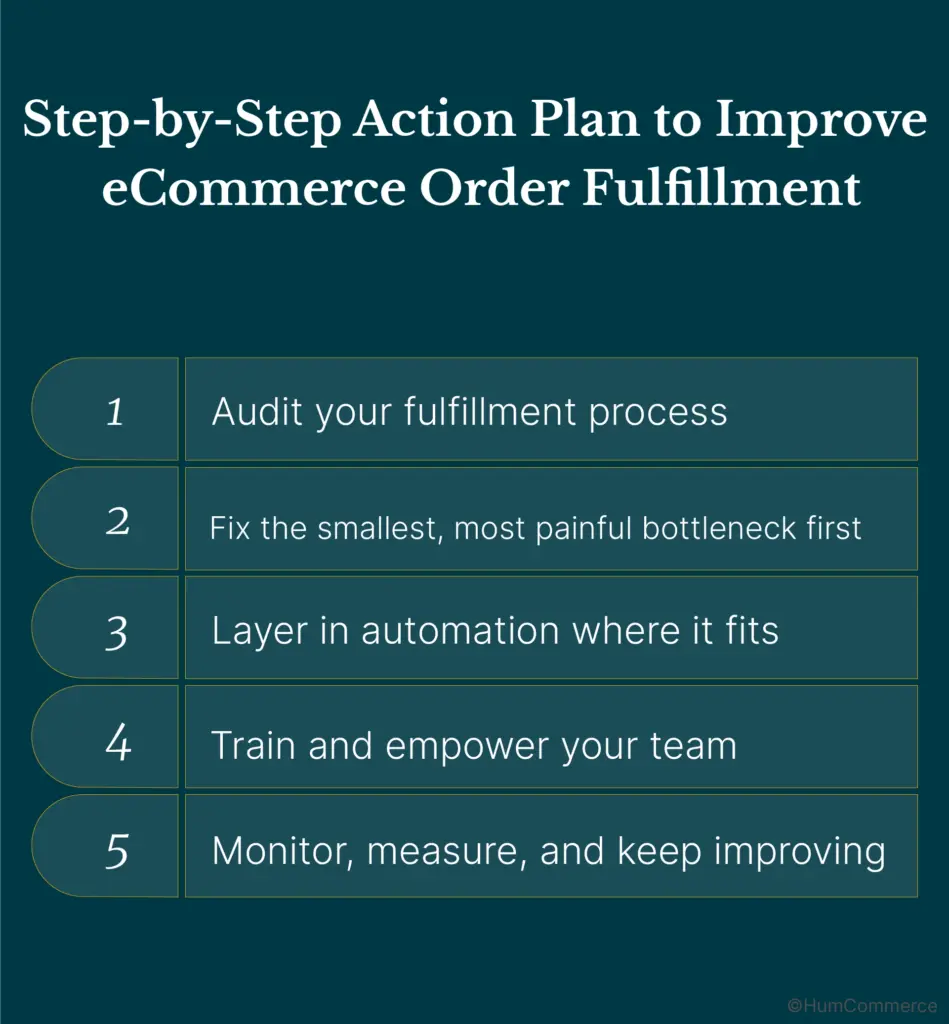
- Check Your Fulfillment Process: Follow orders from the time they are placed until they are delivered (and returns if possible). Write down every step, handoff, and place where team members get stuck or have to wait. Ask your fulfillment and customer service teams what slows them down the most. These are the things that need to be fixed right away.
- Start by fixing the smallest, most annoying bottleneck: Find the one change that would save the most time, like switching from printing labels by hand to printing them in batches. Start there, get a quick win, and use that to make other changes happen. When your team sees the benefit in action, they are much more likely to buy in.
- Add automation where it makes sense: Automate data transfer: send orders from your website to your WMS or ERP without having to copy and paste. Set up rules for split fulfillment, express orders, or picking items from a warehouse based on where they are located. To save a lot of time (and avoid making mistakes by hand) as your order volume goes up, try automatic shipping label creation, inventory alerts, and bulk tracking updates.
- Give your team the training and power they need: Make simple, clear SOPs for new technology and set up automatic reminders for process checkpoints. Teach your employees how to fix simple problems so they don’t have to rely on one “expert” to do it. Cross-train to be more flexible. Have a backup for every step so that things keep running smoothly when you’re busy or not there.
- Keep an eye on things, measure them, and keep making them better: Make dashboards to track fulfillment times, error rates, exceptions, and customer support escalations. Set up short, regular meetings to talk about problems and decide what changes to make next. Celebrate wins by telling stories whenever a team member finds and fixes a new problem.
Final Thoughts
Speeding up the process of filling e-commerce orders makes it more efficient, automating where it matters, and letting your team focus on what really matters. Better fulfillment means fewer mistakes, happier customers, and a team that feels in charge instead of overwhelmed.
That’s where HumCommerce comes in.
Every week, we help businesses like yours make their ecommerce order fulfillment process more efficient, starting with an honest workflow audit and ending with tech recommendations that work with your specific stack. We want to turn every problem into a chance for growth so that your business gets smarter, easier, and more scalable, one step at a time.
Contact HumCommerce if you want to talk to someone who can help you figure out what’s holding you back or if you just want a free consultation. We’re here to help you stop guessing and start moving quickly, with confidence and clarity.
You and your future customers will be grateful.