
Key Takeaways
- On many B2B sites, 30–40% of searches still return zero results, and buyers quietly assume you do not carry what they need even when the right product is in your catalog.
- AI search that understands intent, fixes “no results,” and powers smarter recommendations typically delivers a 10–15% search‑conversion lift and higher AOV when paired with clean product data.
- This guide shows the 7‑metric audit, the CFO formula, and a 16–24 week roadmap that ECommerce leaders can actually execute.
An HVAC parts distributor received a search query last Thursday: “oversized ductwork warehouse job 6-inch custom.” Their legacy keyword search returned 140 results, mostly irrelevant. The buyer, a mechanical contractor racing a project deadline, gave up and left within 40 seconds. That single failed search cost them a 12,000‑dollar order.
Last month, 312 searches ended the same way. Extrapolated over a year, that’s roughly 3.7M dollars in at‑risk pipeline not from bad pricing or weak products, but from a search bar that can’t understand what buyers mean.
This is what “search” really is in B2B ecommerce: not a UX feature, but a hidden revenue tax.
Your Search Bar Is Quietly Taxing Your Revenue
38% of B2B searches return zero results on legacy keyword systems. When buyers can’t find what they need, they call your competitor, email a sales rep (adding friction), or abandon the site.
The math is brutal. If your site sees 80,000 monthly search visitors with a baseline conversion rate of 2.8% and an average order value of $520, every percentage point of conversion lift is worth $116,000 annually.
AI-powered search and recommendation engines are delivering 10–15% conversion lifts by doing three things legacy systems can’t:
- Understanding buyer intent, not just matching keywords
- Surfacing the right products faster, even when queries are incomplete or jargon-heavy
- Suggesting complementary SKUs buyers didn’t know to look for
Industrial distributors leveraging AI-powered search and recommendation tools are transforming B2B e-commerce by significantly enhancing user experience, resulting in a 12% boost in search traffic conversion, 18% higher average order values (AOV) via smart add-ons, and a 35% reduction in zero-result searches.
Why B2B Search Is Harder Than Amazon
B2B buyers don’t search like consumers. They search like engineers and contractors who already know exactly what they want. Four structural realities break keyword‑only search.
- Technical terminology chaos
Buyers use industry jargon (“MRO supplies”), part numbers, spec‑based queries (“208V 3‑phase motor”), and competitor cross‑references. If your catalog doesn’t contain the exact string they type, keyword search shrugs, even when you have the perfect item. - Incomplete queries
A buyer might type “hydraulic fitting 1/4” and omit thread type, pressure rating, or material. Traditional engines either dump hundreds of results or none at all. AI search can infer likely attributes from what’s given and the rest of their behavior. - Synonym hell
One product, many names: fastener = bolt = screw = hardware. Without systematic synonym and alias mapping, a large share of relevant SKUs never make it onto the results page. - Context dependence
“Valve” means something different to a plumbing contractor, a chemical plant engineer, and an HVAC tech. Generic engines treat all “valve” queries alike. AI engines that know who is searching and what they’ve viewed can rank very different products for each segment.
If your search stack doesn’t handle these four realities, no amount of front‑end polish will fix conversion.
Data Quality Determines Your AI Ceiling
AI search is not a magic overlay; it’s a force multiplier on your catalog quality.
To work, it needs:
- A consistent product taxonomy (categories and subcategories that make sense).
- Structured attributes (dimensions, materials, voltages, certifications).
- Synonym mapping for terms, abbreviations, and manufacturer equivalents.
- Clean entitlement and pricing rules (who can see what, at what price).
In most large B2B catalogs, we see 60–80% “readiness”: plenty of data, but with gaps, inconsistent attributes, or legacy categories that confuse both buyers and models. It usually takes 4–8 weeks of focused cleanup, often with PIM and AI enrichment tools, to get the data to a point where AI search can show its full value.
Skipping this step is the fastest way to pay for AI and never see the promised lift.
The Three AI Technologies That Power B2B Search
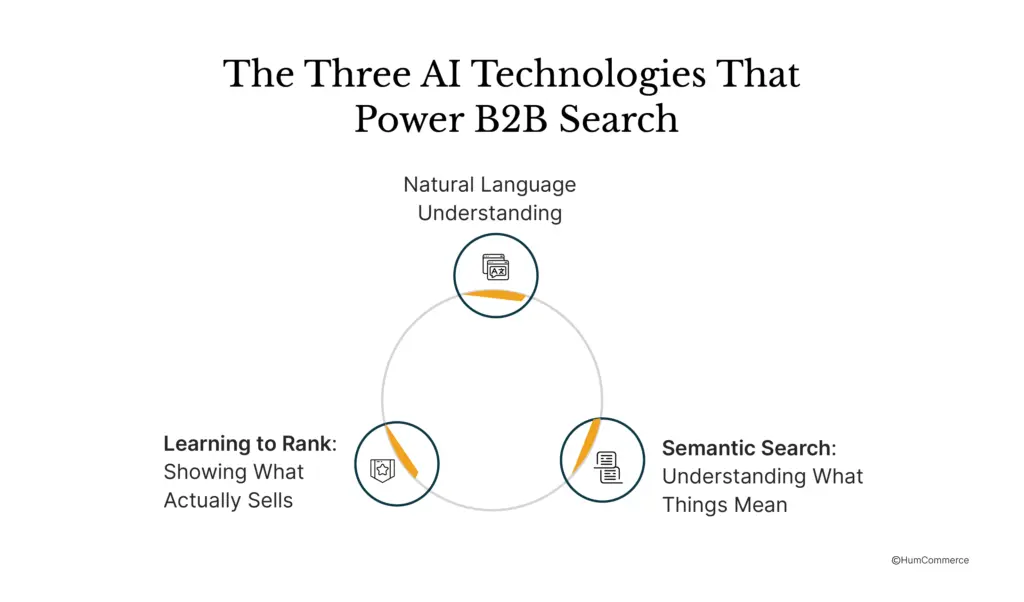
Natural Language Understanding
When a buyer types “stainless six inch schedule forty elbow,” they are using their own shorthand. Your catalog might list it as “SS Sch 40 6 inch 90-degree elbow” or something slightly different. A search engine that only matches exact words will fail.
Natural Language Understanding takes that messy query and breaks it down into its meaningful pieces: material (stainless steel), size (six inches), specification (schedule forty), and product type (elbow fitting). Instead of hunting for those exact words in your title, the engine searches for products that have all four of those attributes, regardless of how you have written them in your catalog.
Semantic Search: Understanding What Things Mean
Semantic search goes a step further. It uses a technique called vector embeddings to understand not just what words mean, but what concepts they represent. If someone searches for “SS pipe connector” and you sell something called a “stainless steel fitting,” semantic search understands that those are conceptually similar and can connect buyer intent to your product, even though the exact words differ.
Learning to Rank: Showing What Actually Sells
Ranking is everything in search. The top three results capture about seventy percent of clicks. A machine learning approach called Learning to Rank watches which products buyers actually click on and purchase after seeing search results, then learns patterns. It discovers things like, “When someone from Contractor Segment A searches for this type of product, item X converts three times better than item Y, so we should show X first.” Over time, your most profitable and most relevant products naturally rise to the top, with no manual tweaking.
Recommendation Engines: Beyond Simple “People Also Bought”
Getting someone to find a product is one thing. Helping them discover related items they need is another.
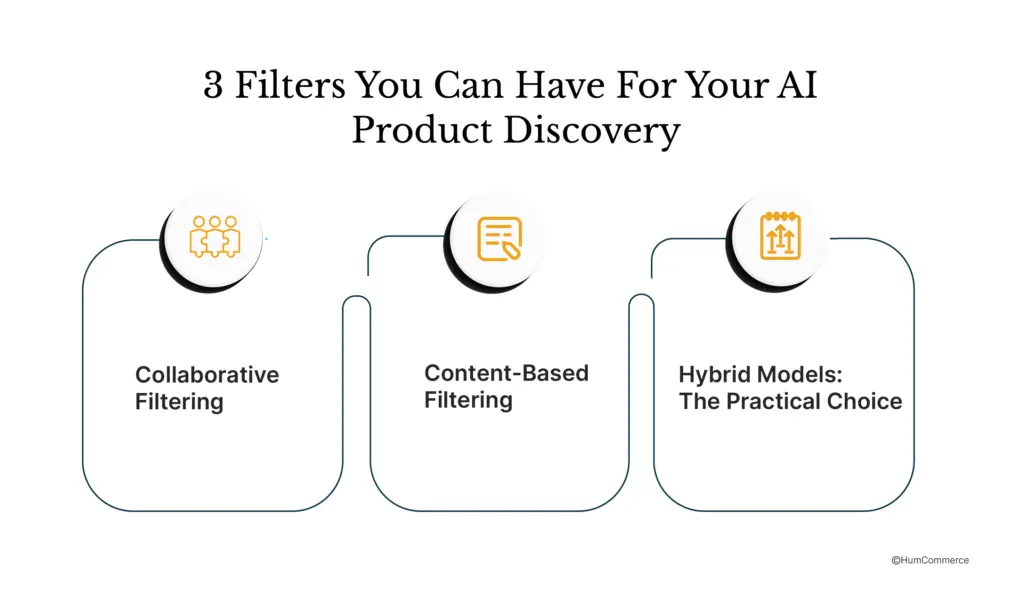
Collaborative Filtering
This is the traditional “customers who bought X also bought Y” approach. The system watches what gets ordered together and finds patterns. It works beautifully for your high-volume, fast-moving SKUs where you have lots of purchase history. The downside is that new products or slow movers do not have enough history to generate good recommendations.
Content-Based Filtering
This approach matches products based on their attributes and technical specs. If someone buys a specific pump, the system recommends compatible filters or seals based on product specifications and relationships in your catalog. It works great for finding substitutes or alternatives and handles new SKUs much better. The trade-off is that it sometimes misses the non-obvious pairings that pure purchase behavior would catch.
Hybrid Models: The Practical Choice
Most B2B operations use a blend. You let collaborative filtering handle your bread-and-butter items where you have lots of data. You use attribute-based matching for the long tail and new products. You layer in business rules to avoid suggesting incompatible or non-compliant items. This combination covers most of your catalog intelligently without over-engineering.
Affinity Analysis: Finding Hidden Cross‑Sell Opportunities
Affinity analysis looks for products that are bought together more often than randomness would predict. The patterns can be surprising:
- Project bundles: e.g., drywall + compound + screws + tape.
- Replacement cycles: oil today, filters six months later.
- Segment‑specific combos: contractors versus facility managers buying different add‑ons for the same core item.
Once you understand these affinities, you can design better “complete the job” bundles, pre‑build carts for common projects, and feed recommendation models with rules that mirror what happens in the field.
Pre-Computed vs. Real-Time: When to Use Each
You don’t have to go “full real‑time AI” everywhere on day one.
- Batch pre‑computed
- Generate “frequently bought together” lists and recommendations nightly or weekly.
- Cache them and serve instantly on product pages, in category views, and in email.
- Cheap, fast, and scales well across large catalogs.
- Limitation: not tailored to the current session or cart.
- Real‑time personalization
- Calculate recommendations based on what the buyer has viewed, searched, and added to cart in this session plus their historical orders.
- Ideal for high‑stakes moments like checkout, RFQ builders, and pricing pages.
- Higher compute cost and more complex integration, but higher impact.
Smart teams combine both: pre‑computed recommendations for most pages, real‑time logic for the few moments where an extra increment of relevance translates directly into larger orders.
Proving the 10–15% Lift: The CFO Formula
You can’t take “AI will lift conversions” to a CFO. You can take math.
Baseline
- Monthly visitors using search: 80,000.
- Baseline search‑to‑order conversion: 2.8% (2,240 orders).
- AOV: 520 dollars.
Baseline monthly revenue from search:
- 2,240 × 520 ≈ 1,164,800 dollars.
After AI Search and Recommendations
Model a 10–12% relative lift in search conversion (a realistic range for well‑executed programs, with many case studies reporting 10–15% and sometimes higher).
- New conversion: ~3.1–3.2%.
- Orders: ~2,480–2,560 per month.
- Monthly revenue: roughly 1.29–1.33M dollars.
Incremental monthly revenue: ~130–170K dollars.
Annualized: around 1.5–2.0M dollars.
That’s before accounting for AOV gains from better recommendations (often another 10–20% lift on search-driven baskets).
Typical Costs
- AI search/recommendation platform: ~50–150K dollars per year.
- Implementation (data cleanup, integration, tuning): ~75–150K one‑time.
- Ongoing: roughly 0.25 FTE for monitoring, merchandising rules, and experiments.
Payback: usually 3–9 months for mid‑market B2B distributors and manufacturers, depending on traffic and baseline performance.
A 16–24 Week Roadmap You Can Actually Execute
The right rollout depends on your catalog size and data maturity. Here’s a practical three‑phase plan.
Phase 1 (Weeks 1–8): Fix the Basics and Deploy Semantic Search
Best fit: 10K–50K SKU catalogs.
Focus:
- Run a 7‑metric search audit: zero‑result rate, search‑to‑conversion, abandonment, query refinement, recommendation CTR, AOV by search vs browse, and time‑to‑product.
- Map and implement synonym/alias lists for your top 500 terms (brand names, abbreviations, part families).
- Integrate an AI semantic search engine and switch search traffic gradually via A/B tests.
- Launch batch, pre‑computed recommendations on key product pages.
Expected impact: 8–12% lift in search conversion and a sharp drop in zero‑result searches once semantic search and synonyms are live.
Phase 2 (Weeks 8–16): Scale with Better Data and Hybrid Recommendations
Best fit: 50K–200K SKU catalogs.
Focus:
- Integrate your PIM and ERP more deeply so search and recommendations “see” attributes, stock, and pricing in a structured way.
- Use AI enrichment to normalize attributes (“6 inch” vs “6″”), fill missing fields where safe, and standardize taxonomy.
- Deploy hybrid recommendation models (collaborative + content‑based) for cross‑sell and substitutes.
- Introduce segment‑aware ranking, contractors vs OEMs vs MRO buyers see what’s most relevant for them.
Expected impact: 12–18% search‑conversion lift plus 15–20% higher AOV on sessions that engage with recommendations.
Phase 3 (Weeks 16–24): Real‑Time Personalization and Predictive Flows
Best fit: 200K–500K+ SKU catalogs.
Focus:
- Add session‑based ranking that adapts results as buyers click, filter, and add items.
- Turn on cart‑aware recommendations at checkout and in RFQ builders.
- Layer in predictive replenishment suggestions based on order history and replacement cycles.
Expected impact: 15–20% lift in search‑driven conversion and 20–25% AOV lift on high‑intent journeys, particularly in repeat buying and contract accounts.
Typical resourcing: one product owner, one technical resource familiar with your commerce/PIM stack, part‑time data support; ongoing optimization demands about 0.25 FTE.
Failure Modes to Avoid
A few patterns show up again and again in stalled AI search projects.
- Treating AI as a plug‑in
- Teams install a new engine without a search audit or data cleanup. Result: the UI changes, numbers don’t. Start with baselines and prerequisites.
- Underestimating integration work
- If AI search can’t reliably see your PIM attributes, ERP inventory, and pricing rules, it will rank and recommend blindly. Map PIM → ERP → search flows before you implement.
- Ignoring mobile and multi‑language behavior
- Many B2B buyers search from job sites on phones, using short, messy queries and sometimes non‑English terms. Your synonym mapping and semantic strategies need to account for mobile and key languages in your markets.
- Ranking for clicks instead of contribution margin
- If you only optimize for clickthrough, you may highlight SKUs that sell but erode margin. Successful teams factor margin and return rates into ranking.
- No clear owner
- Search and recommendations straddle marketing, product, and IT. If no one owns KPIs and review cadence, improvements stall. Assign a cross‑functional squad and review the 7 metrics monthly.
What’s Next: AI Agents, Zero‑Click, and Multimodal Discovery
AI search is changing how B2B buyers start their journey. Increasingly:
- Buyers ask AI assistants to shortlist compatible products and vendors before they ever hit your site.
- “Zero‑click” answers (recommended products inside AI tools or SERPs) mean your product data needs to be structured and rich enough to be pulled into those experiences.
- Multimodal discovery, photo‑based part lookup, voice queries from the field, document uploads (spec sheets, BOMs), will matter more as catalogs and self‑serve usage grow.
Getting search, recommendations, and data enrichment right today is how you stay visible in that world.
From Search Box to Revenue Engine
AI search and recommendations are not just a UX upgrade. For industrial distributors and manufacturers with 10K–500K+ SKU catalogs, they are often a 7‑figure revenue lever.
The lift comes from three moves:
- Reducing zero‑result searches and abandonment.
- Shortening the path from query to the right product.
- Increasing AOV through smarter cross‑sell and substitutes.
The limiting factor is almost never the AI. It is your product data, integration discipline, and willingness to measure what matters and iterate.
What you can do this week:
- Run a lightweight 7‑metric search audit on your store (zero‑result rate, search‑to‑conversion, abandonment, AOV by search, recommendation CTR, time‑to‑product, and top failed queries).
- Benchmark against healthy ranges and estimate the revenue upside with your own traffic and AOV using a simple calculator.
- Identify your top 1–2 revenue leaks (e.g., high zero‑result rate, weak attach rate).
- Map which phase of the 16–24 week roadmap you can realistically start in this quarter.
If you’re running a 10K–500K+ SKU catalog on Adobe Commerce with complex pricing and ERP/PIM integrations, you need partners who understand B2B catalog complexity, not just generic AI tools.
See How HumCommerce Helps You Execute This
HumCommerce AI Assistant is an intelligent B2B chatbot that instantly answers customer questions with the right products, specs, pricing, and stock pulling real-time data from your ERP, PIM, and eCommerce systems.
We’ve helped automotive parts distributors, industrial supply companies, and building materials manufacturers implement the exact prerequisite framework outlined in this guide.
Schedule a 30-minute consultation. We’ll assess your data readiness, discuss integration architecture, and show you how HumCommerce AI Assistant combined with our Analytics services can transform your demand planning.