TL;DR
- Dynamic pricing in manufacturing is harder than retail because raw material costs shift daily, long-term contracts must be honoured exactly, and custom quotes can’t be automated without guardrails.
- The fix: a layered pricing architecture where AI adjusts spot and non-contract prices, ERP governs contract rates, and raw material cost feeds trigger pricing reviews automatically.
- The six-step process: map → assess readiness → prepare data → design → implement → pilot and measure.
- Manufacturers using optimised quoting with CPQ and ERP integration have cut quote turnaround from 3-5 days to hours, without touching a single negotiated contract rate.
- Written for eCommerce Directors and Pricing Managers at B2B manufacturers running Adobe Commerce with Epicor or a similar ERP.
Steel prices move 8% in a quarter. Copper wire costs jump overnight on supply disruption news. Resin prices swing with oil markets. Your manufacturing operation absorbs every one of those inputs, but your B2B ecommerce pricing still reflects the cost structure from your last manual update, six weeks ago. Meanwhile, your sales team is quoting from spreadsheets that don’t match the storefront, your ERP holds contract rates for your top 40 accounts, and every new spot enquiry from a non-contract buyer requires someone to stop what they’re doing and build a custom quote from scratch.
That is the daily reality for eCommerce Directors and Pricing Managers at mid-size manufacturers. The pressure to introduce dynamic pricing in manufacturing is real and growing. But so is the fear: one misconfigured pricing rule and a long-term account sees a price that doesn’t match their contract, trust erodes, and a rep spends two weeks doing damage control. This guide gives you a structured, six-step process to introduce ai pricing strategy for manufacturing b2b without dismantling the contract integrity your largest accounts depend on.
Why Dynamic Pricing in Manufacturing Is a Priority Right Now
Manufacturing businesses face a pricing challenge that consumer ecommerce never had to solve: your cost base changes continuously, your prices are often contractually locked for 12-24 months with major accounts, and your non-contract buyers expect competitive, accurate, real-time pricing for industrial products on demand. Managing all three simultaneously through manual processes is no longer viable at scale.
The problem compounds on Adobe Commerce when your ERP, whether Epicor, SAP, or another system, holds the authoritative record for contract pricing while your storefront operates on a catalog that gets updated in batch cycles. Raw material cost volatility means that prices set in January may be margin-destroying by March if your inputs have moved significantly. Automated pricing for manufacturers addresses this by letting cost-driven signals flow into pricing recommendations automatically, while keeping contract-locked rates untouched in the ERP.
The competitive pressure is direct. Distributors and manufacturers already using AI pricing strategy manufacturing b2b tools are adjusting spot prices faster, winning non-contract buyers at better margins, and freeing their sales teams from repetitive quoting tasks. For manufacturers with complex, multi-input cost structures, the gap between manual pricing and manufacturing pricing optimization widens every quarter. This guide closes that gap with a practical, ERP-respecting implementation path.
What “Done” Looks Like Before You Start Dynamic Pricing in Manufacturing
Vague goals like “make pricing smarter” produce scope creep, misaligned stakeholders, and projects that never reach production. For dynamic pricing in manufacturing, a clear definition of success must account for the three distinct buyer types you serve: long-term contract accounts, repeat non-contract buyers, and one-time spot enquirers. Each needs a different pricing treatment, and “done” means all three are handled correctly without manual intervention.
Before: your pricing team exports cost data from ERP, adjusts a master spreadsheet, updates Adobe Commerce manually, and hopes the storefront reflects reality. Contract accounts see prices that sometimes match their agreements and sometimes don’t. Non-contract buyers get the same static catalog as everyone else, regardless of whether raw material costs have moved 15% since that price was set. Custom manufacturing quotes sit in a rep’s inbox for 3-5 days.
After: an ai pricing strategy manufacturing b2b layer monitors cost inputs and demand signals, generates price recommendations for eligible SKUs within defined guardrails, and pushes approved prices to the storefront automatically. Contract rates in your ERP are never touched. Custom quote workflows are accelerated by CPQ integration that pulls live cost data. Your pricing team manages exceptions, not spreadsheets.
Here’s what “done” looks like in concrete terms for dynamic pricing in manufacturing:
- AI-generated price recommendations for non-contract and spot SKUs are automatically filtered against minimum margin thresholds and maximum change limits before any storefront update occurs.
- Raw material cost changes above a defined threshold (e.g., 5% movement in a primary input) trigger a pricing review alert, allowing your team to act within hours rather than weeks.
- Contract-locked prices for your top accounts flow exclusively from ERP to storefront with zero AI interference, confirmed by audit log for every transaction.
- Manual quoting time for non-contract buyers drops by at least 60% as automated pricing for manufacturers handles standard configurations without rep involvement.
- A manufacturing pricing optimization dashboard gives leadership weekly visibility into margin by product line, cost-to-price gap, and quote conversion rates by pricing method.
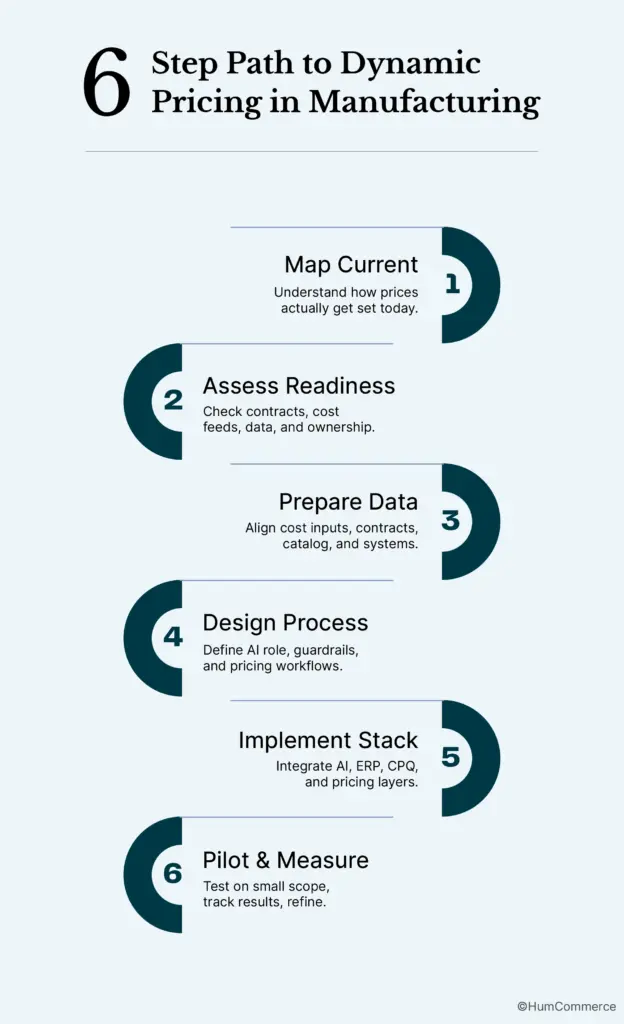
Step 1: Map How Dynamic Pricing in Manufacturing Works in Your Operation Today
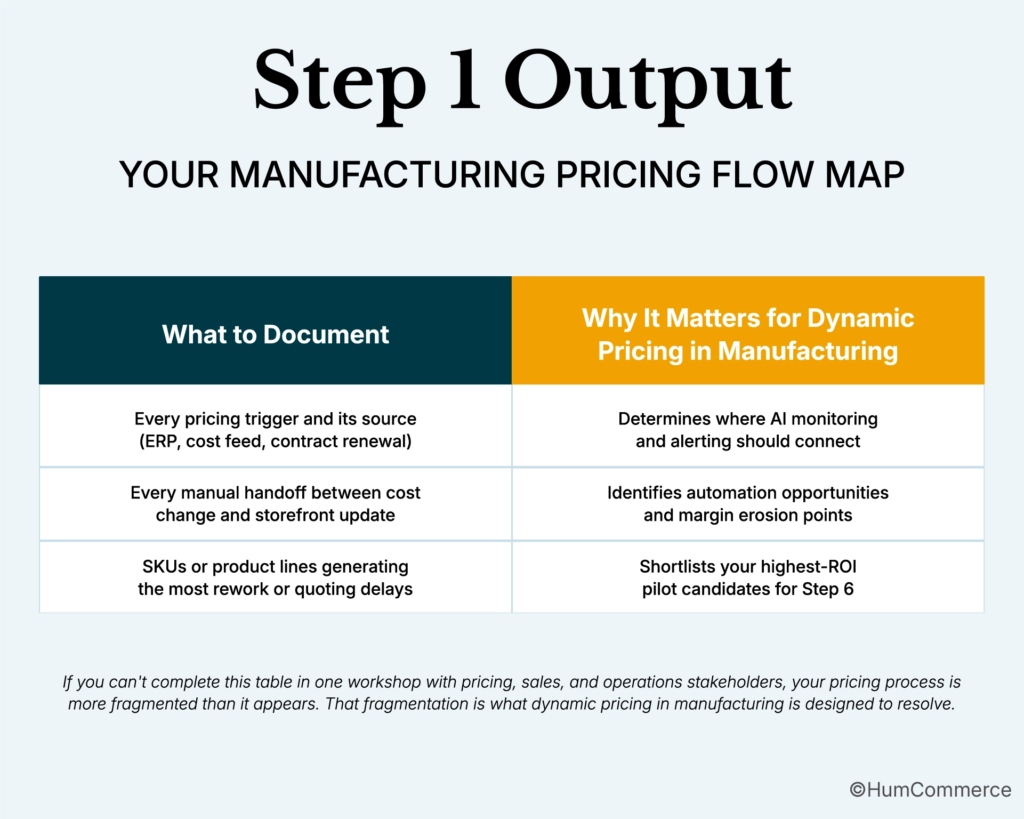
Start with reality, not tools. Before evaluating any pricing software or AI engine, you need an honest picture of how pricing decisions actually get made in your manufacturing operation right now. In most manufacturers, the formal pricing policy and the actual quoting behaviour diverge significantly, especially for non-standard orders.
- Identify every pricing trigger in your operation. What causes a price to change? Raw material cost movements, supplier contract renewals, competitive intelligence, volume threshold changes, customer-requested reviews, or seasonal demand shifts? Document the source of each trigger and who currently acts on it.
- Trace the price from trigger to storefront. When steel prices increase 6%, what happens next? Who gets notified? What systems get updated? How long does it take for the new cost to be reflected in your Adobe Commerce catalog? Map every step and every delay.
- Separate your pricing into categories. Identify which SKUs or product lines are governed by long-term contracts (with fixed or formula-based rates), which are sold at standard list pricing, and which require custom quotes. These three categories need completely different treatment in your dynamic pricing architecture.
- Document your ERP pricing structure. How does Epicor (or your ERP) store contract rates? Are they tied to customer accounts, product codes, effective date ranges, and volume tiers? Understanding this structure is critical because your AI pricing layer must never write over these records.
- Map the custom quote workflow. For configured or made-to-order products, how does a quote get built today? Who assembles the cost components? How are margin targets applied? Where do approvals happen? This workflow is the highest-impact target for automated pricing for manufacturers because it consumes the most rep time.
- Flag every rework and error pattern. How often does a buyer receive a quote that later has to be revised because costs changed between the estimate and the order? Track the volume and dollar value of these corrections over a four-week period. This quantifies the cost of your current manual process and becomes your baseline for Step 6.
Step 2: Check If You’re Ready for Dynamic Pricing in Manufacturing
Readiness for manufacturing pricing optimization isn’t about having perfect data. It’s about having enough structure to build on without creating new problems downstream. Manufacturers with fragmented cost data, unclear contract repositories, and no named pricing owner will amplify chaos with AI rather than reduce it.
Use this checklist before moving to Step 3:
- ☐ Does your ERP contain a complete, authoritative record for every active customer contract? Rates, effective dates, volume tiers, and renewal terms should all live in one place. If contract pricing is split between ERP, spreadsheets, and sales rep emails, consolidate before adding any dynamic pricing layer.
- ☐ Do you have a reliable feed of raw material costs into your cost calculation model? Real-time pricing for industrial products requires that your primary input costs (steel, copper, resin, components) are accessible in a structured format, either from your ERP’s cost module or an external commodity data feed.
- ☐ Is there a named owner for pricing decisions? Someone specific, not “the pricing team”, who can approve or reject AI-generated recommendations, define guardrail parameters, and own the weekly pricing review cadence. AI without a human owner is a liability in B2B manufacturing.
- ☐ Are your non-contract SKUs identifiable in Adobe Commerce? You need to be able to clearly flag which products are eligible for AI-driven price adjustment versus which are covered by contracts and off-limits. If your catalog doesn’t distinguish between these, you’ll need to segment it before implementation.
- ☐ Does your CPQ or quoting tool connect to live ERP cost data? Custom manufacturing quotes need current cost inputs, not last month’s standard costs. If your quoting tool pulls from stale data, automated pricing for manufacturers will produce inaccurate estimates even with AI on top.
If you answered “no” to two or more items: address those foundations first. Clean up your contract data in ERP, establish a cost feed, and create a clear SKU-level flag for contract versus non-contract pricing before proceeding to Step 3.
Step 3: Prepare Your Systems for Dynamic Pricing in Manufacturing
System preparation for dynamic pricing in manufacturing involves more data sources than most ecommerce pricing projects because your prices are downstream of cost inputs, not just demand signals. Getting this right at the foundation level is what separates a manufacturing pricing optimization project that delivers lasting margin improvement from one that requires constant manual correction.
Focus on these six preparation areas:
- Standardize cost data inputs. Your raw material costs, labour rates, and overhead allocations need to be accessible in a consistent format from your ERP. Define the update frequency for each input: daily for commodity-linked materials, weekly for labour and overhead. AI can only optimize pricing as accurately as the cost data it reads from.
- Audit your contract repository in ERP. Verify that every active customer contract has a correct effective date range, all applicable SKUs or product lines, volume tier breakpoints, and any formula-based escalation clauses tied to commodity indices. Gaps in this data are where AI-driven price changes will accidentally override negotiated terms.
- Segment your Adobe Commerce catalog by pricing type. Create a clear, maintainable structure that distinguishes: (1) contract-locked SKUs tied to specific accounts, (2) standard list-price SKUs eligible for AI adjustment, and (3) configured or made-to-order products that route to CPQ. This segmentation is the foundation of your dynamic pricing architecture.
- Define margin floors by product line. Before any AI recommendation engine runs, establish minimum acceptable margins for each product category. These floors become hard guardrails: no automated pricing for manufacturers should be allowed to push a product below the floor, regardless of what demand signals suggest.
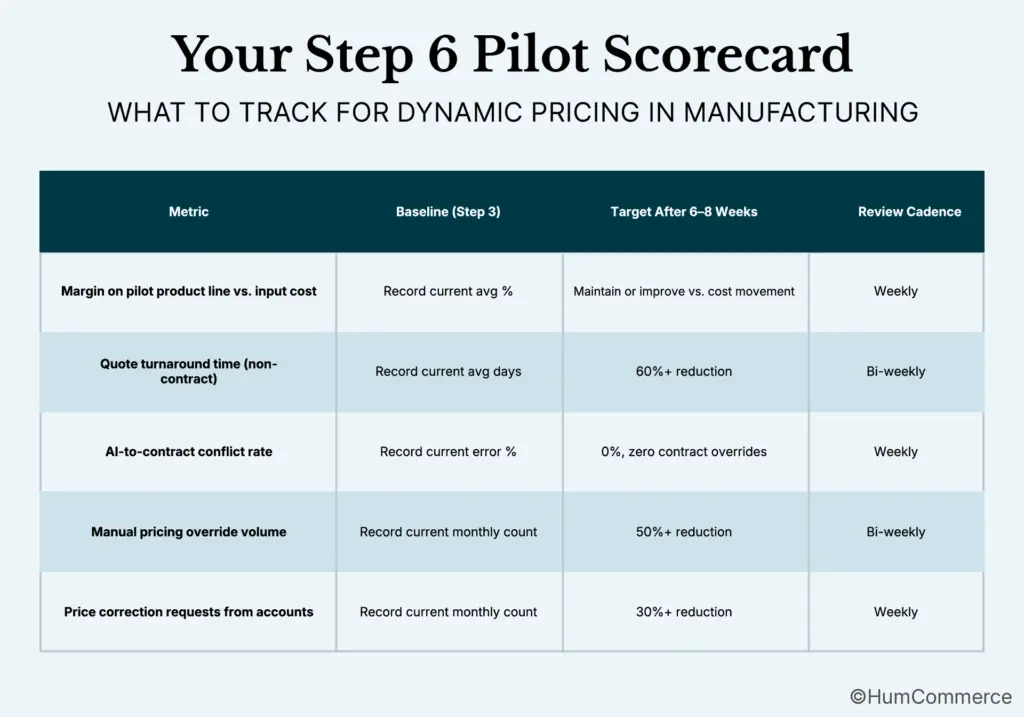
- Set up a baseline metrics report. Document the current average margin by product line, average quote turnaround time for non-contract enquiries, frequency of price correction requests from accounts, and the volume of manual pricing overrides your team makes each month. You’ll use these numbers in Step 6 to prove impact.
- Confirm your Adobe Commerce-to-ERP integration can support increased data exchange. Dynamic pricing in manufacturing will increase the frequency of pricing updates between systems. Verify that your integration layer (whether native API, middleware, or iPaaS) can handle this load without degrading storefront performance or creating sync lag.
Step 4: Design the Improved Process for Dynamic Pricing in Manufacturing
This step is where strategy meets architecture. The design decisions you make here determine whether your dynamic pricing in manufacturing implementation protects your contract relationships or inadvertently damages them. Take the time to get this right before writing a line of configuration.
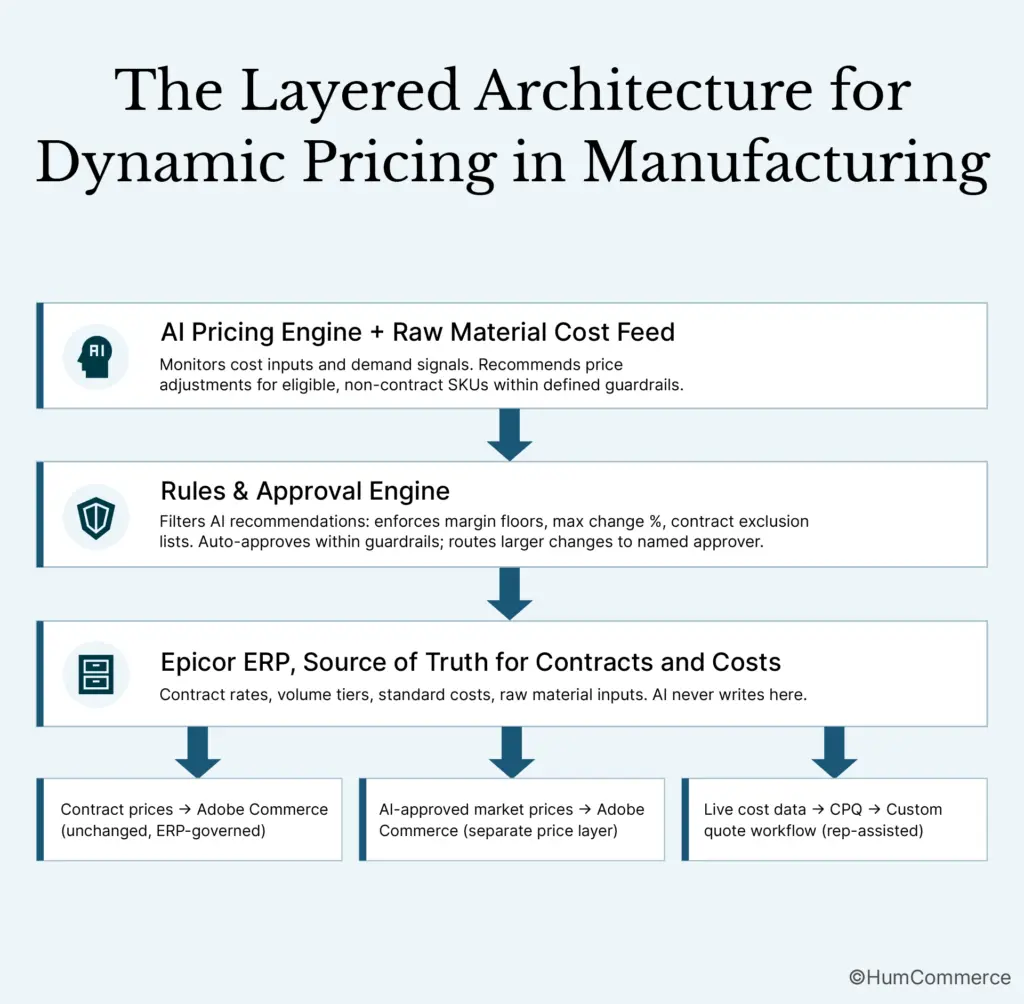
- Draw a hard boundary between contract pricing and market-responsive pricing. This is the most important design decision in the entire process. Contract prices are governed by ERP and flow to Adobe Commerce unchanged. Market-responsive prices, for non-contract buyers, spot orders, and non-configured standard products, are where your AI pricing strategy manufacturing b2b layer operates. These two pricing streams must never mix.
- Define the raw material cost trigger logic. Decide what level of input cost movement triggers an automatic pricing review. A common starting point: if a primary material cost moves more than 3-5% from the last pricing update, flag the affected SKUs for review. The AI recommends new prices; a human approves before publication. This keeps your team in control while removing the lag from manual monitoring.
- Design the approval workflow for AI recommendations. Map the human steps between an AI-generated recommendation and a live storefront price. For adjustments within defined guardrails (e.g., less than 4% change, margin stays above floor), auto-approval is defensible. For larger movements or unusual signals, require a named approver and a documented reason. This governance trail matters if an account ever questions a price they see.
- Architect the custom quote acceleration layer. For configured and made-to-order products, dynamic pricing doesn’t mean fully automated pricing. It means pulling live cost data into CPQ automatically so your reps build accurate quotes faster. Design the data flow from ERP cost module → CPQ → Adobe Commerce quote request so that quote generation starts from current costs, not last month’s standard rates. Manufacturers using this approach with Epicor CPQ integration have reduced quote turnaround from days to hours.
- Plan the buyer experience by account type. A contract account logs in and sees their negotiated rates, identical to what’s in the ERP, untouched by AI. A non-contract buyer sees real-time pricing for industrial products that reflects current cost and demand conditions. A guest enquirer sees standard list pricing with a clear path to request a custom quote. Each experience must be deliberate and distinct.
- Define your escalation and exception handling. What happens when the AI recommends a price that conflicts with an informal pricing commitment a rep made verbally? Who owns the resolution? Build a documented exception process before go-live so that edge cases have a clear path rather than becoming ad-hoc problems.
Step 5: Implement Dynamic Pricing in Manufacturing Changes in Your Stack
Implementation for dynamic pricing in manufacturing involves more system touchpoints than a standard e-commerce pricing project. Your Adobe Commerce storefront, ERP, CPQ tool, and cost data feeds all need to work in concert. Divide ownership clearly before anyone opens a configuration screen.
What the eCommerce Director or Pricing Manager should own:
- Defining which product lines and SKUs are eligible for AI-driven pricing versus contract-locked
- Approving the guardrail parameters: margin floors by product line, maximum single-adjustment percentage, commodity cost trigger thresholds
- Coordinating with sales leadership to communicate what is and isn’t changing for contract accounts, reps need to be confident that their account relationships are protected before go-live
- Setting the KPIs for the pilot phase and owning the weekly review cadence
What a technical partner or internal IT should own:
- Connecting the raw material cost feed (ERP cost module or external commodity data source) to the AI pricing engine
- Building the integration layer that writes AI-approved prices to Adobe Commerce’s non-contract price layer without touching ERP-governed contract rates
- Configuring the CPQ data flow so live ERP costs populate quote templates automatically, replacing stale standard costs
- Setting up the monitoring dashboard and alerting for price change events, contract exclusion flags, and cost threshold breaches
- Testing the full workflow in a staging environment with real product, cost, and account data before any production deployment
HumCommerce has built this exact architecture for manufacturers running Epicor and Adobe Commerce. The key technical insight is that real-time pricing for industrial products requires the AI layer to operate on a completely separate price tier in Adobe Commerce, one that the ERP-to-Commerce sync never overwrites. Without that separation, every scheduled ERP sync will reset your AI-adjusted prices back to the last manual export. That single architectural decision is what makes the system reliable at scale.
Step 6: Pilot, Measure, and Improve Dynamic Pricing in Manufacturing
Treat your first rollout as a controlled experiment, not a full deployment. The stakes in manufacturing B2B pricing are high; a wrong price on a large account costs more in relationship damage than the tool saves in margin. Start narrow, validate the logic, then expand.
Choose your pilot scope based on the rework and delay patterns you mapped in Step 1. The strongest pilot candidates are: non-contract standard products in a single product line where raw material cost exposure is high, and where your current pricing is most likely to be stale relative to actual input costs. Avoid piloting on any SKU or product line that touches a top-10 account relationship in the first round.
Run the pilot for 6-8 weeks. Manufacturing pricing cycles are longer than retail, and you need enough time to see cost trigger events, observe AI recommendation quality, and track whether contract accounts notice any pricing disruption (they shouldn’t, but you want to confirm this empirically).
AI-powered dynamic pricing can improve profit margins by as much as 10% and increase turnover by up to 3%, but manufacturing operations see the strongest results when the feedback loop between cost inputs and price outputs is tightly governed and continuously refined, not set-and-forgotten.
Common Mistakes to Avoid in Dynamic Pricing in Manufacturing
- Skipping the cost-trigger design step. Many manufacturers jump straight to storefront pricing without building the cost-monitoring layer. Without a mechanism that detects when raw material costs have moved beyond a threshold, your AI pricing engine is just recommending prices into a vacuum, disconnected from the cost reality your margins depend on.
- Treating all pricing as equally eligible for AI adjustment. Contract-locked rates and market-responsive prices are fundamentally different. Applying manufacturing pricing optimization across the board, without explicit segmentation and exclusion logic, will break account relationships faster than any price difference can be explained away.
- Underestimating the ERP’s role as the single source of truth. Epicor’s pricing tables, cost structures, and customer hierarchies contain business logic that has been refined over years. Any AI layer that reads from or writes to ERP without explicit mapping rules will create conflicts that require manual intervention to resolve, the exact opposite of what automated pricing for manufacturers is supposed to deliver.
- Automating the custom quote process without a human checkpoint. For configured or made-to-order products, full automation is rarely appropriate in manufacturing B2B. The right design is AI-assisted quoting: live cost data populates the quote automatically, but a rep reviews the margin and approves before sending. Removing that step exposes you to underprice risk on complex orders.
- Launching without a defined margin floor. An AI pricing engine with no minimum margin constraint is a liability. Define floors by product line, by customer tier, and by order size before you go live. Floors aren’t a constraint on the AI, they’re the guardrail that lets you trust it.
- Not communicating the change to your sales team. Sales reps who don’t know that dynamic pricing in manufacturing has been introduced for non-contract SKUs will be blindsided when a buyer asks why the price changed since their last order. Brief your team clearly: what is changing, what is not changing, and what to say if a contract account flags a discrepancy.
- Measuring only revenue, not margin. Real-time pricing for industrial products can increase revenue while compressing margins if the cost-to-price relationship isn’t monitored carefully. Track margin by product line against cost input movements throughout the pilot. Revenue without margin visibility is not manufacturing pricing optimization, it’s just a new way to lose money faster.
Need Help Implementing Dynamic Pricing in Manufacturing?
If you’ve followed this guide, you now have a structured plan to introduce dynamic pricing in manufacturing on Adobe Commerce with Epicor ERP: from mapping your cost and contract workflows through a governed, contract-safe pilot. The framework is clear, but execution in complex manufacturing environments, where cost structures are multi-layered, contracts are high-stakes, and custom quote workflows involve multiple systems, requires both platform depth and operational experience.
HumCommerce helps eCommerce Directors and Pricing Managers at B2B manufacturers move from plan to production. We specialize in building the ERP integration and pricing architecture layers that make automated pricing for manufacturers work within your existing operations stack, not as a standalone tool, but as a governed system that respects the commercial relationships your business depends on. We’ve done this for manufacturers running Epicor and Adobe Commerce, and we understand the constraints you’re working within.
Share your current setup: your Adobe Commerce version, ERP configuration, primary raw material inputs, and the quoting or pricing pain point that’s costing you the most margin or rep time. We’ll schedule a technical walkthrough to map these steps to your specific stack. Start that conversation here.