To put it simply:
- The way the integration is set up, not the choice of software, is what makes ERP work. 73% of failed implementations are due to not choosing the right vendor.
- The real TCO is 40–60% higher than what vendors say it is. This includes the costs of covert integration, data migration, and managing changes.
- Add ERP core, middleware, Adobe Commerce, PIM, CRM, and WMS to your ERP ecosystem in real time.
- For companies in the middle market, a realistic time frame is 18 to 24 months. If someone makes a six-month promise, they are trying to cut corners.
- Follow our 90-day action plan to get everyone on the same page, figure out what you need, and make a list of possible vendors. Get the checklist for ERP readiness right away.
A mid-sized auto parts maker in Ohio had a problem in March 2024 that every operations manager dreads. A $12 bearing broke, which set off a chain reaction that stopped their main production line for 18 hours.
The problem was that the information in their ERP and eCommerce systems didn’t match.
The main warehouse’s ERP said that there were 500 units in stock. Their Adobe Commerce store said there weren’t any. Sales couldn’t say when things would be delivered, and procurement couldn’t place an order quickly because the system didn’t know there was a shortage. Later, the CFO realized that the real cost was $2.3 million in lost production, higher shipping costs, and fines for customers.
It wasn’t the failure itself that made this story so interesting. The company finished putting in an ERP system eight months ago. It cost $1.8 million. Theoretically, the ERP system was up and running, all the data had been moved over, and the consultants had given their stamp of approval.
But the most basic thing you could do, which was to know what you really had in stock, was broken. No one has figured out how to make ERP inventories work with eCommerce in real time.
This is what B2B manufacturers will have to deal with in 2026.
When manufacturers install ERP, they no longer have to pick the right software package. It’s about designing an integration architecture that turns ERP from a back-office ledger into a real-time nervous system for operations. Most implementation guides still think that picking the right software is hard, but the real problem is figuring out how to put everything together.
What Sets This Guide Apart
You can see the numbers: about 73% of ERP projects don’t reach their business goals. You may have seen the polished demos from vendors that promise “push-button” data migration and perfect integrations. And at some point, they also got a legacy setup that was held together by spreadsheets and the knowledge of three people who could never take a vacation.
This guide shows you how to make choices based on what works in 2026.
Things are made in a different way now. Every night, tariffs go up or down. Around the world, supply chains are divided up by area. AI can now do things that used to take a lot of people. This needs to be part of your ERP plan.
We’ll talk about the three operational issues that keep B2B manufacturing leaders awake at night.
Let’s get going.
Are you ready for ERP?
Be honest with yourself before you buy software licenses or hire a consultant. Can you write down how things are done now, with no more than a 5% difference between plants and facilities?
If the answer is no, then using ERP will only make things worse. You’ll spend millions of dollars speeding up broken processes, which only makes things worse.
The Evaluation of ERP Readiness
This framework will help you figure out if your business is ready to use ERP.
How mature the process is
- You should have detailed maps of your order-to-cash, procure-to-pay, and production processes, as well as written exceptions.
- Taking care of unusual situations as they come up shows that the process is not yet fully developed.
- At least 90% of transactions must follow normal paths before an ERP rollout makes sense.
Data Quality
- Standardize SKUs, customers, suppliers, and bills of materials, and get rid of any duplicates.
- If there are more than one way to name the same part, it could be a sign of big data problems.
- There needs to be one reliable source of information and good management before migration.
Ability to Adapt
- For about six months, operations teams will need to be able to handle 15 to 20 hours of training and changes to processes each week.
- If they don’t have time to deal with this, now is not the right time.
- There needs to be a change manager who is committed and has the right tools.
Problems with integration
- Most of the time, ERP systems connect to other systems like eCommerce platforms, CRM, WMS, MES, and PIM.
- It is very hard and risky to connect more than eight systems without middleware.
- Try to keep the number of systems to less than five and use an API-first integration method.
Getting Executives on the Same Page
- The CEO, COO, and CFO must all agree on the ERP’s goals, budget, and ways to measure success.
- If IT is in charge of the project all by itself, other departments won’t be able to work together.
- There should be a formal steering committee at the C level.
Less than 60%? You don’t need to pick out software; you need to get ready for ERP. For the next 90 days, work on making your processes more consistent and cleaning up your data. No matter how good an ERP is, it can’t fix the basics that are broken.
Download this tool:
You can give your steering committee this 40-point checklist to see if you’re ready for ERP integration.
Question 2: How much money do you really have?
Most manufacturers don’t know that the total cost of ownership is 40% to 60% higher than they think. Most of the time, vendor quotes are about the cost of licenses and basic setup services. They don’t tell you everything you need to know about how much it really costs to set up and run an ERP system in a B2B manufacturing setting.
This is what goes into a manufacturing ERP budget in 2026.
The Complete Cost Breakdown of ERP System Running
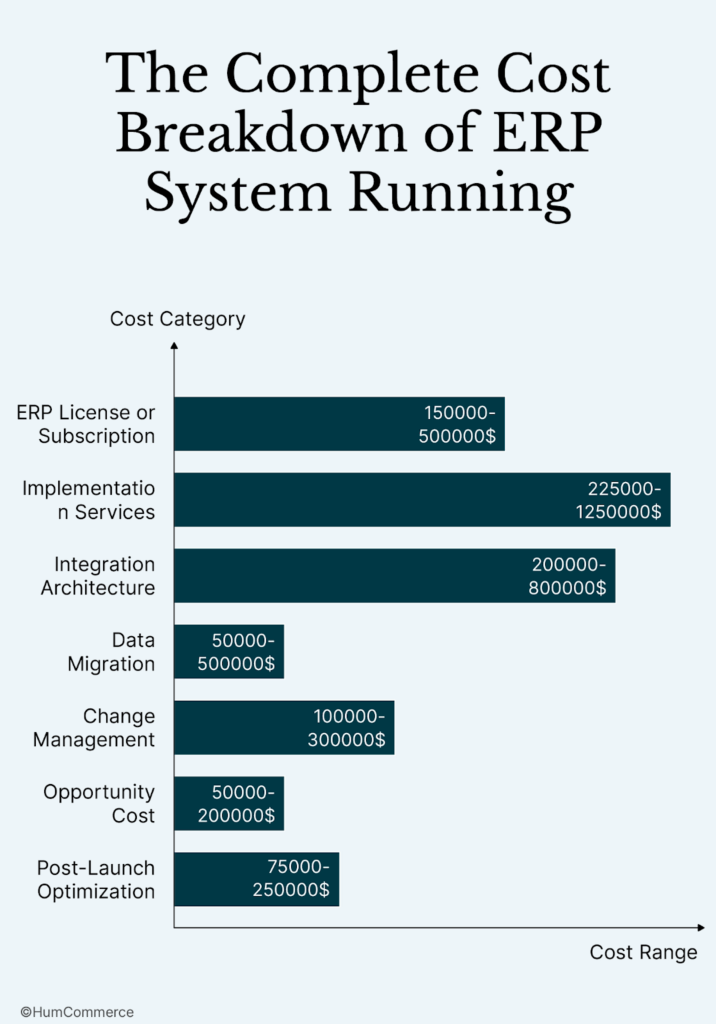
- An ERP license or subscription costs between $150,000 and $500,000 a year.
The cost of an annual membership for medium-sized manufacturers depends on how many users there are and which modules they choose. - Implementation services cost between 1.5 and 2.5 times what your license costs.
You will have to pay between $225,000 and $1.25 million for professional services. The difference depends on how hard the project is, how much customization is needed, and whether you are working with the vendor directly or through a systems integrator. - Architecture for integration costs between $200,000 and $800,000.
ERP vendor quotes don’t include middleware platforms, API development, or custom connectors. You’re connecting your ERP system to your eCommerce platform, PIM system, CRM, and warehouse management system. - Cost of moving data: $50,000 to $500,000
You will be at the lower end if your data is clean and well-organized. If you have to deal with years of inconsistent part numbers, duplicate customer records, and bills of materials that haven’t been checked, expect your costs to go up three times what you thought they would be. - Change Management: $100,000 to $300,000
Training programs, communication campaigns, and ways to deal with resistance usually cost two to three times as much as the software itself. When money gets tight, this is usually the first thing to go, which is why so many implementations fail. - Cost of Opportunity: $50,000 to $200,000
Find out how much money you lose every hour, then multiply that by the number of hours you think you’ll be down during cutover times. Even a weekend cutover could cost a lot of business for a $100 million manufacturer. - $75,000 to $250,000 for post-launch optimization
After the launch, you should expect to see improvements, support tickets, procedure changes, and small upgrades for 12 to 18 months.
A $100 million manufacturer will spend between $1.2 million and $2.5 million over three years to own the business.
Question 3: Should you use the cloud, on-premises, or a mix of both?
It’s not just about the cloud vs. on-premise in 2026. The main problem is finding an architecture that can handle the complexity of your B2B business and still be able to change as your company grows.
When the Cloud is a Good Idea
These days, most B2B manufacturers should use the cloud. The benefits have been very clear over the past few years.
Here are some of the best things about cloud ERP:
- Cloud systems take 6 to 9 months to set up, while on-premise systems take 12 to 18 months.
- The subscription model saves money by not requiring large upfront payments.
- Your internal IT team won’t have to worry about automatically installing security patches and new features.
- Remote access is very important when you have a lot of plants and field sales teams that need to be able to get to the system from anywhere.
Best for: Manufacturers that have consistent processes, work in more than one place, and need to connect their eCommerce, CRM, and warehouse management systems in a lot of ways.
When On-Premise Still Wins
In some cases, it still makes sense to use on-premise.
Here are some of the best things about ERP that is on-premise:
- Deep customization for unique manufacturing processes that cloud ERPs have trouble with
- Regulatory control for environments that are regulated by the FDA, the military, or the government and need air-gapped systems
- Spend the money you’ve already spent on network design and data centers.
Best for: Manufacturers that are very specialized and have specific compliance needs but don’t need to connect to the cloud very often.
The Mixed Reality
In real life, most B2B manufacturers end up with mixed architectures.
How hybrid architectures work:
- The ERP core runs in the cloud and handles orders, finances, and inventory.
- Plant systems that stay on-site include manufacturing execution systems, SCADA, and quality control systems.
- The middleware layer makes sure that your cloud ERP and plant floor processes are always in sync.
This solution strikes a balance between the need for control and customization in specialized manufacturing operations and the flexibility and cost savings of cloud infrastructure.
The 2026 Trend: ERP that can be put together
Find composable ERP platforms that are built on a cloud-native, microservices-based architecture. You don’t have to change the whole ERP system if you want to swap out certain modules or features. You can add new features and technologies as they come out without being stuck in a system that won’t let you do what you want.
Question 4: What skills are really important for making things for other businesses?
Don’t worry about the list of 100 features that vendors like to show off in demos. Focus on the features that will help you solve your three biggest business problems.
Pain Point 1: Keeping track of orders and inventory in pieces
Every day, the problem comes up: your ERP shows one set of inventory levels, your eCommerce platform shows another, and the warehouse manager keeps a spreadsheet that is usually the most reliable source of truth.
You need these exact skills to fix it.
- Real-time visibility of inventory across multiple locations: The system needs to sync inventory between plants, warehouses, and consignment stock in less than 30 seconds. This keeps production lines from stopping because of too many sales or not enough stock.
- Automatically organizing orders: The system should send orders to the best place to fill them based on how much stock is available, how much it can make, and how much it costs to ship. This makes it so that people only need to do things 70 to 80% less.
- Connecting with systems for factories and warehouses: You have to sync both ways. Data goes from ERP to warehouse management systems to tell them how to pick things up. Data goes back and forth between warehouse systems and ERP to keep track of what is being used and to change the inventory. This means you don’t have to enter data by hand or do daily reconciliation work anymore.
Companies that connect their ERP and eCommerce systems in real time can save 30% to 40% on inventory costs by automating reordering, updating stock in real time, and getting rid of mistakes made when entering data by hand.
Pain Point 2: Prices that don’t make sense and where to find the truth
The problem costs a lot of money very quickly. You have contracts that are different for each customer, prices that change based on the level of service, special discounts, and tariffs that change over time. Your systems can’t agree on the final price, which leads to fights, lost profits, and unhappy customers.
You need these exact skills to fix it.
- Pricing Engine for Business to Business: The system needs to be able to handle price lists that are different for each customer, contract prices, volume breaks, and prices that have been negotiated. Your ERP stores the main pricing information and updates it in real time with your eCommerce platform and CPQ tools.
- Changing the cost on the fly: The system’s prices should automatically change when landed costs, tariff rates, and supplier prices change. This is very important when tariff rules change without much warning.
- Audit Trail and Workflow for Getting Approval: The system needs to keep track of who changed what prices and when, and it needs to have approval gates for any changes. This lowers the risk of losing money and breaking the law by changing prices without permission.
Pain Point 3: Getting rid of manual work and automating tasks
The problem makes everyone in your company less productive. Your staff spends 30% of their time re-keying data between systems, fixing mistakes, and looking for status updates instead of working on strategic tasks.
You need these exact skills to fix it.
- Using AI to keep data safe: Self-healing synchronization can find and fix problems with prices, SKUs, and units of measure on its own. This makes it 90% easier to clean up data.
- Making Workflows Automatic: Automating the routing of order approvals, purchase requests, and handling exceptions can cut your order-to-cash cycle by 40% to 60%.
Low-Code Integration Tools: Business users should be able to do simple tasks without having to call IT every time they need to make a change. This makes automation happen faster and makes it less dependent on hard-to-find IT resources.
The ERP Vendor Landscape: What Will Be Important in 2026
Don’t pay attention to general top-ten lists that rank vendors based on how much market share they have or how well analysts rate them. The most important thing is how well it meets your specific B2B manufacturing needs, like how complex it is, how many transactions it can handle, and how well it works with other systems.
Group 1: Large Companies
- SAP S/4HANA is best for big, complicated global manufacturers that have a lot of money and IT teams that are always there. It costs a lot of time and money to set up. The system has a lot of industry modules and can check that everything is up to code all over the world.
- You can easily keep track of your money and assets with Oracle ERP Cloud. The total cost of ownership is high, but the system is strong enough for manufacturing companies that need a lot of assets.
- Microsoft Dynamics 365 works well with other Microsoft products and is flexible enough for businesses that are in the middle of the market. Because the built-in eCommerce features aren’t as good as those of specialized platforms, you need to carefully plan how to combine B2B eCommerce workflows.
Category 2: Mid-Market Leaders
Most B2B manufacturers think this is the best category for them.
- CloudSuite Industrial has a lot of useful features for manufacturing, like templates for the automotive and industrial sectors. The technology works well for business-to-business (B2B) operations.
- Epicor Kinetic is a great choice for industrial manufacturing because it has strong integration and CPQ features. HumCommerce is very good at linking Epicor and Adobe Commerce. They do this by making quotes 88% faster and always keeping data in sync in real time.
- NetSuite’s cloud-native architecture is strong enough for manufacturers who depend on eCommerce. The system is good for scaling, but it needs middleware to handle complicated B2B tasks like tiered pricing and processing big orders.
Category 3: New and Vertical Experts
- Rockwell’s Plex is all about making cars, and it has great quality control and communication on the plant floor.
- QAD Adaptive Applications is mostly known for its work in the life sciences and food and drink industries.
- Acumatica is flexible in the cloud, and its prices go up as you use it more.
The Question About the Architecture of Integration
This is more important than picking an ERP system. Is the ERP tested and has strong, well-documented APIs? Does it work with a middleware environment?
Epicor, Infor, and NetSuite all have strong REST APIs and a lot of partners, which makes it easy to connect to other systems. SAP and Oracle have a lot of advanced features, but they don’t work well together unless you know how to use them and have more money.
If you’re a B2B manufacturer who wants to add Adobe Commerce in 2026, Epicor, Infor CloudSuite, or NetSuite should be at the top of your list. Use a middleware-based integration method instead of writing your own code to connect two systems. This method lowers risk and makes it easier to plan for changes in the future.
The Implementation Roadmap: From Picking to Going Live
For B2B manufacturers in the middle of the market, it will take 18 to 24 months from the time a decision is made until full optimization is reached. If someone tells you they can finish in six months, they are trying to sell you something, not give you advice. They either don’t get how hard things are, or they want to take shortcuts that will hurt you later.
Phase 1: Before the Implementation (Months 1 to 3)
Write down the steps you already have and make them better. Check to see if your workflows are working before you automate them. Check to see that your data is accurate and up to date. Research shows that 80% of implementation delays are caused by bad data quality.
Before you start integrating, make a plan for your architecture. Set up APIs, pick middleware platforms, and figure out how data will move between systems. Plan how you will deal with change. Make plans for how to talk to and train people before anyone uses the new program.
For this step, you need to make a business requirements document and an integration architecture design.
Phase 2: Picking a Contract and Signing It (Months 4 to 6)
Write your RFP using the business needs paper you made in phase one. Don’t just copy and paste feature lists from studies done by analysts. Instead of letting suppliers give their usual pitch, use your own situations to do scripted demos.
Pay close attention to the references. Talk to businesses that are about the same size, do the same kind of work, and have the same level of integration trouble. Be clear about the problems that came up during implementation and how long it really took.
When you talk about your contract, make sure to talk about implementation services and performance guarantees. Add clauses for exit strategies and penalties for missing go-live deadlines. Get people to write down their promises.
Phase 3: Putting it into action and making it work together (Months 7 to 15)
Use agile sprints instead of the waterfall method. With Agile, you can change your plans as you find problems instead of putting them off for months until they become a big deal.
Start working on integration early in this phase. People thought that integration work would be easier and faster than it is. B2B manufacturers should spend 40 to 50% of their time on integration testing.
Do a few rounds of testing for moving data. Put the data in, test it, find mistakes, fix them, and then do it all over again. Make sure everything works by running both old and new systems at the same time. This is known as parallel testing.
Follow your change management plan during this time. Show users how to use the system, help them when they need it, and deal with problems as they come up instead of waiting until the system is live.
Step 4: Go Live and Improve Things (Months 16 to 24)
Instead of a big-bang cutover, plan a staggered go-live by plant or product line. This lowers the risk and gives you time to learn from the first steps before moving on.
Give hypercare support for the first 30 to 60 days after each go-live. Give your staff more tools so they can fix problems right away before they get worse.
Always check on your KPIs. Watch the rates of adoption, the quality of the data, and how well the processes work. As users get better, keep making changes to setups, routines, and add more complicated features.
The Seven Hidden Killers: Why ERP Projects Fail
According to research, 73% of ERP projects do not reach their business goals. Most failures happen the same way. If you know about these tendencies, you can avoid them.
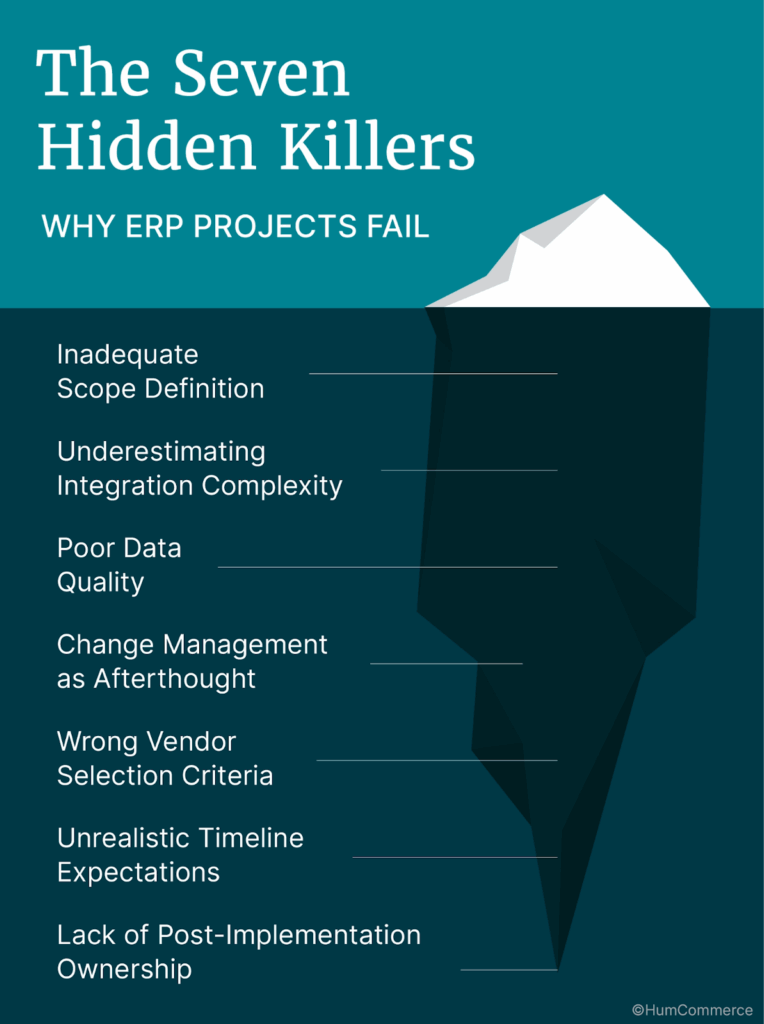
1. Not enough clarity on the scope
When the scope keeps getting bigger, projects fail. Every new need pushes back deadlines and costs go up.
- To fix this: In phase one, make sure the scope is clear and lock it to stop this. Before making any changes, the executives should have to agree and the budget should be looked over. Follow a detailed process for managing changes.
2. Not knowing how hard it is to integrate
Teams don’t think about how hard things are at first, so integrations often cost more and take longer than they should.
- To fix this: Before you choose a vendor to fix this, make a plan for your integration architecture. Instead of writing your own point-to-point code, use middleware. It makes updates easier and lowers the cost of maintenance.
3. Data That Isn’t Good
Bad data makes the go-live process take longer, makes people mad, and causes them to make bad choices.
- To fix this: You should clean and standardize the data for three to six months before moving it. Value data as a valuable asset. Set high standards and let people take charge.
4. Change Management as a Last Resort
When change management starts too late, employees don’t want to use the system, find ways to get around it, or go back to how things were before.
- To fix this: Start managing change right away. Put someone in charge of managing change. Don’t give this job to someone who is already busy.
5. Choosing a Vendor Based on the Wrong Criteria
A lot of businesses pick providers based on how good their demos are, not how well they work together. This means that the tools don’t meet real needs.
- To fix this: Use a requirements matrix with scores that are weighted. Script demos that are based on real-life events. Check out the references. Focus more on integration than on display.
6. Expectations for a Timeline That Isn’t Fair
When you rush things, you get shortcuts and lower system quality. In the end, the ERP never works.
- To fix this: It will take 18 to 24 months to put it into action. Don’t cut the schedule down. When deadlines are shorter, the failure rate goes up a lot.
7. Not taking responsibility after implementation
The system stops getting better and quickly becomes out of date if no one is in charge of it all the time.
- To fix this: Set up an ERP governance committee before you go live. Set aside money for improvements that will last. Don’t think of optimization as something you do once. Consider it an ongoing program.
How to Tell If Your ROI Is Good
Make sure you know what success looks like before you start. Carefully measure during the project and after it goes live.
Metrics for Manufacturing Operations
- Try to stick to the production schedule more than 95% of the time. Pay attention to how much work is actually done compared to how much was planned for each line and plant.
- You should try to keep your inventory correct at least 98% of the time. Check to see how many items are actually in stock at each site compared to what the system says.
- For regular orders, the goal is to fill them in less than 48 hours. Keep track of everything from when you get the order to when it leaves.
- Aim for a perfect order rate of more than 90%. Make sure that orders are delivered on time, completely, and without any mistakes.
Money numbers
- Try to lower the cost of keeping inventory by 20% to 35%. Before and after implementation, figure out the total cost of the inventory and the costs of carrying it.
- Try to cut your overhead costs by 10 to 20% by automating and improving your processes.
- Aim for a 2 to 5 percentage point increase in gross margin through fewer mistakes, better pricing control, and more efficient work.
- Plan on getting your money back in 24 to 36 months for a realistic return on investment. Shorter timelines usually mean that the assumptions are too optimistic.
Metrics for Adoption
A lot of the time, these things are ignored, but they are very important for long-term success.
- Keep track of how often users log in. Daily logins for primary users are necessary to do their work in the system.
- Compare transactions made by the system to those made by hand. Aim for more than 80% of transactions to go through the system instead of workarounds.
- Keep an eye on how people use reports and dashboards. More than 70% of managers should use system dashboards at least once a week to make decisions.
The 2026 Technology Stack: Architecture Comes Before Features
ERP doesn’t let B2B manufacturers sell things directly. They sell through e-commerce sites, marketplaces, EDI connections, and salespeople who go out into the field. Your integration architecture is the real system that runs your business.
The Layers of Architecture
- The top layer is where Customer Touchpoints are. These are your eCommerce platform, EDI connections, and sales portal interfaces.
- The B2B Commerce Platform is the part of your business that customers see. Most manufacturers use Adobe Commerce or other similar enterprise platforms for business-to-business (B2B) functions.
- Integration Middleware is the most important layer for connecting things. This iPaaS platform manages the flow of data and the logic for changing it between systems.
- ERP Core takes care of finances, inventory, and processing orders. This connects to your PIM for product data, your CRM for customer information, and your WMS or MES for warehouse and manufacturing operations in both directions.
- The analytics and AI layer is on top of your operational systems. This gives you business intelligence, predictive insights, and help with making decisions automatically.
Important Technical Skills
Synchronization in Real Time
Don’t just do batch processing; do real-time integration. All channels should get inventory updates in less than 30 seconds. It should take less than 10 seconds for orders to go from eCommerce to ERP. Prices must change right away, which is very important when tariff changes need a quick response.
Design with APIs First
For modern integrations, your ERP needs to have RESTful APIs. Event-driven architecture gives you the ability to grow your business for high-volume B2B transactions. Make sure that the API rate limits can handle the most transactions you get.
Data Integrity using AI
Self-healing capabilities automatically catch SKU mismatches and pricing errors before they cause problems. Anomaly detection flags unusual orders and inventory discrepancies for review. Predictive insights support demand forecasting and supplier risk assessment.
Composable Architecture
Microservices-based design lets you change individual components without breaking other parts of the system. Headless capabilities separate your front-end presentation from back-end logic. A strong plugin ecosystem lets you add features without having to write your own code.
Your Action Plan for the Next 90 Days
Follow this structured plan to start your ERP project off right.
Days 1–30: Evaluation and Alignment
- Make your ERP steering committee. Add an executive sponsor, an operations leader, an IT architect, a finance representative, and a dedicated change manager.
- Write down how your current order-to-cash, procure-to-pay, and production workflows work. Find processes that are broken and need to be fixed before you automate them.
- Do the ERP readiness test that was mentioned earlier in this guide. Give your company an honest score on process maturity, data quality, change capacity, integration complexity, and executive alignment.
- Get everyone on the same page about goals, budget range, and timeline expectations. Before moving forward, make sure that C-level executives are fully committed.
- For this phase, you need to give us an ERP business case and project charter that clearly states the goals and success criteria.
Days 31 to 60: Requirements and Structure
- Plan how your eCommerce, PIM, CRM, and warehouse management systems will work together. Write down the current integration points and find the ones that are missing.
- Plan how your integration will work. Choose middleware platforms and set up the ways that data will move between systems.
- Make a matrix of your needs. Differentiate between essential capabilities and desirable features. Weight requirements that depend on how the business will be affected.
- Make a plan for cleaning your data. Set aside time and money to fix data quality problems before the migration.
- You need to write a requirements document and an integration architecture plan that will help you choose a vendor for this phase.
Days 61 to 90: Working with the vendor
- Make a list of three to four vendors based on how well their architecture fits and how well they can do B2B manufacturing. Use your requirements matrix to narrow down your options.
- Send out your RFP with examples that are specific to your business. Don’t use generic feature checklists that you got from analyst reports.
- Do scripted demos where you set the agenda. Instead of watching vendor standard presentations, show your real workflows and data.
- Look over the references carefully. Talk to businesses that are about the same size, work in the same field, and have the same level of integration difficulty. Ask specific questions about problems and real timelines.
- Your job for this phase is to make a vendor scorecard and recommendation with analysis to help executives make a decision.
The choice that will shape your next five years
Picking an ERP in 2026 means building a digital nervous system that turns disjointed operations into a single, responsive organization. The companies that do well aren’t the ones with the most checked features on a comparison matrix.
The best manufacturers are the ones who decide on integration architecture before they choose software. Instead of rushing to go live, they spend 40% of their time on integration testing. They don’t think of data quality and change management as extras; they think of them as important parts of their work. They choose suppliers based on how well they fit with B2B manufacturing, not on how big their market share or brand recognition is.
The story about the $12 bearing at the beginning of this guide didn’t happen because the maker picked the wrong ERP software. They did it because they thought of integration as a phase-three afterthought instead of a day-one architectural choice.
Don’t do that with your implementation.
If you need a partner who knows how to connect ERP, Adobe Commerce, and complicated B2B manufacturing workflows, HumCommerce can help you with that.
With the right integration architecture, realistic TCO modeling, real-time synchronization, and self-healing data flows, our team helps manufacturers go from fragile projects to operations that can grow and last.
First, make sure your foundations are solid.
Get the ERP Integration Readiness Checklist and start working on your 90-day plan right away.