TL;DR
- Launching a direct B2B ecommerce channel as a manufacturer is difficult because your ERP (Epicor, NetSuite, or SAP Business One) holds pricing and inventory truth, while Adobe Commerce handles the storefront, and keeping both aligned without creating distributor conflict requires careful orchestration.
- This guide walks you through building a direct-to-buyer manufacturer ecommerce portal that complements your existing distribution network rather than competing with it.
- The process follows six steps: map your current channel, assess readiness, prepare systems and data, design the improved process, implement changes in your stack, then pilot and measure results.
- A US-based manufacturer selling both direct and through distribution can realistically expect 15-25% of repeat orders to move to direct self-service in year one, plus new revenue from underserved geographies with no prior distributor coverage.
- This is written for VP Sales leaders in manufacturing running Adobe Commerce with ERP integration who need to decide whether, when, and how to open a direct ecommerce channel without alienating partners.
Why This Matters for manufacturing
Picture this: you’re in a quarterly business review, and your CEO asks why 30% of inbound leads from regions without distributor coverage went unanswered last quarter. Your Adobe Commerce storefront exists, but it only routes buyers to distributors. Your Epicor or NetSuite ERP holds accurate pricing and inventory, yet no self-service path connects those buyers to your products. Meanwhile, customer complaints about slow quoting pile up because manual processes still dominate. You realize you need a structured way to open a direct channel without fracturing the distributor relationships that drive most of your revenue.
Why launch a manufacturer direct B2B ecommerce channel without disrupting the distributor network Is a Priority Now
The core tension for any VP Sales in manufacturing is straightforward: your buyers expect digital self-service, but your distribution partners expect exclusivity. Ecommerce for manufacturers isn’t about replacing distributors. It’s about capturing demand that distributors aren’t serving today, whether that’s small accounts below minimum order thresholds, geographies without coverage, or repeat buyers who just want to reorder without calling anyone.
The numbers back this up. B2B ecommerce continues to grow as a share of total B2B sales, and 65% of B2B buyers now select purchasing channels based on ease of use. If your only digital path routes every buyer to a distributor, you’re invisible to the segment that wants to buy direct. That’s lost revenue you can measure.
On the systems side, this plays out as friction between Adobe Commerce and your ERP. Your NetSuite or SAP Business One instance holds contract rates, volume tiers, and credit limits. Your Adobe Commerce storefront may display products, but without real-time pricing logic and inventory sync, it can’t function as a true transactional channel. Sales reps end up fielding requests that a properly configured portal could handle in minutes. Quote turnaround stretches to 3-5 days when it could take hours.
This guide covers a six-step process for building a direct-to-buyer manufacturer ecommerce portal that works alongside your distributor network. By the end, you’ll have a framework for deciding which buyers to serve directly, how to structure pricing so distributors aren’t undercut, and what needs to happen in your Adobe Commerce and ERP stack to make it operational. The goal is manufacturer ecommerce without distributor conflict: a direct channel that fills gaps instead of creating them.
What ‘Done’ Looks Like When You launch a manufacturer direct B2B ecommerce channel without disrupting the distributor network
Vague goals like “add ecommerce” cause projects to stall because no one agrees on what success means. A VP Sales who says “we need to sell direct” without defining boundaries will face pushback from distribution partners, confusion from internal teams, and scope creep from IT.
A clear definition of “done” means you can describe the before and after in concrete terms. Before: buyers in uncovered territories email your general inbox, wait days for a quote, and often buy from a competitor. After: those same buyers find your products online, see pricing appropriate to their account type, and place orders that flow directly into your ERP for fulfillment.
Here’s what “done” looks like in practice:
- Distributor-served accounts continue ordering through their existing channel. Your direct portal either redirects them or displays distributor-matched pricing so there’s no incentive to switch.
- Underserved accounts (no distributor coverage, below-minimum-order buyers, or new geographies) can self-serve through a direct portal with account-specific pricing pulled from your ERP.
- Quote-to-order cycle time drops from days to hours because pricing rules, approval logic, and credit checks are automated rather than manual.
- VP Sales has a dashboard showing direct channel revenue, order volume by account type, and distributor overlap metrics, so you can prove the channel is additive, not cannibalistic.
Step 1: Map How You launch a manufacturer direct B2B ecommerce channel without disrupting the distributor network Today
You start with reality, not tools. Before configuring anything in Adobe Commerce or your ERP, you need a clear picture of how orders actually flow through your organization and where the gaps are.
Walk through these steps with your sales operations team:
- List every path a buyer currently takes to place an order: through a distributor, via a sales rep, by phone, by email, or through an existing portal. Note which paths are formal and which are workarounds.
- For each path, identify who touches the order internally. Map the handoffs between sales, customer service, and operations. Flag where data gets re-keyed between Adobe Commerce and your ERP (Epicor, NetSuite, or SAP Business One).
- Document where delays happen. Common bottlenecks include manual quote generation, credit check approvals that require email chains, and inventory lookups that depend on someone checking the ERP directly.
- Identify which buyer segments are underserved. Pull data on inbound inquiries that didn’t convert. How many came from regions without distributor coverage? How many were below your distributor’s minimum order threshold?
- Capture failure points and rework loops. How often do orders get entered incorrectly because of manual data transfer? What percentage of quotes expire before the buyer responds because turnaround was too slow?
- Note which parts of your B2B ecommerce workflow for manufacturing companies are already partially digital and which are entirely manual.
This map becomes your baseline. Every improvement you make in later steps gets measured against it. Research shows that B2B organizations with clear channel mapping are significantly more likely to launch direct channels successfully because they can identify exactly where the new channel fits without overlapping existing distributor relationships.
Step 2: Check If You’re Ready to launch a manufacturer direct B2B ecommerce channel without disrupting the distributor network
“Ready” doesn’t mean perfect. It means you have enough foundation to start without creating more problems than you solve. Here’s a checklist your team can answer with a clear yes or no:
- Do you have consistent product IDs and SKU structures across Adobe Commerce and your ERP? If your storefront uses different identifiers than Epicor, NetSuite, or SAP Business One, every order will require manual reconciliation. This is a prerequisite, not a nice-to-have.
- Can your ERP expose real-time or near-real-time pricing and inventory data via API? A direct-to-buyer portal that shows stale pricing or out-of-stock items will damage trust faster than having no portal at all.
- Do you have a clear account segmentation model? You need to distinguish between distributor-served accounts and direct-eligible accounts. If your CRM or ERP can’t flag this distinction, you’ll need to build that logic before launch.
- Is there internal alignment on channel rules? Your VP Sales, distribution manager, and executive team need to agree on which buyers can purchase directly and at what pricing tier. Without this agreement, the project will stall in political debates.
- Do you have at least one person who owns the direct channel as a business function, not just an IT project? A manufacturing ecommerce initiative without a business owner becomes an orphaned storefront.
If you answered “no” to more than two of these, start with data cleanup and internal alignment before investing in platform configuration. Narrowing scope to a single product line or geography can also reduce risk.
Step 3: Prepare Your Systems and Data
Before you change any workflows, your Adobe Commerce instance and ERP need to be aligned on six areas:
- Product data consistency: Every SKU in your direct channel must match your ERP master data exactly. This includes alphanumeric SKU formats, unit-of-measure definitions, and superseded part cross-references. Mismatches here cause fulfillment errors downstream.
- Pricing architecture: Your ERP holds contract rates, volume tiers, and customer-class pricing. Adobe Commerce needs to pull this data dynamically so the direct portal never displays pricing that conflicts with distributor agreements. B2B ecommerce for manufacturing companies requires pricing structures far more complex than typical retail setups.
- Inventory visibility: Decide whether the direct channel shows real-time warehouse stock, available-to-promise quantities, or regional inventory. Configure the sync frequency between your ERP and Adobe Commerce accordingly.
- Account and role permissions: Set up buyer account structures that reflect your segmentation model. Distributor-served accounts should see different experiences than direct-eligible accounts. Adobe Commerce’s B2B module supports company accounts with role-based access, approval chains, and purchase order workflows.
- Order routing logic: Define rules for how orders placed on the direct portal flow into your ERP. Will they route to a specific warehouse? Will they trigger different fulfillment workflows than distributor orders?
- Baseline reporting: Before launch, establish the reports VP Sales needs: direct channel revenue, order volume by account type, average order value, and quote conversion rates. Build these in your ERP or BI tool so you can measure from day one.
Step 4: Design the Improved Process
This step is where you decide what the better version of your direct channel actually looks like for your manufacturing operation. You’re not just replicating the distributor experience online. You’re designing a channel that serves buyers distributors can’t or won’t reach.
- Define which steps stay manual and which get automated. For high-value custom orders, you might keep sales rep involvement but accelerate it with automated quoting tied to your CPQ system. For standard reorders, full self-service makes sense.
- Design the buyer experience on Adobe Commerce. A direct-to-buyer manufacturer ecommerce portal should let returning buyers reorder from their history, see account-specific pricing, and track shipments without calling anyone. Gartner reports that 83% of B2B buyers prefer managing orders entirely online.
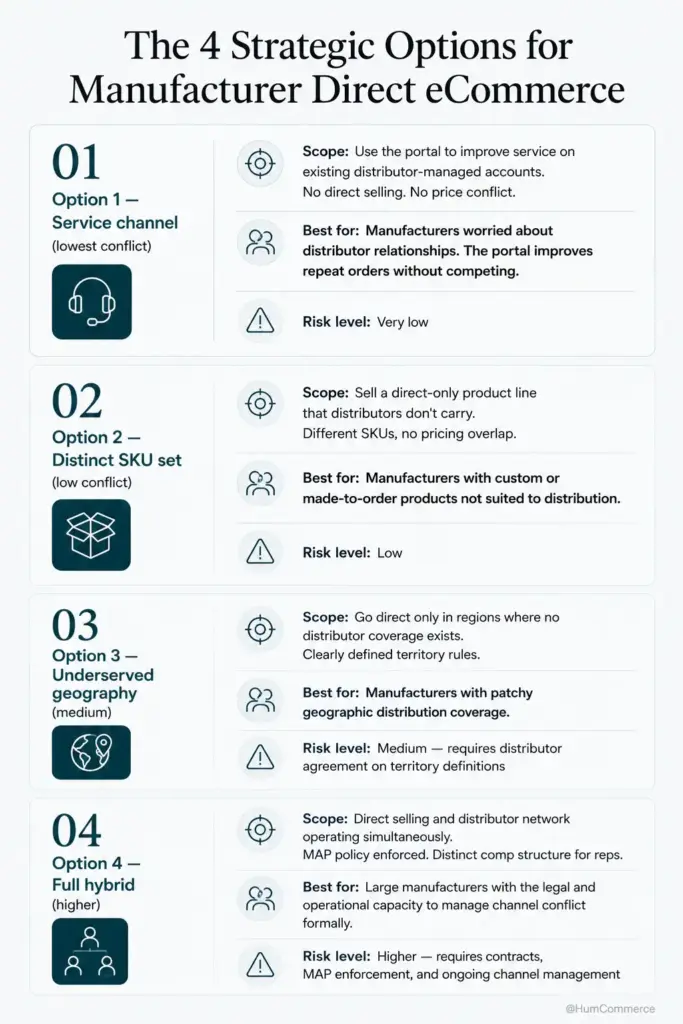
- Build distributor protection into the workflow. If a buyer associated with an active distributor tries to order directly, the system should either redirect them or apply distributor-matched pricing. This is the single most important design decision for avoiding channel conflict.
- Determine how your sales team interacts with the direct channel. Reps should get visibility into direct orders from their territory and receive credit for accounts they originated, even if those accounts now order through self-service.
- Map the data flow between Adobe Commerce and your ERP for every order scenario: standard purchase, quote request, return, and credit memo. Each flow should be documented before development begins.
Step 5: Implement Changes in Your Stack
Implementation on Adobe Commerce with ERP integration follows a specific sequence. Start with the integration layer, then configure the storefront, then test with real data.
Your VP Sales should own these decisions: which buyer segments get access first, what pricing rules apply, and how rep credit works. Your technical partner or internal IT owns the API connections between Adobe Commerce and your ERP, the pricing engine configuration, and the account permission setup.
A practical implementation checklist includes: configuring Adobe Commerce B2B company accounts and approval workflows, building the ERP pricing API integration so contract rates display correctly, setting up inventory sync at the frequency you defined in Step 3, and creating the order routing rules that distinguish direct orders from distributor orders in your ERP.
One area where ecommerce for manufacturers often breaks down is quoting. If your buyers need custom quotes, integrating your CPQ system with Adobe Commerce eliminates manual back-and-forth. HumCommerce has helped manufacturers achieve 75% faster quote workflows by connecting Epicor CPQ directly to their Magento storefront, with automated rules-driven quoting that follows real pricing and approval logic instead of spreadsheets.
Pilot the integration with a small set of test accounts before opening it to real buyers. Run orders through the full cycle: from cart to ERP to fulfillment to invoice.
Step 6: Pilot, Measure, Improve
Treat your first rollout as a controlled pilot, not a company-wide launch. Pick a narrow scope: one product category, one underserved geography, or a set of accounts that currently have no distributor coverage.
Measure what matters from week one. Track direct channel order volume, average order value, quote-to-order conversion rate, and the percentage of orders that require manual intervention. A US-based manufacturer selling both direct and through distribution should target 15-25% of repeat orders moving to direct self-service within the first year. New revenue from underserved geographies with no prior distributor coverage is often the fastest win because there’s no channel conflict to manage.
Set a bi-weekly review cadence where VP Sales checks results alongside operations. Are orders flowing cleanly into the ERP? Are buyers completing purchases without calling customer service? Are distributors raising concerns? Each review should produce one or two specific improvements for the next cycle.
This iterative approach is central to manufacturer ecommerce without distributor conflict. You prove the model works in a controlled environment, demonstrate that it’s additive to distributor revenue, and then expand. B2B buyers increasingly expect multi-channel purchasing options, and manufacturers who offer them capture demand that would otherwise go to competitors.
Common Mistakes to Avoid When You launch a manufacturer direct B2B ecommerce channel without disrupting the distributor network
- Skipping process mapping and jumping straight to platform configuration. If you don’t know how orders flow today, you’ll automate the wrong things and create new bottlenecks.
- Treating the direct channel as an IT project instead of a business initiative. Without VP Sales ownership of pricing rules, account segmentation, and rep credit policies, the portal launches but nobody uses it.
- Underestimating ERP constraints. Your ERP’s pricing and inventory APIs may not support real-time queries out of the box. Budget time for integration work, especially with older Epicor or SAP Business One instances.
- Launching with distributor-matched pricing visible to all buyers. If distributors see that anyone can get their pricing online, trust erodes immediately. Segment your pricing by account type from day one.
- Calling a storefront redesign “ecommerce for manufacturers” when the back-end workflows haven’t changed. A direct-to-buyer portal without ERP integration is just a digital brochure with a broken checkout.
- Trying to serve every buyer segment at once. Start with the segment that has the least distributor overlap and the clearest unmet need.
- Not measuring distributor revenue alongside direct revenue. You need to prove the direct channel is additive. If you can’t show that distributor sales held steady or grew, you’ll face internal and external resistance.
Need Help Putting This Into Practice?
If you’ve followed this guide, you now have a structured approach to launching a direct B2B ecommerce channel on Adobe Commerce that works alongside your Epicor, NetSuite, or SAP Business One ERP without undermining your distribution network. The framework covers channel mapping, readiness assessment, system preparation, process design, implementation, and measurement.
HumCommerce specializes in exactly this kind of work: helping manufacturers build ecommerce for manufacturers that respects B2B complexity. We design Adobe Commerce to behave like part of your ERP and operations, with real-time inventory visibility, contract pricing that follows ERP rules, and account-based workflows that distinguish between direct and distributor-served buyers. Our end-to-end B2B quote management work has reduced quote turnaround from 3-5 days to hours for manufacturers with complex pricing.
If this sounds like your situation, share your current stack (Adobe Commerce version, ERP, main pain point) and we’ll map these steps to your specific environment in a 30-minute technical walkthrough.