
TL;DR
- Launching self-service for industrial distribution is difficult because contract pricing, approval chains, and inventory data live inside ERPs like Epicor P21, NetSuite, or SAP Business One, and syncing that data accurately into Adobe Commerce requires careful architecture, not just a storefront skin.
- This guide helps you reach a state where routine reorders flow through a self-service portal while your reps stay focused on complex quotes, new accounts, and margin-rich negotiations.
- The high-level path: map your current ordering process, assess readiness, prepare systems and data, design the improved workflow, implement changes in your Adobe Commerce and ERP stack, then pilot and measure.
- A US-based industrial distributor with 500+ accounts used this approach to move 30-40% of routine reorders to self-service within 12 months, and real-time contract pricing eliminated rep interruptions for routine pricing queries entirely.
- This is for VP Sales leaders in industrial distribution running Adobe Commerce (Magento) who need a concrete plan for building a B2B distributor self-service portal that protects existing revenue while capturing digital growth.
Industrial distributors face a specific tension: buyers want to place routine reorders without calling a rep, but sales leadership worries that removing the human touch will erode margins and account relationships. B2B eCommerce for industrial distributors isn’t about replacing reps. It’s about freeing them from order-taking so they can protect and grow revenue on high-value deals. This guide walks you through a practical, step-by-step process for launching self-service without disrupting your existing revenue engine.
Why This Matters for industrial distribution
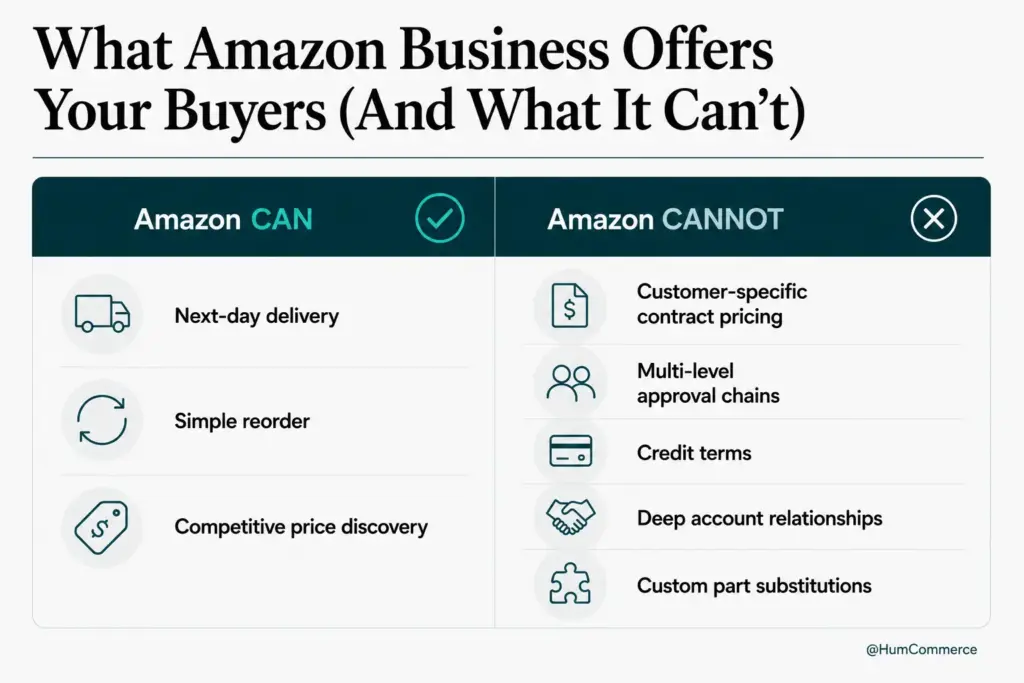
Picture a quarterly business review where your CEO asks why your reps are spending 40% of their time re-keying routine reorders instead of closing new accounts. Your Adobe Commerce storefront exists, but it doesn’t reflect the contract pricing locked inside Epicor P21, NetSuite, or SAP Business One. Customers call in because they can’t trust the online price. Reps field interruptions for stock checks on commodity items. The result: missed targets, rising cost-to-serve, and frustrated buyers who are already comparing your experience to Amazon Business. You need a structured way to launch self-service that actually works with your ERP reality.
Why launch B2B ecommerce self-service for industrial distributors without disrupting existing revenue Is a Priority Now
The core problem is straightforward. Industrial distributors have complex commercial relationships: contract rates, volume tiers, customer-specific catalogs, and multi-level approval chains. When a VP Sales explores B2B eCommerce for distributors, the fear isn’t the technology itself. It’s that a poorly executed portal will confuse buyers, undercut negotiated pricing, or bypass the approval workflows that protect margins. Meanwhile, 73% of B2B buyers are now willing to place orders over $50,000 through digital self-service, and your competitors are responding.
The friction compounds when you look at the systems involved. Adobe Commerce handles the storefront, but authoritative pricing, credit limits, and inventory live in Epicor P21, NetSuite, or SAP Business One. Without bidirectional sync, your portal shows stale prices. Reps get pulled into “Is this the right price?” conversations that should never happen. Orders entered online don’t flow cleanly back to the ERP for fulfillment. These aren’t hypothetical problems: they’re the daily reality for distributors running disconnected systems, and they’re the reason B2B digital commerce is now ranked as the most effective sales channel only when the backend data is trustworthy.
This guide covers a six-step process for launching an online ordering portal for industrial distributors that respects your existing commercial relationships. By the end, you’ll have a practical framework for deciding which orders move to self-service, how to architect pricing and approval logic, and how to measure success without gambling on a big-bang rollout. The goal is a B2B distributor self-service portal that makes your reps more productive, not less relevant.
What ‘Done’ Looks Like When You launch B2B ecommerce self-service for industrial distributors without disrupting existing revenue
Vague goals like “just add eCommerce” cause projects to drift because nobody agrees on what success means. A distributor who says “we want a portal” without defining which buyers, which products, and which workflows will move online ends up with a storefront that duplicates the catalog but doesn’t handle the pricing complexity that actually matters.
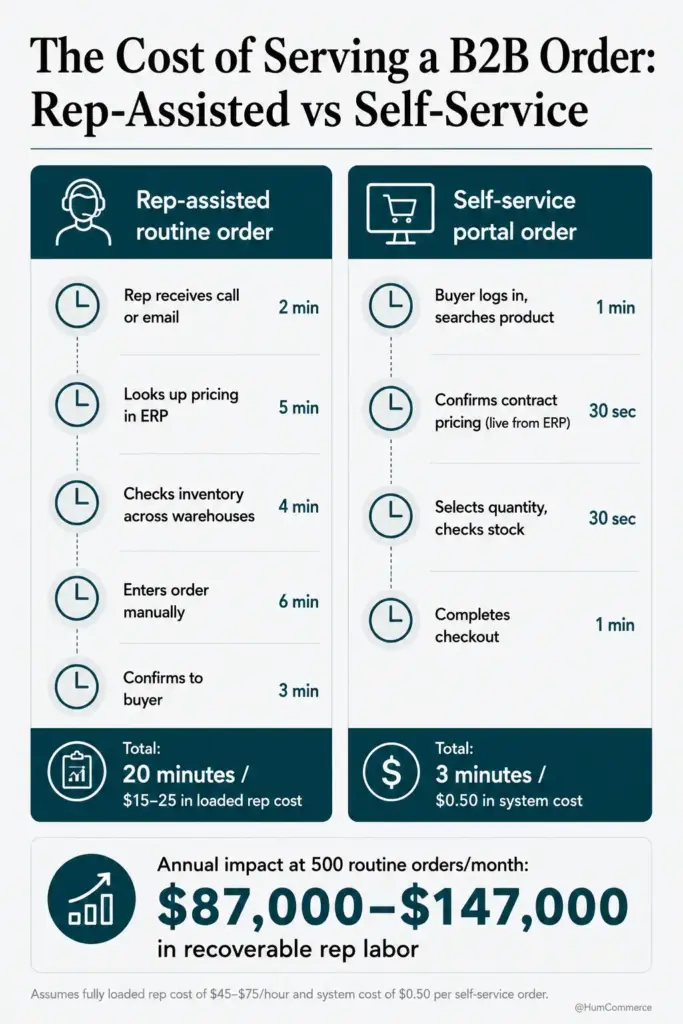
A clear definition of “done” looks like this: your top 50 accounts can log in, see their contract pricing in real time, place routine reorders without calling a rep, and track order status against live ERP data. Your reps see a dashboard showing which accounts are self-serving and which need attention. Here’s what that means in concrete terms:
- Routine reorders (commodity items, standard quantities) are placed through the portal with contract-accurate pricing pulled directly from Epicor P21, NetSuite, or SAP Business One, with no manual price overrides needed.
- Multi-level approval workflows run inside the portal: buyers with spending limits can submit orders that route to their internal approvers before hitting your fulfillment queue.
- Rep interruptions for “What’s my price?” and “Is this in stock?” queries drop by at least 50%, measured against a pre-launch baseline of support tickets and call logs.
- VP Sales has a weekly report showing self-service order volume, average order value, and rep time recaptured, tied to the B2B distributor self-service portal’s adoption metrics.
Step 1: Map How You launch B2B ecommerce self-service for industrial distributors without disrupting existing revenue Today
You start with reality, not tools. Before configuring anything in Adobe Commerce, you need a clear picture of how orders actually flow through your organization right now: who touches them, where delays happen, and which steps are manual.
- Identify your top 20 SKUs by reorder frequency across your largest accounts. These are your self-service candidates. Pull the data from your ERP, not from memory.
- Trace a single routine reorder from the moment a buyer initiates it (phone, email, or fax) through fulfillment. Document every handoff: who enters the order, who checks pricing, who confirms inventory, who approves credit.
- Map where Adobe Commerce and your ERP (Epicor P21, NetSuite, or SAP Business One) are each involved. Note where data is manually re-keyed between systems. This is where errors and delays concentrate.
- Flag the failure points. Common ones include: pricing mismatches between the portal and ERP, inventory shown as available online but allocated in the warehouse, and approval chains that stall because they exist only in email threads.
- Interview two or three inside sales reps and ask them which customer requests consume the most time for the least revenue impact. Shadowing customer service calls and auditing failed site search logs reveals patterns that spreadsheets miss.
- Document the average time from order initiation to ERP entry for routine reorders. This becomes your baseline. One distributor we’ve worked with found that routine reorders took an average of 4.2 hours from customer request to ERP entry, almost entirely due to manual steps that a properly configured distributor eCommerce platform could eliminate.
Step 2: Check If You’re Ready to launch B2B ecommerce self-service for industrial distributors without disrupting existing revenue
Readiness means your data, integrations, and organizational ownership are solid enough to support a portal that buyers will trust. If buyers log in and see wrong prices or phantom inventory, adoption dies immediately and recovery is slow.
Here’s a checklist you can answer yes or no to:
- Are your contract pricing records in Epicor P21, NetSuite, or SAP Business One current and consistently structured? If customer-specific prices are scattered across spreadsheets, sticky notes, and rep memory, you need to consolidate them into the ERP first. This is non-negotiable for any eCommerce-for-distributors initiative.
- Do you have a working integration (even basic) between Adobe Commerce and your ERP that syncs product data, pricing, and inventory? If the connection is batch-only and runs overnight, you’ll need to evaluate whether near-real-time sync is feasible before launch.
- Is there a single owner for the self-service initiative on the sales side? Without a VP Sales or Sales Ops leader who owns adoption targets and rep migration, the project becomes an IT exercise with no commercial accountability.
- Can you identify 10-20 accounts willing to pilot the portal? You need buyers who reorder frequently and have a relationship strong enough to tolerate early friction. Ask your reps who’d be open to it.
- Are your product descriptions and SKU attributes clean enough for buyers to find what they need without calling in? If your catalog has 50,000 alphanumeric SKUs with no application data or cross-reference tables, search will fail and buyers will abandon the portal.
If you answered “no” to more than two of these, narrow your scope. Start with a single product category or a single customer tier. A focused pilot on a clean data set beats a broad launch on messy data every time.
Step 3: Prepare Your Systems and Data
Before changing workflows, your Adobe Commerce instance and ERP need to be aligned on the data that drives buyer trust. Here are the focus areas:
- Pricing consistency: Ensure every contract rate, volume tier, and customer-class discount in your ERP has a corresponding price rule in Adobe Commerce. Run a reconciliation report across your pilot accounts. Mismatches here are the single fastest way to destroy portal credibility.
- Inventory accuracy: Configure real-time or near-real-time inventory sync from your ERP to Adobe Commerce. Buyers need to see actual available-to-promise quantities, not yesterday’s snapshot. If you’re running multi-warehouse operations, each location’s stock should be visible.
- Customer account hierarchy: Set up company accounts in Adobe Commerce with role-based permissions that mirror your buyers’ internal structures. A purchasing agent, a department manager, and a finance approver each need different access levels and spending limits pulled from the ERP.
- Product data quality: Your catalog needs accurate SKU-level attributes, superseded part cross-references, and clear unit-of-measure definitions. An eCommerce-for-distributors platform is only as useful as the product data behind it. If your PIM is disconnected, this is the time to establish it as the single source of truth feeding both Adobe Commerce and your ERP.
- Order flow configuration: Define how orders placed in Adobe Commerce will sync back to your ERP. Two-way sync for orders, returns, and credit memos should follow ERP rules, not portal-side overrides.
- Reporting baseline: Set up dashboards in Adobe Commerce that track self-service order volume, average order value, and conversion rate by account segment before you launch the pilot.
Step 4: Design the Improved Process
This step is about deciding what the better version of your ordering workflow looks like for your specific accounts and product mix.
- Segment your orders into “self-service eligible” and “rep-assisted.” Routine reorders of commodity items with stable pricing go to self-service. Custom configurations, new product inquiries, and large project quotes stay with reps.
- Design the buyer experience for each segment. Self-service buyers should see quick-order forms, requisition lists for repeat purchases, and real-time contract pricing on every product page. For rep-assisted orders, build a workflow where the buyer starts a cart or quote online, then a rep can step into the same session in Adobe Commerce without re-keying anything.
- Define approval routing. Map your buyers’ internal approval chains into Adobe Commerce’s purchase order workflow. A buyer with a $5,000 limit submits the order; it routes to their manager; once approved, it hits your ERP automatically.
- Configure notifications and status visibility. Buyers should see order status updates pulled from Epicor P21, NetSuite, or SAP Business One without calling your team. This is the online ordering portal experience that eliminates “where’s my order” tickets and frees inside sales for higher-value work.
- Plan the rep dashboard. Your sales team needs visibility into which accounts are self-serving, which are stalling, and where intervention adds value. This keeps reps engaged rather than sidelined.
Step 5: Implement Changes in Your Stack
Implementation on Adobe Commerce with an ERP backend like Epicor P21, NetSuite, or SAP Business One involves configuration, integration work, and a controlled rollout.
Your VP Sales should own: defining pilot account selection, setting adoption targets, briefing reps on the new workflow, and reviewing weekly metrics. Your technical partner or internal IT owns: configuring Adobe Commerce’s B2B module (company accounts, shared catalogs, purchase order workflows), building or refining the ERP integration layer for real-time pricing and inventory sync, and setting up the reporting dashboards.
A practical starting point for B2B eCommerce for distributors is to configure the pilot catalog first: load only the SKUs your pilot accounts reorder most frequently. This keeps the data manageable and lets you validate pricing accuracy before scaling. HumCommerce has helped distributors reduce quote turnaround from 3-5 days to hours by automating the capture, approval, and ERP check steps that typically bottleneck the process. The same architecture applies to routine reorders: if the distributor eCommerce platform handles pricing and approval logic correctly, orders flow straight to fulfillment.
Step 6: Pilot, Measure, Improve
Treat the first rollout as a pilot, not a company-wide launch. Select 10-20 accounts from your pilot-ready list, ideally across two or three product categories, and run the self-service portal for 60-90 days.
Measure three things weekly: self-service order volume as a percentage of total orders for those accounts, average order value compared to rep-placed orders, and the number of rep interruptions (pricing queries, stock checks, order status calls) for pilot accounts versus non-pilot accounts. A US-based industrial distributor with 500+ accounts used this exact cadence to move 30-40% of routine reorders to self-service within 12 months. Real-time contract pricing eliminated rep interruptions for routine pricing queries, and the reps redirected that time toward prospecting and complex quotes.
Hold a bi-weekly review where VP Sales checks results and decides what to expand. If pilot accounts are adopting, add more accounts. If certain product categories aren’t converting, investigate whether it’s a data quality issue or a UX problem. The B2B distributor self-service portal should grow incrementally based on evidence, not assumptions.
Common Mistakes to Avoid When You launch B2B ecommerce self-service for industrial distributors without disrupting existing revenue
- Skipping process mapping and jumping straight to platform configuration. If you don’t know where manual handoffs and pricing mismatches exist today, you’ll automate broken processes and wonder why adoption is low.
- Treating the portal as a catalog-only experience. An online ordering portal for industrial distributors that shows products but doesn’t reflect contract pricing, credit limits, or approval workflows is a brochure, not a sales channel. Buyers who can’t see accurate pricing abandon 45-60% of potential transactions.
- Underestimating ERP data quality. If your contract rates in Epicor P21 or NetSuite are inconsistent, the portal will surface those inconsistencies to buyers. Clean the data before you go live.
- Launching to all accounts at once. Big-bang rollouts create support spikes, surface edge cases at scale, and give reps no time to adjust. Pilot with your most willing accounts first.
- Not measuring rep time recaptured. If you can’t show that reps are spending fewer hours on routine order-taking and more on revenue-generating activities, you can’t justify the investment.
- Ignoring buyer onboarding. Even willing buyers need a walkthrough of the portal’s quick-order, requisition list, and approval features. A 15-minute screen share per account during pilot dramatically improves adoption.
- Treating B2B eCommerce for distributors as a one-time project. B2B digital commerce requires ongoing optimization: conversion improvements, catalog expansion, and integration refinements based on real usage data.
Need Help Putting This Into Practice?
If you’ve followed this guide, you now have a structured approach for launching self-service on Adobe Commerce with Epicor P21, NetSuite, or SAP Business One in your industrial distribution business. You know which orders to move online, how to validate readiness, and how to measure results without risking your existing revenue relationships.
HumCommerce specializes in exactly this type of B2B eCommerce for distributors: building Adobe Commerce implementations where pricing, inventory, and approval logic are driven by ERP data, not workarounds. We’ve helped manufacturers and distributors achieve 75% faster quote workflows by connecting commerce and ERP systems with rules-driven automation that eliminates manual spreadsheet processes.
If you’re a VP Sales or Sales Ops leader at an industrial distributor running Adobe Commerce with an ERP backend, share your current stack and main pain point with us. We’ll map these steps to your specific systems and show you where the fastest wins are. Reach out at humcommerce.com and we’ll set up a technical walkthrough tailored to your environment.