
TL;DR
- Most PIM-ERP integrations fail because companies treat them as technical projects instead of governance problems
- The hub-and-spoke model prevents data silos. Real-time sync for inventory and pricing. Daily batch for descriptions and images
- The safety nets: Graceful failure, retry logic, dead letter queues, alert thresholds, and audit trails catch errors before customers see them
- Three layers catch problems early: technical syntax, business rules, cross-system consistency.
- Define data ownership at the attribute level. Document sync patterns. Test error scenarios. Build rollback procedures
- Download the PIM-ERP Integration Checklist to audit your current setup or plan your next integration
Halloween 1999. Hershey had just spent $112 million on a new ERP system, they made it live in July right before their biggest sales season. The result: orders couldn’t be processed, shipments couldn’t be tracked and the company lost $150 million in revenue. Stock dropped 35% and profits fell 19%.
The technology worked fine. The integration didn’t.
Twenty-five years later, the same story plays out in B2B companies every week.
Different systems. Same problem.
Your ERP knows the inventory.
Your PIM has the product descriptions.
Your Adobe Commerce store shows something different from both.
And somewhere in between, orders fall through the cracks, prices don’t match, and your team spends Friday afternoons reconciling spreadsheets instead of closing deals.
The issue is the handoff.
PIM ERP integration fails when companies treat it as a technical project.
It succeeds when they treat it as a governance problem.
Who owns what data? Where does it live? When does it move? What happens when something breaks?
This blog answers those questions with the architecture that works.
Why Most Integrations Fail Before They Start
73% of ERP implementations fail due to poor planning.
Most companies approach ERP PIM integration like a plumbing project. Connect pipe A to pipe B, turn on the water, done but data has owners, rules and consequences when it flows to the wrong place.
The fundamental mistake is treating PIM and ERP as equals competing for the same data. They’re not. They do different jobs and when you try to make them do each other’s job, everything breaks.
The Hot Data vs Cold Data Framework
This is the most important concept in product data integration. Miss this, and your integration will fail.
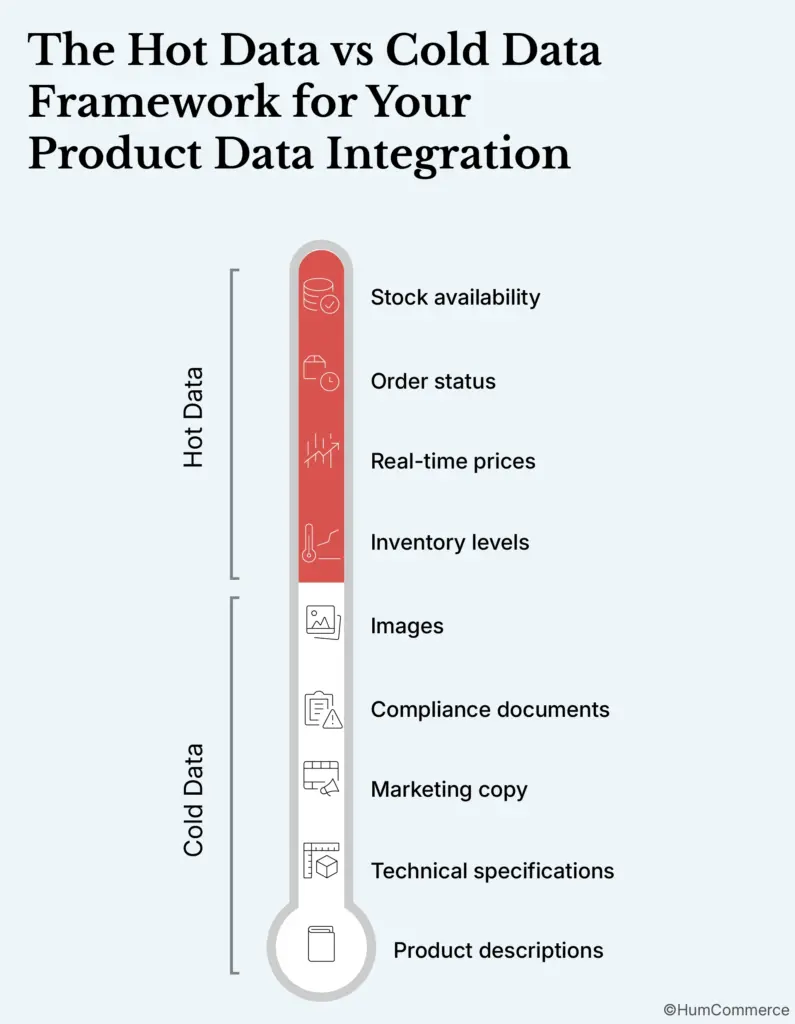
Hot data changes constantly.
Inventory levels. Real-time prices. Order status. Stock availability.
This data moves fast and needs to be accurate to the second. Put it in your PIM and you’re already behind.
Cold data changes rarely.
Product descriptions. Technical specifications. Marketing copy. Images. Compliance documents.
This data needs to be rich, consistent, and governed. That’s what PIM does well.
Hot data flows from ERP directly to your eCommerce platform. Cold data flows through PIM.
When companies put inventory in PIM, they create a delay. PIMs typically sync once or twice a day and that’s fine for descriptions but it’s disastrous for stock levels.
Customers see “in stock,” place an order, and get a backorder notification, this is when trust dies.
When companies skip PIM for product content, they get descriptions written by warehouse managers. “Blue widget, 4 inch” doesn’t convert. Neither does the same product with three different names across three channels.
The architecture that works looks like this:
ERP → PIM: SKU numbers, item status, basic product names, country of origin, reference pricing
PIM → eCommerce: Enriched descriptions, specifications, images, SEO content, translations
ERP → eCommerce (bypassing PIM): Real-time inventory, live pricing, order status
This is how Akeneo’s own documentation recommends structuring the integration. PIM manages cold product information. Hot data stays out.
Who Actually Owns Your Product Data (And Why Conflicts Kill Integrations)
Problem Statement 1: Keep product data accurate across every channel
You can’t have accurate data if two systems are fighting over the same field.
This is called dual maintenance, and it’s the silent killer of integrations. Here’s how it happens: Your ERP has a product description field, your PIM has a product description field. Both get edited. Now you have two versions of truth. Which one wins?
The answer should never be “whoever edited last.”
The rule is simple: every field has one owner. That owner’s system is the source of truth. Every other system gets a read-only copy.
Let me be specific about what this looks like in practice.
Fields Your ERP Should Own
- SKU – Master identifier created by ERP; PIM and eCommerce reference it but never modify it
- Item Status – Active, discontinued, draft; operational decision made by ERP that everyone else respects
- UPC Codes – Logistics data owned by ERP
- Product Group Codes – Organizational structure defined in ERP
- Unit of Measure – Logistics classification from ERP
- Country of Origin – Compliance and tariff data tracked by procurement
- Weight & Dimensions – Shipping calculations managed by warehouse operations
- Reference Pricing – Baseline price before customer-specific adjustments (real-time prices flow ERP to eCommerce directly, bypassing PIM)
Fields Your PIM Should Own
- Marketing Descriptions – Stories that sell the product
- Technical Specifications – Formatted for engineers and technical buyers
- SEO Content – Optimized titles, meta descriptions, keywords
- Translations – International market versions
- Product Relationships – Accessories, compatible items, frequently bought together
- Digital Assets – All files attached to products:
- Images
- Videos
- PDFs
- Spec sheets
- Installation guides
- Compliance certificates
- Technical drawings
- Images
The governance matrix
Create a spreadsheet with every product attribute, who owns it, and who can read it. Share it with every team that touches product data.
This will create clarity.
When the pricing team asks “why is this price wrong on the website,” you can trace it back to the source. When the marketing team wants to update a description, they know exactly where to do it.
Download the PIM-ERP Integration Checklist (PDF) for a template you can customize for your organization.
The Integration Architecture That Actually Works
Problem Statement 2: Automate listings for marketplaces & B2B platforms
Manual data entry doesn’t scale but neither does “connect everything to everything.”
The integration architecture that works uses PIM as the hub because product content needs a single source before it fans out to multiple channels.
Think of it this way: Your ERP feeds the PIM with master data, our team enriches that data in PIM and then PIM distributes the enriched content to Adobe Commerce, to Amazon, to your B2B portal, to your print catalog.
Without the hub, you’re maintaining the same product in five places. With the hub, you maintain it once and publish everywhere.
Sync frequency: the decision framework
Not everything needs real-time sync, in fact, real-time sync for everything will break your integration faster than batch processing ever could.
Use real-time sync for:
- Inventory levels (customers need to know what’s available now)
- Customer-facing prices (especially if you have contract-based pricing)
- Order status (customers expect immediate confirmation)
- Item status changes (when a product goes live or gets discontinued).
Use daily batch sync for:
- Product descriptions (they don’t change hourly)
- Technical specifications (they change even less frequently)
- Images and digital assets (large files that don’t need instant updates)
- SEO metadata (search engines don’t re-crawl every hour anyway).
Use weekly or on-demand sync for:
- Category taxonomy changes (major structural changes need review)
- Full catalog refreshes (for validation and reconciliation)
- Reference data updates (units of measure, country codes).
Be strategic, sync what needs to be fresh in real-time and batch everything else.
Integration methods compared
You have three options for connecting PIM to ERP to eCommerce. Each has trade-offs.
- API-first integration gives you the most control. Your systems talk directly to each other through REST or GraphQL endpoints. Changes propagate quickly. You can customize the logic but you need developers to build and maintain it, and you’ll hit rate limits at scale.
- Middleware or iPaaS (MuleSoft, Boomi, Celigo) sits between your systems. It handles transformation, routing, and monitoring. You get a visual interface for mapping fields. You get built-in error handling but you add another system to manage and another subscription to pay.
- File-based integration (CSV exports, FTP transfers) works for legacy ERPs that don’t have modern APIs. It’s simple and reliable for batch operations but it’s not real-time, and it requires manual intervention when files fail to transfer.
For most B2B companies running Adobe Commerce with a modern ERP (Epicor, SAP, NetSuite) and a cloud PIM (Akeneo, Pimcore), API-first integration with selective middleware makes sense.
Use APIs for the core data flow. Add middleware when you need complex transformations or when you’re connecting to multiple marketplaces.
Adobe Commerce-specific patterns
If you’re running Magento or Adobe Commerce, here’s what you need to know about the major PIM connectors.
Akeneo’s connector fetches data via API and inserts it directly into your database using SQL. This is fast, you can import large catalogs without site outages but because it bypasses Magento’s normal save process, standard observers don’t fire. If you have custom logic that triggers on product save, you’ll need to handle it differently.
For catalogs over 250,000 SKUs, plan for cron-based sync jobs with delta detection. The connector works well out of the box for mid-size catalogs. At enterprise scale, you’ll need custom middleware to manage queuing and error handling.
Pimcore’s connector supports real-time synchronization triggered on publish. When you save a product in Pimcore, it can be pushed to Adobe Commerce immediately. The GraphQL and REST APIs give you flexibility. But Pimcore requires PHP and Symfony expertise to customize, it’s developer-heavy by design.
Salsify’s connector (built through a partnership with Avionos) focuses on D2C and hybrid models. It’s optimized for retail syndication. If you’re primarily B2B selling through your own channels, Salsify’s strengths may not align with your needs. For the full breakdown of all three, see Akeneo vs Salsify vs Pimcore for Adobe Commerce.
Smarter Media Management: When PIM Meets DAM
Problem Statement 3: Smarter media management with PIM & DAM sync
Product images and documents are just as important as specifications. A B2B buyer will forgive a sparse description if the spec sheet PDF is accurate. They won’t forgive uploading the same image twelve times to twelve different places and getting it wrong on three.
The challenge is that digital assets have their own lifecycle. Images get shot. They get retouched, get resized for different channels, replaced when products update. Managing this alongside product data creates complexity.
The PIM-DAM integration gap
When product updates happen in PIM but don’t reach the right visuals, you get mismatches. The wrong image on the product page. An outdated spec sheet that doesn’t match current features or a video that shows last year’s model.
B2B buyers are detail-oriented. They notice when the image doesn’t match the part number, question whether your data is reliable and if they can’t trust your data, they can’t trust your company.
Integration architecture for media
The solution is metadata alignment. Your PIM and DAM need to speak the same language about products.
Every asset should link to a SKU.
When that SKU updates in PIM, the DAM knows.
When new assets get approved in DAM, they flow to PIM automatically.
When PIM publishes to eCommerce, the current assets come along.
This requires shared taxonomies. If PIM calls it “product_image_main” and DAM calls it “hero_shot,” you’ll have mapping problems. Standardize the naming conventions upfront.
It requires synchronized workflows. When a product moves from draft to active in PIM, the asset approval workflow in DAM should complete first. Build dependencies between system.
And it requires version control. When someone uploads a new image, the old one doesn’t disappear. It gets versioned. If you need to roll back, you can.
Native DAM vs. integrated DAM
Some PIMs include DAM capabilities. Pimcore includes DAM in every edition, including the free Community Edition. Akeneo offers Asset Manager in Enterprise and Serenity editions. Salsify includes native DAM within its PXM platform.
If your PIM has capable DAM features and your needs are straightforward, use them. One fewer integration to maintain.
If you have complex media workflows – photography studios, brand guidelines, multi-region asset localization – you may need a dedicated DAM (Bynder, Cloudinary, Aprimo) integrated with your PIM. More complexity, but more capability.
The PIM-ERP Integration Checklist (PDF) includes a section on DAM integration requirements to help you decide.
The Three Layers That Catch Bad Data Before Your Customers See It
Data flows only as cleanly as your validation rules allow.
When ERP sends a product to PIM, the PIM shouldn’t accept it blindly. When PIM sends enriched content to eCommerce, the eCommerce platform shouldn’t publish it without checks.
The three validation layers
Layer zero: technical syntax.
Does the data match the expected format?
Is the file readable?
Does the SKU field contain a valid identifier?
Are required fields present?
This catches obvious errors before they propagate. A malformed CSV shouldn’t make it into your PIM. A product missing a SKU shouldn’t make it to your website.
Layer one: business rules.
Does the data make sense for your business?
Is the price within acceptable ranges?
Is the category assignment valid?
Are required attributes for that product type filled in?
This catches logical errors. A $0.01 price on a $500 product. A “power tool” categorized under “office supplies.” A configurable product missing its configuration options.
Layer two: cross-system consistency.
Does the data in PIM match the data in ERP?
Are there conflicts between what systems say about the same product?
This catches integration drift. ERP says the product is discontinued; PIM still shows it active. ERP updated the weight; PIM still has the old value.
Validation rules that actually work
Be specific. “Product must have description” is a start.
“Product must have description between 100 and 500 characters, with no HTML tags, containing at least one keyword from the SEO list” is a rule that maintains quality.
Build validation into the workflow, not after it. Don’t let products proceed to the next stage until they pass. A product that fails validation stays in draft. The responsible team gets notified. The issue gets fixed before it reaches customers.
Data quality KPIs to track
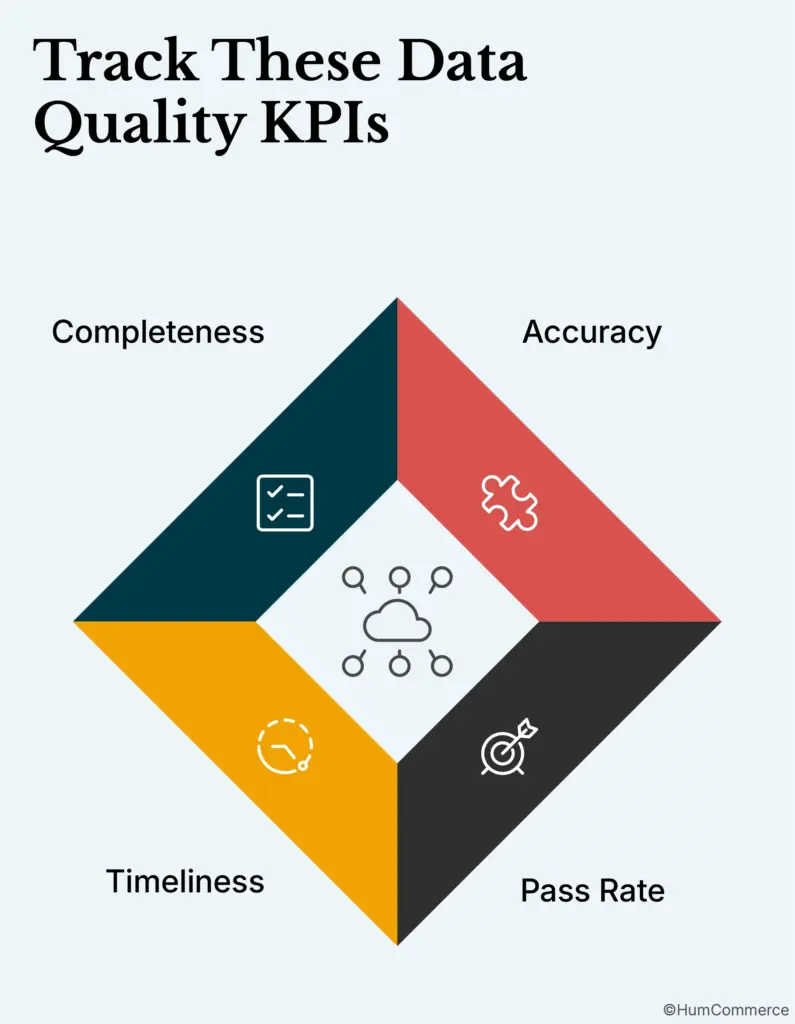
Completeness: what percentage of required attributes are filled? If your products are only 60% complete, you’re publishing incomplete data.
Accuracy: what percentage of values match the source of truth? Run periodic reconciliation between ERP and PIM. Catch drift before it causes problems.
Timeliness: how long between a change in the source system and that change appearing in downstream systems? If it takes three days for a price change to reach your website, that’s a business risk.
First-time pass rate: what percentage of products pass validation on first import? A low rate means your source data has quality issues, fix them upstream.
Error Handling: When Things Break
Synchronization processes will encounter errors so it’s best to plan for it.
Error handling framework
Graceful failure. When one record fails, the system should not stop processing the other 10,000 records. It should isolate the failure, log it, continue with the rest, and let you fix the broken record separately.
Retry logic. Transient failures like API timeouts, network glitches, or temporary rate limits are normal. Build automatic retry with exponential backoff so the system tries again in 1 minute, then 5 minutes, then 30 minutes, instead of hammering a failing endpoint.
Dead letter queue. When all retries are exhausted, the record should move into a queue for human review, where someone can see exactly what failed, correct the data or configuration, and rerun or escalate the issue.
Alert thresholds. One failed record is not an emergency, but a thousand failed records probably is. Set thresholds that trigger notifications only when error volume, frequency, or pattern crosses a meaningful line, so alerts point to real problems instead of becoming background noise.
Audit trail. Every sync attempt should be logged with what was sent, what was received, what changed, and when it happened. This level of detail turns debugging from guesswork into a traceable investigation.
Common error patterns and fixes
Unit of measure mismatches.
ERP says “each.” PIM expects “EA.” The sync fails.
Fix: create a transformation layer that normalizes UoM codes before sync.
Vendor name variations.
“Ford Motor Company” in one system, “Ford Motor Co.” in another.
Fix: standardize vendor master data with consistent naming conventions.
API rate limits exceeded.
You’re syncing 50,000 products at once. The API throttles you.
Fix: batch processing with queue management. Don’t send everything at once.
Timeout on large operations.
Syncing a product with 200 images times out.
Fix: chunked processing. Sync the product data first. Sync images in a separate job.
Duplicate records created.
Same product gets imported twice with different IDs.
Fix: unique identifier enforcement with duplicate detection before insert.
What Hershey Didn’t Test (And You Must)
The difference between a successful integration and Hershey’s Halloween disaster is testing.
Testing framework
Pre-migration testing happens before you go live.
- Run trial migrations with sample data
- Verify that field mappings work correctly
- Check that validation rules catch what they should catch
- Benchmark performance so you know what normal looks like
Integration testing validates the full data flow.
- Create a product in ERP
- Watch it flow to PIM
- Enrich it
- Publish to eCommerce
- Verify that every field arrived correctly at every step
- Test the error paths too – what happens when you send invalid data?
Load testing checks performance under realistic conditions.
- If you have 100,000 SKUs, test with 100,000 SKUs
- If you process 1,000 orders per day, simulate 1,000 orders per day
- Find the breaking points before your customers do
User acceptance testing gets stakeholders to validate the output.
- Does the product page look right?
- Does the pricing calculate correctly?
- Does the integration support the workflows people actually use?
Rollback procedures
Always backup before migration.
Maintain version control for data states. If you need to undo a batch import, you need to know what the data looked like before the import.
Test rollback procedures before production deployment. Don’t find out your rollback doesn’t work when you need it.
Document freeze windows. During critical periods like holiday seasons, major promotions, don’t deploy changes, stabilize the system when you can’t afford failures.
Keep delta logs. If you need to roll back partially, you need to know exactly what changed and when.
Five Signs Your Integration Is Already Broken
Before you start a product data integration project, treat this as a quick diagnostic on your current stack.
Signs your integration needs work:
- People are manually copying data between systems; if a human is your integration layer, you do not have an integration
- Pricing mismatches are common: one price online, another in the quote, a third on the invoice, and every mismatch erodes trust
- You have oversold products because inventory was not current; once is a mistake, twice is a pattern, three times is a broken integration
- Product launches take months instead of weeks because getting data into every system is the bottleneck, not getting the product ready
- Compliance data lives in spreadsheets, and answering “what’s the country of origin for every product?” takes more than a few minutes
Integration readiness checklist:
- Data ownership is defined at the attribute level; not “PIM owns product data,” but exactly which fields each system owns
- Validation rules are documented so everyone knows what must be true before a product can be published
- Error handling procedures exist and are followed; when sync fails, it is clear what happens, who is notified, and how issues are escalated
- Testing protocols are defined; there is a known set of tests that run before every deployment or major change
- Rollback procedures are not only documented but tested, so you can actually roll back and verify that everything returns to a safe state
- Monitoring dashboards are configured so you can see integration health at a glance and spot problems before customers report them
The PIM-ERP Integration Checklist (PDF) walks you through each of these items with specific questions to answer and decisions to make.
The Handoff That Actually Works
The difference between Hershey’s 1999 disaster and a successful integration is the handoff.
When you define who owns what data, you eliminate conflicts.
When you route hot data directly and cold data through PIM, you get accuracy where it matters.
When you build validation gates, you catch errors before customers do.
When you plan for failures, you recover gracefully instead of catastrophically.
Solve the governance and the technology follows.
70% of PIM implementations fail to meet their objectives because companies don’t define the handoff. They don’t document ownership or test the integration under realistic conditions, they go live before they’re ready.
Do the work upfront. Define the architecture. Document the rules. Test the failure modes. Build the safety nets.
Next Step: Get the Checklist
We’ve built a comprehensive integration checklist covering everything in this guide:
- Data ownership matrix template
- Sync frequency decision framework
- Validation rules checklist
- Error handling procedures
- Testing protocol template
- Go-live readiness checklist
Download: PIM-ERP Integration Checklist (PDF)
Use it to audit your current integration or plan your next one.And if you want help designing or implementing the integration, that’s what we do. HumCommerce has built PIM-ERP integrations for manufacturers, distributors, and industrial suppliers running Adobe Commerce with Epicor, SAP, and NetSuite.