
TL;DR
- Data bottlenecks, not production, are what cause product launches to be late. Teams spend 40% of their time hunting for information in systems that don’t work.
- A 10-day product launch process has five steps: importing data, automatically enriching it, integrating assets using DAM automation, mapping channels, and QA/go-live.
- Three key options are a centralized PIM to make sure data is correct on all channels, automatic syndication for marketplace listings, and bidirectional PIM-DAM connectivity to make media management smarter.
- You require PIM infrastructure, ERP connectivity, DAM sync, and clear team accountability to be successful. Before 10-day launches to happen again, there needs to be 4 to 8 months of basic work.
- Results: 50% faster time to market, 60–80% less human data processing, almost no channel rejection rates, and predictable product GTM cycles
Vector Consulting Group’s findings in September 2025 shocked product leaders. Late-stage technical modifications and data difficulties that affected every downstream step were causing 80% of Indian carmakers to miss their launch dates.
Changes that should have ended after the initial prototype stayed elevated well into production. Only 6% of manufacturers followed the ideal trajectory where changes drop below 15% in pre-production. The rest were constantly firefighting. Every change triggered rework in design, tooling, repeated validations, and documentation updates. Launch schedules slipped. Costs ballooned. 76%of suppliers reported longer project lead times as a direct result.
The delays weren’t happening in factories. They were happening in data flows.
This is the untold story of product launch failures. The product is ready, engineering has signed off, manufacturing has capacity and yet the product sits in a queue for weeks because nobody can find the test results. Why? Because the specifications aren’t in the right format for the website and the images haven’t been linked to the product records.
Sound familiar?
The product launch process in most manufacturing and distribution companies isn’t broken at the marketing stage. It’s broken at the data stage and that’s exactly where the opportunity lies.
This blog shows you how to compress product launch data preparation from weeks to 10 days with the infrastructure, workflows, and team structure to make it repeatable.
The Hidden Bottleneck Nobody Talks About
45% of product launches are delayed by at least one month because of missing technical data and documentation issues.
For industrial OEMs, a single 12-month delay costs up to $200 million in lost revenue and opportunities. For suppliers, that same delay costs $15 million.
It gets worse when product and marketing teams spend up to 40% of their working hours just looking for the right product information.
Manual data updates waste approximately 25 minutes per SKU. If you’re launching 100 new products, that’s 42 hours of pure data hunting before anyone even starts the actual work of enriching and syndication.
The product gtm process has been studied extensively from a marketing perspective. Countless playbooks exist for launch campaigns, press releases, and sales enablement. But the data preparation stage where products actually get stuck remains a black box in most organizations.
That’s what this blog addresses.
Where Your Launches Actually Get Stuck
Before you can fix the product launch process, you need to understand where it breaks. In our work with manufacturers and distributors, we see the same five bottlenecks repeatedly.
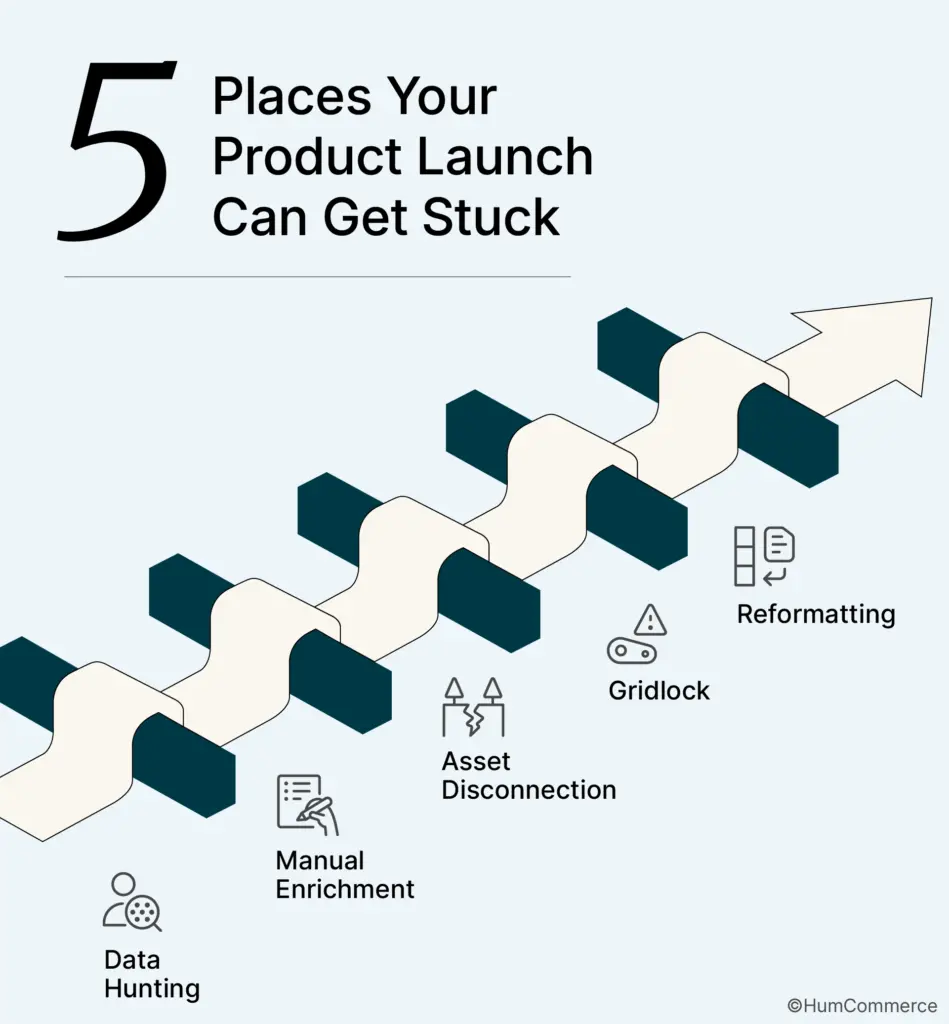
The first bottleneck is data hunting. Teams search across ERP systems, spreadsheets, supplier portals, engineering documents, and shared drives looking for product information. The data exists somewhere. But finding it, verifying it, and consolidating it takes days.
The second bottleneck is manual enrichment. Every new product requires descriptions, attributes, specifications, and marketing content. Without templates or automation, teams write from scratch every time. The same category descriptions get rewritten for the hundredth product in that category.
The third bottleneck is asset disconnection. Images, videos, PDFs, and CAD drawings live in a different system than product data. Nobody maintains the connection between assets and products systematically. When it’s time to launch, teams manually match files to SKUs and often get it wrong.
The fourth bottleneck is approval gridlock. Products sit waiting for sign-off from engineering, marketing, compliance, or sales. No one knows who owns the approval. Decisions get stuck in email threads. “Waiting for review” becomes the default status for weeks.
The fifth bottleneck is channel reformatting. Your website needs data in one format. Amazon needs it in another. Your distributor portal has different requirements entirely. Teams manually rebuild product information for each channel instead of transforming from a single source.
These five bottlenecks explain why launches take weeks when they should take days. The product is ready. The systems aren’t.
Why the Same Problems Keep Happening
Bottlenecks are symptoms. Root causes are what you need to fix.
The first root cause is data architecture that is broken apart. There are several separate systems that hold product information, such as ERP for pricing and inventories, PLM for engineering specs, spreadsheets for marketing content, and file servers for photos. There is no one source of truth, so every launch has to start over.
The second reason is because there are no clear workflows. There isn’t a set way for items to go from engineering to market. Handoffs are done verbally, approvals are done on the fly, and quality checks are done at the end, when rectifying mistakes costs a lot.
The third main cause is checking quality by hand. If it happens at all, data validation is done by hand. People find mistakes after goods go live, not before. Teams spend more time repairing mistakes than they do stopping them from happening.
The fourth root cause is asset-data disconnection. PIM and DAM operate as separate kingdoms, product updates don’t trigger asset reviews, asset updates don’t sync to products. The two systems that should work together operate in isolation.
The fifth root cause is unclear decision rights. Multiple people think they own approval or no one does. Escalation paths are undefined. When something needs a decision, the default is to wait until someone else acts.
Until you address these root causes, you’ll keep fighting the same fires with every launch.
The 10-Day Framework
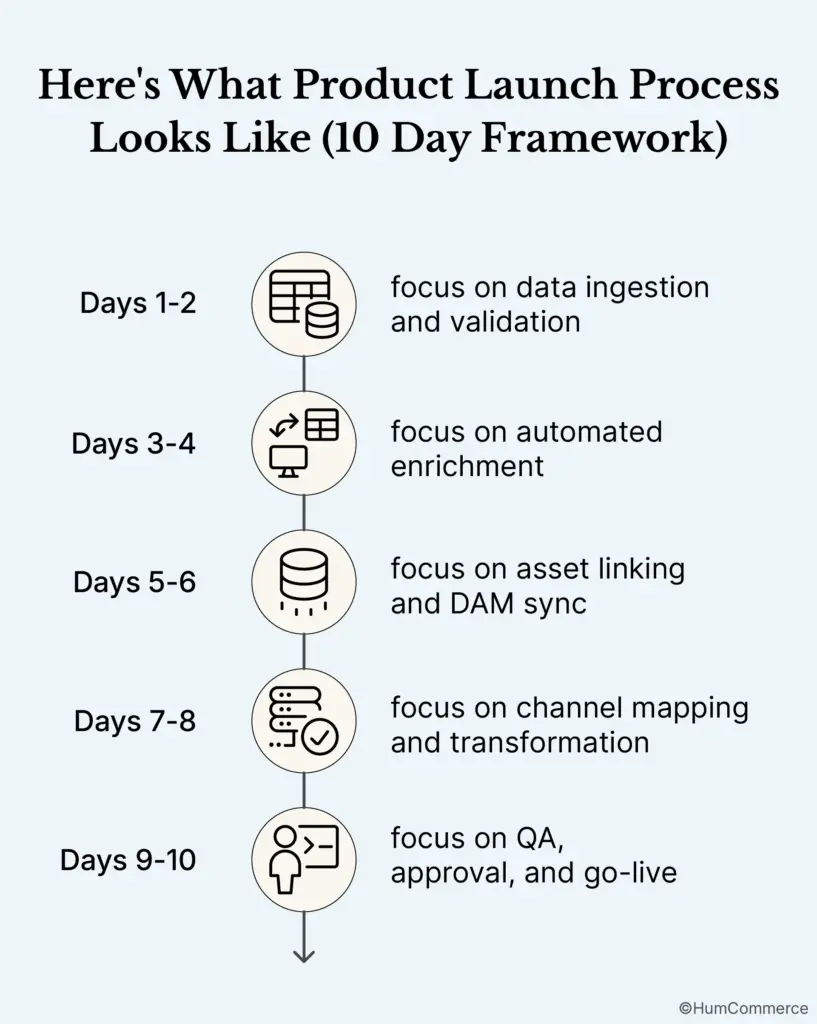
Here’s what a compressed product launch process looks like when the infrastructure and workflows are in place.
The first 2 days are all about getting data in and checking it. Your PIM system automatically gets product data from ERP, PLM, or supplier feeds. Before anyone touches the data, validation rules catch missing attributes, formatting mistakes, and incomplete records. A quality gate makes sure that products can’t move on until core data has been validated. The output is organized, clear product records that are ready to be enriched.
Automated enrichment is the focus of days 3 and 4. Automated enrichment is the main focus on days 3 and 4. It starts to make material using templates. The descriptions at the category level are the base. When you group products together, attribute inheritance obtains standard values from them. AI-powered tools can help you write descriptions faster when you need them. Keyword mapping and SEO optimization are not done on the fly; they are planned out ahead of time. The end result is product content that may be linked to assets.
You will connect assets and sync DAM on days 5 and 6. This is where DAM automation turns a manual nightmare into a procedure that always works. Automated asset-to-product matching employs data about SKUs, categories, and product families to connect the right files to the right records. Bidirectional PIM-DAM sync makes ensuring that the right assets are linked immediately away. Version control makes sure that only assets that have been approved and are up to date are linked. Getting the structure just right makes assets work for different channel needs. The final product is comprehensive records of products with the right assets.
Days 7 and 8 are all about shifting channels and mapping. Automated transformation takes your regular product data and turns it into formats that are unique to each channel. Marketplace attribute mapping meets the needs of Amazon, Walmart, and the distributor portal. Checking against channel schemas finds mistakes before syndication. The output is product feeds that channels can use.
Getting approval, making sure everything is okay, and going online are the main things that happen on days 9 and 10. Automated QA checks make sure that everything is right, full, and follows the regulations. Approvals that go through the workflow go to the right people on time. The last human check handles strange circumstances. Syndication provides products to all channels at the same time. Because of this, live commodities are where they should be.
This framework works when the infrastructure supports it. Without that foundation, 10 days isn’t realistic. With it, 10 days becomes repeatable.
Download the 10-Day Product Launch Checklist to see the detailed task breakdown, owner assignments, and quality gates for each phase.
Keeping Product Data Accurate Across Every Channel
The first pain point in any product launch is accuracy. You have product data in multiple systems. It needs to be consistent everywhere. And right now, it isn’t.
The surface symptom is easy to spot. Pricing doesn’t match between your website and your Amazon listing. Specifications differ between your catalog and your quoting system. Inventory shows available on one channel while it’s actually committed elsewhere.
The root cause runs deeper. Without a centralized source of truth, every system maintains its own version of product information. Updates happen in one place but not another. Manual reconciliation becomes a full-time job and still doesn’t catch everything.
The architectural solution is a PIM that establishes genuine single-source-of-truth governance. This means defining which system owns which data. Your ERP owns pricing, inventory, and core identifiers. Your PIM owns enriched product content – descriptions, specifications, marketing copy. Your DAM owns digital assets. Integrations respect those boundaries and keep data synchronized.
When this architecture works, a pricing change in your ERP propagates to your eCommerce platform, your marketplace listings, and your sales quoting tools within minutes. Your team stops chasing discrepancies and starts focusing on growth.
HumCommerce has implemented this pattern for manufacturers managing 150,000+ SKUs with zero downtime during migration and full data integrity throughout.
Still confused about how to do PIM Integration for your B2B? Here’s a guide which will help you.
Automating Listings for Marketplaces and B2B Platforms
The second pain point is the manual labor of getting products listed everywhere they need to be.
Every marketplace has unique requirements. Amazon wants titles formatted one way. Walmart wants something different. Your B2B portal needs different attributes than your D2C storefront. Grainger has specific compliance fields. Each channel has its own rules.
Manual management hits a wall fast. One retailer spent two years struggling to get products live on a marketplace. After all that effort, only 18 percent of their 11,000 products were actually listed. The bottleneck wasn’t inventory or pricing, it was product data that didn’t meet the marketplace’s formatting standards.
The solution is automated syndication from a single source. Your canonical product record contains all the information. Channel connectors transform that data into each platform’s required format. Scheduled feeds push updates on whatever cadence each channel requires. Error monitoring catches problems before they impact listings.
Attribute modeling is where this gets technical. You need a data model flexible enough to capture 200+ attributes for complex industrial products while structured enough to map cleanly to each channel’s requirements.
The best implementations build attribute inheritance into the model. Category-level attributes cascade to products automatically. Product types define required versus optional attributes. Variants inherit from parents while allowing overrides where needed.
The shift from manual to automated syndication typically reduces time-to-market by 50 percent. More importantly, it eliminates the listing errors that get products suspended or buried in search results.
Smarter Media Management with PIM and DAM Sync
The third pain point is the disconnect between product data and digital assets.
Your PIM manages structured information – attributes, descriptions, specifications, pricing. Your DAM manages files which are images, videos, PDFs, CAD drawings. When these systems don’t talk to each other, chaos follows.
A product gets updated in your PIM, but old images stay attached. A new hero shot gets uploaded to your DAM, but nobody updates the product records. Marketing creates photography that sits unused because the connection to product data was never made.
DAM automation through proper PIM-DAM integration solves this by creating bidirectional links between product records and their associated assets.
The metadata alignment is critical. Product IDs match asset tags. Categories map to folders. Status flags sync between systems. When you search for a product in your PIM, the correct assets surface automatically.
Workflow synchronization matters just as much. When a product is ready for its final evaluation in your PIM, the DAM immediately checks to see if there are any approved assets. The PIM gets an email when a new asset is accepted in your DAM, telling it to update the products that are affected. Version control makes ensuring that everyone is using the most recent approved files.
This connectivity goes beyond marketing images for production and distribution. There are links between engineering drawings and products. Certificates of compliance go with the relevant SKUs. Safety data sheets are sent to the channels that need them.
HumCommerce achieved this in a 150,000 SKU migration where PIM integration automated image processing and metadata tagging with AWS S3 Adapter for scalable, secure image storage across marketplaces.
Configuring Your PIM for Speed
Infrastructure alone isn’t enough. Configuration decides if your systems speed things up or slow them down.
The cornerstone is data model optimization. If you use attribute inheritance, category-level attributes will flow down to goods. This cuts down on data entry by 60–80% for each SKU. Product families and types tell you which qualities are essential and which are not. Variant modeling is set up once at the parent level and passed down to the children.
Workflow automation settings keep products moving. Automated triggers advance products to the next queue when validation passes. Status-based routing sends products to the right owner based on completion stage. When approvals are delayed, deadline enforcement gets stronger. Parallel processing lets several products move through the workflow at the same time.
Validation rules find mistakes early on. Before export, pre-syndication completeness checks make sure that all needed fields are filled up. Format validation checks that the data types, character restrictions, and enumeration values are all proper. Cross-reference validation checks that SKUs match ERP and that prices are within the right range.
Bulk processing features can manage a lot of data. Mass import templates make it easier to quickly get data into a system. Bulk editing changes properties for thousands of SKUs at the same time. Scheduled processing processes big jobs during times when there aren’t many people using the system.
Real-time sync configuration keeps everything current. ERP integration syncs pricing and inventory in real-time or near-real-time. eCommerce push delivers product updates to storefronts within minutes. Marketplace feeds run on scheduled or triggered syndication based on business rules.
Building QA Automation That Catches Errors Before They Cost Money
Quality control by hand doesn’t work on a large scale. It takes a long time, is prone to mistakes, and isn’t always the same. Finding mistakes after goods are live costs a lot of money to fix and hurts customer trust.
Automated QA changes quality control from being reactive to being proactive.
Data completeness checks make sure that all needed fields are filled up before products move on in the workflow. Missing data is automatically marked with a visible label. You may see completeness scores at both the product and catalog levels.
Accuracy validation enforces data types, ranges, and cross-references. Prices must fall within defined bounds. Dimensions must be realistic. SKUs must exist in the ERP. Categories must be valid.
Consistency verification catches duplicates, enforces naming conventions, and standardizes attribute values. Units and terminology become uniform across the catalog.
Channel compliance pre-checks validate against channel-specific requirements before syndication. Character limits, required attributes, and format specifications get verified. Marketplace schema compliance happens automatically.
Asset-data alignment verification confirms required assets are linked to products. Asset metadata must match product attributes. Asset quality standards must be met.
The result is that errors get caught before they reach customers, not after.
Team Structure and Decision Rights
Technology alone won’t accelerate launches. You need clear accountability.

The critical principle: every task has exactly one Accountable person. Two As equals no A.
The Data Steward or Product Ops Lead owns data quality and completeness. They manage PIM workflows and configurations. They’re accountable for data accuracy across channels.
The Technical Product Owner owns engineering specifications. They validate technical accuracy. They bridge engineering and commercial teams.
The Content or Marketing Lead owns enrichment and marketing content. They manage DAM and creative workflows. They’re accountable for brand consistency.
The Integration or IT Lead owns system connections and data flows. They manage ERP, PIM, DAM, and eCommerce integration. They’re accountable for technical performance.
The Launch Coordinator owns timeline and milestone tracking. They manage cross-functional coordination. They’re accountable for on-time delivery.
Decision rights must be explicit. Who can approve versus who can veto? What’s the maximum approval timeframe – 24 hours? 48 hours? What’s the escalation path when decisions stall?
Document these in your workflow system, not just in people’s heads.
When 10 Days Isn’t Realistic And What to Do Instead
Let’s be honest. Ten days isn’t achievable for everyone right now.
If you don’t have a PIM system in place, you’re looking at a 4-8 month implementation before acceleration becomes possible.
If your data quality is poor and research suggests 40-60 percent of product records are typically incomplete or inconsistent, you need remediation before you can move fast.
If your organization has deep silos between engineering, marketing, sales, and IT, governance issues will slow you down regardless of technology.
If critical integrations are missing – ERP to PIM, PIM to DAM, PIM to eCommerce – those connections need to be built first.
The path to 10-day launches is sequential.
Phase 1 is Foundation. PIM implementation, data cleanup, and core integration. This typically takes 4-8 months.
Phase 2 is Optimization. Workflow refinement, automation expansion, and team training. This takes 2-4 months.
Phase 3 is Acceleration. With infrastructure and processes in place, 10-day capability becomes achievable and repeatable.
Trying to skip phases creates frustration. Build the foundation first.
Measuring Launch Velocity
What gets measured gets improved. Track these metrics to understand your launch performance.
Days from product-ready to channel-live measures your end-to-end velocity. This should decrease as processes mature.
Hours per SKU for data preparation reveals efficiency gains from automation. The 25-minute-per-SKU manual benchmark should drop dramatically with proper infrastructure.
Error rates post-launch indicate quality control effectiveness. Track pricing errors, specification mismatches, and asset problems that reach customers.
Channel rejection rates show how well your data meets platform requirements. This should approach zero as validation and syndication improve.
Approval cycle time identifies workflow bottlenecks. If products wait days for sign-off, that’s where to focus.
Making Speed Repeatable
One fast launch is a heroic effort. Repeatable 10-day launches require infrastructure, process, and people working together.
Companies that launch products six months late but on budget earn 33 percent less profit over five years. Speed to market isn’t a nice-to-have. It’s a revenue driver.
The companies that get this right treat product launch as a capability to build, not a fire to fight. They invest in infrastructure that supports velocity. They document and automate processes. They clarify team roles and decision rights. They measure and improve continuously.
The companies that struggle keep treating every launch as a unique project. They rely on heroics instead of systems. They add headcount instead of fixing processes. They fall further behind competitors who move faster.
Download the 10-Day Product Launch Checklist to assess your current state and start building toward repeatable launch velocity. It includes the day-by-day task breakdown, RACI template, and quality gates we use with manufacturing and distribution clients to compress launch timelines from weeks to days.HumCommerce specializes in PIM implementation and product launch process optimization for manufacturing and distribution, with documented success accelerating product launches through integrated ERP, PIM, DAM, and eCommerce solutions. If your organization is struggling with launch velocity, request a consultation to discuss your specific situation.