TL;DR
- Most mid-market manufacturers have $500,000 to $2.3 million worth of licensed ERP software that they aren’t using.
- Seven advanced features are ready to go: procurement automation (saves 15–25%), embedded analytics (makes decisions 3–5 times faster), workflow automation (cuts down on manual tasks by 40%), inventory optimization (lowers carrying costs by 20–30%), customer/supplier portals (cuts down on inquiries by 50%), multi-entity management (closes 30% faster), and compliance automation (prepares for audits 90% faster).
- Realistic ROI timeline: 3 months for easy victories and 12 months for more complicated features
- Real problem: not software problems, but data quality and change management
- Action: Use a 90-day pilot to turn on one feature that is high-pain and low-complexity and show ROI.
In March 2024, an industrial distributor in Ohio with $180 million in sales found out something shocking. For 22 months, their ERP system has been running. There was a completely licensed and set up procurement automation module ready to run in the system.
The corporation had spent $127,000 on this feature. No one had ever used it.
Instead, they were doing this. Every month, their procurement crew had to process more than 400 purchase orders by hand. It took an average of 2.3 days for three people to approve each PO by email. It took another 1.5 days to verify the vendor. The spreadsheets that tracked spending looked like they were from 2005. There was no way to score how well suppliers were doing.
This manual method cost $487,000 a year in procurement labor, maverick spending, and missed volume discounts.
Something changed when the corporation eventually turned on the dormant module in the second quarter of 2024. Costs fell to $312,000 in six months. That means they saved $175,000 a year on a feature they already had.
What makes this guide different (and why it matters now)
73% of mid-market manufacturers have ERP systems that are 70% inactive. Just not used.
Most of the content in ERP is about:
- Choosing: “Which ERP is the best?”
- Implementation: “How to make it happen”
- Failure: “Why ERP projects don’t work”
Nobody talks about the 18-month post-live chasm, which is when the implementation team goes, management wants ROI, and the IT staff finds out that “core financials working” is not the same as “strategic platform delivering.”
This tutorial is for anyone who needs to know: “We spent $1.8 million on ERP. Why are we still using spreadsheets to keep track of our inventory, prices, and purchases?”
We’ll talk about the 7 ERP features that B2B manufacturers don’t use enough, why they don’t use them, and the exact steps you need to take to change them from “nice-to-have” to “must-have” ROI drivers.
The 7 Features You Already Have but Aren’t Using
The 7 Things You’re Already Paying For But Not Using
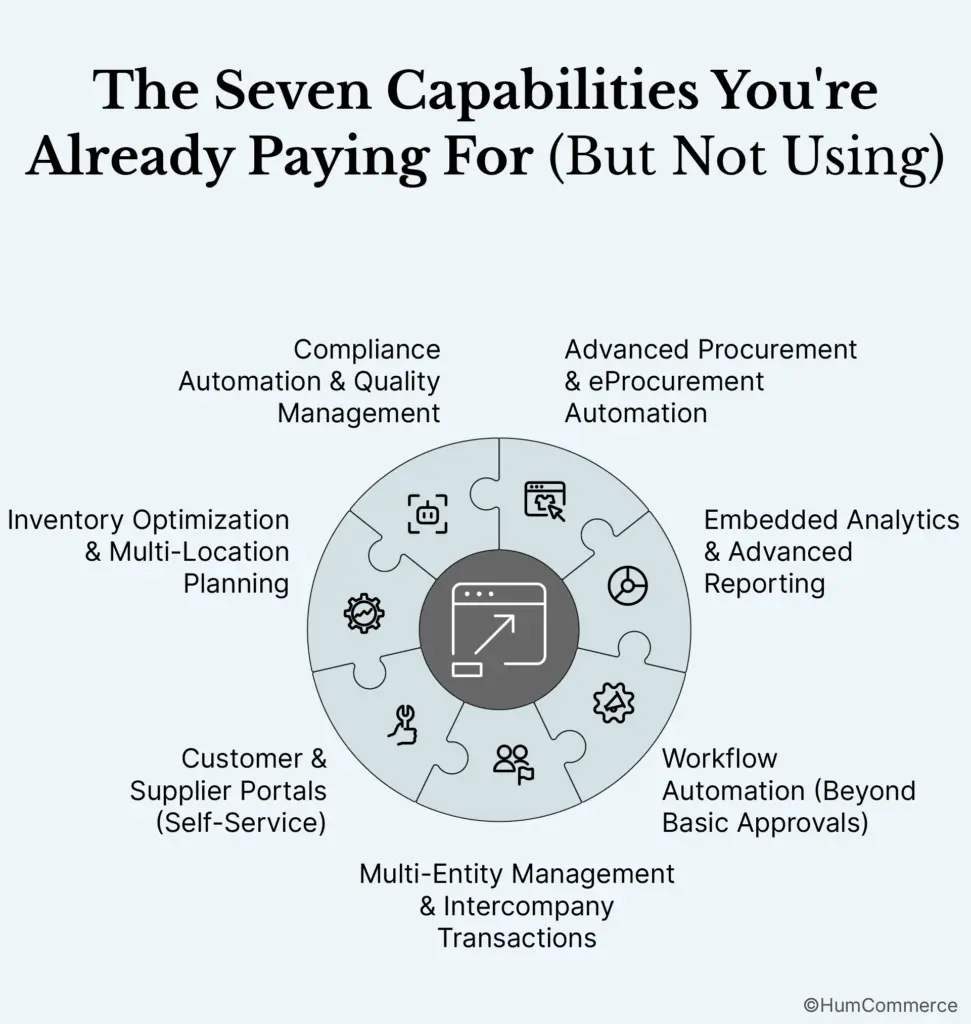
1. Advanced Procurement and Automation of eProcurement
What It Does:
Automated supplier onboarding, e-RFX, e-auctions, punchout catalogs, touchless PO processing, and AI-powered spend analytics are all examples of this.
Why Businesses Don’t Use It:
- Legacy ERP procurement modules don’t have APIs or cloud connectivity.
- “Good enough” manual processes (until they aren’t)
- Fear of ruining connections with suppliers by using automation
The real return on investment is:
- Costs of buying things go down by 15% to 25%
- Cycle times that are 50% to 80% faster
- 30% less spending on maverick or off-contract items
Barrier to Activation: Data quality, supplier master data is typically missing or doesn’t match up amongst plants.
The first step in activation is to run a pilot with your top 20 suppliers (who make up 80% of your spending) utilizing a supplier portal to send in invoices and keep track of POs.
2. Advanced Reporting and Embedded Analytics
What It Does:
Dashboards that show data in real time, predictive analytics, and reports that go beyond traditional ERP templates.
Why Businesses Don’t Use It:
- Users don’t know how to ask questions about the ERP data model.
- Reports that come with the software don’t solve actual business questions.
- “Reporting fatigue” means there are too many reports, but none that help make judgments.
Real return on investment:
- 3–5 times faster decision-making (real-time vs. batch reporting)
- Deloitte says that operational efficiency has gone up by 21%.
- When employing predictive analytics, forecast errors go down by 20% to 50%.
Activation barrier: Cross-functional data silos because finance, operations, and sales data are all stored in different systems.
Step 1: Find one important business issue (like “Which products have the biggest drop in margins?”) and make a single custom dashboard.
3. Workflow Automation (More Than Just Basic Approvals)
What It Does:
Automated purchase requests, processing invoices, routing approvals, and resolving exceptions.
Why Businesses Don’t Use It:
- Thought of as a “IT project” that needs to be set up and tested
- There are no written rules for business logic.
- Fear of destroying things by automating important tasks
The real ROI:
- 40% less work to do by hand when buying things
- Processing time for invoices went down by 65% (from 8 days to 3 days).
- 70% less money spent on processing purchases
Activation Barrier: The process is too complicated since each workflow contains conditional rules that are hard to write down.
First Step to Activation: Create a map of one end-to-end workflow (for example, from a purchase request to a purchase order to an invoice to payment) and automate the 80% standard path.
Tool you can download:
Download the ERP Integration Readiness Checklist if you’re still not sure how to get started.
4. Managing Multiple Entities and Transactions Between Companies
What It Does:
Automated billing between companies, reports that combine data from multiple companies, and handling of multiple currencies.
Why Businesses Don’t Use It:
- Each plant or subsidiary wants to be independent and doesn’t like centralized reasoning.
- Setting up includes figuring out the rules for each entity.
- After it was put into place, it was called “too complex.”
Real Return on Investment:
- 30% less time needed to shut at the end of the month
- 25% better visibility of inventory across all entities
- 15% less inventory that is the same as other inventory
Barrier to Activation: Organizational politics—plant managers don’t want to exchange inventories.
The first step in activation is to consolidate finances by billing between companies and eliminating them.
5. Self-Service Portals for Customers and Suppliers
What It Does:
Suppliers keep track of their own information, send in invoices, and keep track of payments. Customers can check the status of their orders, download invoices, and ask for estimates.
Why Businesses Don’t Use It:
- Worry about giving consumers and suppliers “too much access”
- You need to customize the gateway; ERP portals that come with the box are cumbersome.
- IT doesn’t have the time to set up and keep up with it.
Real Return on Investment:
- 50% fewer questions from the procurement staff
- 40% faster onboarding of suppliers
- Customers are 30% happier now.
Barrier to Activation: worries about security and data management.
First Step to Activation: Set up a read-only portal for the top 10 suppliers to see POs and payment status.
6. Planning for several locations and optimizing inventory
What It Does:
Real-time inventory across operations, the best place to fulfill orders, and automatic transfers across factories.
Why Businesses Don’t Use It:
- Needs all plants to follow the same procedures (which is hard to do)
- Plant managers don’t like centralized thinking.
- Master data is not comprehensive or consistent.
Real ROI:
- 20% to 30% less in expenditures for keeping inventory
- 35% fewer times when stock is out
- 25% better inventory turnover
Barrier to Activation: Data quality—algorithms won’t work unless inventory accuracy is over 95%.
The first step to activation is to set up a cycle counting program that will bring the accuracy of your inventory up to 98%.
7. Quality Management and Automation of Compliance
What It Does:
Automated quality inspection workflows, tracking of non-conformance, and corrective actions. Automatically created regulatory documents.
Why Businesses Don’t Use It:
- Setting up needs a lot of process mapping.
- People who work on the shop floor don’t like digital workflows; they like paper logs better.
- After it was put into use, the quality module was left with basic settings.
Real ROI:
- 90% less time needed to get ready for an audit
- 50% faster resolution of non-conformance
- 15% fewer defects
Cultural resistance is an activation barrier. Quality teams trust paper checklists more than ERP.Step One: Use tablets to digitize one important inspection point, like checking incoming raw materials..
Why these skills aren’t used
1. Abandonment After Implementation
The installation crew leaves after the system goes online. The business has a system, but not a plan for how to use it. Because of budget cuts, there isn’t much IT assistance and little planning for proactive feature activation.
2. Not taking ownership
No one is responsible for turning on features. “IT backlog” is where features that should be owned by Operations, Finance, or Quality go.
3. Complexity of Activation vs. Urgency of Business
Setting up, testing, and managing changes for advanced features all cost a lot of money. Businesses don’t prioritize unless there’s a big problem, like a stockout issue or an audit failure.
4. Readiness of Data
Most features need clean master data, which isn’t there after go-live. Data that is “good enough” for transactions is not the same as data that is “good enough” for advanced features.
5. Skepticism of Users
People have moved on if training ended six months ago. People usually say, “We don’t have time to learn a new feature.”
6. Information that is in silos
Cross-functional workflows are needed for advanced features to work. If IT, Ops, and Finance don’t talk to each other, the features stay dormant.
The Activation Framework: From Inactive to Powerful
Phase 1: Building the Base (Months 1–3)
- Data Cleaning: Make sure that master data is 95% correct.
- Process Documentation: Draw a map of one complete workflow
- Quick Win: Set up a read-only supplier site for the top 10 suppliers.
Phase 2: Quick Wins (Months 4–6)
- Workflow Automation: Make 80% of the normal journey from purchase requisition to PO automatic.
- Embedded Analytics: Make a custom dashboard
- Demonstration of ROI: Show that manual chores are 40% less and reporting is three times faster.
Phase 3: Advanced Capabilities (Months 7–12)
- Advanced Procurement: Start using e-RFX and e-auctions
- Optimizing Inventory: Turn on safety stock algorithms when they are 98% accurate
- Compliance Automation: Turn one important inspection process into a digital one
Phase 4: Scale and Optimize (Months 13–18)
- Multi-Entity Management: Make billing between companies automatic
- Customer Portals: Start offering quotes on your own
- Predictive Analytics: Use AI to predict demand
Your 90-Day Activation Plan
Days 1–30: Evaluation and Data Foundation
- Check whether ERP modules are licensed but not in use
- Get rid of 95% of the errors in your master data (suppliers, SKUs, customers).
- Map out one whole workflow, like procure-to-pay.
- Find the top 10 suppliers (who account for 80% of spending) for the portal pilot.
- Deliverable: Data Quality Report and Activation Roadmap
Days 31 to 60: Putting Quick Wins into Action
- Set up a read-only supplier portal for the top 10 suppliers.
- Automate 80% of the normal process for buy requisition to PO
- Create a bespoke analytics dashboard that answers an important question.
- Teach the procurement staff how to use the new workflows
- Deliverable: a working portal, an automated workflow, and a bespoke dashboard
Days 61–90: Show ROI
- Find out how much shorter the cycle time is, how much money you save, and how much more productive you are.
- Give the steering committee the ROI and a plan for how to activate it over the next year.
- Get the money and other resources you need for Phase 2 (advanced capabilities).
- Deliverable: Phase 2 Business Case and ROI Report
The $2.3M Decision
Your ERP is not broken. It’s not active.
The features you need to save $500,000 to $2.3 million a year are already licensed. Activation is the only thing that stands in the way of you getting that ROI.
In 2026, the manufacturers who win won’t be the ones who buy the most expensive ERP. They are the ones who turn on one feature at a time, with each one adding to the value of the last.
Don’t get any more software. Turn on what you own.
HumCommerce was made for this kind of job if you want a partner who can handle ERP, Adobe Commerce, and complicated B2B manufacturing workflows all at once. Our team helps manufacturers change ERP from a fragile project into a scalable, resilient backbone for growth. We do this by modeling TCO, integrating architecture, and creating real-time sync and self-healing data flows.
We have helped more than 70+ brands get dormant capabilities up and running, which has led to savings in procurement, better inventory management, and workflow automation that really works since the integration layer is set up correctly from the start.