
TL;DR
- Most B2B companies manage product data like chaos: stored everywhere, hoped to stay consistent, fixed when broken
- A PIM hub becomes your central orchestration layer—feeding ERP, enriching data, syndicating to marketplaces, managing media
- Result: faster time-to-market, 40-60% more marketplace revenue, 15-20% fewer returns
- An eCommerce team freed from manual work that was consuming 40% of their time
Google doesn’t let each website manage its own search presence. They’d get chaos.
Instead, Google built a central hub: the search index. Websites feed content to Google. Google crawls, validates, ranks, and indexes. When a user searches, Google serves results from that single, curated, quality-controlled index.
Remove the hub, and search breaks.
Your product data faces the same architecture challenge.
A $200M manufacturer thought adding a marketplace was simple. They were vastly unprepared for what came next. Their entire catalog got suspended within 48 hours. Why? Product data was everywhere scattered across ERP, spreadsheets, websites, a DAM, and a PIM they weren’t even using. When the marketplace tried to index the product catalog, it found five different versions of every product.
The manufacturer had created content chaos without a search engine.
Most B2B companies operate the same way. Product data exists in siloes. Systems don’t coordinate. Data gets stale, conflicts, or disappears. When you need to push products to a new channel, the integration fails because there’s no single source of truth.
The solution is to build an index for your product data – a central hub that crawls, validates, and syndicates everything.
When Good Connectors Go Bad: The Math That Breaks Your Architecture
Most B2B companies start the same way: ERP is the master system. Then they add eCommerce. One connector. Life is good.
Then they add a PIM because product data is growing too fast for the ERP to manage. Two connectors. Still manageable.
Then an OMS (Order Management System) for order routing. IMS (Inventory Management System) for real-time stock visibility. DAM for asset management. Now they’re at five systems, and the integration topology looks like a spider web.
Here’s what happens next: A change to product data in the ERP flows to the website, but doesn’t reach the marketplace. Or it reaches the marketplace after 12 hours, which means customer searches return stale results. Or it conflicts with data the marketing team manually uploaded to the PIM.
The math is brutal: With N systems, a point-to-point architecture requires N × (N-1) ÷ 2 unique integrations. Ten systems mean 45 integration points. Each one is a place where data can get lost, delayed, or conflicted.
A hub-and-spoke architecture cuts that to just N connections. PIM becomes the central hub for product data. Everything plugs into PIM, not to each other. The complexity doesn’t vanish, but it becomes manageable.
The core insight: Without a hub, every new system multiplies your integration burden. With a hub, you add one new spoke.
PIM as Hub: It’s Not Just Software Sitting in the Middle
Before we talk architecture, let’s be clear on what a “hub” means. It’s not just a piece of software sitting in the middle. It’s a role in your data architecture.
PIM becomes the hub for three specific reasons:
First, PIM is built for enrichment. ERP owns the transactional data (inventory, pricing, cost). PIM adds the commercial and marketing data (descriptions, images, SEO metadata, relationships). PIM doesn’t replace ERP; it augments it.
Second, PIM is built for syndication. Unlike ERP, which powers operations, PIM is designed to push product data to multiple channels: eCommerce, marketplaces, catalogs, partner portals, even print. This is its core purpose.
Third, PIM is built for governance. Through validation rules, completeness checks, and workflow approvals, PIM can enforce data quality at every stage. This prevents bad data from cascading across channels.
An ERP can technically handle these functions. So can a custom database. But they weren’t designed for this job. PIM was. When you make PIM the hub, you’re aligning architecture with expertise.
One Source of Truth: Stop Data From Drifting Across Channels
This is where most hub architectures fail in practice.
Without clear ownership, product data gets duplicated and drifts. Marketing changes the product description in the PIM. The ERP still has the old version. The marketplace is now showing a mismatch between the title (from PIM) and the detailed specs (from ERP). Customer confusion. Returns spike.
A proper hub architecture prevents this through canonical data flows:
ERP feeds the hub with transactional data: SKU, base attributes, price, cost, inventory location, lifecycle status. This data is authoritative. It doesn’t change without an ERP transaction.
The hub enriches with commercial and marketing data: Once PIM receives a SKU from the ERP, the commerce team enriches it. They add descriptions, images, categories, cross-sells, localized variants.
The hub enforces completeness gates: Before a product can go live on any channel, certain fields must be filled and validated. Is there a title? Are there images? Is there a category? Until these gates pass, the product stays in “draft.”
The hub syndicates to channels: Only when a product passes completeness gates does it flow to eCommerce, marketplaces, and portals. Each channel gets a subset of attributes, formatted to its specific requirements.
The result: Every channel sees the same product data (single source of truth), but formatted for its specific context. Accuracy isn’t achieved through hope; it’s built into the architecture.
Marketplace Automation: From Manual CSV Exports to 24/7 Feeds
This is where PIM as a hub earns its cost.
Marketplace syndication is one of the highest-ROI projects a B2B company can execute. Get products live on Amazon Business, Grainger, or MSC Industrial, and revenue can jump 15-30% without adding sales overhead.
But marketplaces are notoriously picky. Each has its own taxonomy, mandatory fields, formatting rules. Amazon wants “brand,” “material type,” and “item weight” in specific formats. Grainger wants different fields. A custom export breaks when the marketplace changes their schema.
A hub architecture solves this with channel-specific attribute mapping inside the PIM:
The PIM stores a canonical attribute set: Product ID, title, description, images, weight, dimensions, material, color, price, lead time. This is your “golden record.”
Mapping rules live in the PIM: For Amazon, the mapping rule says “take ‘material’ and send it as ‘material type’.” For Grainger, “send only if the category is ‘hardware.'” These rules are transparent, auditable, and changeable without touching code.
Validation happens before publishing: If a marketplace requires a “UPC” field and it’s missing, the PIM flags the product as “ready for marketplace X but not Y.” Marketing team knows exactly what’s blocking syndication.
Automation becomes safe: Once these rules are locked in, automated feeds run 24/7. No manual CSV exports. No delays. When a product price changes in the ERP, it’s live on every marketplace within hours.
The 15-20% Conversion Boost Nobody Talks About (It’s Media Management)
Here’s where most hub architectures break down in practice: media gets orphaned.
Digital assets (images, spec sheets, CAD files, manuals) are critical to eCommerce. A product without an image converts at 1/10th the rate of one with an image. A manual that’s out of date costs customer service tickets and returns.
The problem: Media lives in a DAM (Digital Asset Management system). Product data lives in PIM. They’re not connected. Marketing uploads an old image. Engineering publishes a new spec sheet. Nobody knows which version is current.
A proper hub architecture connects PIM and DAM:
PIM stores references to assets (not the binaries themselves). When marketing uploads a new image to the DAM, the DAM notifies PIM: “image_v3.jpg has been replaced.” The PIM automatically marks the product as “media updated” and flags it for review.
Version awareness prevents stale data: If a spec sheet is marked as “superseded,” the PIM stops using it. If an old image is still referenced by a product that’s active, the PIM alerts the team.
Completeness rules enforce media standards: A rule can say “every product in the ‘electrical equipment’ category must have at least 3 images, a spec sheet, and a safety manual before it can go live.”
The result: Your media stays fresh, complete, and aligned with product data. This alone reduces customer returns by 15-20% because customers see accurate, up-to-date representations of products.
The 200K SKU Inflection Point: When Your Pattern Needs to Change
There are multiple ways to implement a PIM hub. Your choice depends on scale and complexity.
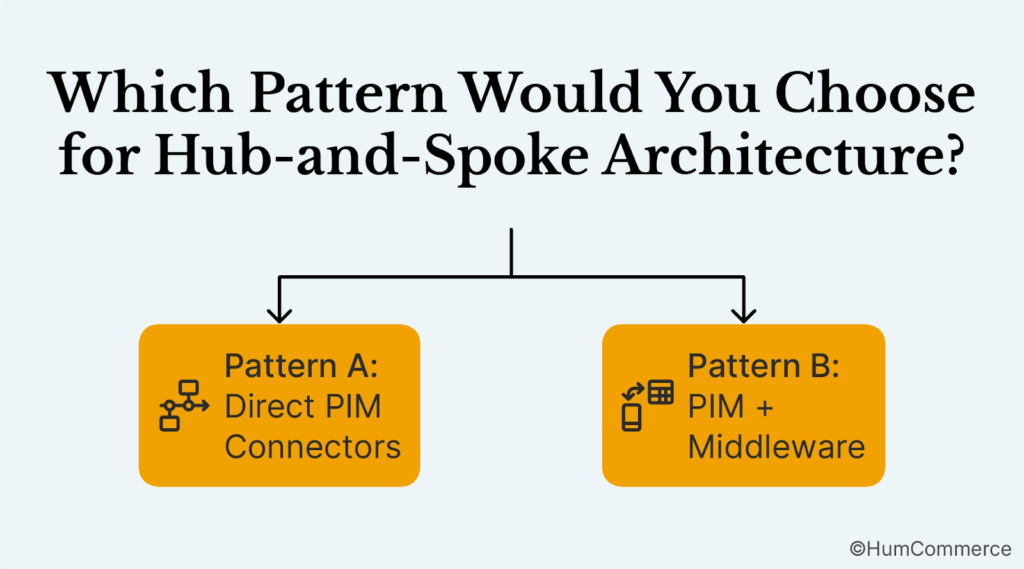
Pattern A: Direct PIM Connectors (Simple, 50-200K SKUs)
PIM connects directly to ERP, eCommerce, marketplaces, and OMS. Each system has a dedicated connector maintained by your team or a partner.
Pros: Simple, fast to implement, clear responsibility.
Cons: Scales poorly; the PIM team becomes a bottleneck; every new channel requires a new connector.
Pattern B: PIM + Middleware (Complex, 200K-1M SKUs)
A middleware layer (iPaaS, ESB, or API orchestration platform) sits between PIM and all consuming systems. PIM publishes product data to the middleware; channels subscribe to it.
Pros: Highly scalable; new channels can be added without touching PIM; transformation logic is centralized and testable.
Cons: Additional complexity, cost, and operational overhead; requires integration expertise.
Which pattern is right? If you have fewer than 200K SKUs and 5 systems, Pattern A works. Beyond that, Pattern B prevents your architecture from becoming a hairball.
Silent Failures: Why Your Integration Monitoring Is Probably Non-Existent
A hub architecture is only as good as its observability.
Integrations fail silently. A marketplace feed breaks; nobody notices for six hours. A product is stuck in “draft” and hasn’t been published in days. A price sync fails for one category but not others.
Your hub needs three layers of monitoring:
Real-time dashboards: Sync status, error rates, latency, and data volumes per channel. These tell you when something is wrong before customers complain.
Error handling and retry logic: When a sync fails, the system should retry with exponential backoff. Failed records should go to a quarantine queue for investigation. You need a clear playbook for recovery.
Audit trails: Who changed what, when, and why? This is critical for compliance (especially pharma) and for debugging data integrity issues.
Most PIM implementations skimp on monitoring because it’s not flashy. But in production, monitoring is what separates a system that works from a system that breaks.
Year 1, Year 2, Year 3: A Realistic Roadmap to Hub Architecture
The companies that succeed with a PIM hub don’t try to do everything at once. They start with a single use case and expand.
Year 1: Set up PIM as a hub for eCommerce. Connect ERP → PIM → Adobe Commerce. Get product enrichment and governance working. Baseline: all products live on your webstore with 95%+ data accuracy.
Year 2: Add marketplace syndication. Implement channel-specific attribute mapping. Connect PIM to Amazon Business, Grainger, or your primary B2B marketplaces. Goal: automated feed exports with zero manual intervention.
Year 3: Add DAM sync and OMS integration. At this point, PIM is truly a hub. Product data flows from ERP through PIM to every channel and system. You’re no longer managing data silos; you’re orchestrating a system.
HumCommerce has guided this journey for manufacturers and distributors across automotive, pharma, construction, and energy. The ones that follow this blog go from “we can’t move fast” to “we can launch a new channel in a week.”
Fast or Fragmented: The Operational Foundation That Determines Everything
A PIM hub isn’t a technology project. It’s an operational foundation.
When your product data is fragmented, you’re spending cycles fighting fires: wrong prices on marketplaces, outdated specs confusing customers, images that don’t match the real product. You’re moving slow because every change requires coordinating across five systems.
When your product data is centralized and governed, you can move fast. A new market? Add a channel connector and data flows. A new compliance requirement? Add a validation rule. A new marketplace? Add a mapping. The system adapts without rework.
The companies winning in B2B eCommerce aren’t winning because they have fancier software. They’re winning because they’ve simplified their data architecture. They’ve made product data a first-class asset, managed with as much care as their production line or their supply chain.
This is exactly what HumCommerce helps manufacturers, distributors, and pharma companies achieve. For over a decade, we’ve guided digital leaders through the journey from fragmented data to orchestrated systems.
PIM as a hub is how you get there. And it starts with clarity on your current architecture.
Ready to map your architecture?
Download the PIM Integration Planning Checklist (PDF) to identify your current system landscape, define data ownership, and plan your hub-and-spoke migration. This is the same worksheet HumCommerce uses with clients to accelerate from discovery to implementation.
If you’re ready to go deeper to understand how other B2B leaders have architected their PIM hubs and what patterns work at your scale, let’s talk. HumCommerce specializes in ERP + PIM + eCommerce orchestration for manufacturers, distributors, and industrial suppliers.
[Schedule a 15-minute architecture consultation with our team]