
TL;DR
- B2B ecommerce conversion rates average 1.8% or lower because contract pricing, complex catalogs, and approval friction drive buyers off your Adobe Commerce or Shopify Plus storefront before they reach checkout
- Six-step process: audit your buyer journey and drop-off points, check data and system readiness, prepare your commerce and ERP stack, design the improved conversational workflow, implement the integration, then pilot and measure
- Buyers who engage with AI-powered chat convert at 12.3% compared to 3.1% for non-engaged visitors, a 4x difference, and AI chatbot deployments generate a 7-25% sales lift in ecommerce environments
- Cicero Supply deployed AI-powered product discovery and saw a 40% increase in product click-through rate within four weeks, with 25-35% of orders completed via self-service
- Built for B2B ecommerce managers on Adobe Commerce, Magento, or Shopify Plus who need a clear, data-backed plan to deploy conversational AI and move their conversion numbers
Your site’s conversion rate is stuck at 1.6%. Buyers are searching your catalog, hitting dead ends on product pages, and calling sales reps for basic questions your Epicor or NetSuite ERP could answer in seconds. High bounce rates on product pages, abandoned carts at checkout, and a support team buried under “what is the price on this?” tickets, these are not random friction points. They are the predictable result of a storefront that is disconnected from the operational data buyers need to complete a purchase. B2B e-commerce conversion rates average as low as 1.8%, roughly half the B2C average, and the gap widens when your Adobe Commerce storefront cannot answer the questions that close orders. This guide gives you a six-step process to deploy an AI chatbot that actually connects to your systems and moves the conversion needle.
Why Using an AI Chatbot to Improve B2B Ecommerce Conversion Rates Is a 2026 Priority
The average B2B ecommerce conversion rate sits between 1.7% and 1.8%, representing thousands of qualified buyers who browse, search, and leave without purchasing. The problem is not traffic. It is that B2B buying is operationally complex: contract pricing, approval chains, SKU-level specifications, and volume tiers create friction at every stage that a standard storefront cannot resolve on its own. Done right, conversational AI can boost B2B conversion rates by up to 4x, but only when the chatbot connects to the right data, with the right integrations, and a clear deployment process behind it.elogic+2
The complexity compounds on platforms like Adobe Commerce connected to SAP or NetSuite through batch-based integrations. A buyer sees one price online, gets a different number from their rep, and loses confidence in self-service entirely. Product data lives in the PIM, inventory in the ERP, and customer-specific pricing rules somewhere else. Without a unified data layer, even a well-designed chatbot returns wrong answers. A B2B ecommerce customer who types “Do you have M8 hex bolts in stainless, 316 grade?” and gets a generic “not found” response will not try again, and will not return to the storefront.
This guide walks you through a structured process: audit your current buyer journey, assess system readiness, prepare your data, design the improved workflow, implement it on your stack, and measure results with real KPIs.
What “Done” Looks Like When You Use an AI Chatbot to Improve B2B Ecommerce Conversion Rates
Vague goals like “add a chatbot to the site” cause projects to stall. Without a clear definition of success, teams spend months configuring a tool that never connects to the data buyers actually need, and the chatbot launches, answers generic questions, and has zero measurable impact on conversion rates.
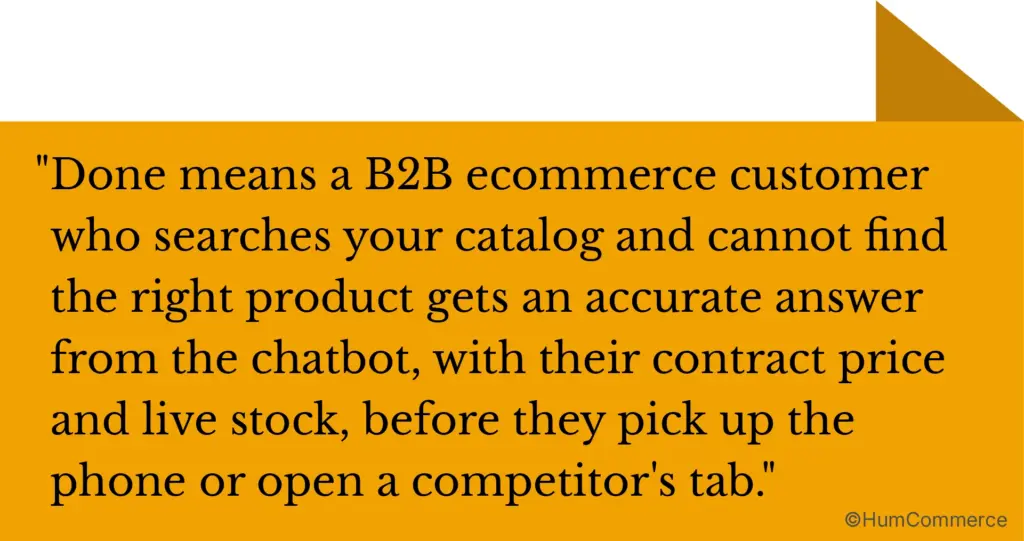
Before deployment, a typical B2B ecommerce customer searches your catalog, fails to find the right product, calls a rep, waits for a quote, and maybe places an order days later. After a properly implemented AI chatbot, that same buyer types “replacement filter for model 4200, need 50 units at our contract rate,” gets an accurate answer with pricing and availability pulled from your ERP, and completes the order in minutes.
Here is what “done” looks like in concrete terms:
- Product discovery is conversational, not keyword-dependent. The chatbot handles alphanumeric SKUs, cross-reference tables, and superseded part numbers using a hybrid RAG architecture that combines retrieval-augmented generation with your product database, preventing the “not found” failures that plague pure semantic search.
- Self-service order completion reaches 25-35% of total orders, with B2B ecommerce customers checking contract pricing, confirming inventory, and placing bulk orders without involving a rep.
- Resolution times for routine inquiries drop from an average of 38 hours to under 6 minutes with AI, freeing your sales team for high-value conversations that require human judgment.
- You have a dashboard showing chatbot engagement rate, conversion rate lift by segment, average order value changes, and support ticket reduction, the data you need to justify continued investment and prove the program is working.
Step 1: Map Where B2B Ecommerce Customers Drop Off Today
Start with reality, not tools. Before evaluating any chatbot platform, you need a clear picture of how buyers move through your site and where they leave. Skipping this step is the most common reason AI chatbot projects underperform: the technology gets bolted onto a broken process.
- Identify your top five entry points. Where do buyers land? Pull your analytics to see which pages carry the most traffic and which have the highest exit rates. Product category pages, search results, and direct product URLs from email campaigns each carry different buyer intent signals.
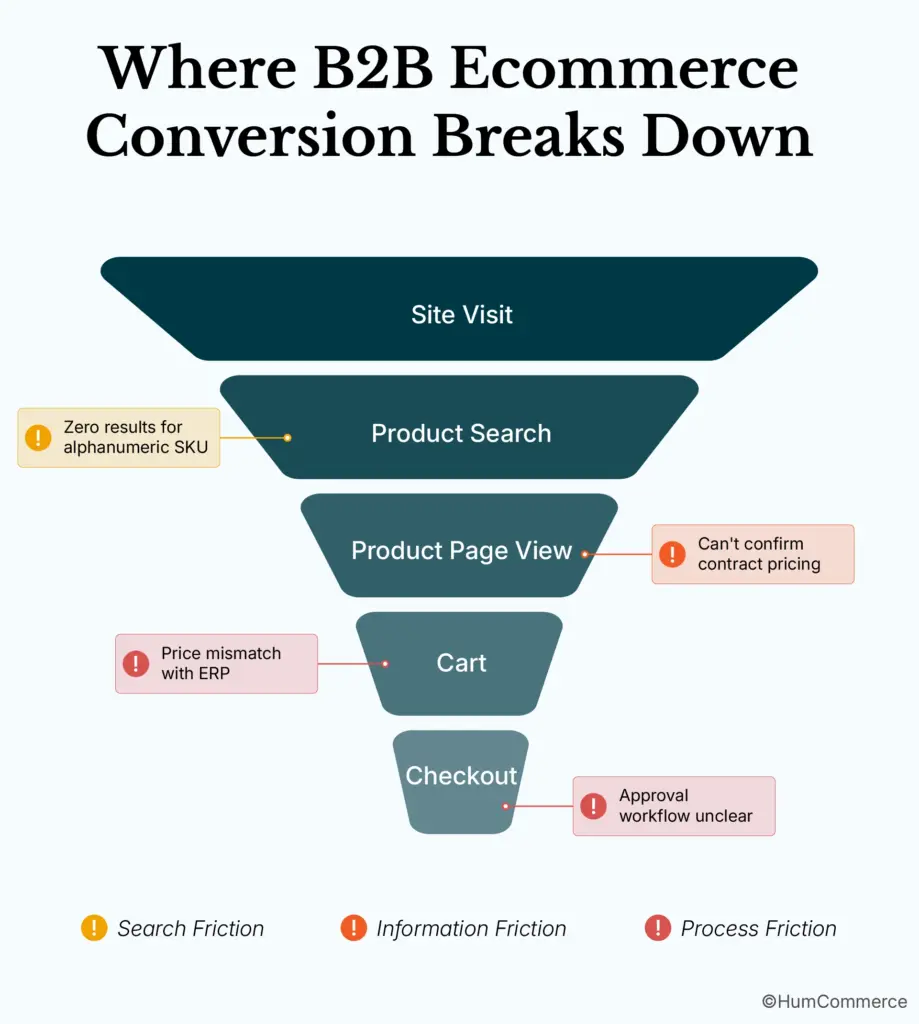
- Trace the path from search to purchase. Document each step: search query, product page view, add to cart, quote request, approval, checkout. Note where B2B ecommerce customers switch channels, such as leaving the site to call a rep or email for pricing.
- Flag where Adobe Commerce and your ERP hand off data. Does your Magento storefront pull real-time pricing from NetSuite, or is pricing synced in nightly batches? Batch-based integrations create windows where buyers see stale data, one of the most reliably confirmed conversion killers in B2B ecommerce.
- Record the questions your support team answers most often. “Is this in stock?” “What is my contract price?” “Is this compatible with model X?” These are the queries an AI assistant should handle. Chatbots handle up to 80% of routine inquiries when connected to live operational data.
- Measure current response times. How long does it take a buyer to get an answer to a product or pricing question through your existing channels? This baseline matters more than any technology decision because it defines the before metric you will measure against.
- Identify rework loops. Where do orders get rejected, re-quoted, or delayed because of data mismatches between your storefront and ERP? These loops are direct, quantifiable conversion losses.
Step 2: Check If You Are Ready to Deploy an AI Chatbot for Conversion Optimization
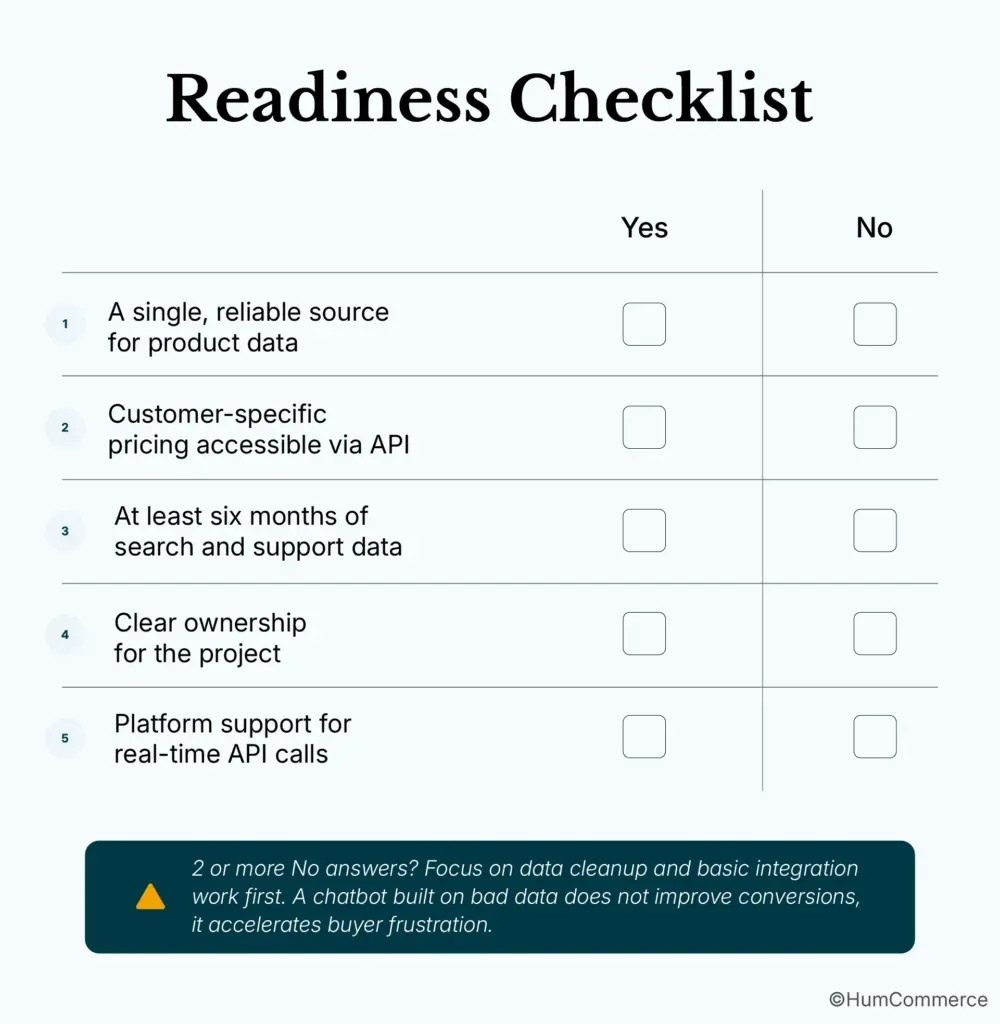
Readiness is not about having a perfect stack. It is about having enough foundation to avoid a failed pilot.
- A single, reliable source for product data. Your PIM or ERP should be the authoritative source for SKU attributes, descriptions, and specifications. If product data lives in spreadsheets, shared drives, and someone’s email, the chatbot will return inaccurate answers and erode buyer trust before the pilot is three weeks old.
- Customer-specific pricing accessible via API. Conversational AI for B2B conversion depends on showing the right price to the right buyer. If contract rates and volume tiers are locked inside SAP or Epicor with no API access, integration work is a prerequisite before the chatbot can be useful.
- At least six months of search and support data. Chat logs, search queries, and support tickets tell you what buyers ask and where they get stuck. This data trains and tunes the chatbot’s responses. Without it, you are making configuration decisions based on assumptions.
- Clear ownership for the project. You need an ecommerce manager who owns the buyer experience and a technical counterpart who owns the integration layer. If both roles point at each other, the project stalls.
- Platform support for real-time API calls. Adobe Commerce supports REST and GraphQL APIs natively, but your ERP integration must support real-time or near-real-time responses. If every data request takes 30 seconds, the chatbot experience is worse than calling a rep.
Step 3: Prepare Your Commerce and ERP Systems for AI Chatbot Deployment
Your chatbot is only as good as the data it can access. Here is what needs to be in place across your commerce and ERP systems before going live.
- Standardize product identifiers across systems. SKUs, part numbers, and model codes must match exactly between Adobe Commerce, your PIM, and your ERP. A single character mismatch between “SKU-38995-WC” in Magento and “SKU38995WC” in NetSuite means the chatbot cannot find the product. RAG architecture addresses this by combining real-time database retrieval with AI-powered contextual understanding, so exact-match queries for alphanumeric SKUs work alongside natural language questions.
- Validate pricing rules and customer segments. Pull a sample of 50 B2B ecommerce customer accounts and verify that contract pricing, volume tiers, and regional rules display correctly on your storefront. Any discrepancy between ERP and storefront data surfaces immediately once a chatbot starts answering pricing questions at scale.
- Confirm inventory sync frequency. If your ERP pushes inventory updates every four hours, B2B ecommerce customers may order products already allocated to other orders. Move to real-time or near-real-time sync before deploying the chatbot on high-velocity SKUs.
- Set up role-based permissions for chatbot data access. The chatbot should surface only pricing and account data that the logged-in buyer is authorized to see. Map your Adobe Commerce customer groups to ERP customer classes so the chatbot respects approval chains and credit limits automatically.
- Create a product knowledge base for the chatbot. Go beyond catalog data. Include application data, compatibility tables, cross-reference guides, and superseded part mappings. B2B ecommerce customers ask questions like “What replaces the discontinued 7200 series bearing?” and the chatbot needs structured data to answer accurately rather than returning a generic result.
- Establish baseline reports. Before launch, document your current conversion rate, average order value, bounce rate on product pages, and support ticket volume. These become your before metrics.
Step 4: Design the Improved Conversational Workflow for B2B Buyers
This step is about deciding what the better version of your buyer journey looks like with conversational AI in place. You are choosing which friction points the chatbot addresses and which remain with your sales team.
Defining the Chatbot’s Starting Scope
Product discovery and pricing confirmation are high-impact, low-risk starting points. They generate the most support tickets, cause the most bounces on product pages, and are reliably answered when the chatbot has live ERP access. Returns, warranty claims, and complex custom quotes belong in version two, after the core use cases are proven.
Mapping the Conversational Flow for Your Top Ten Buyer Questions
Using the support data from Step 1, design how the chatbot responds to each high-frequency query. For “What is my price on 500 units of item X?”, the flow pulls the buyer’s contract rate from the ERP, applies volume tier logic, and returns a specific number, not a range, not a redirect to a rep, but the actual price the B2B ecommerce customer is entitled to see. Designing these flows on paper before building them is how you avoid the most common failure mode: a chatbot that gives plausible-sounding but incorrect answers.
Designing Handoffs and Monitoring
When a buyer asks about a custom configuration or a large project quote, the chatbot captures full conversation context and routes to a sales rep with account details pre-filled. No re-keying, no repeated introductions. This is where conversational AI improves B2B conversion rates most sustainably: the rep enters the conversation already informed, shortening close time and improving buyer confidence. Build monitoring triggers for interactions that end without a purchase or where the buyer asks a question that the chatbot cannot answer. These gaps become your improvement backlog.
Step 5: Implement the AI Chatbot Conversion Optimization Changes in Your Stack
Implementation splits into two tracks: what you own as the e-commerce manager and what your technical team or integration partner handles.
What the E-commerce Manager Owns
Your responsibilities include defining the chatbot’s tone, response templates, and escalation rules. You own the product knowledge base content, the buyer personas the chatbot serves, and the KPIs it is measured against. You also manage the pilot scope: which product categories, which B2B ecommerce customer segments, which pages go live first.
What Your Technical Partner Owns
Your technical team or partner handles connecting the chatbot to Adobe Commerce’s API, setting up the RAG pipeline that queries your product database and ERP, configuring authentication so the chatbot respects customer-specific pricing, and deploying the widget on your storefront. For teams running Magento with Epicor, HumCommerce’s integration work has demonstrated this architecture in practice, achieving 75% faster quote workflows by connecting Epicor CPQ directly to the commerce layer. A phased rollout protects your conversion rates from a buggy full-site launch: deploy on a subset of product pages first, monitor engagement and accuracy for two weeks, then expand based on what the data shows.
Step 6: Pilot, Measure, and Improve Your B2B Chatbot Conversion Program
Treat the first rollout as a controlled experiment. Pick a product category with high traffic and a known conversion problem, industrial fasteners where B2B ecommerce customers frequently search by specification and leave when they cannot find exact matches, for example.
What to Measure
Run the pilot for four to six weeks. Measure chatbot engagement rate, conversion rate for buyers who interact with the chatbot versus those who do not, average order value, and the percentage of orders completed via self-service. The benchmark data here is clear: buyers who engage with AI-powered chat convert at 12.3% compared to 3.1% for non-engaged visitors, and businesses deploying AI chatbots see a 23% higher overall conversion rate with a 7-25% sales lift. AI-powered ecommerce bots also drive 15% higher average order values through conversational upsells and volume tier prompts. Cicero Supply’s deployment provides a real-world reference point: within four weeks of deploying AI-powered product discovery, they saw a 40% increase in product page click-through rates, with 25-35% of orders shifting to self-service.
Building the Weekly Review Cadence
Every week, pull the chatbot’s unanswered question log and identify gaps in your product knowledge base. If B2B ecommerce customers keep asking about cross-references the chatbot cannot answer, that is your next data improvement priority. An AI chatbot that boosts B2B ecommerce conversion rates is not a set-and-forget tool; it gets more effective as you feed it better data and refine its conversational flows based on what buyers actually ask.
Common Mistakes to Avoid When Using an AI Chatbot to Improve B2B Ecommerce Conversion Rates
- Skipping process mapping and jumping straight to tool selection. If you do not know where buyers drop off, you cannot position the chatbot where it matters. A chatbot on a homepage that buyers never engage with is a wasted investment with no conversion impact.
- Treating the chatbot as a generic retail widget. Consumer-grade chatbots do not understand contract pricing, approval chains, or alphanumeric part numbers. B2B requires a purpose-built solution with ERP and PIM connectivity.
- Ignoring ERP data quality. If your NetSuite or SAP data has inconsistent SKUs, outdated pricing, or incomplete product attributes, the chatbot surfaces those errors to B2B ecommerce customers at scale. Bad data amplified by AI is worse than no AI.
- Launching site-wide without a pilot. A full-site deployment means every buyer hits an untested experience simultaneously. Start with one category, one customer segment, and expand based on data.
- Not measuring before and after. Without baseline metrics, you cannot prove ROI. Document conversion rate, average order value, support ticket volume, and bounce rates before launch.
- Over-automating the buyer journey. Large custom orders, new account negotiations, and complex configurations need human judgment. The chatbot supports reps; it does not replace them for high-value interactions.
- Calling it done after launch. Chatbot conversion optimization in B2B is ongoing. The unanswered question log is your continuous improvement roadmap.
Ready to Move Your B2B Ecommerce Conversion Rate?
If you have followed this guide, you now have a structured plan: from auditing your buyer journey to preparing your Adobe Commerce and ERP stack, designing conversational flows, and measuring pilot results with real KPIs. The gap between plan and execution is where most B2B ecommerce teams stall, especially when the integration between your storefront and systems like Epicor, SAP, or NetSuite introduces complexity that generic chatbot platforms cannot handle.
HumCommerce helps B2B ecommerce managers move from strategy to live deployment. We specialize in connecting AI chatbots to the commerce and ERP data they need to actually improve conversion rates: real-time pricing, inventory, customer-specific rules, and product knowledge bases built for industrial catalogs. Our work with manufacturers and distributors has reduced quote turnaround from 3-5 days to hours by automating the capture, approval, and ERP validation steps. If you are running Adobe Commerce or Magento with an ERP integration challenge, share your stack details and your biggest conversion pain point. We will map these steps to your specific systems and show you what a realistic improvement timeline looks like.