
TL;DR
- Keyword search breaks down on large B2B catalogs: buyers hit dead ends, call reps, or leave when they cannot find what they need.
- Six-step process: map your current search experience, assess data readiness, prepare your systems, design the improved workflow, implement across your commerce and ERP stack, then pilot and measure.
- RAG (Retrieval Augmented Generation) is the architecture that makes AI chatbot search accurate for B2B: it combines exact-match database lookups for SKUs with AI-powered contextual understanding for descriptive queries.
- Cicero Supply saw a 40% increase in product click-through rate after deploying AI-powered product discovery, with 25-35% of orders completed via self-service within four weeks.
- Built for B2B ecommerce managers in wholesale distribution using Adobe Commerce, Magento, or a custom build, who need a concrete deployment plan.
Your top distributor account just sent a one-line email: “Can someone call us? We spent half an hour trying to find the right valve on your site and gave up.” They were not looking for something obscure. It was a product you stocked in three variants, listed in your catalog under a category name that made sense to your merchandising team but not to a buyer who types “brass shutoff 3/4 inch 600 WOG.” Zero results. No suggestions. No fallback. They called a competitor. For wholesale distributors running Adobe Commerce with an ERP like SAP or Epicor behind it, an AI chatbot changes how buyers discover products, turning typed queries into conversational exchanges that actually understand what someone needs. This guide walks you through the practical steps to get there.
Why Using an AI Chatbot to Navigate Large B2B Product Catalogs Is a 2026 Priority
Wholesale distributors manage catalogs that dwarf typical retail inventories: tens of thousands of SKUs, each with technical specifications, cross-references, superseded part numbers, and customer-specific pricing rules. For a B2B ecommerce manager, keeping those products discoverable is a daily responsibility. Research shows that nearly 70% of B2B buyers struggle to find relevant products once they land on a site, and on many B2B sites, 30-40% of searches still return zero results because buyers assume you do not carry what they need even when the right product is in stock. An AI chatbot that can navigate large B2B product catalogs directly addresses this gap.For the full breakdown of what’s driving this shift — the technology, the ROI math, and a realistic rollout plan see our guide to AI-powered B2B search and discovery
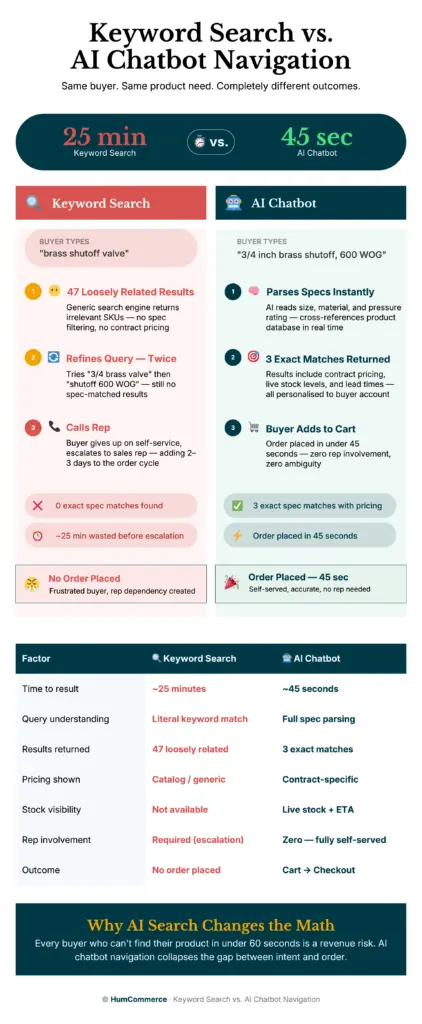
The challenge compounds when your commerce platform and ERP operate as separate systems with limited real-time communication. On Adobe Commerce or a Magento-based custom build, product attributes might be structured for display but not for intelligent search. Meanwhile, your SAP, Epicor, or NetSuite instance holds the authoritative pricing, inventory, and customer contract data. Without a bridge between these systems, a buyer typing “3/4 inch brass ball valve 600 WOG” gets a page of loosely related results, or nothing at all. This is where conversational product search in B2B ecommerce becomes more than a nice-to-have.
This guide gives you a step-by-step process to implement AI chatbot product discovery across a large catalog. You will learn how to audit your current search experience, prepare your product data and system integrations, design a chatbot workflow that connects Adobe Commerce with your ERP, and measure results against clear KPIs. By the end, you will have a practical roadmap for making your catalog searchable through natural language, whether a buyer types “Do you have M8 hex bolts in stainless?” or searches by a specific alphanumeric SKU.
What “Done” Looks Like When You Use an AI Chatbot to Navigate Large B2B Product Catalogs
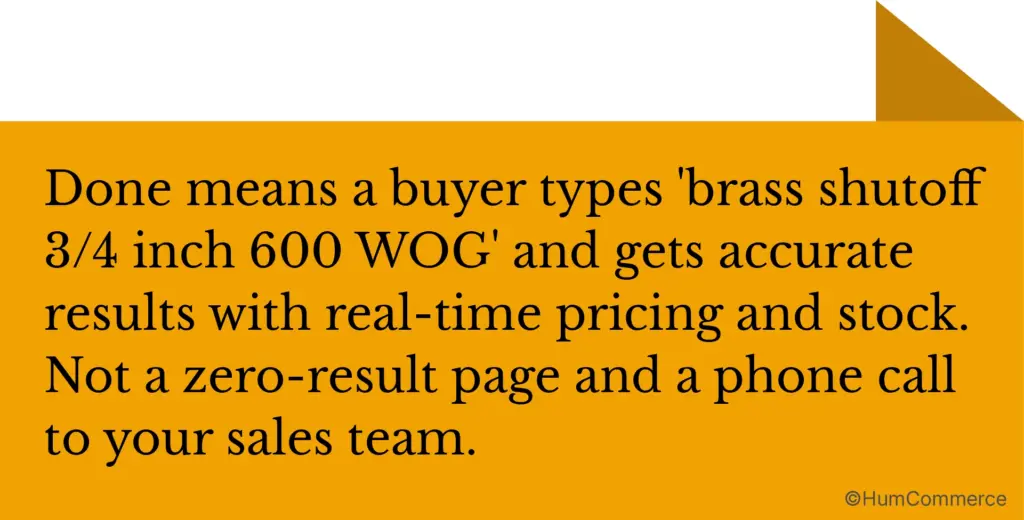
A vague goal like “add AI search to our site” leads to stalled projects and unclear ROI. Without a concrete definition of success, you will end up with a chatbot that answers basic questions but does not connect to your product data, pricing rules, or inventory reality.
Before: buyers rely on faceted search and keyword matching, frequently hitting dead ends. A large share of product inquiries are handled manually by sales reps. After: buyers describe what they need in plain language, the chatbot returns accurate product matches with real-time pricing and availability, and a significant share of orders happen without rep involvement.
Here is what “done” looks like in concrete terms:
- Buyers can ask technical questions such as “What is your highest-rated corrosion-resistant pipe fitting for 200 PSI?” and receive accurate product recommendations pulled from your Adobe Commerce catalog and enriched by ERP data.
- Zero-result searches drop by 30-50% because the chatbot uses both exact-match database lookups for SKUs and part numbers, and semantic AI for descriptive queries, a hybrid approach called Retrieval Augmented Generation (RAG).
- A standard dashboard exists for the e-commerce manager showing chatbot engagement rates, click-through to product pages, self-service order completion, and escalation rates to human reps.
- The chatbot handles cross-references and superseded parts automatically, so a buyer searching for a discontinued item gets directed to the correct replacement without calling support.
Step 1: Map How Buyers Navigate Your Large B2B Product Catalog Today
Start with reality, not tools. Before selecting or configuring any AI solution, you need a clear picture of how buyers currently find products on your site and where the process breaks down. This audit will reveal the specific gaps an AI chatbot needs to fill.
- Document the buyer’s entry points. How do B2B ecommerce customers arrive at product pages? Track the split between site search, category browsing, direct URL access, and rep-assisted navigation. Pull this data from your Adobe Commerce analytics and any heatmap tools you run.
- Analyze your search logs. Export your top 500 search queries from the last 90 days. Flag zero-result searches, misspelled queries, and searches using part numbers or technical specs. On B2B sites with complex catalogs, zero-result rates commonly reach 10-25% or higher, and each one represents a buyer who may assume you do not stock what they need.
- Map where product data lives. Identify which attributes exist in Adobe Commerce, which are only in your SAP, Epicor, or NetSuite instance, and which live in PDFs, spec sheets, or the heads of senior sales reps. This is your data fragmentation map.
- Trace the handoff to sales. When a buyer cannot find what they need, what happens? Do they use live chat, call a rep, email, or just leave? Quantify the volume and cost of these manual interventions.
- Identify cross-reference and compatibility gaps. B2B ecommerce customers frequently search by competitor part numbers, OEM references, or application data. Document whether your current search handles these queries accurately.
- Note the failure loops. Where do buyers circle back, refine searches repeatedly, or abandon sessions? These friction points become the priority targets for your chatbot’s conversational flows.
This process map becomes your baseline. Every improvement you make in later steps gets measured against it.
Step 2: Check If You Are Ready for AI Chatbot Product Discovery on a Large Catalog
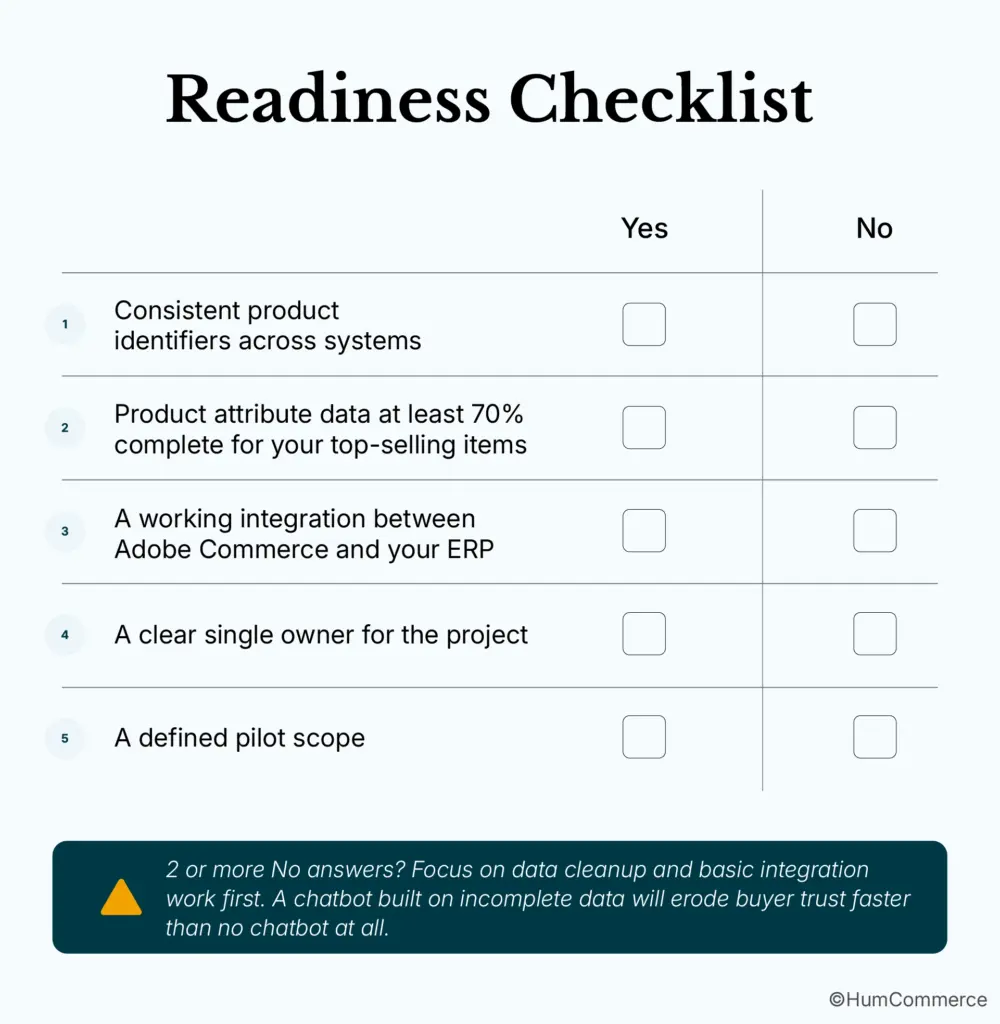
Readiness is not about having perfect data. It is about having enough structure to make an AI chatbot useful from day one. Work through this checklist with honest yes-or-no answers:
- Consistent product identifiers across systems. Your Adobe Commerce SKUs, ERP item numbers, and any PIM identifiers need to be mappable. If the same product has different IDs in Magento and NetSuite with no cross-reference table, the chatbot cannot reliably pull unified data.
- Product attribute data at least 70% complete for your top-selling items. An AI chatbot for large SKU catalog discovery needs attributes like dimensions, materials, certifications, and application data to answer technical queries. Your top 20% of revenue-generating products must be well-described.
- A working integration between Adobe Commerce and your ERP. Even a batch-based nightly sync counts. The chatbot needs access to real-time or near-real-time inventory and pricing. Fully disconnected systems must be integrated first.
- A clear single owner for the project. AI chatbot deployment touches ecommerce, IT, product data, and sales. Without one accountable person, typically the ecommerce manager, the project stalls between teams.
- A defined pilot scope. Pick a product category, a customer segment, or a region. Trying to cover 100,000 SKUs on day one is a common reason projects stall at launch.
Step 3: Prepare Your Systems and Data for AI Chatbot Product Navigation
Your Adobe Commerce instance and ERP need specific preparation before an AI chatbot can deliver accurate results. Think of this as making your catalog data AI-ready.
- Standardize product identifiers. Create a master cross-reference table that maps Adobe Commerce SKUs to ERP item numbers, manufacturer part numbers, and any superseded or discontinued identifiers. This table becomes the backbone of exact-match lookups for B2B ecommerce customers searching by part number.
- Enrich product attributes in your PIM or Commerce catalog. Focus on the attributes buyers actually search by: material, size, pressure rating, voltage, thread type, certification, and application compatibility. Pull from spec sheets and PDFs if needed. This enriched data is the raw material for conversational product search that goes beyond keyword matching.
- Clean up pricing and availability data. The ERP is your single source of truth for contract pricing, volume tiers, and customer-specific rates. A chatbot that shows the wrong price destroys credibility instantly and is harder to recover from than a zero-result search.
- Configure user roles and permissions. B2B ecommerce customers often operate under account hierarchies with different pricing visibility and approval chains. Your chatbot needs to respect these rules, which means your Adobe Commerce customer group and shared catalog configurations must be accurate.
- Prepare your content assets. Technical documents, installation guides, and compatibility charts should be indexed and accessible. RAG-based chatbots can pull answers from these documents, but only when they are structured and stored in a searchable format.
- Set up logging and analytics infrastructure. Capture every chatbot interaction including queries, responses, click-throughs, and escalations. This data drives the continuous improvement cycle in Step 6.
Step 4: Design the Improved AI Chatbot Catalog Navigation Experience
This step is about deciding what the better version of product discovery looks like for your wholesale distribution operation. Not every interaction needs AI, and not every AI response should replace a human.
Defining the Chatbot’s Autonomous Scope
Product lookups by SKU, part number, or technical spec are strong candidates for full automation. So are stock checks, cross-references, and “find similar” requests. These are high-volume, low-complexity interactions where the chatbot consistently outperforms keyword search. Complex configuration questions, custom pricing requests, and large-volume quotes should route to a sales rep with full context from the chatbot conversation, so no information is lost and no B2B ecommerce customer repeats themselves.
Designing the Data Flow for Large SKU Catalog AI Search
When a buyer asks “Do you have a replacement for part 4892-B?”, the chatbot should query your cross-reference table in Adobe Commerce, check availability via your SAP or Epicor integration, apply the buyer’s contract pricing, and return a response with a direct add-to-cart option. Map each step of this flow with defined response time targets before any development work begins. Sketching this flow in a shared document also makes it easier to identify where API latency or missing attributes will cause problems.
Planning the Monitoring Layer
The ecommerce manager should review chatbot performance dashboards weekly: response accuracy, zero-result rates, escalation frequency, and conversion from chat interaction to product page visit. This monitoring responsibility should be assigned before launch, not after the first performance review.
Step 5: Implement AI Chatbot Navigation Changes in Your Commerce Stack
Implementation splits into two tracks: what you own as the ecommerce manager and what your technical team or partner handles.
What the E-commerce Manager Owns
Your responsibilities include defining the pilot scope and the chatbot’s product knowledge coverage, writing escalation workflows for queries the AI should not handle alone, setting KPIs for the pilot, and coordinating with sales to prepare reps for the new handoff model. You also own the go/no-go decision before the chatbot goes live with real B2B ecommerce customers.
What Your Technical Partner Owns
Your technical team or partner handles deploying the chatbot application, building or configuring the RAG pipeline that connects to your product database and content assets, setting up the real-time API connections between Adobe Commerce and your ERP, and configuring the hybrid search layer that handles both exact-match SKU lookups and semantic natural language queries.
This hybrid architecture is not optional for B2B. Pure large language models fail on alphanumeric SKU queries: a B2B ecommerce customer searching “SKU-38995-WC” needs an exact database match, not a semantic guess. RAG architecture solves this by combining database retrieval with AI-powered contextual understanding. HumCommerce’s AI Assist uses a three-layer search hierarchy: your product database first, then company assets like PIM data and PDFs, then broader AI context only as a fallback. Start with a single product category or a specific customer segment to keep the scope manageable and validate accuracy before expanding.
Step 6: Pilot, Measure, and Improve Your AI Chatbot Product Discovery
Treat your first rollout as a controlled experiment, not a company-wide launch. Pick a product category with strong search volume and well-structured data, perhaps your top 500 SKUs by revenue, and deploy the chatbot to a subset of your buyer accounts.
What to Measure
Run the pilot for four to six weeks. Measure product page click-through rate from chatbot interactions, zero-result search reduction, self-service order completion rate, average time from search to add-to-cart, and escalation volume to human reps. Cicero Supply achieved a 40% increase in product click-through rate after deploying AI-powered product discovery, with 25-35% of orders completed via self-service within four weeks. Across ecommerce, AI chat users convert at 12.3% compared to 3.1% for buyers who do not engage with AI assistance, a 4x improvement documented in the Rep AI 2025 Ecommerce Shopper Behavior Report.
Building the Continuous Improvement Loop
Set a weekly review cadence. Pull the chatbot interaction logs and look for patterns: which queries return poor results, which products are missing attributes, and where B2B ecommerce customers abandon the conversation. HumCommerce’s approach includes twice-daily accuracy checks on chatbot responses, with corrections fed back into the system overnight. This continuous learning loop is what separates a chatbot for complex B2B product navigation from a static FAQ widget. After two to four weeks of stable performance, expand to the next product category or customer segment.
Common Mistakes When Using an AI Chatbot to Navigate Large B2B Product Catalogs
Avoiding these mistakes matters as much as following the steps above:
- Skipping the process map. Jumping straight to tool selection without understanding how B2B ecommerce customers currently search your catalog means you will automate the wrong things. Your chatbot will answer questions nobody asks and miss the ones that matter.
- Treating it as a frontend-only project. An AI chatbot that is not connected to your ERP for real-time pricing and inventory is just a fancier search bar. Buyers will get inaccurate information, and trust erodes faster than it took to build.
- Launching across the full catalog at once. A 100,000-SKU deployment with incomplete attribute data will produce poor results and create a negative first impression that is hard to reverse. Start narrow, prove accuracy, then expand.
- Ignoring the hybrid search requirement. Relying on pure semantic AI means every alphanumeric part number query fails. You need exact-match database lookups alongside AI understanding, not one or the other.
- Not measuring continuously. A chatbot that is not monitored and improved weekly will degrade as your catalog changes. New products, discontinued items, and pricing updates all require the system to stay current.
- Underestimating ERP constraints. Your SAP, Epicor, or NetSuite instance has API rate limits, data refresh cycles, and permission structures. Ignoring these during implementation leads to timeout errors and stale data in chatbot responses.
- Expecting the chatbot to replace sales reps entirely. The goal is to handle routine discovery and lookups so your reps focus on complex deals, custom configurations, and relationship-building. A chatbot that tries to do everything does nothing well.
Ready to Deploy AI Chatbot Navigation for Your Large B2B Product Catalog?
If you have followed this guide, you now have a structured approach: audit your current search experience, prepare your data, design the improved workflow, implement with a hybrid RAG architecture across your Adobe Commerce and ERP stack, and pilot with real metrics before expanding.
HumCommerce helps B2B ecommerce managers move from this kind of plan to working implementation. Our AI Assist product is built specifically for large-catalog B2B environments, connecting directly to your commerce and ERP data with a hybrid search that handles both natural language and exact SKU lookups. We have helped distributors like Cicero Supply cut through the complexity of catalog navigation and achieve measurable self-service adoption within weeks, not quarters. If you are managing a wholesale distribution catalog on Adobe Commerce and your B2B ecommerce customers are struggling to find what they need, share your current setup, including your commerce platform, ERP, and the main pain point. We will map these steps to your specific stack in a technical walkthrough.