
TL;DR
- Replatforming a B2B ecommerce store is difficult because your ERP (Epicor P21, NetSuite, or SAP Business One) holds the real pricing, inventory, and credit data. Migrating from Magento 1 or a legacy platform to Adobe Commerce without breaking those connections risks order errors, stalled fulfillment, and lost buyer trust.
- This guide gives you a step-by-step process to execute a full platform migration while preserving business continuity for your buyers and internal teams.
- The high-level path: map your current process, assess readiness, prepare systems and data, design the improved workflow, implement changes in your stack, then pilot and measure before full rollout.
- A mid-market manufacturer completed a Magento 1 to Adobe Commerce migration with zero revenue disruption by running parallel environments and migrating their top 50 accounts first. Their ERP integration was rebuilt with better performance and documentation than the original.
- This guide is for IT Directors in manufacturing and distribution running Adobe Commerce or planning a b2b ecommerce platform migration. After reading, you’ll have a clear framework to scope your replatforming cost and timeline and present a credible migration plan to leadership.
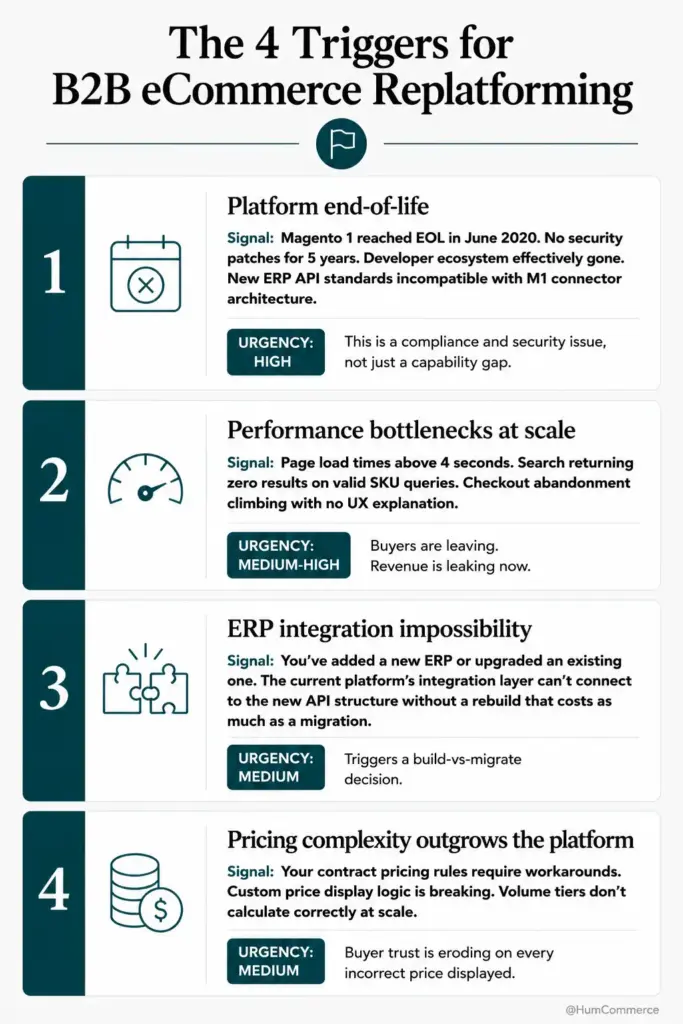
Magento 1 reached end-of-life in June 2020, yet a surprising number of manufacturers and distributors still run their B2B storefronts on it. Every month that passes increases security exposure, compliance risk, and the gap between what your buyers expect and what your platform can deliver. B2B ecommerce replatforming is no longer a “someday” initiative: it’s an operational risk that belongs on this quarter’s agenda.
Why This Matters for manufacturing and distribution
Picture this: you’re in a quarterly review, and the VP of Sales flags that three key accounts placed orders with incorrect contract pricing last month. The root cause traces back to a brittle integration between your aging Magento 1 storefront and Epicor P21. Meanwhile, your NetSuite or SAP Business One data isn’t syncing product availability in real time, so customer service fields dozens of “is it in stock?” calls daily. These aren’t minor annoyances: they’re symptoms of a platform that can’t keep pace with how your buyers need to purchase. You need a clearer, safer way to replatform without disrupting the operations your revenue depends on.
Why execute a B2B ecommerce replatform without disrupting buyer operations or losing business continuity Is a Priority Now
The core problem for manufacturers and distributors is straightforward: your ecommerce platform has become a liability instead of an asset. IT Directors own platform stability, integrations, and the ability to scale the stack. When the storefront can’t handle contract pricing rules, bulk ordering workflows, or approval chains tied to your ERP, every workaround creates technical debt. Ecommerce replatforming isn’t just a technology refresh: it’s an operational necessity when your current system actively slows down revenue.
On Adobe Commerce environments migrated from Magento 1, the pain points are specific and measurable. Custom integrations with Epicor P21 break when PHP versions change. NetSuite sync jobs fail silently, creating inventory discrepancies that surface only when a buyer tries to check out. SAP Business One pricing rules don’t translate cleanly to storefront logic, forcing sales reps to manually adjust quotes. B2B buyers now prefer self-serve portals over sales reps for placing even large orders, and a platform that can’t support that preference costs you accounts. Gartner’s data showing that 70% of ERP implementations fail to meet stated goals underscores why these integrations need architectural attention, not just patches.
This guide walks you through a practical, six-step process to execute a B2B ecommerce replatform without losing business continuity. You’ll learn how to map your current state, assess readiness, prepare data and systems, design the target workflow, implement changes, and pilot the migration with a subset of accounts before full rollout. By the end, you’ll have a framework you can present to leadership with confidence: a clear ecommerce replatforming checklist tied to real timelines and measurable outcomes.
What ‘Done’ Looks Like When You execute a B2B ecommerce replatform without disrupting buyer operations or losing business continuity
Vague goals like “upgrade the platform” or “improve the buyer experience” cause migration projects to drift. Without a concrete definition of success, scope creeps, timelines stretch, and stakeholders lose confidence. You need to define “done” in terms your CFO, your operations team, and your buyers can all verify.
Before the migration, your IT team spends hours each week troubleshooting sync failures between Magento 1 and your ERP. After a successful replatform, order data flows bidirectionally between Adobe Commerce and your ERP with documented error handling and automated retry logic. The difference shows up in fewer support tickets, faster order processing, and pricing that always matches contract terms.
Here’s what “done” looks like in concrete terms:
- All customer-specific and tiered pricing rules are managed in the ERP and reflected accurately on the storefront without manual intervention. No more spreadsheet-based price overrides.
- Order, inventory, and fulfillment data syncs bidirectionally between Adobe Commerce and Epicor P21, NetSuite, or SAP Business One, with batch or real-time integration depending on data type. Sync failures trigger alerts, not silent data loss.
- Your top 50 accounts can self-serve: place bulk orders, view order history, track shipments, and request quotes without calling a sales rep.
- IT has a documented integration architecture, API contracts, and monitoring dashboards. The b2b ecommerce replatforming cost and timeline are tracked against the original project scope, and post-launch performance is measured weekly.
Step 1: Map How You execute a B2B ecommerce replatform without disrupting buyer operations or losing business continuity Today
Start with reality, not tools. Before evaluating any new platform feature or integration pattern, you need a clear picture of how orders, pricing, and fulfillment actually flow through your current systems. This isn’t a technology audit: it’s a process audit. The best practices for building a B2B ecommerce platform all start with understanding the current state before proposing changes.
- Identify every trigger that starts an order or quote: a buyer submitting a cart, a sales rep entering an order manually, an EDI transmission from a large account, or a phone call to inside sales. Document which triggers go through your Magento 1 storefront and which bypass it entirely.
- Map who touches each order and where. Track the handoffs between your ecommerce platform, your ERP (Epicor P21, NetSuite, or SAP Business One), your warehouse management system, and your customer service team. Note where data is re-keyed manually.
- Document the integration points: which APIs or flat-file imports move data between systems, how often they run, and what happens when they fail. Capture error rates if you have them. Many Magento 1 integrations rely on deprecated SOAP APIs or custom cron jobs with no monitoring.
- Flag the rework loops. Where do orders get stuck? Where does pricing mismatch force a manual correction? Where do buyers call because the storefront showed the wrong availability?
- Record the workarounds your team has built over time: custom scripts, manual CSV uploads, or “just email the warehouse” processes. These represent hidden requirements your new platform must address.
- Estimate the time and cost of each failure point. Even rough numbers help prioritize which integrations to rebuild first during your magento 1 to adobe commerce b2b migration.
Step 2: Check If You’re Ready to execute a B2B ecommerce replatform without disrupting buyer operations or losing business continuity
Readiness means more than having budget approval. It means your data, your team, and your systems are in a state where migration won’t create more problems than it solves. Replatforming without preparation is the single most common reason B2B migration projects stall or fail.
Use this checklist to assess whether you’re genuinely ready:
- Do you have a single, authoritative source for product data (SKUs, descriptions, attributes, images)? If product data lives in spreadsheets, your ERP, and your old Magento database with no clear master, you need a data cleanup phase before migration. A PIM or at minimum a canonical product export is essential.
- Can you identify and export your customer-specific pricing rules, contract rates, and volume tiers from your ERP? If pricing logic is buried in custom Magento code or sales rep knowledge, you’ll need to extract and document it before Adobe Commerce can enforce it correctly.
- Is there a clear owner for the migration project on both the business and technical side? Replatforming touches sales, operations, IT, and customer service. Without a single point of accountability on each side, decisions stall. Your ecommerce replatforming checklist should name these owners explicitly.
- Do you have test accounts and sample orders that represent your most complex buying scenarios? Bulk orders with mixed shipping, approval chains, credit holds, and custom configurations all need to work on day one. If you can’t test them, you’re not ready.
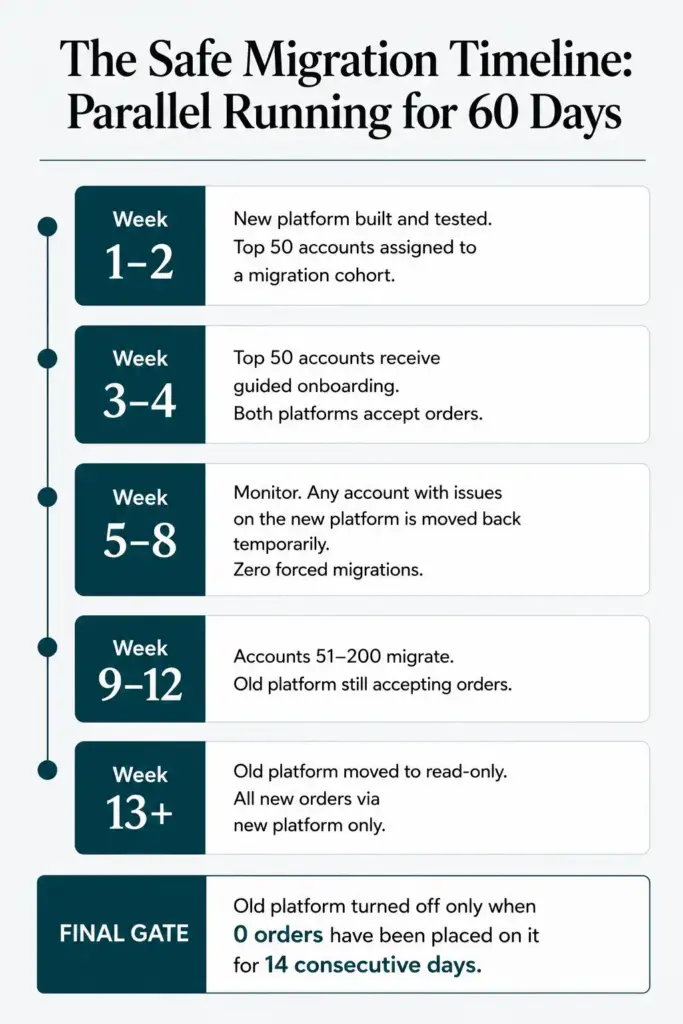
- Can your ERP handle a second integration endpoint during the parallel running period? You’ll need your ERP to sync with both the old and new storefronts simultaneously during migration. Confirm this with your ERP partner before committing to a timeline.
If you answered “no” to two or more of these, scope a 4-6 week readiness sprint focused on data cleanup, pricing documentation, and ERP capacity validation before starting the platform migration itself.
Step 3: Prepare Your Systems and Data
Your Adobe Commerce instance and your ERP need to be in alignment before you start building new integrations. Skipping this step is how teams end up with a new storefront that displays wrong prices or ships from the wrong warehouse.
- Standardize product identifiers across systems. Your ERP’s item numbers, your PIM’s SKUs, and your storefront’s product IDs must map cleanly. Create a cross-reference table if they don’t match one-to-one, and validate it against your top 200 products before proceeding.
- Export and validate pricing rules. Pull every contract rate, volume tier, and customer-class discount from your ERP. Compare them against what your current Magento 1 store displays. Document discrepancies: these are bugs you’re fixing during migration, not carrying forward.
- Audit user roles and permissions. B2B buying involves approval chains, purchase order limits, and credit checks. Map these from your ERP’s customer hierarchy to Adobe Commerce’s company account structure. This is where many b2b ecommerce platform migrations break down: the new platform supports the features, but nobody configured them to match ERP rules.
- Set up monitoring and alerting for your ERP’s API endpoints. If you’re moving from flat-file integrations to real-time REST or GraphQL APIs, your ERP needs to handle the increased call volume. Load test before go-live.
- Prepare a rollback plan for each integration. If the new product sync fails, can you revert to the old data feed within an hour? Define recovery time objectives for every critical data flow.
- Document everything. The original Magento 1 integration was likely built by someone who’s no longer on the team. This migration is your chance to create the documentation that should have existed from the start.
Step 4: Design the Improved Process
This step is where you decide what the better version of your B2B ecommerce operation looks like. Don’t just replicate what you had on Magento 1: identify which manual steps can be eliminated and which buyer experiences can be improved on Adobe Commerce.
Start by mapping the ideal order flow for your top three buyer segments. For your largest accounts, self-service bulk ordering with saved carts and quick reorder should replace phone and email orders. For mid-tier accounts, a quote request workflow tied directly to your ERP’s CPQ logic eliminates the 3-5 day turnaround that manual quoting creates. HumCommerce helped one B2B manufacturer reduce quote turnaround from days to hours by automating quote capture, approvals, and ERP checks in a single flow.
Decide which integrations run in real time versus batch. Inventory and pricing typically need real-time sync. Order history and customer account updates can often run on a 15-minute cycle without buyer-facing impact. Design your monitoring layer so IT can see sync status, error rates, and processing times from a single dashboard.
Step 5: Implement Changes in Your Stack
Implementation on Adobe Commerce with an ERP backend follows a specific sequence. Get the data layer right first, then build the buyer-facing features on top of stable integrations.
Your IT team should own the integration architecture decisions: which middleware to use, how to handle API versioning, and where to place retry logic. A technical partner handles the Adobe Commerce configuration, theme development, and performance tuning. At HumCommerce, this split is deliberate: the client’s IT Director retains control over ERP-side changes while we handle the commerce platform engineering.
The implementation checklist looks like this: deploy Adobe Commerce in a staging environment, connect ERP product and pricing feeds, validate data accuracy against your cross-reference tables, configure company accounts and approval workflows, build the checkout and payment flows, and run end-to-end order tests with real ERP data. Ecommerce replatforming projects that skip staging validation consistently hit problems at launch. For a magento 1 to adobe commerce b2b migration, expect the integration rebuild to consume 40-50% of total project effort.
Step 6: Pilot, Measure, Improve
Treat your first rollout as a controlled pilot, not a company-wide launch. Select your top 50 accounts, migrate them to the new Adobe Commerce storefront, and run both platforms in parallel for 4-6 weeks. This parallel running strategy is how one manufacturer completed their Magento 1 to Adobe Commerce migration with zero revenue disruption: buyers on the new platform placed orders normally while the remaining accounts stayed on the legacy system.
Measure specific outcomes during the pilot: order accuracy rate, average order processing time, sync error frequency, and buyer adoption of self-service features. Compare these against your baseline from Step 1. If your ERP integration was rebuilt correctly during the replatform, you should see better performance and documentation than the original: faster sync times, fewer manual corrections, and clear error logs instead of silent failures.
Hold weekly reviews where IT, operations, and sales examine pilot results and decide what to adjust before expanding. B2B ecommerce replatforming cost and timeline estimates should be updated based on pilot data, not original assumptions. AI-driven tools are increasingly helping B2B teams analyze buyer behavior during these transition periods, identifying friction points that manual review might miss.
Common Mistakes to Avoid When You execute a B2B ecommerce replatform without disrupting buyer operations or losing business continuity
- Skipping process mapping and jumping straight to platform selection. If you don’t know how orders actually flow today, you’ll rebuild the same broken workflows on a newer platform. This is the most expensive mistake in any b2b ecommerce platform migration.
- Treating the ERP integration as an afterthought. Your ERP is the source of truth for pricing, inventory, and customer credit. Building the storefront first and “figuring out the integration later” guarantees data mismatches at launch.
- Migrating all accounts at once. A big-bang cutover maximizes risk. Parallel running with phased account migration lets you catch problems before they affect your entire customer base.
- Underestimating data cleanup effort. Dirty product data, duplicate customer records, and undocumented pricing rules create significant migration risks that surface at the worst possible moment.
- Confusing a UI refresh with a real replatform. Putting a new theme on a broken integration layer doesn’t solve the underlying problems. A proper ecommerce replatforming checklist addresses data, integrations, and workflows: not just the frontend.
- Not measuring before and after. Without baseline metrics from your current platform, you can’t prove the migration delivered value. Define your KPIs before you start.
Need Help Putting This Into Practice?
If you’ve followed this guide, you now have a structured approach to replatforming your B2B ecommerce store from Magento 1 or another legacy platform to Adobe Commerce, without disrupting the buyer operations and ERP integrations your business depends on. You know how to map your current state, assess readiness, prepare your Epicor P21, NetSuite, or SAP Business One data, design improved workflows, and pilot the migration safely.
HumCommerce specializes in exactly this work for manufacturers and distributors. We’ve rebuilt ERP integrations, migrated complex pricing logic, and run parallel deployments for B2B companies where downtime isn’t an option. Our ecommerce replatforming projects are scoped around your ERP as the source of truth, not the other way around.
If your team is evaluating a migration, share your current platform, ERP, and the biggest pain point keeping you up at night. We’ll map these steps to your specific stack in a technical walkthrough: no pitch deck, just architecture and next steps. Reach out and we’ll schedule a conversation around your timeline.