
TL;DR
- Assessing your B2B operation’s readiness for conversational commerce is difficult when your Adobe Commerce storefront sits on top of Epicor P21, NetSuite, or SAP Business One, and catalog data, pricing rules, and buyer authentication all live in different places with different owners.
- This guide gives you a scored, step-by-step framework to evaluate your data quality, integration maturity, and process clarity so you can plan a staged deployment with confidence.
- The high-level path: map your current ordering and quoting workflows, run a readiness checklist, prepare your systems and data, design the improved process, implement changes in your stack, then pilot and measure results.
- One industrial manufacturer that deployed conversational AI in phases saw 75% faster quote workflows after connecting conversational AI to ERP and CPQ, and early adopters in similar programs report 25-35% of orders completed via conversational self-service within six months.
- This is written for Heads of eCommerce at manufacturing and distribution companies running Adobe Commerce. After reading, you’ll know whether to greenlight a conversational ordering platform project now, fix prerequisites first, or scope a limited pilot.
Why This Matters for manufacturing and distribution
Picture a quarterly business review where your CEO asks why 40% of quotes still require manual re-entry between Adobe Commerce and Epicor P21 or SAP Business One. Customer complaints about slow quote turnaround are climbing. Your inside sales team spends half its day on “where’s my order” calls instead of selling. NetSuite shows one price, the storefront shows another, and nobody trusts either number. These symptoms – rework, pricing mismatches, delayed responses – signal that your current stack can’t support conversational commerce without serious groundwork. You need a structured way to assess readiness and plan a phased deployment before investing in new capabilities.
Why assess your B2B operation’s readiness for conversational commerce and plan a staged deployment Is a Priority Now
Manufacturers and distributors face a specific problem: buyers expect faster, more self-sufficient purchasing experiences, but the back-end systems powering those experiences weren’t designed for real-time, conversational interactions. As a Head of eCommerce, you’re responsible for bridging the gap between what buyers want and what your operations can actually deliver. Conversational commerce is the capability your leadership team is asking about, but deploying it on a weak foundation wastes budget and erodes trust with the very buyers you’re trying to serve.
The challenge compounds when you look at how Adobe Commerce connects to your ERP. Whether you run Epicor P21, NetSuite, or SAP Business One, you likely have data silos separating product catalogs, customer-specific pricing, inventory positions, and order status. A buyer asks a conversational AI chatbot “Do you have M8 hex bolts in stainless, and what’s my contract price?” – and the system needs to pull from your product master, check customer-tier pricing in the ERP, and confirm real-time stock. If those data sources aren’t clean, connected, and accessible via API, the conversational experience breaks immediately. B2B buyers are already shifting from keyword search to conversational product discovery, which means the window to prepare is shrinking.
This guide walks you through a practical, scored process to evaluate your readiness across six dimensions: current workflow mapping, data and integration maturity, system preparation, process redesign, implementation, and measurement. By the end, you’ll have a clear picture of where your operation stands, what gaps to close first, and how to plan a staged rollout that doesn’t disrupt existing order flows. You’ll also understand where a conversational ecommerce chatbot fits into your broader B2B ordering strategy and where it doesn’t – yet.
What ‘Done’ Looks Like When You assess your B2B operation’s readiness for conversational commerce and plan a staged deployment
Vague goals like “add AI chat to the storefront” cause projects to drift because there’s no shared definition of success. The sales team imagines one thing, IT imagines another, and operations worries about order accuracy. Without a concrete target state, you can’t prioritize, you can’t measure, and you can’t defend the investment in a leadership review.
A clear “before and after” looks like this: before, buyers call or email for quotes, reps manually look up contract pricing in the ERP, and order status requests clog the support queue. After, buyers interact with a conversational interface that pulls real pricing, checks stock, and routes complex requests to the right human – all within Adobe Commerce. The Head of eCommerce can see adoption rates, deflection metrics, and order accuracy in a single dashboard. Here’s what “done” means in concrete terms:
- Routine inquiries (order status, stock availability, reorder by PO history) are handled through self-service conversational flows, reducing support tickets by a measurable percentage.
- Quote requests for standard configurations are auto-routed through CPQ logic tied to ERP pricing rules, cutting turnaround from days to hours.
- A live dashboard shows conversational session volume, conversion-to-order rate, escalation rate, and average resolution time, giving you weekly visibility into performance.
- The B2B conversational ordering platform respects existing approval chains, credit limits, and purchase order requirements so finance and operations don’t lose control.
Step 1: Map How You assess your B2B operation’s readiness for conversational commerce and plan a staged deployment Today
You start with reality, not tools. Before evaluating any conversational AI solution, you need a clear picture of how orders, quotes, and buyer inquiries actually flow through your organization. Most B2B operations have undocumented workarounds, tribal knowledge, and manual handoffs that only surface when you map them explicitly. Research shows that 72% of B2B suppliers believe their sales processes are mostly automated, but only 47% of buyers agree – a gap that reveals hidden manual effort.
- Identify every entry point for buyer interactions: phone, email, Adobe Commerce storefront, sales rep, EDI. Document which channel handles what percentage of volume.
- Trace a typical order from first contact to fulfillment. Note where Adobe Commerce hands off to Epicor P21, NetSuite, or SAP Business One, and where data is re-keyed manually.
- Map your quote-to-order cycle separately. Record who initiates the quote, who prices it, where CPQ or spreadsheet logic lives, and how long each step takes on average.
- Flag every point where a human intervenes because the system can’t handle the request – custom pricing overrides, out-of-stock substitutions, credit hold reviews, or cross-reference lookups for superseded parts.
- Document common failure points: orders that bounce back due to incorrect SKUs, pricing mismatches between the storefront and ERP, or approval chain bottlenecks that stall large POs.
- Interview two or three inside sales reps and one customer service agent. Ask them what questions buyers ask most often and where they spend the most time on repetitive tasks. Shadow a few customer service calls if possible, and audit your failed site search logs for patterns.
This map becomes your baseline. It tells you exactly which workflows a conversational commerce solution for B2B manufacturers could handle and which ones need prerequisite fixes first.
Step 2: Check If You’re Ready to assess your B2B operation’s readiness for conversational commerce and plan a staged deployment
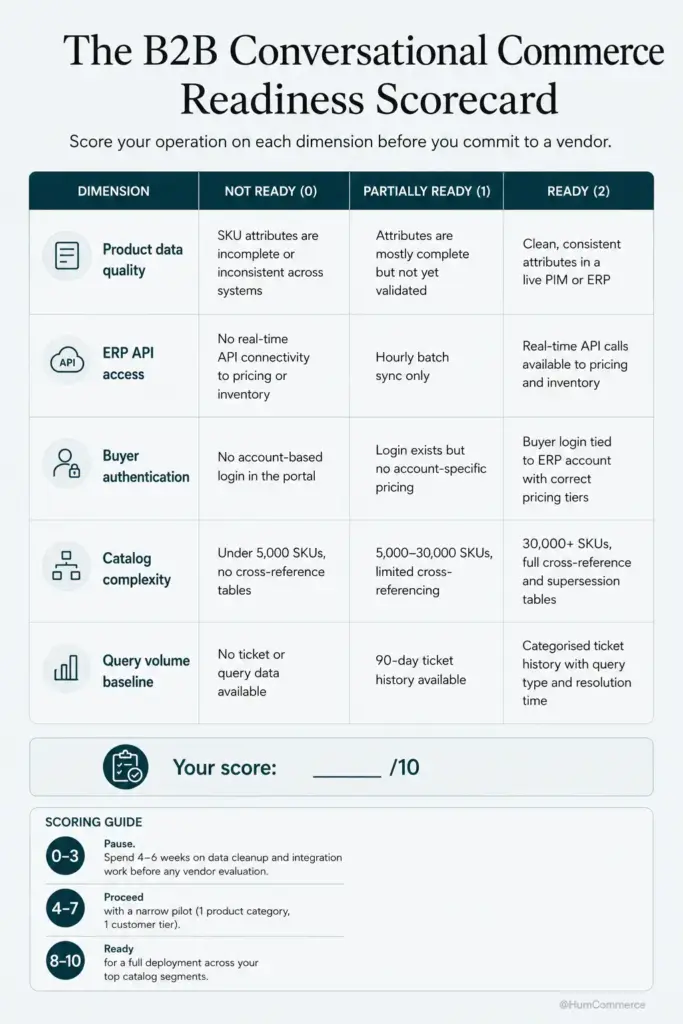
Readiness means your data, integrations, and organizational ownership are mature enough to support a conversational layer without creating new problems. If your product catalog has inconsistent SKU-level attributes, your ERP integration is batch-based with 24-hour delays, or nobody owns the conversational experience, you’re not ready for a full deployment. You might be ready for a scoped pilot.
Use this checklist. Answer each honestly with yes, partial, or no:
- Your Adobe Commerce product catalog has complete, structured attributes (dimensions, materials, application data, alphanumeric SKUs) for at least 80% of your active items. Partial catalog coverage means the conversational AI will fail on the products buyers ask about most.
- Real-time or near-real-time integration exists between Adobe Commerce and your ERP (Epicor P21, NetSuite, or SAP Business One) for inventory, pricing, and order status. Batch-based syncs that run overnight won’t support a conversational experience where buyers expect instant answers.
- Customer-specific pricing, contract rates, and volume tiers are accessible via API from your ERP, not stored in spreadsheets or sales rep memory. A conversational AI for ecommerce can only quote accurately if it can reach the single source of truth.
- You have a named owner for the conversational experience: someone who can make decisions about scope, escalation rules, and success metrics without waiting for committee approval.
- Your buyer authentication flow in Adobe Commerce supports account-level permissions, so the conversational interface knows who’s asking and what pricing and catalog access they should see.
- You have baseline metrics for the workflows you mapped in Step 1: average quote turnaround time, support ticket volume by category, and self-service order percentage.
If you answered “no” to more than two items, focus on those gaps before deploying. Basic data cleanup, an API-first ERP connector, or simply narrowing your pilot scope to a single product line can move you from “not ready” to “ready for a limited test” in weeks, not months.
Step 3: Prepare Your Systems and Data
Before changing any workflow or adding a conversational layer, your Adobe Commerce instance and ERP need to meet specific conditions. Think of this as making your data “AI-ready” – because a conversational AI for ecommerce is only as good as the data it can access.
- Standardize product identifiers across Adobe Commerce and your ERP. If Epicor P21 uses one SKU format and your storefront uses another, create a reliable cross-reference table. Conversational queries like “Do you have part number 4829-SS in stock?” depend on exact ID matching.
- Validate pricing data consistency. Pull a sample of 200 customer-specific prices from your ERP and compare them to what Adobe Commerce displays. Flag discrepancies. Contract rates, volume tiers, and promotional pricing must match across systems before a conversational interface quotes them to buyers.
- Confirm that order status codes map cleanly between systems. If your ERP uses 12 status codes and Adobe Commerce uses 5, define the mapping so a buyer asking “where’s my order” gets a meaningful answer, not a generic “processing” label.
- Review user roles and permissions in Adobe Commerce. Buyer-level authentication must support account hierarchies, approval chains, and credit limit visibility. The conversational interface inherits these permissions, so a purchasing agent shouldn’t see pricing meant for a procurement director.
- Set up baseline reporting. You need pre-deployment benchmarks for quote turnaround time, support ticket volume, self-service order rate, and average order value (AOV). Without these, you can’t measure whether the new process actually improves anything.
- Test your API endpoints under load. If your ERP connector handles 50 concurrent requests today but conversational sessions could generate 200, you’ll hit bottlenecks that degrade the buyer experience.
Step 4: Design the Improved Process
This step is about deciding what the better version of your ordering and quoting workflow looks like for your specific manufacturing or distribution operation. Not every step should be automated. The goal is to remove friction from high-volume, repetitive interactions while keeping human expertise where it adds real value.
- Separate your buyer interactions into three tiers: fully self-service (order status, reorders, stock checks), AI-assisted with human backup (standard quotes, product recommendations, cross-reference lookups), and human-required (custom engineering requests, large contract negotiations, exception pricing).
- Define the conversational flows for each self-service and AI-assisted tier. Specify what data the system pulls from Adobe Commerce and the ERP, what the buyer sees, and what triggers an escalation to a human.
- Design the escalation path. When a conversational ecommerce chatbot can’t resolve a request, it should hand off context (buyer identity, conversation history, relevant product data) to the right person without making the buyer repeat themselves.
- Decide what changes in Adobe Commerce: new API endpoints, updated catalog attributes, modified checkout flows for conversational-originated orders.
- Define how the Head of eCommerce monitors the new process: a weekly dashboard showing session volume, resolution rate, escalation rate, and revenue attributed to conversational sessions.
- Get sign-off from sales, operations, and IT on the design before building anything. Sales needs to know their commissions aren’t threatened – online orders should still be attributed to the assigned rep.
Step 5: Implement Changes in Your Stack
Implementation on Adobe Commerce with Epicor P21, NetSuite, or SAP Business One involves three workstreams: platform configuration, integration setup, and conversational AI deployment. Gartner projects that by 2026, 75% of B2B buyers will prefer rep-free purchasing for routine transactions, which means the infrastructure you build now needs to scale.
As Head of eCommerce, you own scope definition, success criteria, and buyer experience decisions. Your technical partner or internal IT owns API development, ERP connector configuration, and infrastructure scaling. Here’s how to split the work:
You own: defining which product lines and customer segments enter the pilot, setting escalation rules, approving conversational flow scripts, and establishing the measurement framework.
IT or your implementation partner owns: configuring Adobe Commerce APIs for real-time catalog, pricing, and inventory access; setting up the conversational AI layer with proper authentication and permission inheritance; and load-testing the full path from conversational query to ERP response.
Together: run a two-week integration test with a small group of internal users (inside sales reps make excellent testers) before any buyer sees the new experience. Conversational commerce only works when every system in the chain returns accurate, timely data. HumCommerce has seen this pattern repeatedly – teams that invest in a structured integration test before pilot launch avoid the “it crashed twice” skepticism that kills adoption.
Step 6: Pilot, Measure, Improve
Treat your first deployment as a controlled experiment, not a company-wide launch. Pick a scope that’s meaningful but contained: one product category, one customer segment, or one region. This gives you real data without risking your entire buyer base.
Measure what matters from day one. Track conversational session volume, percentage of sessions that result in a completed order or quote, escalation rate to human agents, and average resolution time. Compare these against your Step 3 baselines. An industrial manufacturer that deployed conversational commerce in phases saw quote turnaround drop from 3-5 days to hours after connecting conversational AI to ERP and CPQ logic. Within six months, early adopters in similar programs report 25-35% of routine orders completed via conversational self-service.
Set a weekly review cadence where you examine the data and make targeted adjustments. Are buyers dropping off at a specific point in the conversational flow? Is the AI misinterpreting product queries for items with complex alphanumeric SKUs? Fix these issues in small iterations. After 90 days, you’ll have enough data to decide whether to expand scope, adjust the conversational design, or invest in deeper ERP integration. This phased approach is how a B2B conversational ordering platform earns internal trust and buyer adoption simultaneously.
Common Mistakes to Avoid When You assess your B2B operation’s readiness for conversational commerce and plan a staged deployment
Skipping the workflow map. Teams jump straight to tool selection without understanding their current process. You end up automating broken workflows, which just produces wrong answers faster.
Treating a chatbot widget as a complete solution. A conversational ecommerce chatbot that can’t access real-time ERP data for pricing, inventory, and order status is just a glorified FAQ page. Buyers will try it once, get a wrong answer, and never return.
Ignoring data quality. If 30% of your catalog lacks structured attributes or your cross-reference tables for superseded parts are outdated, the AI will fail on exactly the queries that matter most to experienced buyers.
Underestimating ERP constraints. Your Epicor P21 or SAP Business One instance may have API rate limits, batch-only sync schedules, or legacy data formats that block real-time conversational interactions. Discover these limits before you promise buyers instant answers.
Launching too broadly. A company-wide rollout with 50,000 SKUs and 2,000 customer accounts is a recipe for visible failure. Start with 500 SKUs and 50 accounts.
Not measuring from day one. If you don’t capture baseline metrics before deployment, you can’t prove ROI, and without ROI proof, the project loses funding at the next budget cycle.
Forgetting change management for sales reps. Reps who fear the conversational AI will cannibalize their commissions will actively discourage buyers from using it. Attribute conversational orders to the assigned rep and communicate this clearly before launch.
Need Help Putting This Into Practice?
If you’ve worked through this guide, you now have a structured framework for evaluating your readiness across catalog quality, ERP integration maturity, buyer authentication, and process design. You know where your Adobe Commerce instance and your Epicor P21, NetSuite, or SAP Business One environment stand, and you have a phased plan rather than a vague aspiration.
HumCommerce helps Heads of eCommerce at manufacturing and distribution companies move from this kind of assessment into actual implementation. We specialize in Adobe Commerce for complex B2B operations – connecting conversational commerce capabilities to real ERP data, CPQ systems, and account-based pricing logic so the experience actually works for professional buyers. Our team has reduced quote turnaround from days to hours by automating the capture-to-approval pipeline.
If this sounds like your situation, share your current stack details (Adobe Commerce version, ERP, main pain point) and we’ll map these steps to your specific environment in a 30-minute technical walkthrough. Reach out at humcommerce.com to schedule.