
TL;DR
- Integrating Epicor P21 with Adobe Commerce for real-time B2B pricing and inventory remains one of the hardest ecommerce ERP integration challenges in manufacturing and distribution, largely because P21’s pricing logic, customer tiers, and inventory structures don’t map cleanly to a storefront without significant middleware or configuration work.
- This guide gives you a clear, step-by-step path to connect Epicor ERP to Magento so that pricing, inventory, and order data stay accurate across both systems from day one.
- You’ll walk through six stages: map your current process, assess readiness, prepare systems and data, design the improved workflow, implement changes, then pilot and measure results.
- An industrial supply manufacturer running Epicor CPQ achieved 75% faster quote workflows after integration, with real-time pricing accuracy across all customer tiers from launch day – the kind of outcome this guide is designed to produce.
- If you’re an IT director in manufacturing or distribution running Adobe Commerce with Epicor P21 and you need to decide between Epicor Commerce Connect, custom middleware, or a hybrid approach, this Epicor ecommerce integration guide will help you make that call with confidence.
Why This Matters for manufacturing and distribution
Picture this: your VP of Sales pulls you into a quarterly review, frustrated that 30% of online orders required manual price corrections last month. Your Adobe Commerce storefront shows one price; Epicor P21 (Prophet 21) holds the contract rate. Customer service is drowning in “what’s my real price?” tickets. The board wants self-service B2B buying to scale, but every order that touches the website creates rework downstream. You need a reliable way to integrate Epicor P21 with Adobe Commerce for real-time B2B pricing and inventory, and this guide will show you how.
Why integrate Epicor P21 with Adobe Commerce for real-time B2B pricing and inventory Is a Priority Now
If you’re an IT director responsible for both ERP stability and ecommerce growth, the pressure to deliver accurate, self-service buying experiences has never been higher. B2B buyers now expect the same speed and transparency they get from consumer sites, but your Epicor P21 instance holds complex pricing rules, customer-specific contracts, and multi-warehouse inventory data that can’t simply be dumped into a storefront. This Epicor ecommerce challenge sits squarely at the intersection of operations and digital revenue.
The reality on Adobe Commerce (Magento) with P21 in the background is messy. Pricing tiers live in P21, but the storefront needs to display the right price for each logged-in customer, factoring in volume breaks, contract rates, and regional adjustments. Inventory counts change constantly across multiple warehouses, and a 15-minute sync lag can mean overselling or stockouts. Many teams still rely on batch CSV exports or manual data entry to bridge the gap, which introduces errors and delays. Epicor has been expanding its AI and automation capabilities to help supply chain businesses work faster, but connecting that intelligence to your storefront requires deliberate integration architecture.
This guide walks you through a practical, six-step process to build a reliable magento Epicor integration. By the end, you’ll know how to assess your current state, prepare your data and systems, design an improved sync workflow, and validate everything before go-live. You’ll also understand when Epicor Commerce Connect makes sense versus building custom middleware, and how to connect Epicor ERP to Magento in a way that supports real-time pricing and inventory accuracy across all customer tiers.
What ‘Done’ Looks Like When You integrate Epicor P21 with Adobe Commerce for real-time B2B pricing and inventory
Saying “we need Epicor ecommerce integration” without defining success is how projects drift into six-month overruns. Vague goals like “sync everything” or “make it real-time” leave too much room for interpretation between your internal team, your integration partner, and your ERP admin.
A clear before-and-after definition matters. Before integration, your customer service team manually verifies pricing on 20-40% of orders, your warehouse team fields calls about stock availability that the website got wrong, and your IT team spends hours each week troubleshooting failed data imports. After a successful integration, those manual touchpoints disappear. The IT director can monitor sync health from a dashboard, and the sales team trusts the website enough to direct customers there.
Here’s what “done” looks like in concrete terms:
- Customer-specific contract pricing from P21 displays correctly on the Adobe Commerce storefront within minutes of an ERP update, with no manual CSV uploads or price overrides required.
- Inventory quantities sync bidirectionally across all active warehouses with less than 15 minutes of lag, reducing oversell incidents to near zero.
- Orders placed on the storefront flow into P21 automatically with correct customer IDs, shipping methods, and payment terms, eliminating the 48-72 hour order processing delay many distributors experience.
- An integration health dashboard shows sync status, error counts, and failed transactions in real time, giving the IT director visibility without digging through server logs.
These outcomes connect directly to the broader goal of connecting Epicor ERP to Magento as a single operational system rather than two disconnected platforms.
Step 1: Map How You integrate Epicor P21 with Adobe Commerce for real-time B2B pricing and inventory Today
Before selecting tools or writing API specs, you need an honest picture of how data actually moves between your systems right now. Most teams discover that the “integration” they think they have is really a patchwork of scheduled exports, manual lookups, and workarounds that only a few people understand.
- Identify every data object that moves between P21 and Adobe Commerce: customer records, pricing tables, inventory levels, product attributes, order headers, line items, shipping updates, and credit memos. List each one.
- For each data object, document the trigger. Does a price update in P21 push to the storefront automatically, or does someone run a script on Tuesday mornings? Does an order on the website create a sales order in P21 instantly, or does it sit in a queue?
- Map who touches each handoff. Your Epicor p21 adobe commerce integration likely involves at least three roles: the ERP admin, the ecommerce manager, and someone in customer service or inside sales who catches errors.
- Document the timing. How long does each sync take? A distributor we’ve worked with discovered their “real-time” inventory sync actually ran every four hours due to a misconfigured cron job.
- Flag failure points. Where do errors happen most? Common culprits include mismatched customer IDs between systems, SKUs that exist in P21 but not on the website, and pricing rules that don’t translate cleanly into Adobe Commerce’s tier pricing structure.
- Note any rework loops. If an order fails validation in P21, what happens? Does someone manually re-enter it? Does the customer get notified? These loops are where you’re burning the most time and trust.
Research shows that bidirectional data sync tools for Epicor P21 and Adobe Commerce exist specifically to address these handoff problems, but they only work well when you understand what you’re syncing and why.
Step 2: Check If You’re Ready to integrate Epicor P21 with Adobe Commerce for real-time B2B pricing and inventory
Readiness isn’t about having perfect systems. It’s about having enough foundation to build on without the project collapsing under bad data or unclear ownership.
- Do your customer records in P21 have consistent, unique identifiers that match (or can be mapped to) customer accounts in Adobe Commerce? If your ERP uses one customer numbering scheme and your website uses another, you’ll need a mapping table before any sync will work reliably.
- Is your product data in P21 complete enough to display on a storefront? This means SKUs, descriptions, unit-of-measure codes, and at minimum base pricing. If 30% of your catalog has missing attributes, you’re not ready for a full ecommerce ERP integration – start with a subset.
- Do you have a single person or small team with authority over both the ERP configuration and the Adobe Commerce instance? Split ownership between departments with no shared accountability is the number one reason these projects stall.
- Can your P21 instance handle API calls at the volume your storefront generates? Some older Prophet 21 configurations weren’t built for real-time query loads. Test this before assuming real-time sync is feasible.
- Do you have a staging or sandbox environment for both systems? Implementing changes directly in production is how you end up with corrupted pricing data on a Friday afternoon.
If you answered “no” to two or more of these, focus first on data cleanup and environment setup. A magento Epicor integration built on shaky foundations will create more problems than it solves.
Step 3: Prepare Your Systems and Data
Getting Adobe Commerce and Epicor P21 ready for integration means aligning data structures, permissions, and configurations so the middleware or API layer has clean inputs to work with.
- Standardize customer IDs. Create a cross-reference table that maps P21 customer numbers to Adobe Commerce customer accounts. Every customer who will use the B2B portal needs a clean match. Duplicates or orphaned records will cause order routing failures.
- Align SKU and product structures. Your P21 item master and your Adobe Commerce catalog need to agree on SKU formats, units of measure, and product hierarchy. If P21 uses alphanumeric SKUs with dashes and your storefront strips special characters, you’ll get silent mismatches.
- Normalize pricing data. P21 supports complex pricing: contract rates, volume tiers, customer-specific overrides, and promotional pricing. Decide which pricing types will sync to Adobe Commerce and how they’ll map to the platform’s native B2B pricing features like shared catalogs and negotiated quotes.
- Configure API access and permissions. Set up dedicated API user accounts in both systems with the minimum permissions needed for sync operations. Don’t use admin-level credentials for integration – it’s a security risk and makes troubleshooting harder.
- Build baseline reports. Before you change anything, capture current metrics: order error rate, average sync delay, manual intervention frequency, and customer complaint volume related to pricing or availability. These become your “before” measurements.
- Validate your Epicor p21 adobe commerce integration environment. Confirm that staging environments mirror production configurations closely enough to test realistic data volumes. A sync that works with 100 SKUs may fail at 50,000.
Step 4: Design the Improved Process
This step is about deciding what the better version of your P21-to-Adobe Commerce workflow looks like for your specific operation. Not every process should be automated, and not every sync needs to be real-time.
Start by categorizing your data flows into three tiers. Tier one is data that must sync in real time or near-real time: inventory availability and customer-specific pricing. Tier two is data that can sync on a schedule without business impact: product descriptions, images, and category assignments. Tier three is data that only needs to sync on-demand or during batch windows: historical order data, archived customer records, and superseded part cross-references.
For each tier, decide whether the sync is one-way or bidirectional. Inventory typically flows from P21 to Adobe Commerce. Orders flow from Adobe Commerce to P21. Pricing can go either direction depending on whether your sales team negotiates quotes on the storefront or in the ERP. The magento Epicor integration experience your buyers have depends heavily on getting these directional flows right.
Design your error handling before you build anything. What happens when a sync fails? Who gets notified? Is there an automatic retry, or does it queue for manual review? Define these rules now so your IT team isn’t making decisions under pressure during go-live.
Step 5: Implement Changes in Your Stack
Implementation splits into two workstreams: what you configure directly and what requires a technical partner or internal development team.
Your responsibilities as IT director typically include defining business rules for pricing display, approving data mapping documents, coordinating UAT with internal stakeholders, and owning the go/no-go decision. Your technical partner handles API development or middleware configuration, building sync monitoring dashboards, setting up error logging and alerting, and performance testing under realistic load.
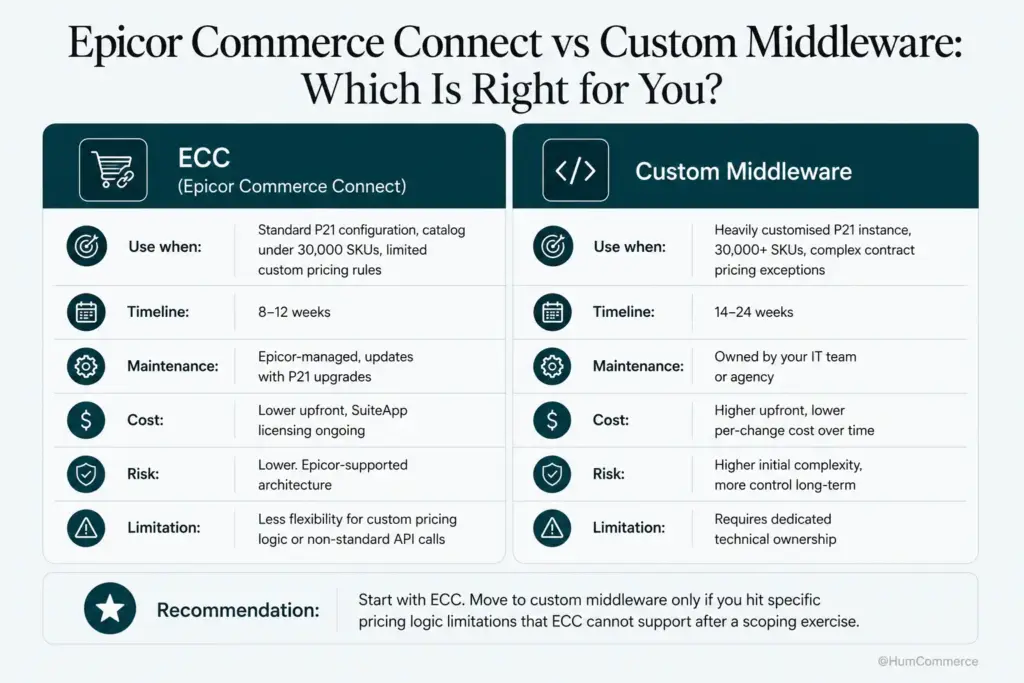
Epicor has been introducing new integration capabilities through its Propello platform, which may simplify some connectivity tasks. Evaluate whether these native tools meet your requirements before building custom middleware. The Epicor ecommerce landscape has matured significantly, and there are more pre-built connectors available now than even two years ago.
Start with a single data flow – typically inventory sync – and validate it end-to-end before adding pricing or order sync. This ecommerce ERP integration approach reduces risk and gives your team confidence in the architecture before scaling up.
Step 6: Pilot, Measure, Improve
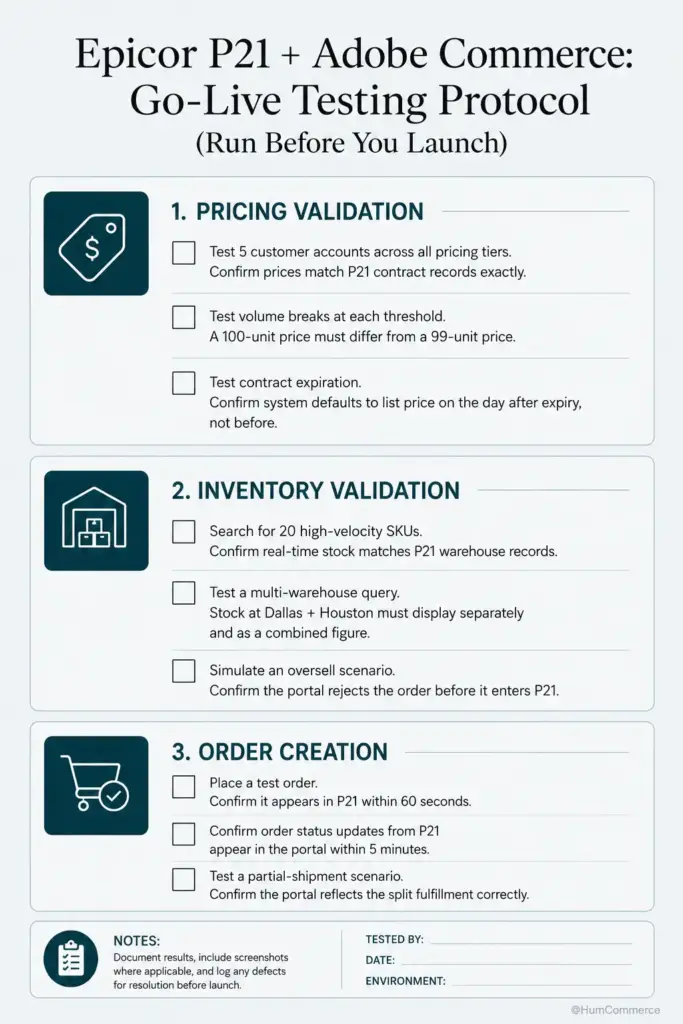
Treat your first rollout as a controlled pilot, not a company-wide launch. Pick a scope that’s meaningful but manageable: one product category, one customer segment, or one warehouse location.
Define what you’re measuring before the pilot starts. Key metrics include sync latency (time between a P21 update and its reflection on the storefront), order accuracy rate (percentage of orders that flow into P21 without manual correction), and customer-reported pricing discrepancies. An industrial supply manufacturer running Epicor CPQ achieved 75% faster quote workflows after integration by automating rules-driven quoting tied directly into ERP pricing and approval logic, and they saw real-time pricing accuracy across all customer tiers from launch day.
Run the pilot for at least two to four weeks. Hold weekly reviews where you check error logs, measure sync performance against your baseline, and collect feedback from customer service and inside sales. These are the people who hear about problems first.
After the pilot, decide what to expand and what to fix. Most teams discover one or two data flows that need adjustment before scaling. This iterative approach is how you connect Epicor ERP to Magento reliably rather than hoping a big-bang launch works perfectly.
Common Mistakes to Avoid When You integrate Epicor P21 with Adobe Commerce for real-time B2B pricing and inventory
- Skipping the process mapping step. Teams jump straight to tool selection and discover mid-project that their data flows are more complex than anyone documented. You can’t automate what you don’t understand.
- Treating Epicor ecommerce integration as a one-time project. Sync requirements change as you add products, customers, and warehouses. Build for ongoing maintenance, not just initial launch.
- Underestimating P21’s pricing complexity. Prophet 21 supports dozens of pricing methods – contract, matrix, quantity break, customer-specific overrides. A shallow magento Epicor integration that only syncs base prices will frustrate your best customers.
- Choosing real-time sync for everything. Real-time is expensive to build and maintain. If product descriptions only change monthly, a nightly batch sync is perfectly fine.
- Not testing with production-scale data. A sync that handles 500 SKUs flawlessly may timeout or corrupt data at 50,000. Always test at realistic volumes.
- Ignoring error handling until something breaks. Define retry logic, alerting thresholds, and manual fallback procedures before go-live. Epicor’s own teams have emphasized that AI-driven error detection and resolution is becoming essential for maintaining integration health at scale.
- Letting the integration partner own all the knowledge. Your internal team needs to understand the architecture well enough to troubleshoot basic issues and make configuration changes without filing a support ticket.
Need Help Putting This Into Practice?
If you’ve followed this guide, you now have a structured approach to integrating Epicor P21 with Adobe Commerce in a manufacturing or distribution environment: from mapping your current state through piloting and measuring results. You know what “done” looks like, what readiness requires, and where most teams stumble.
HumCommerce helps IT directors move from this kind of plan into actual implementation. We’ve built Epicor ecommerce integrations for B2B manufacturers and distributors with complex pricing, high-SKU catalogs, and multi-warehouse operations. Our work with an industrial supply manufacturer – reducing quote turnaround from days to hours by automating quote capture, approvals, and ERP checks – is a good example of what’s possible when the integration is done right.
If you’re running Adobe Commerce with Epicor P21 and struggling with pricing accuracy, inventory sync lag, or manual order processing, share your setup and main pain point with us. We’ll map these steps to your specific stack and give you a realistic timeline. Reach out for a technical walkthrough – no pitch deck, just a conversation about your architecture.