TL;DR
- Dynamic pricing AI on Adobe Commerce is high-risk when Epicor ERP governs contracts and volume tiers.
- One misconfigured rule can break trust with your largest accounts.
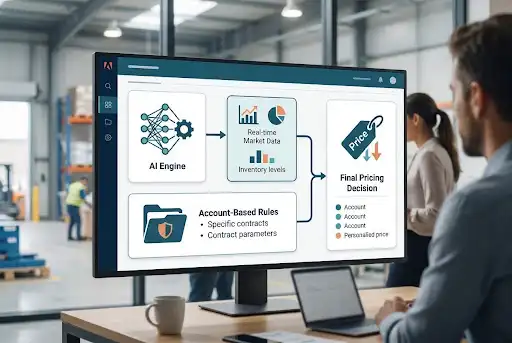
- The fix: a layered architecture where AI recommends, ERP governs, and nothing overrides a negotiated rate.
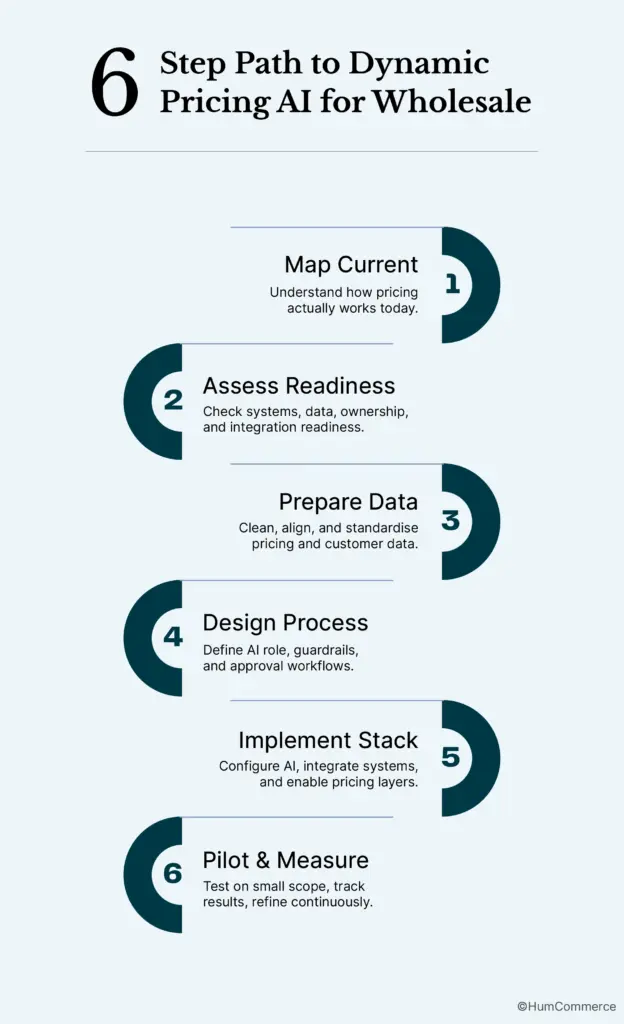
- The six-step process: map → assess readiness → prepare data → design → implement → pilot and measure.
- Teams following this path have seen up to 88% faster quoting and 100% real-time data sync between Adobe Commerce and ERP.
- Written for eCommerce Directors in B2B wholesale and distribution running Adobe Commerce.
You’re sitting in a quarterly review, and leadership asks why margins slipped 2% despite higher order volume. You pull up Adobe Commerce reports, cross-reference Epicor ERP pricing tables, and realise your team has been manually adjusting prices on spreadsheets that haven’t synced in weeks. Customer complaints about inconsistent quotes are piling up.
Sales reps are spending hours chasing approvals instead of closing deals. You know dynamic pricing could help, but the fear of breaking carefully negotiated account-based contracts keeps you stuck. That tension between pricing agility and contract integrity is exactly what this guide addresses.
Why Dynamic Pricing AI for Wholesale Is a Priority Right Now
Wholesale distributors face a specific bind. Your margins depend on pricing accuracy across thousands of SKUs, dozens of customer tiers, and contracts that vary by region, volume, and relationship history. As an eCommerce Director, you’re responsible for the digital experience that supports all of this, and the pressure to introduce dynamic pricing AI for wholesale is growing. Competitors are already adjusting prices at the SKU level based on demand signals, and your team is still reconciling spreadsheets.
The challenge compounds when Adobe Commerce and Epicor ERP are both in the stack. Pricing logic often lives in multiple places: ERP contract tables, Commerce catalog rules, and sometimes a sales rep’s inbox. When these systems aren’t tightly synchronised, manual workarounds multiply. A rep quotes one price, the storefront shows another, and the ERP holds a third. This fragmentation makes any pricing automation project feel risky because one misconfigured rule could override a negotiated contract and damage a key account relationship.
This guide gives you a practical, step-by-step process to introduce AI-driven pricing without breaking the account-based structures your business relies on. The goal is a real-time pricing capability for B2B wholesale that respects contract logic and ERP authority while giving you the margin intelligence you need. By the end, you’ll have a clear plan, not just a concept, for making wholesale dynamic pricing software work within your existing operations.
What “Done” Looks Like Before You Start Dynamic Pricing AI for Wholesale
Vague goals like “add AI to our pricing” lead to scope creep, misaligned expectations, and projects that stall after the first integration hiccup. A clear definition of “done” means your day-to-day operations change in measurable ways.
Before, a pricing update required a manual export from Epicor, a review in a spreadsheet, and a re-import into Adobe Commerce, taking hours or days. After, pricing recommendations surface automatically, filtered through your contract and tier rules, and only applied where they don’t conflict with account-specific agreements. You, as eCommerce Director, can see a dashboard showing which SKUs received AI-adjusted prices, which were held back due to contract locks, and what margin impact resulted.
Here’s what “done” looks like in specific, measurable terms:
- AI-generated price suggestions are automatically filtered against ERP contract rates and customer-tier rules before any storefront update occurs.
- Manual pricing reconciliation between Adobe Commerce and Epicor drops by at least 60%, freeing your team for higher-value work.
- A pricing exception report is available weekly, showing where AI recommendations were overridden by contract logic and why.
- Your wholesale dynamic pricing software feeds into broader strategy reviews, giving leadership visibility into margin trends by product category, customer segment, and season.
Step 1: Map How Pricing Actually Works in Your Operation Today
Start with reality, not tools. Before evaluating any AI pricing solution, you need a clear picture of how pricing decisions actually happen in your organisation right now. Most teams discover that their “process” is really a patchwork of formal rules, informal habits, and workarounds that have accumulated over the years.
Walk through this mapping exercise with your pricing, sales, and operations stakeholders:
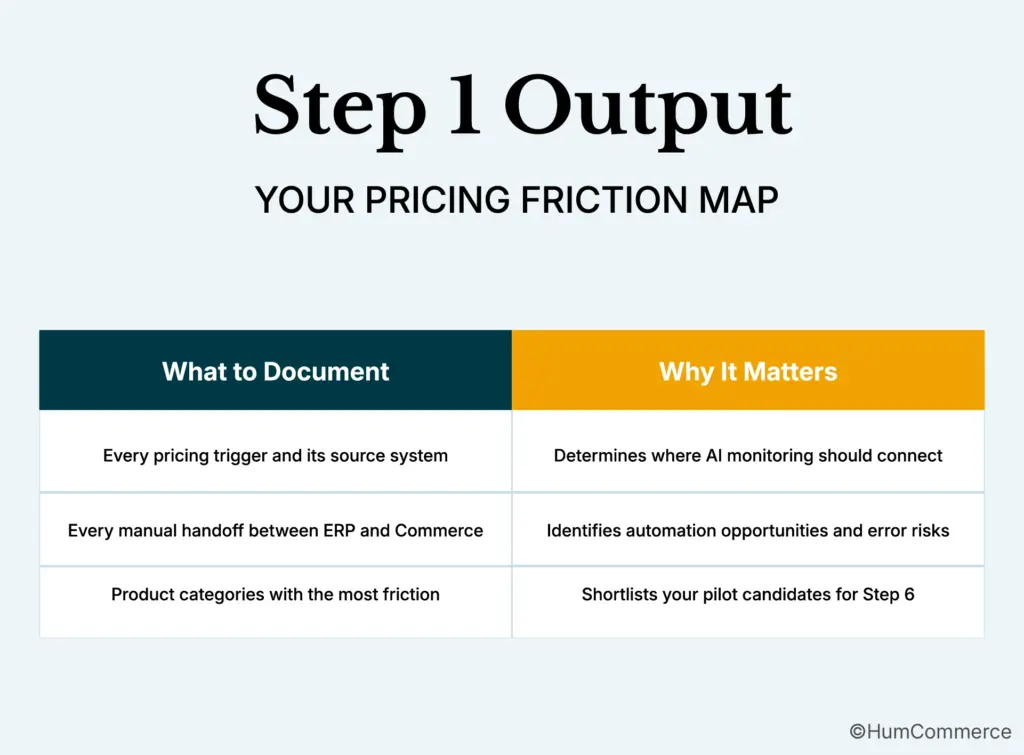
- Identify every trigger that initiates a price change: seasonal shifts, supplier cost updates, competitive moves, volume threshold changes, or contract renewals. Document where each trigger originates (Epicor ERP, a supplier email, a market report).
- Trace who touches the price between trigger and storefront. In many wholesale operations, a pricing analyst pulls data from Epicor, adjusts it in Excel, and sends it to an eCommerce team member, who then updates Adobe Commerce catalog rules. Each handoff is a delay and error risk.
- Map where Adobe Commerce and Epicor ERP interact during this flow. Is pricing pushed from ERP to Commerce via scheduled batch jobs? Real-time API calls? Manual CSV uploads? Note the frequency and reliability of each sync.
- Document how account-based pricing is enforced. Are customer-specific prices stored in Epicor and pulled into Commerce at login? Or are they maintained as separate price lists in Adobe Commerce? Understanding this is critical because your AI layer must respect these rules.
- Flag every point where rework happens: a quote that had to be reissued because the price was wrong, a customer who saw a storefront price that didn’t match their contract, or an order that required manual adjustment after submission.
- Note which product categories or customer segments cause the most pricing friction. These become your pilot candidates in Step 6. Automated pricing workflows for wholesale will deliver the fastest ROI where current pain is highest.
Step 2: Check If You’re Ready to Implement Dynamic Pricing AI for Wholesale
Readiness isn’t about having perfect systems. It’s about having enough foundation to build on without creating new problems. If your pricing data is scattered across disconnected systems with no clear ownership, an AI layer will amplify the chaos rather than reduce it.
Use this readiness checklist before moving forward:
- ☐ Your Epicor ERP contains a single, authoritative record for each customer’s contract pricing, volume tiers, and payment terms. If pricing “truth” is split between ERP and Commerce, consolidate first. The ERP must remain the source of truth for account-based agreements.
- ☐ Adobe Commerce is configured with customer group or shared catalog structures that reflect your actual pricing tiers. A flat price list with manual overrides needs restructuring before AI can filter recommendations properly.
- ☐ You have at least 6-12 months of transactional data (order history, price changes, margin outcomes) accessible in a format an AI model can consume. Sparse or inconsistent data limits the quality of any pricing recommendation engine.
- ☐ There is a clear owner for pricing decisions: someone who can approve or reject AI-generated recommendations. AI without governance is a liability in B2B, where a single bad price on a large account can cost more than the tool saves.
- ☐ Your integration layer between Adobe Commerce and Epicor supports at least near-real-time data exchange for pricing and inventory. Batch-only syncs that run overnight won’t support the responsiveness an ai-powered wholesale pricing strategy requires.
If you answered “no” to two or more items: focus on foundational work first. Clean up your ERP pricing tables, align your Commerce customer groups, and establish a basic integration cadence before layering in AI.
Step 3: Prepare Your Systems and Data
Before any AI pricing logic touches your storefront, your underlying systems need to be ready. This means ensuring Adobe Commerce and Epicor ERP are aligned on the data that pricing decisions depend on.
Focus on these six areas:
- Standardise product identifiers across both systems. Every SKU, part number, and cross-reference table entry in Epicor must match what Adobe Commerce uses. Mismatched IDs are the most common cause of pricing sync failures, and AI models trained on inconsistent data produce unreliable recommendations.
- Audit your customer segmentation. Verify that customer groups, tiers, and contract classifications in Epicor map cleanly to shared catalogs or customer group pricing in Adobe Commerce. If a customer belongs to “Tier 2” in ERP but “Gold” in Commerce, your AI layer won’t know which rules to enforce.
- Clean historical pricing data. Remove duplicate records, correct obvious errors (like $0.01 prices on high-value items), and fill gaps where pricing changes weren’t logged. AI models treat your historical data as ground truth; garbage in means garbage out.
- Confirm permissions and roles. Define who can approve AI-generated price changes, who can override them, and who receives alerts when contract-locked prices are flagged for review. This governance layer is essential for any AI-powered wholesale pricing strategy.
- Set up baseline reports. Before you change anything, establish current metrics: average margin by category, quote turnaround time, pricing error rate, and frequency of manual overrides. You’ll need these baselines in Step 6 to prove whether your AI implementation is actually working.
- Verify your integration middleware. Whether you’re using a custom connector, an iPaaS tool, or native APIs, confirm that your Adobe Commerce-to-Epicor pipeline can handle the increased data volume that real-time pricing adjustments will generate.
Step 4: Design the Improved Process
This step is about deciding what the better version of your pricing workflow looks like for your specific wholesale operation. Not every step should be automated, and not every price should be AI-driven.
Separate your pricing into two categories: contract-locked and market-responsive.
Contract-locked prices (negotiated rates for specific accounts, volume commitments, long-term agreements) should remain governed by Epicor ERP rules. Market-responsive prices (spot pricing for non-contract customers, promotional pricing, slow-moving inventory) are where AI adds the most value. Dynamic pricing works best for high-volume, transactional businesses where price sensitivity is the primary driver.
Once you’ve drawn that line, design the following elements:
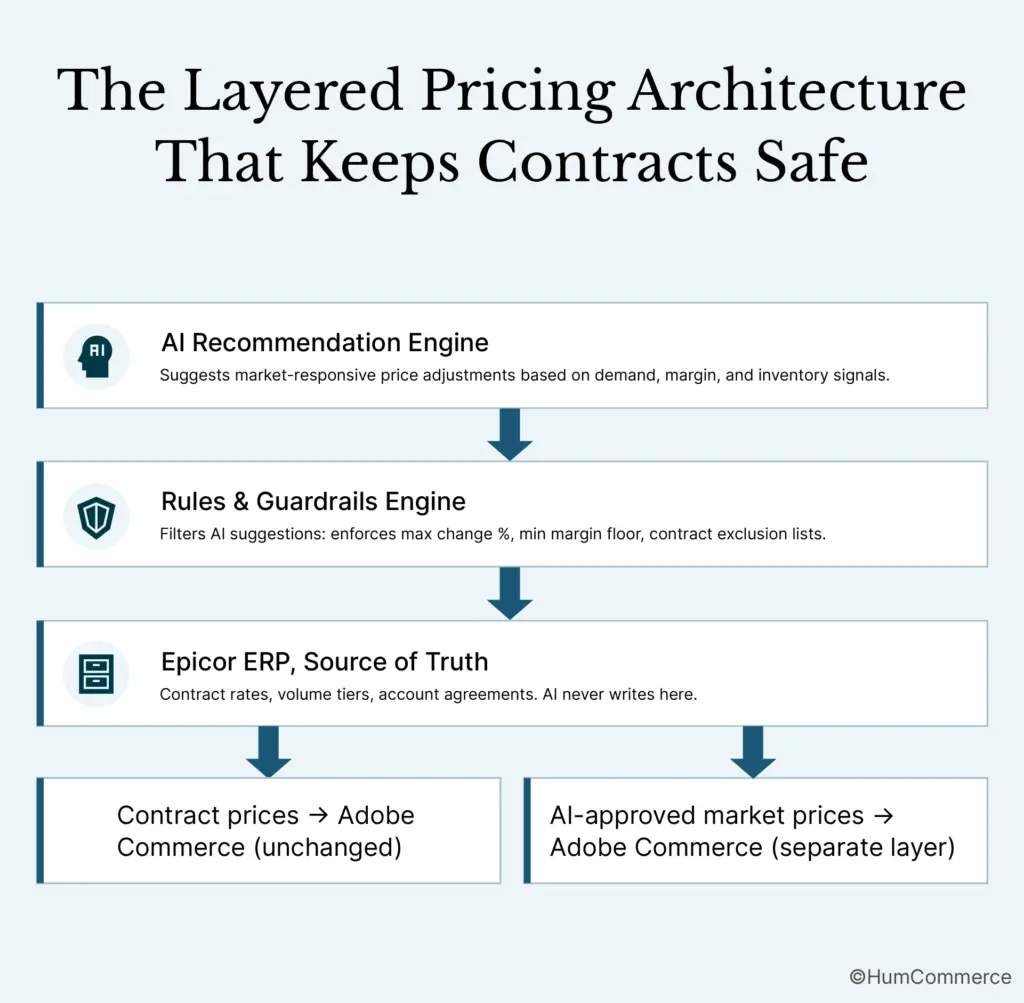
- Define the AI’s role as a recommendation, not an override. The system suggests price adjustments based on demand signals, competitor data, and margin targets. A human or a rules engine approves or rejects each suggestion before it reaches the storefront.
- Design the approval workflow in Adobe Commerce. Use role-based permissions so that AI recommendations for non-contract SKUs can be auto-approved within defined guardrails (for example, no more than 5% change from the current price), while larger adjustments require manual review.
- Map how the new process interacts with Epicor. Contract prices continue to flow from ERP to Commerce as they do today. AI-adjusted prices for market-responsive SKUs are written to a separate price layer in Commerce that doesn’t interfere with ERP-governed rates.
- Plan the buyer experience. A customer logged into their account should see their contract price, untouched by AI adjustments. A guest or non-contract buyer sees the real-time pricing for B2B wholesale that reflects current market conditions. This separation is what protects your account relationships.
Step 5: Implement Changes in Your Stack
Implementation on Adobe Commerce and Epicor ERP involves configuration, integration work, and a controlled rollout. This isn’t a weekend project, but it doesn’t need to be a six-month initiative either. Here’s how to divide ownership clearly.
Your responsibilities as eCommerce Director:
- Define the business rules that govern which SKUs, categories, and customer segments are eligible for AI-driven pricing.
- Approve the guardrail parameters: maximum price change percentage, minimum margin thresholds, and contract exclusion lists.
- Coordinate with sales leadership to communicate what’s changing and what isn’t. Sales teams need to know that contract pricing remains intact.
Technical partner or internal IT responsibilities:
- Configure the AI pricing engine’s connection to your product catalog, order history, and margin data.
- Build the integration layer that writes AI-recommended prices to Adobe Commerce without overwriting ERP-governed contract rates. HumCommerce has built this exact pattern for distributors running Epicor and Adobe Commerce, using a layered pricing architecture where automated, rules-driven quoting ties directly into Epicor CPQ and ERP so quotes always follow real pricing and approval logic.
- Set up monitoring dashboards that show pricing changes in real time, flagging any instance where an AI recommendation conflicts with a contract rule.
- Test the integration in a staging environment with real data before any production deployment.
AI can automate SKU-level pricing based on real-time market data, preventing overstocking or excessive discounting, but only if the implementation respects your existing pricing hierarchy. Dynamic pricing AI for wholesale must operate as a layer on top of your ERP logic, never as a replacement for it.
Step 6: Pilot, Measure, Improve
Treat your first rollout as a pilot, not a company-wide launch. Pick a narrow scope: one product category, one customer segment (non-contract accounts), or one region. The goal is to learn before you scale.
Choose your pilot based on where you mapped the most pricing friction in Step 1. If slow-moving industrial supplies are sitting in your warehouse because prices haven’t been adjusted in months, that’s a strong candidate. Dynamic pricing helps move slow-season products and raise prices on high-demand items, maintaining stock balance and healthy margins.
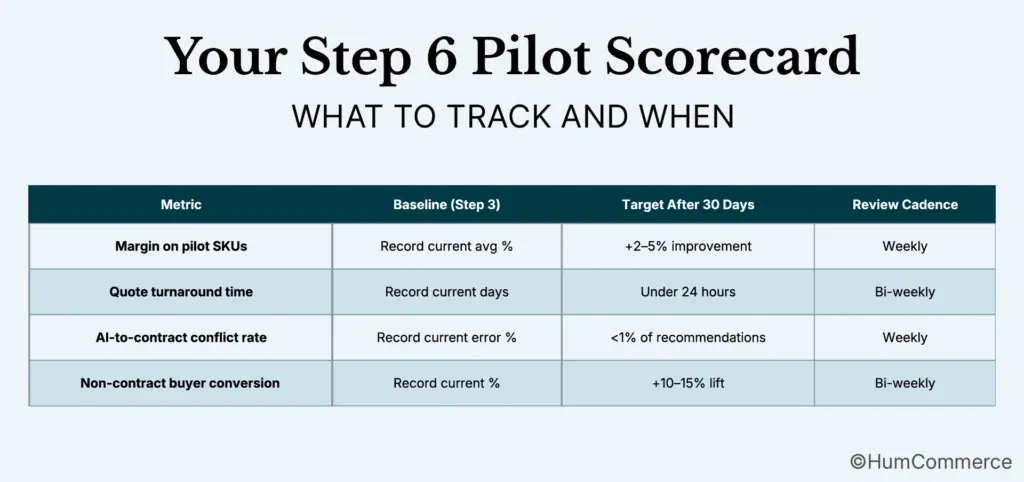
Measure these specific outcomes during the pilot:
- Margin change on pilot SKUs compared to the 30/60/90-day baseline you established in Step 3.
- Quote turnaround time for any products that flow through your CPQ process. Teams using optimised quoting and sales workflows with CPQ integrations have seen quote turnaround drop from 3-5 days to just hours.
- Pricing error rate: how often does the AI recommend a price that conflicts with a contract rule? This should trend toward zero as your rules engine matures.
- Customer feedback: Are non-contract buyers responding positively to more competitive, market-responsive pricing?
Set a weekly or bi-weekly review cadence. You and your pricing team should examine results, adjust guardrails, and decide whether to expand the pilot scope. Wholesale dynamic pricing software delivers compounding returns as you feed it more data and refine your rules, but only if someone is actively managing the feedback loop.
AI-powered dynamic pricing can improve profit margins by as much as 10% andincrease turnover by up to 3%, but those numbers come from organisations that treat pricing AI as an ongoing discipline, not a one-time deployment.
Common Mistakes to Avoid When Using Dynamic Pricing AI for Wholesale
- Skipping the process map. Jumping straight to tool selection without understanding how pricing actually works today guarantees you’ll automate the wrong things. Every workaround your team uses exists for a reason.
- Treating all prices as equal candidates for AI adjustment. Contract-locked prices and market-responsive prices require fundamentally different treatment. Applying dynamic pricing AI for wholesale across the board will break account relationships.
- Underestimating ERP constraints. Epicor’s pricing tables, approval workflows, and customer hierarchies have business logic baked in. Any AI layer that ignores these constraints will create conflicts your operations team has to resolve manually.
- Launching without guardrails. An AI engine with no maximum price change limit, no minimum margin floor, and no contract exclusion list is a liability. Define boundaries before you go live.
- Not measuring against a baseline. If you don’t know your current margin by category, quote turnaround time, and pricing error rate, you can’t prove whether your ai-powered wholesale pricing strategy is working.
- Confusing a UI tweak with a real-time pricing capability. Adding a “suggested price” field to your admin panel isn’t the same as building a governed, integrated pricing intelligence layer. The difference matters operationally and financially.
- Trying to change everything at once. Start with one category, one segment, one region. Prove value, then expand. B2B pricing is too complex and too high-stakes for big-bang rollouts.
Need Help Putting Dynamic Pricing AI for Wholesale Into Practice?
If you’ve followed this guide, you now have a structured plan to introduce AI-driven pricing on Adobe Commerce with Epicor ERP without dismantling the account-based pricing your wholesale customers expect. You know how to map your current process, assess readiness, prepare your data, design the improved workflow, implement changes, and pilot safely.
HumCommerce helps eCommerce Directors in B2B wholesale and distribution move from plan to production. We specialise in building the integration and pricing layers that make dynamic pricing AI for wholesale work within complex ERP-driven environments: not as a standalone tool, but as part of your operations stack. Our team has done this for distributors and manufacturers running Epicor and Adobe Commerce, and we understand the constraints you’re working within.
Share your current setup, your Adobe Commerce version, Epicor configuration, and the pricing pain point that’s costing you the most, and we’ll map these steps to your specific stack in a technical walkthrough. Start that conversation here.